The proposed architecture consists in adding a small internal REST API on the Proxmox server in order to expose a controlled ZFS snapshot operation. SQL Server 2025 can then call this API through sp_invoke_external_rest_endpoint, instead of running SSH commands directly or relying on an external tool.
The role of the API is deliberately limited: it receives a snapshot request, checks that the requested zvol is authorized, and then runs the zfs snapshot command on the Proxmox side. An allowlist is used to restrict the ZFS volumes that can be accessed. This prevents a REST call from being able to manipulate any dataset on the server.
With this approach, we can reproduce a behavior close to what an enterprise storage array provides, but using Proxmox and ZFS. It is important to note that Proxmox does not natively provide the same level of integration as Pure Storage for SQL Server snapshots. Pure Storage provides dedicated mechanisms and integrations. In our case, we need to build a specific orchestration layer. The REST API therefore acts as an adapter between SQL Server, which drives the snapshot backup workflow, and ZFS, which actually performs the storage-level snapshot.
Architecture
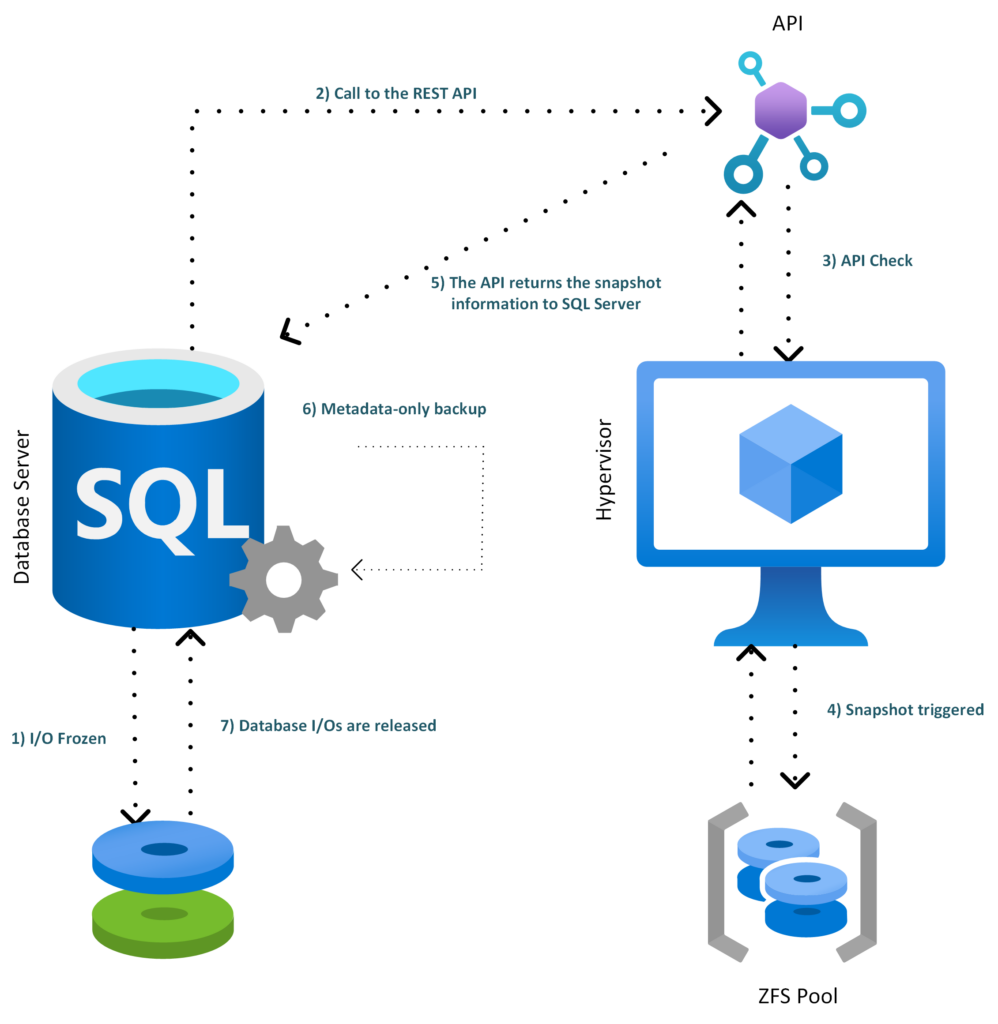
Here is a global overview of the architecture:
- SQL Server freezes the database I/Os
- SQL Server 2025 calls the internal REST API
- The REST API validates the request and checks the zvol allowlist
- The API triggers the ZFS snapshot on Proxmox
- The API returns the snapshot information to SQL Server
- SQL Server creates the metadata-only backup
- The database I/Os are released
REST API implementation
Under Proxmox, we install the required packages:
apt update
apt install -y python3-venv sudo openssl
We create a dedicated user:
useradd --system \
  --home /opt/sql-zfs-api \
  --shell /usr/sbin/nologin \
  sqlsnap
We create the following folders:
mkdir -p /opt/sql-zfs-api
mkdir -p /etc/sql-zfs-api
We declare the authorized zvol :
cat >/etc/sql-zfs-api/allowed-zvols <<'EOF'
sqlpool/pve/vm-302-disk-0
EOF
We create a root-only allowlist:
chown root:root /etc/sql-zfs-api/allowed-zvols
chmod 600 /etc/sql-zfs-api/allowed-zvols
Then we create the secured ZFS helper. This script is executed as root through sudo, but it rejects any dataset that is not defined in the allowlist.
cat >/usr/local/sbin/sql-zfs-helper <<'EOF'
#!/usr/bin/env bash
set -euo pipefail

ALLOW_FILE="/etc/sql-zfs-api/allowed-zvols"
LOCK_FILE="/run/sql-zfs-helper.lock"

die() {
  echo "$*" >&2
  exit 1
}

exec 9>"$LOCK_FILE"
flock -n 9 || die "another snapshot operation is already running"

[[ -r "$ALLOW_FILE" ]] || die "allowlist not readable: $ALLOW_FILE"

mapfile -t ALLOWED_DATASETS < <(grep -Ev '^\s*(#|$)' "$ALLOW_FILE")

is_allowed() {
  local ds="$1"
  local allowed
  for allowed in "${ALLOWED_DATASETS[@]}"; do
    [[ "$ds" == "$allowed" ]] && return 0
  done
  return 1
}

valid_snapname() {
  [[ "$1" =~ ^[A-Za-z0-9_.:-]{1,120}$ ]]
}

ACTION="${1:-}"
shift || true

case "$ACTION" in
  snapshot)
    SNAPNAME="${1:-}"
    shift || true

    valid_snapname "$SNAPNAME" || die "invalid snapshot name: $SNAPNAME"
    [[ "$#" -ge 1 ]] || die "no zvol specified"
    [[ "$#" -le 8 ]] || die "too many zvols"

    SNAPSHOTS=()

    for DS in "$@"; do
      is_allowed "$DS" || die "dataset not allowed: $DS"
      /sbin/zfs list -H -t volume -o name "$DS" >/dev/null 2>&1 || die "zvol not found: $DS"

      FULLSNAP="${DS}@${SNAPNAME}"

      if /sbin/zfs list -H -t snapshot -o name "$FULLSNAP" >/dev/null 2>&1; then
        die "snapshot already exists: $FULLSNAP"
      fi

      SNAPSHOTS+=("$FULLSNAP")
    done

    /sbin/zfs snapshot "${SNAPSHOTS[@]}"
    /sbin/zfs hold sqlsnap "${SNAPSHOTS[@]}"

    printf '{"status":"ok","snapshots":['
    SEP=""
    for S in "${SNAPSHOTS[@]}"; do
      printf '%s"%s"' "$SEP" "$S"
      SEP=","
    done
    printf ']}\n'
    ;;

  list)
    /sbin/zfs list -H -t snapshot -o name -r sqlpool | grep '@sql_' || true
    ;;

  *)
    die "usage: sql-zfs-helper snapshot SNAPNAME ZVOL [ZVOL...]"
    ;;
esac
EOF

chown root:root /usr/local/sbin/sql-zfs-helper
chmod 750 /usr/local/sbin/sql-zfs-helper
We only allow the helper through sudo:
cat >/etc/sudoers.d/sql-zfs-helper <<'EOF'
sqlsnap ALL=(root) NOPASSWD: /usr/local/sbin/sql-zfs-helper *
EOF

chmod 440 /etc/sudoers.d/sql-zfs-helper
visudo -cf /etc/sudoers.d/sql-zfs-helper
We install the FastAPI API:
python3 -m venv /opt/sql-zfs-api/venv
/opt/sql-zfs-api/venv/bin/pip install fastapi "uvicorn[standard]"
We create the application file:
cat >/opt/sql-zfs-api/app.py <<'EOF'
import os
import re
import json
import socket
import secrets
import subprocess
from datetime import datetime, timezone
from fastapi import FastAPI, Header, HTTPException
from pydantic import BaseModel, Field

API_KEY = os.environ.get("SQL_ZFS_API_KEY", "")
ALLOW_FILE = "/etc/sql-zfs-api/allowed-zvols"
SNAP_RE = re.compile(r"^[A-Za-z0-9_.:-]{1,120}$")

app = FastAPI(title="SQL ZFS Snapshot API", version="1.0.0")


class SnapshotRequest(BaseModel):
    database: str = Field(..., min_length=1, max_length=128)
    vmid: int = 302
    snapname: str = Field(..., min_length=1, max_length=120)
    zvols: list[str] = Field(..., min_length=1, max_length=8)


def load_allowed_zvols() -> set[str]:
    with open(ALLOW_FILE, "r", encoding="utf-8") as f:
        return {
            line.strip()
            for line in f
            if line.strip() and not line.strip().startswith("#")
        }


def check_api_key(x_sqlsnap_key: str | None) -> None:
    if not API_KEY:
        raise HTTPException(status_code=500, detail="API key not configured")

    if not x_sqlsnap_key:
        raise HTTPException(status_code=401, detail="missing API key")

    if not secrets.compare_digest(x_sqlsnap_key, API_KEY):
        raise HTTPException(status_code=403, detail="invalid API key")


@app.get("/health")
def health():
    return {
        "status": "ok",
        "host": socket.gethostname(),
        "utc": datetime.now(timezone.utc).isoformat(),
    }


@app.post("/v1/sql-zfs/snapshot")
def create_snapshot(
    req: SnapshotRequest,
    x_sqlsnap_key: str | None = Header(default=None, alias="x-sqlsnap-key"),
):
    check_api_key(x_sqlsnap_key)

    if not SNAP_RE.fullmatch(req.snapname):
        raise HTTPException(status_code=400, detail="invalid snapname")

    allowed = load_allowed_zvols()

    for zvol in req.zvols:
        if zvol not in allowed:
            raise HTTPException(status_code=403, detail=f"zvol not allowed: {zvol}")

    cmd = [
        "sudo",
        "/usr/local/sbin/sql-zfs-helper",
        "snapshot",
        req.snapname,
        *req.zvols,
    ]

    try:
        completed = subprocess.run(
            cmd,
            text=True,
            stdout=subprocess.PIPE,
            stderr=subprocess.PIPE,
            timeout=30,
            check=False,
        )
    except subprocess.TimeoutExpired:
        raise HTTPException(status_code=504, detail="zfs snapshot timeout")

    if completed.returncode != 0:
        raise HTTPException(
            status_code=500,
            detail={
                "error": completed.stderr.strip(),
                "stdout": completed.stdout.strip(),
            },
        )

    snapshots = [f"{zvol}@{req.snapname}" for zvol in req.zvols]

    return {
        "status": "ok",
        "database": req.database,
        "vmid": req.vmid,
        "snapname": req.snapname,
        "snapshots": snapshots,
        "media_description": "zfs|" + socket.gethostname() + "|" + ";".join(snapshots),
    }
EOF

chown -R root:root /opt/sql-zfs-api
chmod 755 /opt/sql-zfs-api
chmod 644 /opt/sql-zfs-api/app.py
We configure and generate the key:
APIKEY="$(openssl rand -hex 32)"
echo "$APIKEY"
We create the environment file:
cat >/etc/sql-zfs-api/sql-zfs-api.env <<EOF
SQL_ZFS_API_KEY=$APIKEY
EOF

chown root:root /etc/sql-zfs-api/sql-zfs-api.env
chmod 600 /etc/sql-zfs-api/sql-zfs-api.env
We need to save the generated key.
Next, we enable HTTPS. SQL Server sp_invoke_external_rest_endpoint calls HTTPS endpoints, and the documentation specifies that only HTTPS endpoints with TLS are supported.
openssl req -x509 -newkey rsa:4096 -sha256 -days 360 -nodes \
  -keyout /etc/sql-zfs-api/tls.key \
  -out /etc/sql-zfs-api/tls.crt \
  -subj "/CN=promox1" \
  -addext "subjectAltName=DNS:promox1,IP:192.168.1.110"

chown root:sqlsnap /etc/sql-zfs-api/tls.key /etc/sql-zfs-api/tls.crt
chmod 640 /etc/sql-zfs-api/tls.key
chmod 644 /etc/sql-zfs-api/tls.crt
The /etc/sql-zfs-api/tls.crt certificate must be imported into the Windows trusted root certification authorities on the SQL Server side. Otherwise, the HTTPS call may fail.
We create the systemd service:
cat >/etc/systemd/system/sql-zfs-api.service <<'EOF'
[Unit]
Description=SQL Server to ZFS Snapshot API
After=network-online.target
Wants=network-online.target

[Service]
User=sqlsnap
Group=sqlsnap
WorkingDirectory=/opt/sql-zfs-api
EnvironmentFile=/etc/sql-zfs-api/sql-zfs-api.env
ExecStart=/opt/sql-zfs-api/venv/bin/uvicorn app:app --host 0.0.0.0 --port 8443 --ssl-keyfile /etc/sql-zfs-api/tls.key --ssl-certfile /etc/sql-zfs-api/tls.crt
Restart=on-failure
RestartSec=3

[Install]
WantedBy=multi-user.target
EOF

systemctl daemon-reload
systemctl enable --now sql-zfs-api
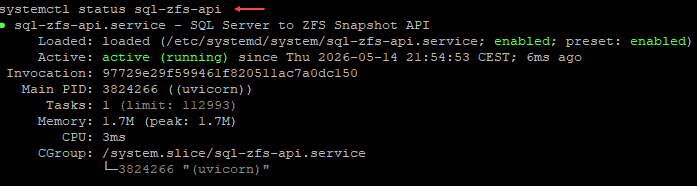
systemctl status sql-zfs-api
We check the status of our API:
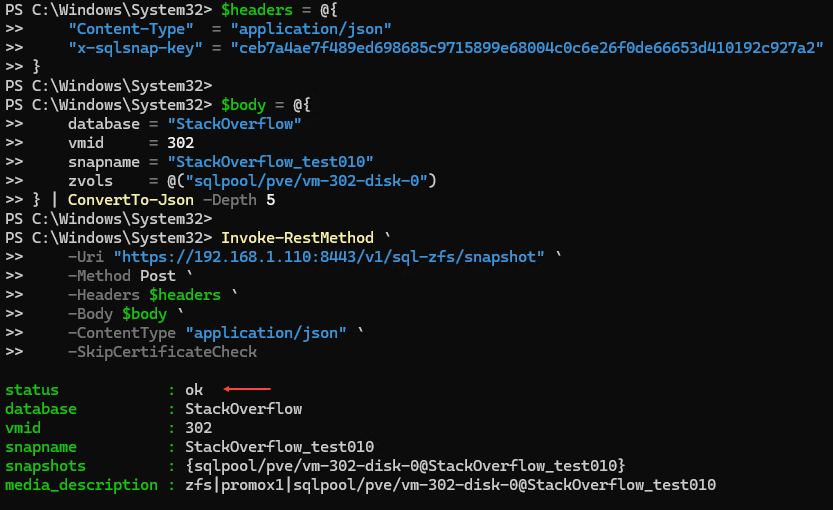
It is possible to call the API in PowerShell using Invoke-RestMethod with PowerShell 7:
$headers = @{
"Content-Type"  = "application/json"
"x-sqlsnap-key" = "MyKey"
}

$body = @{
database = "StackOverflow"
vmid     = 302
snapname = "StackOverflow_test010"
zvols    = @("sqlpool/pve/vm-302-disk-0")
} | ConvertTo-Json -Depth 5

Invoke-RestMethod `
-Uri "https://192.168.1.110:8443/v1/sql-zfs/snapshot" `
-Method Post `
-Headers $headers `
-Body $body `
-ContentType "application/json" `
-SkipCertificateCheck
This gives:
Test from SQL Server
A certificate was generated on Proxmox and it needs to be imported on the SQL Server host. In my case, it was located here:

I then imported it on Windows Server:


For testing purposes, I created something simple. On the SQL Server side, we can create a database that will be used to store our future stored procedure. This procedure will allow us to interact with the API. In my case, I created a database called dbi_tools:
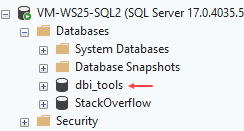
This database will contain a credential. In our case, the DATABASE SCOPED CREDENTIAL is used to securely store the authentication information required to call the REST API from SQL Server. This allows us, for example, to protect the API key:
USE [dbi_tools]
GO

IF NOT EXISTS (
    SELECT 1
    FROM sys.symmetric_keys
    WHERE name = '##MS_DatabaseMasterKey##'
)
BEGIN
    CREATE MASTER KEY ENCRYPTION BY PASSWORD = 'MyStrongPassword_%99';
END
GO

CREATE DATABASE SCOPED CREDENTIAL [https://192.168.1.110:8443/v1/sql-zfs/snapshot]
WITH
    IDENTITY = 'HTTPEndpointHeaders',
    SECRET = '{"x-sqlsnap-key":"MyAPIKey"}';
GO
We then create a stored procedure to encapsulate the code used to call the API:
USE dbi_tools;
GO

CREATE OR ALTER PROCEDURE dbo.usp_BackupDatabase_WithZfsSnapshot
    @DatabaseName sysname,
    @BackupDirectory nvarchar(4000) = N'D:\Backups\'
AS
BEGIN
    SET NOCOUNT ON;

    DECLARE @Url nvarchar(4000) =
        N'https://192.168.1.110:8443/v1/sql-zfs/snapshot';

    DECLARE @Vmid int = 302;

    DECLARE @ZvolsJson nvarchar(max) =
        N'["sqlpool/pve/vm-302-disk-0"]';

    DECLARE @Stamp varchar(20) =
        REPLACE(REPLACE(CONVERT(varchar(19), SYSUTCDATETIME(), 126), '-', ''), ':', '') + 'Z';

    DECLARE @SafeDbName nvarchar(128) =
        REPLACE(REPLACE(REPLACE(@DatabaseName, N' ', N'_'), N'[', N''), N']', N'');

    DECLARE @SnapName nvarchar(128) =
        CONCAT(N'sql_', @SafeDbName, N'_', @Stamp);

    DECLARE @BackupFile nvarchar(4000) =
        CONCAT(@BackupDirectory, N'\', @SafeDbName, N'_', @Stamp, N'.bkm');

    DECLARE @Payload nvarchar(max) =
    (
        SELECT
            @DatabaseName AS [database],
            @Vmid AS [vmid],
            @SnapName AS [snapname],
            JSON_QUERY(@ZvolsJson) AS [zvols]
        FOR JSON PATH, WITHOUT_ARRAY_WRAPPER
    );

    DECLARE @ReturnCode int;
    DECLARE @Response nvarchar(max);
    DECLARE @SnapshotList nvarchar(max);

    SELECT @SnapshotList =
        STRING_AGG(CONCAT([value], N'@', @SnapName), N';')
    FROM OPENJSON(@ZvolsJson);

    DECLARE @MediaDescription nvarchar(max) =
        CONCAT(N'zfs|promox1|', @SnapshotList);

    DECLARE @Sql nvarchar(max);

    BEGIN TRY
        SET @Sql =
            N'ALTER DATABASE ' + QUOTENAME(@DatabaseName) +
            N' SET SUSPEND_FOR_SNAPSHOT_BACKUP = ON;';

        EXEC sys.sp_executesql @Sql;

        EXEC @ReturnCode = sys.sp_invoke_external_rest_endpoint
            @url = @Url,
            @method = N'POST',
            @headers = N'{"Content-Type":"application/json","Accept":"application/json"}',
            @payload = @Payload,
            @credential = [https://192.168.1.110:8443/v1/sql-zfs/snapshot],
            @timeout = 30,
            @response = @Response OUTPUT;

        IF @ReturnCode <> 0
        BEGIN
            DECLARE @Err nvarchar(max) =
                CONCAT(N'ZFS snapshot API failed. ReturnCode=', @ReturnCode, N' Response=', @Response);
            THROW 51001, @Err, 1;
        END;

        SET @Sql =
            N'BACKUP DATABASE ' + QUOTENAME(@DatabaseName) + N'
              TO DISK = @BackupFile
              WITH METADATA_ONLY,
                   FORMAT,
                   MEDIANAME = @MediaName,
                   MEDIADESCRIPTION = @MediaDescription,
                   NAME = @BackupName;';

        EXEC sys.sp_executesql
            @Sql,
            N'@BackupFile nvarchar(4000),
              @MediaName nvarchar(128),
              @MediaDescription nvarchar(max),
              @BackupName nvarchar(128)',
            @BackupFile = @BackupFile,
            @MediaName = @SnapName,
            @MediaDescription = @MediaDescription,
            @BackupName = @SnapName;

        SELECT
            @DatabaseName AS database_name,
            @SnapName AS zfs_snapshot_name,
            @SnapshotList AS zfs_snapshots,
            @BackupFile AS metadata_backup_file,
            @MediaDescription AS media_description,
            @Response AS api_response;
    END TRY
    BEGIN CATCH
        IF DATABASEPROPERTYEX(@DatabaseName, 'IsDatabaseSuspendedForSnapshotBackup') = 1
        BEGIN
            SET @Sql =
                N'ALTER DATABASE ' + QUOTENAME(@DatabaseName) +
                N' SET SUSPEND_FOR_SNAPSHOT_BACKUP = OFF;';

            EXEC sys.sp_executesql @Sql;
        END;

        THROW;
    END CATCH
END;
GO
We then call the stored procedure:
EXEC dbi_tools.dbo.usp_BackupDatabase_WithZfsSnapshot
    @DatabaseName = N'StackOverflow',
    @BackupDirectory = N'D:\Backups\';
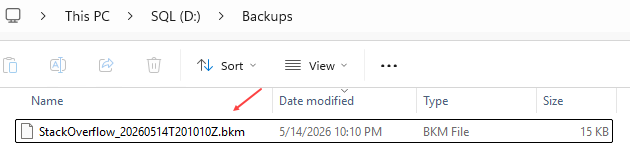
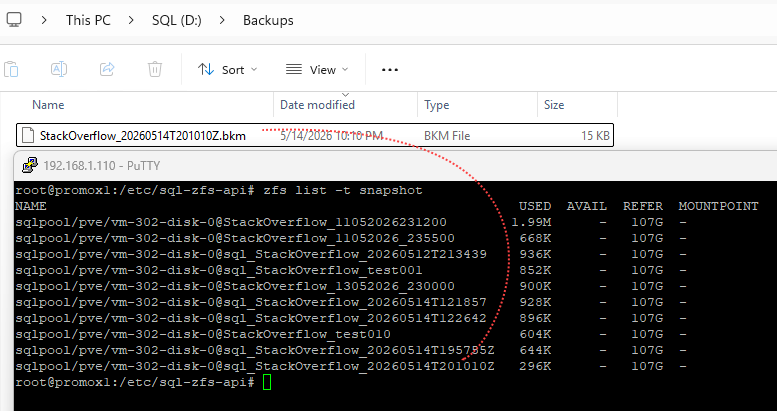
The backup was generated :
References
sp_invoke_external_rest_endpoint
Thank you. Amine Haloui
![Thumbnail [60x60]](https://www.dbi-services.com/blog/wp-content/uploads/2024/03/AHI_web.jpg)
![Thumbnail [90x90]](https://www.dbi-services.com/blog/wp-content/uploads/2025/11/LTO_WEB.jpg)