One of our clients encountered blocking during their daily data load. The process loads several million rows and then performs an ALTER TABLE … SWITCH operation into a partitioned table. This operation usually takes some time, but in this case it became blocked.
Context
Initially, I did not have access to much information. The only element I received from the client was a extract of the output from the sp_WhoIsActive procedure.

Initial analysis
Based on this extract, we were able to perform a first-level analysis:
A Python session executed a query against MyTable without applying a date filter. On a table containing approximately 244 million rows, this prevented proper partition elimination and forced SQL Server to read a much broader data set than necessary. Queries against partitioned tables only benefit from partition elimination when the predicate references the partitioning column without such a predicate, SQL Server may have to search or scan all partitions.
The Python session eventually became sleeping but remained with open_tran_count = 1. This is a typical sign of an unclosed transaction on the client side: autocommit disabled, cursor not closed, result set not fully consumed, connection returned to the pool without a rollback…
Session 146 then attempted to perform the partition TRUNCATE/SWITCH operation. However, TRUNCATE TABLE requires a schema modification lock, Sch-M, and ALTER TABLE … SWITCH also requires a Sch-M lock on both the source and target tables.
This Sch-M lock could not be acquired while session 167 was still referencing the object. SQL Server documents Sch-M as the lock required to modify the schema and to ensure that no other session is referencing the object. Once the Sch-M request from session 146 was queued, new read queries were also blocked behind it. Even NOLOCK would not avoid this issue: queries still acquire Sch-S locks during compilation and execution, and Sch-S and Sch-M locks block each other.
Second analysis
After some time, we were able to access the client’s environment. Query Store was enabled on the affected database, and an Extended Events session was configured on the SQL Server instance to track blocking.
Querying the Extended Events session provided detailed information about the blocking events that occurred, and we were able to identify the specific blocking issue reported by the client.

By looking more closely at this blocking issue, we found the following:
EXEC [STAGING_DB].[ETL].[sp_ETL_Exec]
    @ETL_StepIKs_List = '["Exec-[TARGET_DB].dbo.[SP_Load_TargetTable]"]',
    @StartAsJob = 0

Which is blocked by:

WITH position AS
(
    SELECT ...
    FROM [SOURCE_DB].[SCHEMA_NAME].[LARGE_PARTITIONED_TABLE]
    ...
)

<blocking-process>
    spid="167"
    status="sleeping"
    trancount="1"
    clientapp="python[version]"
    hostname="client-host-..."
    loginname="user_account"
    inputbuf="... WITH position AS ..."
</blocking-process>
However, the blocking report highlights an important point: session 167 was no longer actively executing the query at the time the report was captured:
- status = sleeping
- trancount = 1

However, by correlating this information with Query Store data, we were able to obtain additional details. By retrieving the corresponding query, we could better understand what was happening.
The blocking report also showed that session 146 was requesting a Sch-M lock, meaning a Schema Modification Lock. This is a strong lock required for operations such as TRUNCATE, ALTER TABLE, and partition SWITCH.
According to the data, session 146 waited for more than two hours, approximately 7,770,160 ms.

However, by correlating this information with Query Store data, we were able to obtain additional details. Specifically, by retrieving the query:
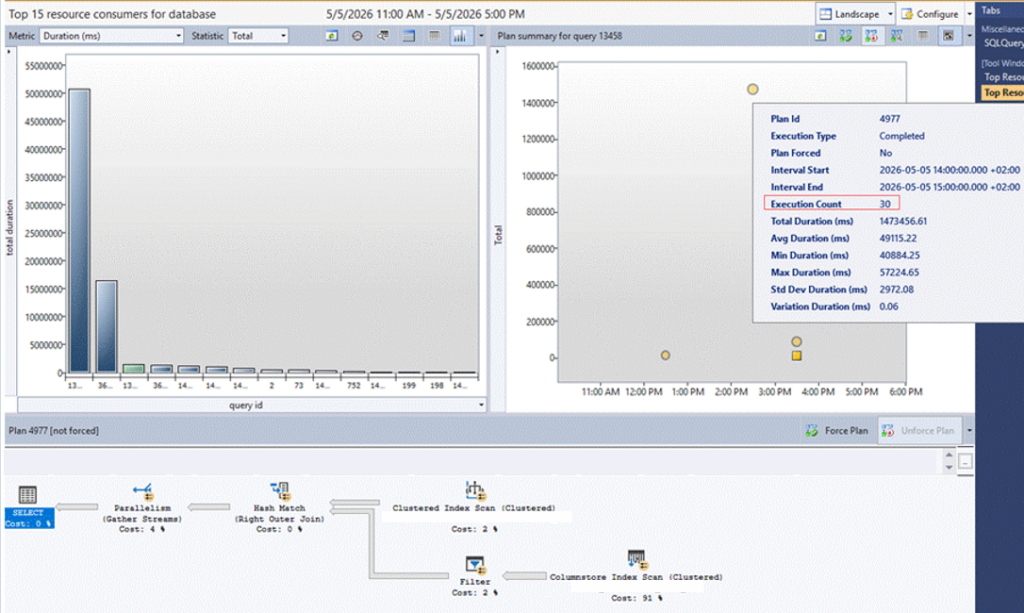
It was executed 30 times during the following time interval: 05-05-2026 from 2:00 PM to 3:00 PM. The average execution time was 49.1 seconds, with a maximum execution time of approximately 57 seconds. This represents a total of around 24 minutes of cumulative execution time over a one-hour period.
Based on this data, the issue was therefore not caused by the performance of the query itself, but rather by the state of session 167. Indeed, the session left a transaction open, with an open_tran_count of 1, thereby locking the corresponding objects and preventing other sessions from accessing them.
How is it related to Python driver configuration?
The observed blocking can likely be explained by a misconfiguration or misuse of the Python driver used to access SQL Server. The root session was a Python connection in a sleeping state, but with trancount = 1, which indicates that a transaction was still open even though the query was no longer actively running.
In this situation, SQL Server may continue to hold transaction-related locks even if the application appears to have completed its work.
If the Python driver was running with autocommit = 0, each SELECT statement could implicitly start a transaction that then had to be explicitly closed with a commit or rollback. If the cursor was not closed properly, the result set was not fully consumed, or a rollback was not issued before returning the connection to the pool, the session could remain open on the SQL Server side. This residual transaction likely prevented the related ETL process from acquiring the Sch-M lock required for the TRUNCATE or partition SWITCH operation.
As a result the ETL session was not the initial root cause. It was waiting for a lock held by an idle Python connection.
Next queries then accumulated behind the pending Sch-M lock request, creating the impression of a global outage.
Switching to autocommit = 1 significantly reduces this risk, because read operations are no longer tied to an open transaction by default. Finally, preventing parallel pipeline execution helps avoid amplifying the issue when a job is delayed.
Thank you. Amine Haloui
![Thumbnail [60x60]](https://www.dbi-services.com/blog/wp-content/uploads/2024/03/AHI_web.jpg)
![Thumbnail [90x90]](https://www.dbi-services.com/blog/wp-content/uploads/2022/08/JEW_web-min-scaled.jpg)
![Thumbnail [90x90]](https://www.dbi-services.com/blog/wp-content/uploads/2022/08/STH_web-min-scaled.jpg)
![Thumbnail [90x90]](https://www.dbi-services.com/blog/wp-content/uploads/2025/11/LTO_WEB.jpg)