We are currently working with clients on migrations to SQL Server 2022 and SQL Server 2025. During a discussion with one client, we reviewed some of the benefits introduced in the latest SQL Server 2022 and 2025 releases.
Among the available features, starting with SQL Server 2022, we have:
- T-SQL snapshot backup : https://learn.microsoft.com/en-us/sql/relational-databases/backup-restore/create-a-transact-sql-snapshot-backup?view=sql-server-ver17
Starting with SQL Server 2025:
- REST API Call through sp_invoke_external_rest_endpoint : https://learn.microsoft.com/en-us/sql/relational-databases/system-stored-procedures/sp-invoke-external-rest-endpoint-transact-sql?view=sql-server-ver17&tabs=request-headers
The customer’s environment consists of a very large number of instances, some of which host very large SQL Server databases. In this customer’s case, we are referring to a database of approximately 6–7 TB, configured for high availability using Always On Availability Groups. For this database, backups take around two hours, and restores take slightly longer.
In addition, the customer has a Pure Storage array.
We explained to the customer that it is possible to use certain SQL Server 2025 features together with their Pure Storage array to perform snapshots and restores very quickly.
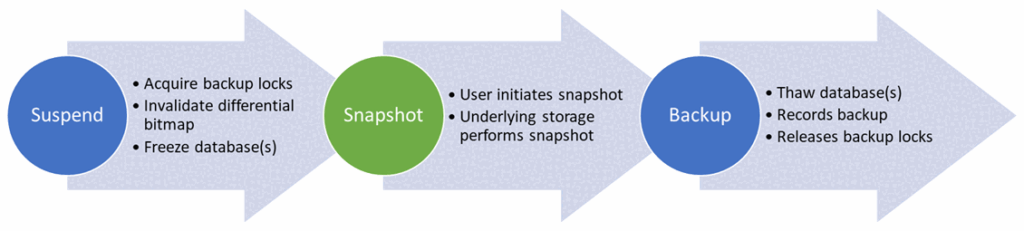
In summary, the process consists of performing the following operations:
- Change the database state to suspend writes.
- Create the snapshot using the storage system.
- Perform a backup using the BACKUP DATABASE MyDB WITH METADATA_ONLY command to indicate that a snapshot has been taken.
However, the customer raised several interesting questions, which, reading between the lines, can be summarized as follows:
- Can this also be applied to PostgreSQL?
- Are we dependent on Pure Storage to achieve this?
Several articles have been published about the implementation of this process between SQL Server and Pure Storage including the following one:
In my opinion, it is possible to reproduce this operating model with other systems. In my case, we will use Proxmox and ZFS.
Context and environment
ZFS pool provides fast, storage-level, copy-on-write snapshots with minimal space overhead. This makes it well suited for SQL Server snapshot backups, where the database writes are briefly suspended while the underlying virtual disk is captured. ZFS also allows precise rollback or cloning of a snapshot, which is useful for both restore testing and recovery scenarios.
On Proxmox, it integrates naturally with VM disks, making it a practical alternative to enterprise storage snapshot platforms.
The environment consists of a server and two disks: one disk used to store the VMs, and a 1 TB Samsung T7 disk that will be used to create our ZFS pool.
Proxmox Setup
We identity the path of the related volume (Samsung T7) :
for d in /dev/disk/by-id/*; do
  [ "$(readlink -f "$d")" = "/dev/sda" ] && echo "$d"
done
We create the pool. Everything stored in the disk will be erased :
DISK="/dev/disk/by-id/usb-Samsung_PSSD_T7_S6TWNJ0T300328F-0:0"

wipefs -a "$DISK"
sgdisk --zap-all "$DISK"
zpool create \
  -o ashift=12 \
  -o autotrim=on \
  -O compression=lz4 \
  -O atime=off \
  -O xattr=sa \
  -O acltype=posixacl \
  -m /mnt/sqlpool \
  sqlpool "$DISK"
Then we create a Proxmox dataset for the VM disks:
zfs create sqlpool/pveWe add it to proxmox:
pvesm add zfspool sql-zfs \
  --pool sqlpool/pve \
  --content images,rootdir \
  --sparse 1
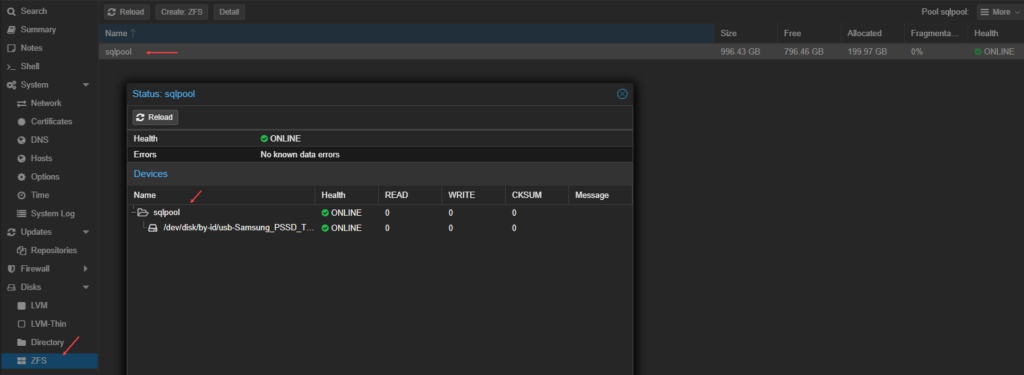
We check the pool:
zpool status sqlpool

zfs list

pvesm status
pool: sqlpool
state: ONLINE

config:
       NAME                                       STATE     READ WRITE CKSUM
       sqlpool                                    ONLINE       0     0     0
       usb-Samsung_PSSD_T7_S6TWNJ0T300328F-0:0    ONLINE       0     0     0

errors: No known data errors

NAME          USED  AVAIL  REFER  MOUNTPOINT
sqlpool       636K   899G    96K  /mnt/sqlpool
sqlpool/pve    96K   899G    96K  /mnt/sqlpool/pve

Name             Type     Status     Total (KiB)      Used (KiB) Available (KiB)        %
local             dir     active        98497780        42429080        51019152   43.08%
local-lvm     lvmthin     active      3746553856       285112748      3461441107    7.61%
sql-zfs       zfspool     active       942931428              96       942931332    0.00%
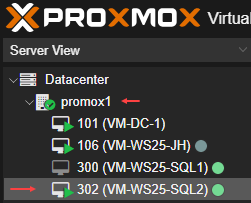
My VM ID is 302 and we have to add the virtual disk into the ZFS pool:
VMID=302
qm set "$VMID" --agent enabled=1
qm set "$VMID" --scsihw virtio-scsi-single
qm set "$VMID" --scsi1 sql-zfs:700,cache=none,discard=on,iothread=1,ssd=1
Be carefull to the scsi ID. You may overwrite a used volume.
What does it look like ?
Once the pool created we have something like this :
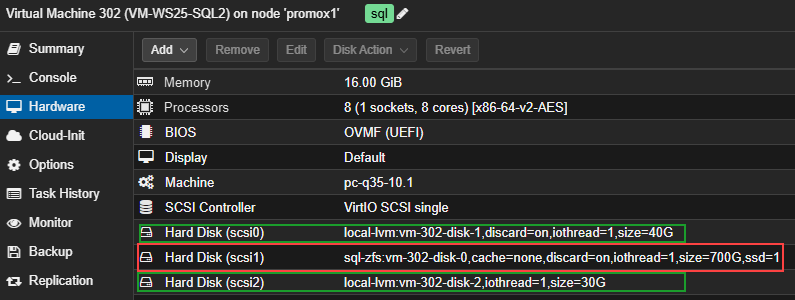
On the virtual machine side, I have 3 disks :
- 1 for my virtual machine (for Windows Server)
- 1 for SQL Server
- 1 linked to the ZFS pool to store the user database (the StackOverflow database)
SQL Server setup
The virtual machine used for the tests runs with:
- Windows Server 2025 Standard Edition
- SQL Server 2025 Enterprise Developer Edition
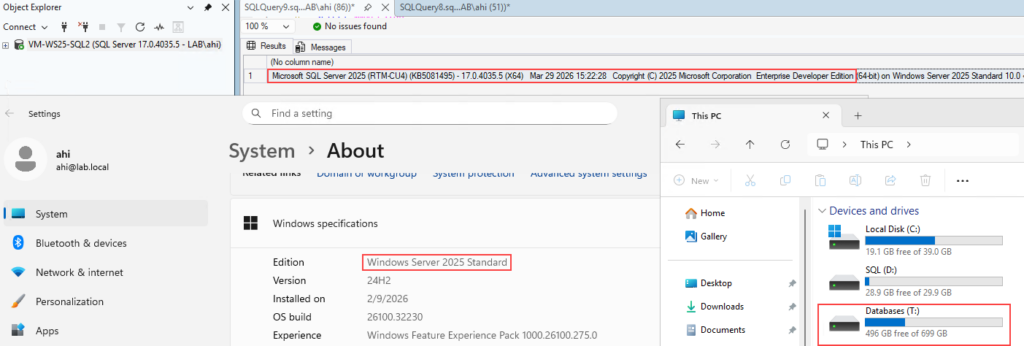
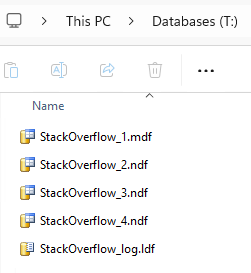
The mounted zvol is represented by the Databases (T:) volume. Most of the files related to the SQL Server installation are stored on the SQL (D:) volume while the StackOverflow database is located on the Databases (T:) volume.
Manual process flow (snapshot)
Here is how we will proceed to create a snapshot and then restore the database:
- ALTER DATABASE [StackOverflow] SET SUSPEND_FOR_SNAPSHOT_BACKUP = ON;
- Create the snapshot using the zfs snapshot command.
- Run BACKUP DATABASE [StackOverflow] … WITH METADATA_ONLY.
To avoid confusion and to be able to link the snapshot to the backup, we will include the snapshot name in the MEDIADESCRIPTION clause.
Here are the corresponding commands to create the snapshot:
ALTER DATABASE [StackOverflow] SET SUSPEND_FOR_SNAPSHOT_BACKUP = ON;
We perform the snapshot:
zfs snapshot sqlpool/pve/vm-302-disk-0@StackOverflow_11052026_235500
In the same session as the ALTER DATABASE command, we perform a backup:
BACKUP DATABASE [StackOverflow]
TO DISK = N'D:\Backups\StackOverflow_11052026_235500.bkm'
WITH METADATA_ONLY, MEDIADESCRIPTION = N'zfs|proxmox1|sqlpool/pve/vm-302-disk-0@StackOverflow_11052026_235500';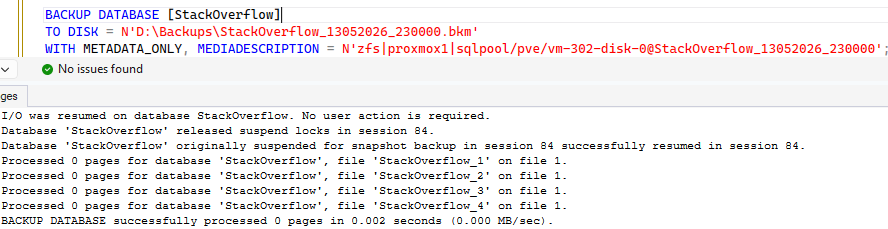
The error log shows the following:

We verify that the snapshot has been successfully created:

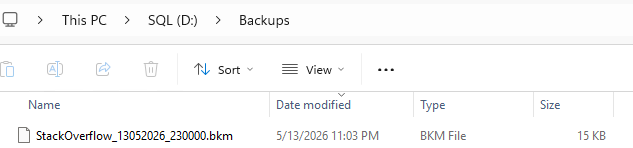
And the SQL backup :
Manual process flow (restore)
We now need to be able to restore the database. Before doing so, we can delete a few tables to verify that the database has been restored as expected. We deleted most of the tables, leaving only three:
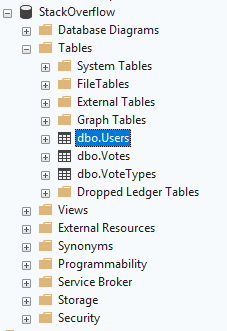
To perform the restore, we will follow these steps:
- Take the database offline.
- Rollback the snapshot using the zfs rollback command.
- Restore the database using the SQL backup created earlier.
This is done using the following commands:
ALTER DATABASE [StackOverflow] SET OFFLINE WITH ROLLBACK IMMEDIATE;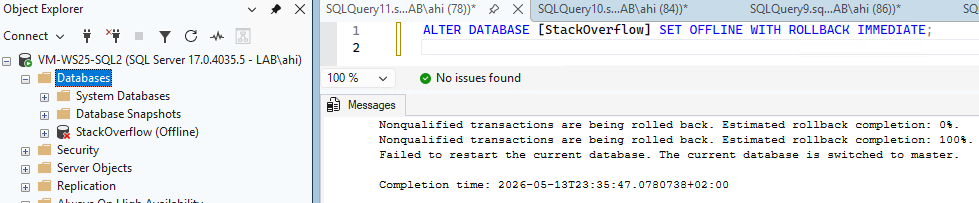
Snapshot restore:
zfs rollback -r sqlpool/pve/vm-302-disk-0@StackOverflow_13052026_230000
Database restore:
RESTORE DATABASE [StackOverflow]
FROM DISK = N'D:\Backups\StackOverflow_13052026_230000.bkm'
WITH METADATA_ONLY, REPLACE, NORECOVERY;

RESTORE DATABASE [StackOverflow] WITH RECOVERY;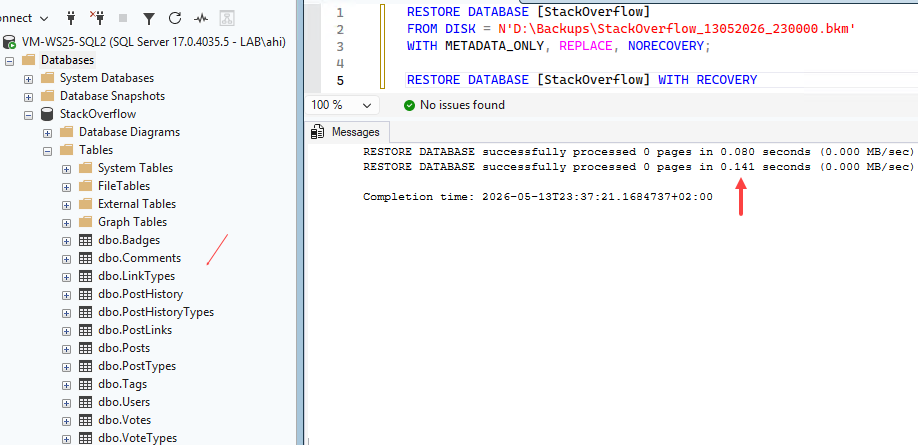
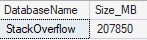
We were able to restore our database in less than one second, even though it is approximately 207 GB in size.
Major drawbacks
The process is manual, and we need to switch between running commands in SQL Server and performing the snapshot/restore operations in Proxmox. This freezes the database for a certain amount of time. During that period, connected applications could generate errors or timeouts.
The solution to this problem would be to automate the process using PowerShell, for example.
What was not covered in this section
While writing this blog post, I omitted two points:
- When the database is deleted, it is necessary to take the volume dedicated to the StackOverflow database, Databases (D:), offline. Indeed, When you run a DROP DATABASE, SQL Server deletes the files from disk, and the database no longer exists. Then, if you perform a zfs rollback while Windows still sees the disk as online, you are effectively changing the disk “under Windows feet” Windows may keep the previous NTFS state cached: an empty directory, MFT information, file handles, volume metadata, and so on. As a result, the ZFS rollback may have completed successfully, but Windows does not properly refresh its view of the disk.
- We did not make any calls to a REST API. Indeed, this functionality does not exist in my case, but it is possible to implement it.
Thank you. Amine Haloui
![Thumbnail [60x60]](https://www.dbi-services.com/blog/wp-content/uploads/2024/03/AHI_web.jpg)
![Thumbnail [90x90]](https://www.dbi-services.com/blog/wp-content/uploads/2025/11/LTO_WEB.jpg)
![Thumbnail [90x90]](https://www.dbi-services.com/blog/wp-content/uploads/2022/08/JEW_web-min-scaled.jpg)
![Thumbnail [90x90]](https://www.dbi-services.com/blog/wp-content/uploads/2022/08/STH_web-min-scaled.jpg)