In the previous section, we discussed the drawbacks of running the commands manually. Indeed, the manual process was taking too much time and could directly impact the database state while the freeze was occurring.
To address this issue, it is possible to automate the solution with PowerShell. The idea is to automate the different operations involved in the snapshot backup and restore process.
We will use two scripts:
- One script to perform the backups and create the snapshots.
- One script to perform the restores.
Backup process
Here is how the backup process works:
- We connect to the corresponding SQL Server instance.
- We change the state of the database using ALTER DATABASE … SET SUSPEND_FOR_SNAPSHOT_BACKUP = ON. At this point, the I/Os are frozen.
- We connect to the hypervisor through SSH.
- We create the snapshot.
- We back up the database using BACKUP DATABASE … WITH METADATA_ONLY.
- We change the state of the database using ALTER DATABASE … SET SUSPEND_FOR_SNAPSHOT_BACKUP = OFF. At this point, the I/Os are unfrozen.
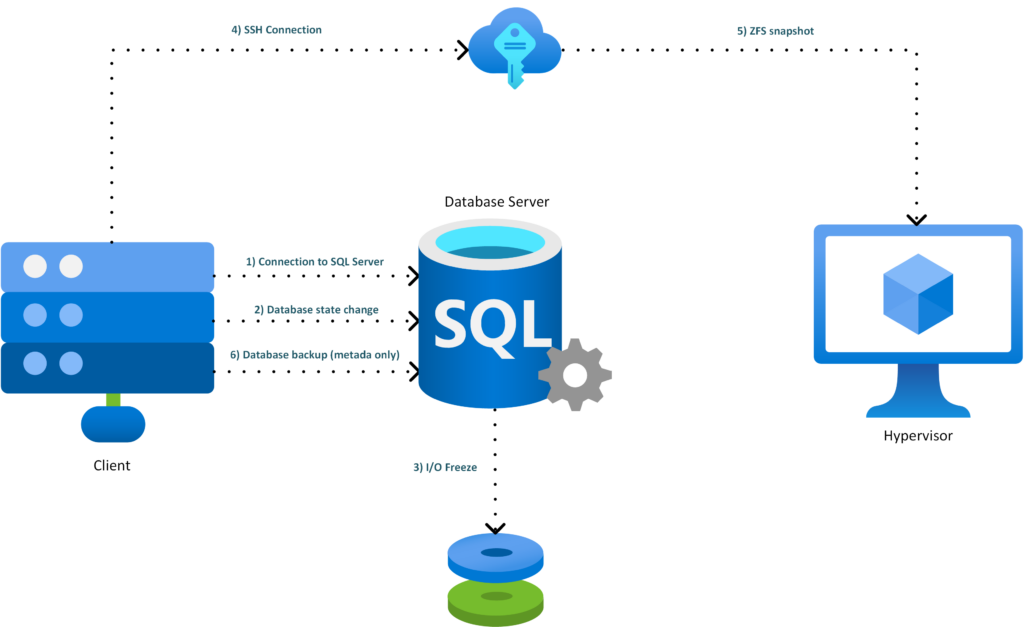
Powershell implementation (backup)
Here is the code used to perform the backup:
param(
    [string]$SqlInstance = "VM-WS25-SQL2",
    [string]$Database    = "StackOverflow",
    [string]$BackupDir   = "D:\Backups",
    [string]$PveHost     = "192.168.1.110",
    [string]$PveUser     = "MyUser",
    [string[]]$Zvols     = @("sqlpool/pve/vm-302-disk-0")
)

$Timestamp = Get-Date -Format "yyyyMMddTHHmmss"
$SnapName  = "sql_${Database}_${Timestamp}"

$DbSafe = $Database.Replace("]", "]]")
$BackupFile = Join-Path $BackupDir "${Database}_${Timestamp}.bkm"

$ZfsSnapshots = $Zvols | ForEach-Object { "$_@$SnapName" }
$ZfsSnapshotArgs = $ZfsSnapshots -join " "

$MediaDescription = "zfs|$PveHost|$ZfsSnapshotArgs"

$BackupFileSql = $BackupFile.Replace("'", "''")
$MediaSql = $MediaDescription.Replace("'", "''")

$connString = "Server=$SqlInstance;Database=master;Integrated Security=True;TrustServerCertificate=True;Application Name=ZFS-TSQL-Snapshot;"
$conn = New-Object System.Data.SqlClient.SqlConnection $connString

function Invoke-SqlNonQuery {
    param([string]$Sql)

    $cmd = $conn.CreateCommand()
    $cmd.CommandTimeout = 0
    $cmd.CommandText = $Sql
    [void]$cmd.ExecuteNonQuery()
}

try {
    $conn.Open()

    Write-Host "Freezing SQL database writes..."
    Invoke-SqlNonQuery "ALTER DATABASE [$DbSafe] SET SUSPEND_FOR_SNAPSHOT_BACKUP = ON;"

    Write-Host "Taking ZFS snapshot on Proxmox..."
    ssh "$PveUser@$PveHost" "zfs snapshot $ZfsSnapshotArgs && zfs hold sqlsnap $ZfsSnapshotArgs"

    if ($LASTEXITCODE -ne 0) {
        throw "ZFS snapshot failed on $PveHost"
    }

    Write-Host "Writing SQL metadata backup..."

    Invoke-SqlNonQuery @"
BACKUP DATABASE [$DbSafe]
TO DISK = N'$BackupFileSql'
WITH METADATA_ONLY,
     MEDIADESCRIPTION = N'$MediaSql',
     NAME = N'$SnapName';
"@

    Write-Host "Snapshot backup completed:"
    Write-Host "  Snapshot: $ZfsSnapshotArgs"
    Write-Host "  Metadata: $BackupFile"
}
catch {
    Write-Warning $_

    try {
        Write-Warning "Attempting to unfreeze SQL database..."
        Invoke-SqlNonQuery "ALTER DATABASE [$DbSafe] SET SUSPEND_FOR_SNAPSHOT_BACKUP = OFF;"
    }
    catch {
        Write-Warning "Could not unfreeze cleanly. Check SQL Server error log."
    }

    throw
}
finally {
    $conn.Close()
}
Restore process
Here is how the restore process works:
- We connect to the corresponding SQL Server instance.
- We take the database offline.
- The volume dedicated to the StackOverflow database is taken offline.
- We connect to the hypervisor through SSH.
- We roll back the corresponding snapshot.
- We restore the database using the corresponding backup, which was created at the same time as the snapshot.
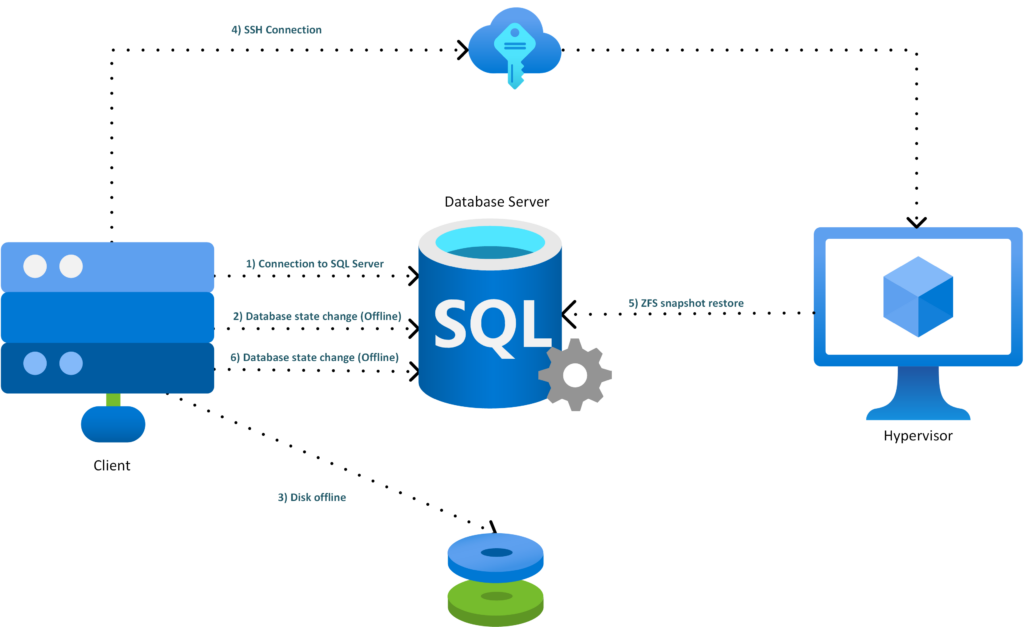
Powershell implementation (restore)
Here is the code used to perform the restore:
param(
    [string]$SqlInstance = "VM-WS25-SQL2",
    [string]$Database    = "StackOverflow",
    [string]$BackupFile  = "D:\Backups\StackOverflow_20260514T122642.bkm",
    [string]$SnapName    = "sql_StackOverflow_20260514T122642",
    [string]$PveHost     = "192.168.1.110",
    [string]$PveUser     = "MyUser",
    [string[]]$Zvols     = @("sqlpool/pve/vm-302-disk-0"),
    [string[]]$DatabaseDriveLetters = @("T"),
    [switch]$NoRecovery
)

$ErrorActionPreference = "Stop"

function Assert-SafeName {
    param(
        [string]$Value,
        [string]$Name,
        [string]$Pattern
    )

    if ($Value -notmatch $Pattern) {
        throw "$Name contained not allowed characters : $Value"
    }
}

function Normalize-DriveLetter {
    param([string]$DriveLetter)

    $letter = $DriveLetter.Trim().TrimEnd(":").ToUpperInvariant()

    if ($letter -notmatch '^[A-Z]$') {
        throw "Drive letter invalid : $DriveLetter"
    }

    return $letter
}

function Get-DiskForDriveLetter {
    param([string]$DriveLetter)

    $letter = Normalize-DriveLetter $DriveLetter

    $partition = Get-Partition -DriveLetter $letter -ErrorAction Stop
    $disk = $partition | Get-Disk -ErrorAction Stop

    return [pscustomobject]@{
        DriveLetter = $letter
        DiskNumber  = [int]$disk.Number
        IsOffline   = [bool]$disk.IsOffline
        FriendlyName = $disk.FriendlyName
        Size        = $disk.Size
    }
}

function Invoke-SshChecked {
    param([string]$Command)

    Write-Host "SSH $PveUser@$PveHost :: $Command"

    & ssh "$PveUser@$PveHost" "$Command"

    if ($LASTEXITCODE -ne 0) {
        throw "SSH command failed with code $LASTEXITCODE : $Command"
    }
}

function New-SqlConnection {
    $connString = "Server=$SqlInstance;Database=master;Integrated Security=True;TrustServerCertificate=True;Application Name=ZFS-TSQL-Restore-NoVmRestart;"
    return New-Object System.Data.SqlClient.SqlConnection $connString
}

function Invoke-SqlNonQuery {
    param([string]$Sql)

    $conn = New-SqlConnection

    try {
        $conn.Open()
        $cmd = $conn.CreateCommand()
        $cmd.CommandTimeout = 0
        $cmd.CommandText = $Sql
        [void]$cmd.ExecuteNonQuery()
    }
    finally {
        $conn.Close()
    }
}

function Invoke-SqlScalar {
    param([string]$Sql)

    $conn = New-SqlConnection

    try {
        $conn.Open()
        $cmd = $conn.CreateCommand()
        $cmd.CommandTimeout = 0
        $cmd.CommandText = $Sql
        return $cmd.ExecuteScalar()
    }
    finally {
        $conn.Close()
    }
}

function Set-DatabaseDisksOffline {
    param([object[]]$DiskInfos)

    $offlinedByScript = @()

    foreach ($diskInfo in ($DiskInfos | Sort-Object DiskNumber -Unique)) {
        if ($diskInfo.IsOffline) {
            Write-Host "Disque $($diskInfo.DiskNumber) déjà offline. Lecteur $($diskInfo.DriveLetter):"
            continue
        }

        Write-Host "Taking the Windows disk offline $($diskInfo.DiskNumber), drive $($diskInfo.DriveLetter):"
        Set-Disk -Number $diskInfo.DiskNumber -IsOffline $true

        $offlinedByScript += $diskInfo
    }

    return $offlinedByScript
}

function Set-DatabaseDisksOnline {
    param([object[]]$DiskInfos)

    foreach ($diskInfo in ($DiskInfos | Sort-Object DiskNumber -Unique)) {
        Write-Host "Bringing the Windows disk back online. $($diskInfo.DiskNumber), drive $($diskInfo.DriveLetter):"
        Set-Disk -Number $diskInfo.DiskNumber -IsOffline $false
    }

    Write-Host "Update-HostStorageCache..."
    Update-HostStorageCache
}

Assert-SafeName -Value $SnapName -Name "SnapName" -Pattern '^[A-Za-z0-9_.:-]{1,160}$'

foreach ($zvol in $Zvols) {
    Assert-SafeName -Value $zvol -Name "Zvol" -Pattern '^[A-Za-z0-9_.:/-]{1,240}$'
}

$DbQuoted = "[" + $Database.Replace("]", "]]") + "]"
$DbLiteral = $Database.Replace("'", "''")
$BackupFileSql = $BackupFile.Replace("'", "''")

$ZfsSnapshots = $Zvols | ForEach-Object { "$_@$SnapName" }
$ZfsSnapshotArgs = ($ZfsSnapshots | ForEach-Object { "'$_'" }) -join " "

$RecoveryOption = if ($NoRecovery) { "NORECOVERY" } else { "RECOVERY" }

$DatabaseDiskInfos = @()
$DisksOfflinedByScript = @()

Write-Host ""
Write-Host "Restore SQL Server from a ZFS snapshot, without restarting the VM"
Write-Host "SQL Instance : $SqlInstance"
Write-Host "Database     : $Database"
Write-Host "BackupFile   : $BackupFile"
Write-Host "DB volumes   : $($DatabaseDriveLetters -join ', ')"
Write-Host "Snapshots    :"
$ZfsSnapshots | ForEach-Object { Write-Host "  $_" }
Write-Host ""

try {
    Write-Host "Checking ZFS snapshots..."
    Invoke-SshChecked "zfs list -H -t snapshot -o name $ZfsSnapshotArgs >/dev/null"

    Write-Host "Identifying Windows disks containing SQL Server files..."
    foreach ($driveLetter in $DatabaseDriveLetters) {
        $diskInfo = Get-DiskForDriveLetter $driveLetter
        $DatabaseDiskInfos += $diskInfo

        Write-Host "Drive $($diskInfo.DriveLetter): -> Windows disk $($diskInfo.DiskNumber) [$($diskInfo.FriendlyName)]"
    }

    $backupDrive = $null
    if ($BackupFile -match '^([A-Za-z]):\\') {
        $backupDrive = Normalize-DriveLetter $Matches[1]

        try {
            $backupDiskInfo = Get-DiskForDriveLetter $backupDrive
            $targetDiskNumbers = @($DatabaseDiskInfos | ForEach-Object { $_.DiskNumber } | Select-Object -Unique)

            if ($targetDiskNumbers -contains $backupDiskInfo.DiskNumber) {
                throw @"
The backup file $BackupFile is located on drive $backupDrive, which is on the same Windows disk as the SQL Server data volume.
Taking the data disk offline would make the .bkm file inaccessible, and a rollback could also make the .bkm file disappear.
Move the .bkm file to C:, a network share, or another disk that is not rolled back.
"@
            }
        }
        catch {
            throw
        }
    }

    Write-Host "Checking whether the SQL Server database exists..."
    $DbExists = Invoke-SqlScalar "SELECT CASE WHEN DB_ID(N'$DbLiteral') IS NULL THEN 0 ELSE 1 END;"

    if ($DbExists -eq 1) {
        Write-Host "Taking database $Database OFFLINE..."
        Invoke-SqlNonQuery @"
ALTER DATABASE $DbQuoted SET SINGLE_USER WITH ROLLBACK IMMEDIATE;
ALTER DATABASE $DbQuoted SET OFFLINE WITH ROLLBACK IMMEDIATE;
"@
    }
    else {
        Write-Host "Database $Database does not exist in SQL Server. Continuing with disk offline and ZFS rollback."
    }

    Write-Host "Taking Windows disks containing MDF/LDF files offline..."
    $DisksOfflinedByScript = Set-DatabaseDisksOffline -DiskInfos $DatabaseDiskInfos

    Write-Host "Rolling back ZFS snapshot..."
    $RollbackCommands = ($ZfsSnapshots | ForEach-Object { "zfs rollback -r '$_'" }) -join "; "
    Invoke-SshChecked "set -e; $RollbackCommands"

    Write-Host "Bringing Windows disks back online..."
    Set-DatabaseDisksOnline -DiskInfos $DisksOfflinedByScript
    $DisksOfflinedByScript = @()

    Write-Host "Short pause to let Windows and SQL Server detect the restored disk state..."
    Start-Sleep -Seconds 5

    Write-Host "Restoring SQL Server metadata-only backup..."

    $RestoreSql = @"
RESTORE DATABASE $DbQuoted
FROM DISK = N'$BackupFileSql'
WITH METADATA_ONLY,
     REPLACE,
     $RecoveryOption;
"@

    Invoke-SqlNonQuery $RestoreSql

    if (-not $NoRecovery) {
        Write-Host "Setting database back to MULTI_USER..."
        Invoke-SqlNonQuery @"
ALTER DATABASE $DbQuoted SET MULTI_USER;
"@
    }

    Write-Host ""
    Write-Host "Restore completed."
    Write-Host "Database : $Database"
    Write-Host "Snapshot : $SnapName"
    Write-Host "Backup   : $BackupFile"
}
catch {
    Write-Warning "Restore failed: $_"

    if ($DisksOfflinedByScript.Count -gt 0) {
        try {
            Write-Warning "Attempting to bring disks offlined by the script back online..."
            Set-DatabaseDisksOnline -DiskInfos $DisksOfflinedByScript
            $DisksOfflinedByScript = @()
        }
        catch {
            Write-Warning "Unable to automatically bring the disks back online. Check with Get-Disk."
        }
    }

    try {
        $DbExistsAfterError = Invoke-SqlScalar "SELECT CASE WHEN DB_ID(N'$DbLiteral') IS NULL THEN 0 ELSE 1 END;"

        if ($DbExistsAfterError -eq 1 -and -not $NoRecovery) {
            Write-Warning "Attempting to set the database back ONLINE/MULTI_USER..."
            Invoke-SqlNonQuery @"
ALTER DATABASE $DbQuoted SET ONLINE;
ALTER DATABASE $DbQuoted SET MULTI_USER;
"@
        }
    }
    catch {
        Write-Warning "Unable to automatically set the database back ONLINE/MULTI_USER."
    }

    throw
}
What does it look like?
We start the backup process:

We verify that the snapshot is present:

We verify that the backup is present:

We drop the StackOverflow database:
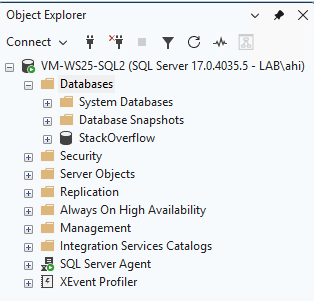
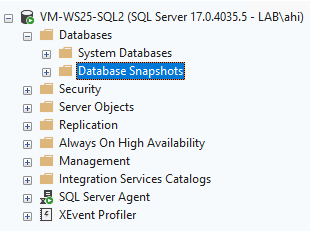
We start the restore process:
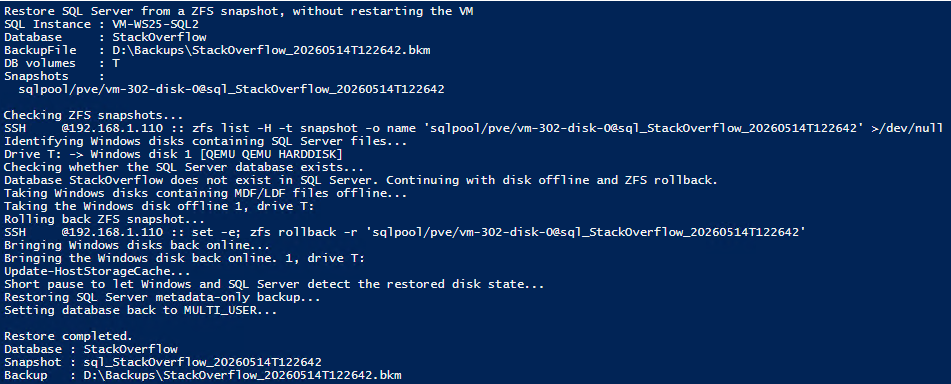
The database is available again. The restore took only a few seconds for a database of approximately 200 GB.
Major drawbacks
In my case, the solution is executed from the SQL Server itself. Ideally, it should rather be hosted on another server or client machine. We could also imagine running these scripts from a scheduler such as RedDeck, for example.
During the database restore, the database is switched to SINGLE_USER mode. This could be an issue if the applications using the database reconnect very frequently. A better approach would probably be to explicitly terminate the active sessions using the KILL command.
We have also not yet covered the use of a REST API.
Thank you. Amine Haloui
![Thumbnail [60x60]](https://www.dbi-services.com/blog/wp-content/uploads/2024/03/AHI_web.jpg)
![Thumbnail [90x90]](https://www.dbi-services.com/blog/wp-content/uploads/2025/11/LTO_WEB.jpg)
![Thumbnail [90x90]](https://www.dbi-services.com/blog/wp-content/uploads/2022/08/JEW_web-min-scaled.jpg)
![Thumbnail [90x90]](https://www.dbi-services.com/blog/wp-content/uploads/2022/08/STH_web-min-scaled.jpg)