Skip to content

SQL Server 2012

Three basic points on SQL Server Best Practice

A few weeks ago, I went to the Swiss Database Days 2013 and followed the “Practical SQL Server Performance Troubleshooting” workshop. During this workshop, I have seen a different way of troubleshooting, but I was surprised to see that some participants were not aware that some basic SQL Server Best Practice do not depend on the instance settings. This blog… 

SQL Server 2012: System views poster available

Good news for all SQL Server DBAs: DMVs and DMFs poster are now available for SQL Server 2012. You can download them here. You can choose between 2 formats: pdf and xps. What’s new? You will notice the new category AlwaysOn: You can see the ColumnStore Index in the Partitioning section: If you want to know more about the new… 

SQL Server 2012 SP1: Fourth Cumulative Update (CU4) available

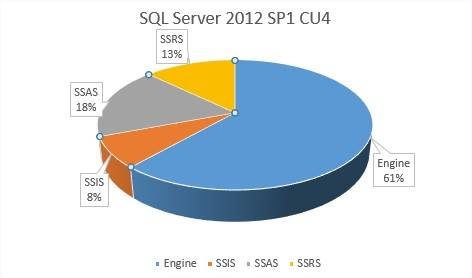
Microsoft has just published the Fourth Cumulative Update (CU4) for Microsoft SQL Server 2012 SP1. If this CU covers an issue you are experiencing, you should install it quickly. Otherwise, it is not mandatory. Which issues are covered by CU4? This CU4 contains 39 Hotfixes: 24 for the Engine 3 for SSIS 7 for SSAS 5 for SSRS If you… 

SQL Server 2012: CompoundCurve – a new geospatial feature

There are three new geospatial features in Microsoft SQL Server 2012: CircularString, CurvePolygon, and CompoundCurve. For the fun and as an example, I will test CompoundCurve, a set of circular strings that may be combined with line strings, and store a “dbi” character set in a table.:-D What is CompoundCurve? It’s a set of circular strings, or circular strings combined… 

SQL Server 2012: Create & replay a trace with Distributed Replay

My last blog was about installing and configuring Microsoft SQL Server 2012 Distributed Replay. This time, I will show you how you can create a trace and replay it with Distributed Replay Clients on a specific SQL Server target. This is my Distributed Replay configuration:   Creation of the trace I will use the two Distributed Replay clients to generate… 

SQL Server 2012 SP 1: Third Cumulative Update (CU3) available

Three weeks ago, Microsoft published the third Cumulative Update (CU3) for Microsoft SQL Server 2012 Service Pack one. As usual, if this Cumulative Update solves an issue you are facing, install it quickly – otherwise, do not install it. Which issues are covered by this CU3? It contains 38 Hotfixes: 27 for the Engine 8 for SSAS 3 for SSRS To… 

SQL Server 2012: Installing and configuring Distributed Replay

Distributed Replay is a new fonctionality of Microsoft SQL Server 2012. It helps you assess the impact of future upgrades (SQL Server, hardware, OS) or SQL Server tunings by replaying a trace captured from a productive SQL Server environment to a new SQL Server test environment. This new functionality is similar to SQL Server Profiler, but with more possibilities: e.… 

SQL Server 2012: new perfmon counters

I have read some blog postings concerning the new perfmon counters, but I have not seen really extensive overviews yet. In this post, I would like to present not only what is new, but also what has changed (or not) and how to find it. The first step is to select all objects in SQL2008R2 and SQL2012 from the view sys.dm_os_performance_counters.… 

SQL Server 2012: Configuring your TCP Port via Powershell

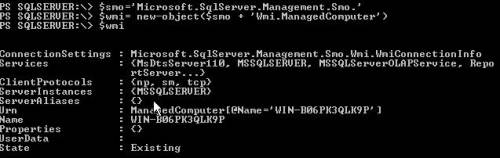
Changing the default TCP port 1433 for SQL Server is an important step for securing your SQL Server. I have written a script in PowerShell to modify the port number that helps me perform this task. This blog posting will show you how to do it. Please note that the code in this article is for SQL Server 2012 on Windows… 

SQL Server 2012 SP1: Second Cumulative Update available (CU2)

A couple of days ago, Microsoft published the second Cumulative Update (CU2) for Microsoft SQL Server 2012 SP1. If this CU covers an issue you are experiencing, you should install it quickly. Otherwise, it is not mandatory. Which issues are covered by this CU2? This CU2 contains 51 Hotfixes: 35 for the Engine 6 for SSAS 3 for SSIS 7… 

SQL Server View problem in LightSwitch 2012

I recently faced a problem in Visual Studio LightSwitch 2012 with SQL Server views. I attached an external datasource to my project and when I tried to import my view (which is very simple) I experienced some issues. Here is my View in SQL Server 2012: During the import process a warning says  my view doesn’t have any primary key… 

SQL Server 2012: First Hotfix for Service Pack 1 available

This month, Microsoft has released the first hotfix for SQL Server Service Pack 1. Analysis This Hotfix concerns the installation of SQL Server components and Analysis Services. If you have installed the RTM version with Analysis Service and successfully installed Service Pack 1, you may experience problems in the next installation process for other component: The installation freezes and does…