In the blog series I previously wrote, I did not answer all the customer’s questions. The last one was the following:
Can this also be applied to PostgreSQL?
In short, yes, it is possible. Let’s see how.
Here is the list of the previous blog posts:
- https://www.dbi-services.com/blog/sql-server-snapshot-backup-and-restore-with-proxmox-zfs/
- https://www.dbi-services.com/blog/sql-server-snapshot-backup-and-restore-with-proxmox-zfs-2-3/
- https://www.dbi-services.com/blog/sql-server-snapshot-backup-and-restore-with-proxmox-zfs-rest-api-with-sql-server-2025-3-3/
Partitioning and filesystem
We will reuse the sqlpool ZFS pool created in the first part of this series.

We identify the 300 GB disk attached to the VM. In our case, it is /dev/sdb, backed by the sqlpool/pve/vm-307-disk-0 zvol on the Proxmox side:
lsblkWe create a single partition of type Linux filesystem:
sudo sgdisk -n 1:0:0 -t 1:8300 /dev/sdb
We format the partition with XFS, which is the most commonly recommended filesystem for PostgreSQL data directories:
sudo mkfs.xfs -L pgdata /dev/sdb1 -f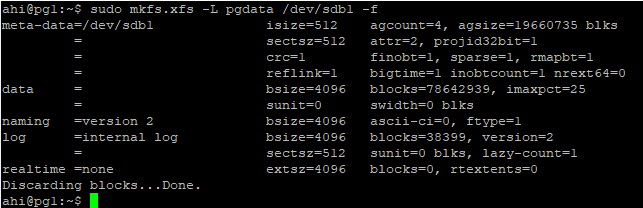
We verify the result:
ahi@pgl:~$ sudo blkid /dev/sdb1
/dev/sdb1: LABEL="pgdata" UUID="028afa2f-7bb3-4a40-92aa-91c1a33f18ae9" BLOCK_SIZE="512" TYPE="xfs" PARTUUID="bd54f285-092e-4b1b-ba5e-6877f054fa7"
Mountpoint:
We create the mount point:
sudo mkdir -p /pgdataPersistent mount via fstab:
We add the mount entry to /etc/fstab using the filesystem label rather than the device name. The device name (/dev/sdb) may change if disks are added or removed while the label remains stable:
echo 'LABEL=pgdata /pgdata xfs noatime,nodiratime 0 2' | sudo tee -a /etc/fstab
sudo systemctl daemon-reload
sudo mount /pgdata
We verify that the volume is mounted:
df -h /pgdata
PostgreSQL installation
We install PostgreSQL 18 from the official PGDG repository, which provides the latest PostgreSQL versions for Ubuntu:
sudo apt install -y postgresql-common
sudo /usr/share/postgresql-common/pgdg/apt.postgresql.org.sh -y
sudo apt install -y postgresql-18
Cluster creation on /pgdata:
The Ubuntu packages create a default cluster under /var/lib/postgresql. This is not what we want. The data files and the WAL must both reside on the ZFS-backed volume, so that a single ZFS snapshot captures a consistent state of the database. If they were on different volumes, the snapshot would not be atomic.
We drop the default cluster and recreate it on /pgdata:
ahi@pgl:~$ sudo pg_dropcluster --stop 18 main
sudo install -d -o postgres -g postgres -m 700 /pgdata/18
sudo pg_createcluster -d /pgdata/18/main 18 main
sudo systemctl enable --now postgresql@18-main
Creating new PostgreSQL cluster 18/main ...
/usr/lib/postgresql/18/bin/initdb -D /pgdata/18/main --auth-local peer --auth-host scram-sha-256 --no-instructions
The files belonging to this database system will be owned by user "postgres".
This user must also own the server process.

The database cluster will be initialized with locale "en_US.UTF-8".
The default database encoding has accordingly been set to "UTF8".
The default text search configuration will be set to "english".

Data page checksums are enabled.

fixing permissions on existing directory /pgdata/18/main ... ok
creating subdirectories ... ok
selecting dynamic shared memory implementation ... posix
selecting default "max_connections" ... 100
selecting default "shared_buffers" ... 128MB
selecting default time zone ... Etc/UTC
creating configuration files ... ok
running bootstrap script ... ok
performing post-bootstrap initialization ... ok
syncing data to disk ... ok
             Ver Cluster Port Status Owner     Data directory  Log file
             18  main    5432 down   postgres  /pgdata/18/main /var/log/postgresql/postgresql-18-main.log
Created symlink /etc/systemd/system/multi-user.target.wants/[email protected] → /usr/lib/systemd/system/[email protected].
We verify that the cluster is online and located on the right volume:
ahi@pgl:~$ pg_lsclusters
Ver Cluster Port Status Owner     Data directory  Log file
18  main    5432 online <unknown> /pgdata/18/main /var/log/postgresql/postgresql-18-main.log
ahi@pgl:~$ sudo -u postgres psql -c "SHOW data_directory;"
 data_directory
-----------------
 /pgdata/18/main
(1 row)

ahi@pgl:~$ sudo -u postgres psql -c "SELECT version();"
                                                             version
-------------------------------------------------------------------------------------------------------------------------------
 PostgreSQL 18.4 (Ubuntu 18.4-1.pgdg24.04+1) on x86_64-pc-linux-gnu, compiled by gcc (Ubuntu 13.3.0-6ubuntu2~24.04.1) 13.3.0, 64-bit
(1 row)
We can also confirm that the WAL directory lives inside the data directory, and therefore on the zvol:
ls -ld /pgdata/18/main/pg_walCreating a large database
We need a database large enough to make traditional backup and restore operations time-consuming. In the SQL Server part of this series, we used the StackOverflow database (about 207 GB). For PostgreSQL, we use pgbench, the benchmarking tool shipped with PostgreSQL.
We create the database and initialize it with a scale factor of 10000. This produces a database of approximately 146 GB, with 1 billion rows in the pgbench_accounts table:
sudo -u postgres createdb bench
sudo -u postgres pgbench -i -s 10000 --partitions=8 bench
A few minutes later:

We can monitor the data growth during the initialization:
watch -n 30 'df -h /pgdata'
A few minutes later:

On the Proxmox side:
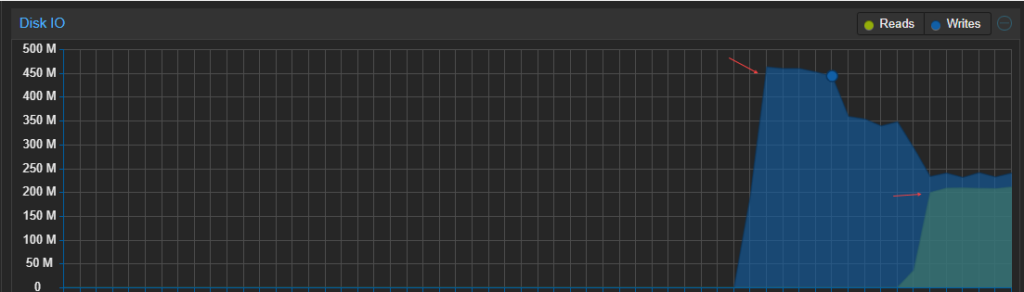
After some time, the process completes:
vacuuming...

creating primary keys...
done in 1559.55 s (drop tables 0.00 s, create tables 0.02 s, client-side generate 598.12 s, vacuum 675.53 s, primary keys 285.88 s).
ahi@pgl:~$
We check the database size:

We run a checkpoint before taking the snapshot. The recovery process starts replaying the WAL from the last checkpoint. By running it right before the snapshot, almost nothing needs to be replayed when the database starts after a restore:
sudo -u postgres psql -c "CHECKPOINT;"
Comparison with SQL Server:
On the SQL Server side, we had to run SUSPEND_FOR_SNAPSHOT_BACKUP and BACKUP WITH METADATA_ONLY. On the PostgreSQL side, none of that is needed.
The data files and the WAL are on the same zvol. An atomic ZFS snapshot therefore captures a state equivalent to a power loss, and PostgreSQL is designed to recover cleanly from that state through crash recovery: the WAL is replayed from the last checkpoint. This is documented and officially supported.
The snapshot is the backup. There is no .bkm file, no metadata backup.
| SQL Server | PostgreSQL | |
| Before the snapshot | ALTER DATABASE…SET SUSPEND_FOR_SNAPSHOT_BACKUP = ON | CHECKPOINT (optional) |
| Backup record | BACKUP WITH METADATA_ONLY | None |
| During the restore | RESTORE WITH METADATA_ONLY | Automatic crash recovery (WAL replay) |
| Evidence in the logs | “I/O is frozen” in the ERRORLOG | “redo starts/redo done” in the PostgreSQL log |
Snapshot process flow
On the Proxmox side, we create the snapshot and protect it with a hold:
SNAP="sqlpool/pve/vm-307-disk-0@pg_bench_$(date +%Y%m%dT%H%M%S)"
zfs snapshot "$SNAP"
zfs hold sqlsnap "$SNAP"
echo "$SNAP"
The hold protects the snapshot from an accidental destruction, as we did in part 2 of this series. We note the exact snapshot name, it will be needed for the restore.
The database stays online during the whole operation. No I/O freeze is required.
We list the snapshots:
zfs list -t snapshot -r sqlpool/pve/vm-307-disk-0
We drop the database then we restore the snapshot:
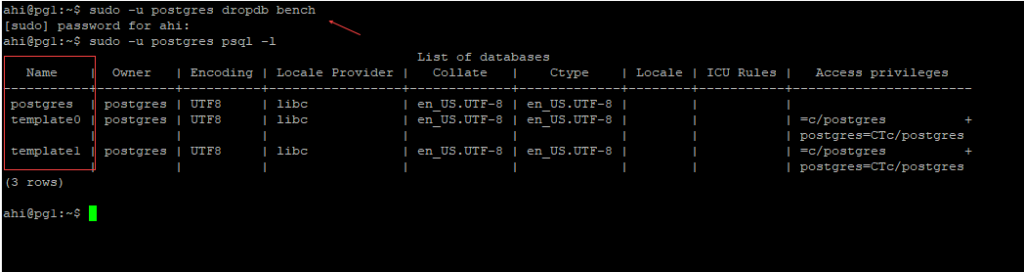
We run the snapshot restore procedure. On the VM, we stop the cluster and unmount the volume:
sudo systemctl stop postgresql@18-main
sudo umount /pgdata
On the Proxmox side, we want to restore our snapshot. We can list the available snapshots:
zfs list -t snapshot -r sqlpool/pve/vm-307-disk-0
We roll back the snapshot:
zfs rollback -r sqlpool/pve/vm-307-disk-0@pg_bench_20260803T165409On the VM, we mount the volume and start the service:
sudo mount /pgdata
sudo systemctl start postgresql@18-main
We check a few elements in the logs:
sudo tail -30 /var/log/postgresql/postgresql-18-main.logThe service shutdown, then the restart:
UTC [232108] LOG:  database system is shut down
UTC [233968] LOG:  starting PostgreSQL 18.4 (Ubuntu 18.4-1.pgdg24.04+1) on x86_64-pc-linux-gnu, compiled by gcc (Ubuntu 13.3.0-6ubuntu2~24.04.1) 13.3.0, 64-bit
UTC [233968] LOG:  listening on IPv4 address "0.0.0.0", port 5432
UTC [233968] LOG:  listening on IPv6 address "::", port 5432
UTC [233968] LOG:  listening on Unix socket "/var/run/postgresql/.s.PGSQL.5432"
PostgreSQL detects that the database was not shut down properly and replays the WAL. This is the same crash recovery mechanism as in SQL Server. Finally, the database starts.
UTC [233974] LOG:  database system was not properly shut down; automatic recovery in progress
UTC [233974] LOG:  redo starts at 20/2CB76278
UTC [233974] LOG:  invalid record length at 20/2CB76380: expected at least 24, got 0
UTC [233974] LOG:  redo done at 20/2CB76348 system usage: CPU: user: 0.00 s, system: 0.00 s, elapsed: 0.00 s
UTC [233974] LOG:  checkpoint starting: end-of-recovery immediate wait
UTC [233972] LOG:  checkpoint complete: wrote 0 buffers (0.0%), wrote 3 SLRU buffers; 0 WAL file(s) added, 0 removed, 0 recycled; write=0.002 s, sync=0.009 s, total=0.030 s; sync files=0, longest=0.000 s, average=0.005 s; distance=0 kB, estimate=0 kB; lsn=20/2CB76380, redo lsn=20/2CB76380
UTC [233968] LOG:  database system is ready to accept connections
We then verify that the database is available again:
sudo -u postgres psql -d bench -c "SELECT pg_size_pretty(pg_database_size('bench'));"
Consistency proof under load
The previous test was done on a quiesced database: we ran a CHECKPOINT right before the snapshot, and nothing was writing. The real question is: what happens if the snapshot is taken while the database is being written to?
This is where PostgreSQL differs the most from SQL Server. There is no SUSPEND_FOR_SNAPSHOT_BACKUP. We take the snapshot in the middle of the write activity and we let the WAL replay do the work.
We start the load. The built-in pgbench script runs a TPC-B-like transaction: three UPDATE statements on the accounts, tellers and branches tables and one INSERT into the history table:
sudo -u postgres pgbench -c 8 -j 4 -T 300 bench &
While the load is running, we take a snapshot on the Proxmox side:
zfs snapshot sqlpool/pve/vm-307-disk-0@pg_bench_$(date +%Y%m%dT%H%M%S)

zfs hold sqlsnap sqlpool/pve/vm-307-disk-0@pg_bench_20260803T224551
No CHECKPOINT this time, no freeze. The database is actively writing while the snapshot is taken.
The state after some time under load:
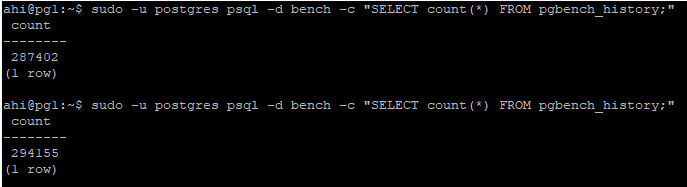
We stop the service:
sudo systemctl stop postgresql@18-main
sudo umount /pgdata
We restore the snapshot:
zfs rollback -r sqlpool/pve/vm-307-disk-0@pg_bench_20260803T224551 
We mount the volume, start the service and check the logs:
sudo mount /pgdata
sudo systemctl start postgresql@18-main
This time the log shows a real recovery:
2026-08-03 20:49:03.244 UTC [234405] LOG:  database system is shut down
2026-08-03 20:50:34.333 UTC [234620] LOG:  starting PostgreSQL 18.4 (Ubuntu 18.4-1.pgdg24.04+1) on x86_64-pc-linux-gnu, compiled by gcc (Ubuntu 13.3.0-6ubuntu2~24.04.1) 13.3.0, 64-bit
2026-08-03 20:50:34.333 UTC [234620] LOG:  listening on IPv4 address "0.0.0.0", port 5432
2026-08-03 20:50:34.333 UTC [234620] LOG:  listening on IPv6 address "::", port 5432
2026-08-03 20:50:34.335 UTC [234620] LOG:  listening on Unix socket "/var/run/postgresql/.s.PGSQL.5432"
2026-08-03 20:50:34.343 UTC [234626] LOG:  database system was interrupted; last known up at 2026-08-03 20:44:36 UTC
2026-08-03 20:50:34.381 UTC [234626] LOG:  database system was not properly shut down; automatic recovery in progress
2026-08-03 20:50:34.384 UTC [234626] LOG:  redo starts at 20/7A3618B0
2026-08-03 20:50:38.024 UTC [234626] LOG:  invalid record length at 20/8BC0A4F8: expected at least 24, got 0
2026-08-03 20:50:38.024 UTC [234626] LOG:  redo done at 20/8BC0A4D0 system usage: CPU: user: 0.71 s, system: 0.63 s, elapsed: 3.63 s
2026-08-03 20:50:38.028 UTC [234624] LOG:  checkpoint starting: end-of-recovery immediate wait
2026-08-03 20:50:53.936 UTC [234624] LOG:  checkpoint complete: wrote 105355 buffers (53.6%), wrote 5 SLRU buffers; 0 WAL file(s) added, 17 removed, 0 recycled; write=3.648 s, sync=12.232 s, total=15.911 s; sync files=189, longest=12.223 s, average=0.065 s; distance=287395 kB, estimate=287395 kB; lsn=20/8BC0A4F8, redo lsn=20/8BC0A4F8
2026-08-03 20:50:53.948 UTC [234620] LOG:  database system is ready to accept connections
Three differences compared to the first test:
- The “last known up at” timestamp (20:44:36) does not match a checkpoint we ran manually. It matches the last automatic checkpoint triggered during the load.
- The redo is not instantaneous anymore: 3.63 seconds, replaying about 280 MB of WAL (from LSN 20/7A3618B0 to 20/8BC0A4D0). All the write activity between the last checkpoint and the snapshot had to be replayed. The transactions committed before the snapshot are recovered, the ones that were in flight are rolled back.
- The end-of-recovery checkpoint then writes everything the redo rebuilt in memory: 105355 buffers, 53.6% of the buffer pool. The database is ready to accept connections about 19 seconds after the service start.
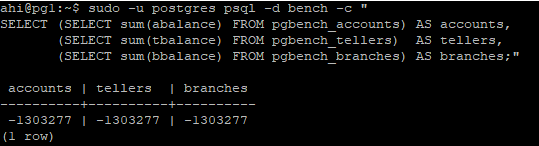
The crash recovery completed correctly and the database has been restored. We verify the TPC-B invariant. Each pgbench transaction applies the same delta to the accounts, tellers and branches tables in a single transaction. On a consistent database, the three sums must be equal:
Major drawbacks
- The snapshot covers the whole zvol. All the databases of the cluster are captured and restored together. There is no per-database restore, unlike the METADATA_ONLY approach on SQL Server which targets a single database.
- There is no backup history. SQL Server records the metadata backup in msdb. Here, the only trace is the snapshot itself on the ZFS side.
- Point-in-time recovery is not covered. The snapshot alone brings the database back to the moment it was taken. For PITR, WAL archiving would still be required on top of it.
Conclusion
- The snapshot backup and restore model of the SQL Server series applies to PostgreSQL (no I/O freeze, no metadata backup).
- One important rule: data files and WAL must reside on the same zvol so the snapshot is atomic.
- A 146 GB database was restored in a few seconds and in less than 20 seconds under active load, WAL replay included.
Thank you. Amine Haloui
![Thumbnail [60x60]](https://www.dbi-services.com/blog/wp-content/uploads/2024/03/AHI_web.jpg)
![Thumbnail [90x90]](https://www.dbi-services.com/blog/wp-content/uploads/2022/08/HER_web-min-scaled.jpg)
![Thumbnail [90x90]](https://www.dbi-services.com/blog/wp-content/uploads/2022/08/JOC_web-scaled.jpg)
![Thumbnail [90x90]](https://www.dbi-services.com/blog/wp-content/uploads/2022/08/JEW_web-min-scaled.jpg)
![Thumbnail [90x90]](https://www.dbi-services.com/blog/wp-content/uploads/2022/08/STH_web-min-scaled.jpg)