Introduction
Monitoring Microsoft SQL Server database files is an important part of infrastructure supervision.
A database reaching its storage limit can rapidly lead to application outages, transaction failures, or even complete service interruptions.
The Initial Problem
In SQL Server, retrieving file information is relatively simple when working directly inside SQL Server Management Studio
- database file size,
- used space,
- free space,
- auto-growth configuration,
- or maximum file size
A common query used by many DBAs is the following:
USE [TEST]

GO

SELECT
  DB_NAME(database_id) AS DBName,
  Name AS Logical_Name,
  Physical_Name AS [PhysicalName],
  CAST(ROUND(((size)/128/1024), 2) AS float) AS [SizeGB],
  CAST(ROUND((CAST(FILEPROPERTY(name, 'SpaceUsed') AS INT)/128/1024), 2) AS float) AS [SpaceUsedGB],
  CAST(ROUND((size/128/1024 - CAST(FILEPROPERTY(name, 'SpaceUsed') AS INT)/128/1024), 2) AS float) AS [FreeSpaceGB],
  ROUND(ISNULL(((CAST((fileproperty(name, 'SpaceUsed'))/128/1024 as float)) / NULLIF((CAST(size/128/1024 as float)), 0)), 0)*100, 2) as [SpaceUsed%],
  CASE WHEN [max_size] = -1 THEN [max_size] ELSE CAST(ROUND(((max_size)/128/1024), 2) AS float) END AS [MaxSizeGB],
  CAST(ROUND((max_size/128/1024 - CAST(FILEPROPERTY(name, 'SpaceUsed') AS INT)/128/1024), 2) AS float) AS [FreeSpaceGBtoMaxSize],
  ROUND(ISNULL(((CAST((fileproperty(name, 'SpaceUsed'))/128/1024 as float)) / NULLIF((CAST(max_size/128/1024 as float)), 0)), 0)*100, 2) as [SpaceUsed%toMaxSize]
FROM sys.master_files
WHERE DB_NAME(database_id) = 'TEST'
ORDER BY Logical_Name
The initial query works perfectly for manual analysis in SQL Server Management Studio.
However, integrating it into Zabbix becomes more complicated because sys.database_files only returns information from the current database context.
This means the query must be executed individually for every database using:
USE [DatabaseName]
In small environments this remains manageable, but in larger infrastructures containing dozens or even hundreds of databases, maintaining static queries quickly becomes impractical.
To automate this process, we use:
sp_MSforeachdb
This SQL Server procedure dynamically executes the same query across every database on the instance.
Example:
EXEC sp_MSforeachdb '
USE [?]

SELECT
    DB_NAME(),
    name,
    physical_name
FROM sys.database_files
'
The ? placeholder is automatically replaced by the database name during execution, allowing SQL Server to iterate through all databases dynamically.
At first glance, this seems to solve the problem entirely.
However, another limitation quickly appears: sp_MSforeachdb returns one independent result set per database.
Instead of producing a single structured dataset, SQL Server generates multiple separate tables:
Database 1 result
-----------------
file1
file2

Database 2 result
-----------------
file1
file2
While this output remains perfectly readable for a DBA inside SQL Server Management Studio, it becomes difficult to exploit inside Zabbix, especially for Low-Level Discovery and dependent items.
To solve this limitation, we redesigned the query architecture to centralize all results into a single temporary table, allowing Zabbix to consume one normalized dataset fully compatible with automatic discovery and scalable monitoring.
Why Zabbix Cannot Easily Use This Output
Zabbix works much better when:
- the result is normalized,
- the structure is predictable,
- and all rows belong to a single dataset.
With multiple independent result sets:
- Low-Level Discovery becomes difficult,
- JSON conversion becomes complicated,
- dependent items cannot parse values correctly,
- preprocessing becomes unreliable.
The issue is therefore no longer the database context itself. The issue becomes the query output structure.
Building a Zabbix-Compatible Query
To make the output usable inside Zabbix, the query had to be redesigned completely.
The objective was no longer simply to retrieve MSSQL file information, but to transform multiple independent database results into a single normalized dataset compatible with Low-Level Discovery.
The new query therefore introduces three important concepts:
- dynamic iteration through all databases using
sp_MSforeachdb, - centralized data collection using a global temporary table,
- and a final unified output consumable by Zabbix dependent items.
The core logic becomes inside the sp_MSforeachdb execution.
INSERT INTO ##Results
Each database inserts its rows into the same centralized structure instead of returning independent result sets.
At the end of the execution, the query simply returns:
SELECT * FROM ##Results
The final output is now normalized instead of multiple disconnected tables.
| Database | File | Type | Size | Free |
|---|---|---|---|---|
| TEST | TEST_Data | Data | … | … |
| TEST | TEST_Log | Log | … | … |
| PROD | PROD_Data | Data | … | … |
The complete query
SET NOCOUNT ON;

DECLARE @Granularity VARCHAR(10) = NULL
DECLARE @Database_Name sysname = NULL

DECLARE @SQL VARCHAR(5000)

IF EXISTS (SELECT NAME FROM tempdb..sysobjects WHERE NAME = '##Results')
BEGIN
    DROP TABLE ##Results
END

CREATE TABLE ##Results (
    [Database Name] sysname,
    [File Name] sysname,
    [Physical Name] NVARCHAR(260),
    [File Type] VARCHAR(4),
    [Total Size in Bytes] BIGINT,
    [Available Space in Bytes] BIGINT,
    [Growth Units] VARCHAR(20),
    [Max File Size in Bytes] BIGINT
)

SELECT @SQL =
'USE [?]
INSERT INTO ##Results(
    [Database Name],
    [File Name],
    [Physical Name],
    [File Type],
    [Total Size in Bytes],
    [Available Space in Bytes],
    [Growth Units],
    [Max File Size in Bytes]
)
SELECT
    DB_NAME(),
    [name],
    physical_name,
    CASE type
        WHEN 0 THEN ''Data''
        WHEN 1 THEN ''Log''
    END,

    -- TOTAL SIZE (bytes) SAFE
    CAST(size AS BIGINT) * 8 * 1024,

    -- FREE SPACE (bytes) SAFE
    (CAST(size AS BIGINT) - CAST(FILEPROPERTY([name], ''SpaceUsed'') AS BIGINT)) * 8 * 1024,

    -- GROWTH
    CASE is_percent_growth
        WHEN 1 THEN CAST(growth AS varchar(20)) + ''%''
        ELSE CAST(CAST(growth AS BIGINT) * 8 * 1024 AS varchar(20))
    END,

    -- MAX SIZE (bytes) SAFE
    CASE max_size
        WHEN -1 THEN NULL
        WHEN 268435456 THEN NULL
        ELSE CAST(max_size AS BIGINT) * 8 * 1024
    END

FROM sys.database_files
ORDER BY type, file_id
'

EXEC sp_MSforeachdb @SQL

-- =========================
-- RESULTATS
-- =========================

IF @Database_Name IS NULL
BEGIN
    IF @Granularity = 'Database'
    BEGIN
        SELECT
            T.[Database Name],

            T.[Total Size in Bytes] AS [DB Size (Bytes)],
            T.[Available Space in Bytes] AS [DB Free (Bytes)],
            T.[Consumed Space in Bytes] AS [DB Used (Bytes)],

            D.[Total Size in Bytes] AS [Data Size (Bytes)],
            D.[Available Space in Bytes] AS [Data Free (Bytes)],
            D.[Consumed Space in Bytes] AS [Data Used (Bytes)],
            CEILING(CAST(D.[Available Space in Bytes] AS decimal(20,2)) / NULLIF(D.[Total Size in Bytes],0) * 100) AS [Data Free %],

            L.[Total Size in Bytes] AS [Log Size (Bytes)],
            L.[Available Space in Bytes] AS [Log Free (Bytes)],
            L.[Consumed Space in Bytes] AS [Log Used (Bytes)],
            CEILING(CAST(L.[Available Space in Bytes] AS decimal(20,2)) / NULLIF(L.[Total Size in Bytes],0) * 100) AS [Log Free %]

        FROM
        (
            SELECT [Database Name],
                SUM([Total Size in Bytes]) AS [Total Size in Bytes],
                SUM([Available Space in Bytes]) AS [Available Space in Bytes],
                SUM([Total Size in Bytes] - [Available Space in Bytes]) AS [Consumed Space in Bytes]
            FROM ##Results
            GROUP BY [Database Name]
        ) T

        INNER JOIN
        (
            SELECT [Database Name],
                SUM([Total Size in Bytes]) AS [Total Size in Bytes],
                SUM([Available Space in Bytes]) AS [Available Space in Bytes],
                SUM([Total Size in Bytes] - [Available Space in Bytes]) AS [Consumed Space in Bytes]
            FROM ##Results
            WHERE [File Type] = 'Data'
            GROUP BY [Database Name]
        ) D ON T.[Database Name] = D.[Database Name]

        INNER JOIN
        (
            SELECT [Database Name],
                SUM([Total Size in Bytes]) AS [Total Size in Bytes],
                SUM([Available Space in Bytes]) AS [Available Space in Bytes],
                SUM([Total Size in Bytes] - [Available Space in Bytes]) AS [Consumed Space in Bytes]
            FROM ##Results
            WHERE [File Type] = 'Log'
            GROUP BY [Database Name]
        ) L ON T.[Database Name] = L.[Database Name]

        ORDER BY T.[Database Name]
    END
    ELSE
    BEGIN
        SELECT
            [Database Name],
            [File Name],
            [Physical Name],
            [File Type],
            [Total Size in Bytes] AS [DB Size (Bytes)],
            [Available Space in Bytes] AS [DB Free (Bytes)],
            CEILING(CAST([Available Space in Bytes] AS decimal(20,2)) / NULLIF([Total Size in Bytes],0) * 100) AS [Free Space %],
            [Growth Units],
            [Max File Size in Bytes] AS [Grow Max Size (Bytes)]
        FROM ##Results
    END
END
ELSE
BEGIN
    IF @Granularity = 'Database'
    BEGIN
        SELECT
            T.[Database Name],

            T.[Total Size in Bytes] AS [DB Size (Bytes)],
            T.[Available Space in Bytes] AS [DB Free (Bytes)],
            T.[Consumed Space in Bytes] AS [DB Used (Bytes)],

            D.[Total Size in Bytes] AS [Data Size (Bytes)],
            D.[Available Space in Bytes] AS [Data Free (Bytes)],
            D.[Consumed Space in Bytes] AS [Data Used (Bytes)],
            CEILING(CAST(D.[Available Space in Bytes] AS decimal(20,2)) / NULLIF(D.[Total Size in Bytes],0) * 100) AS [Data Free %],

            L.[Total Size in Bytes] AS [Log Size (Bytes)],
            L.[Available Space in Bytes] AS [Log Free (Bytes)],
            L.[Consumed Space in Bytes] AS [Log Used (Bytes)],
            CEILING(CAST(L.[Available Space in Bytes] AS decimal(20,2)) / NULLIF(L.[Total Size in Bytes],0) * 100) AS [Log Free %]

        FROM
        (
            SELECT [Database Name],
                SUM([Total Size in Bytes]) AS [Total Size in Bytes],
                SUM([Available Space in Bytes]) AS [Available Space in Bytes],
                SUM([Total Size in Bytes] - [Available Space in Bytes]) AS [Consumed Space in Bytes]
            FROM ##Results
            WHERE [Database Name] = @Database_Name
            GROUP BY [Database Name]
        ) T

        INNER JOIN
        (
            SELECT [Database Name],
                SUM([Total Size in Bytes]) AS [Total Size in Bytes],
                SUM([Available Space in Bytes]) AS [Available Space in Bytes],
                SUM([Total Size in Bytes] - [Available Space in Bytes]) AS [Consumed Space in Bytes]
            FROM ##Results
            WHERE [File Type] = 'Data'
              AND [Database Name] = @Database_Name
            GROUP BY [Database Name]
        ) D ON T.[Database Name] = D.[Database Name]

        INNER JOIN
        (
            SELECT [Database Name],
                SUM([Total Size in Bytes]) AS [Total Size in Bytes],
                SUM([Available Space in Bytes]) AS [Available Space in Bytes],
                SUM([Total Size in Bytes] - [Available Space in Bytes]) AS [Consumed Space in Bytes]
            FROM ##Results
            WHERE [File Type] = 'Log'
              AND [Database Name] = @Database_Name
            GROUP BY [Database Name]
        ) L ON T.[Database Name] = L.[Database Name]

        ORDER BY T.[Database Name]
    END
    ELSE
    BEGIN
        SELECT
            [Database Name],
            [File Name],
            [Physical Name],
            [File Type],
            [Total Size in Bytes] AS [DB Size (Bytes)],
            [Available Space in Bytes] AS [DB Free (Bytes)],
            CEILING(CAST([Available Space in Bytes] AS decimal(20,2)) / NULLIF([Total Size in Bytes],0) * 100) AS [Free Space %],
            [Growth Units],
            [Max File Size in Bytes] AS [Grow Max Size (Bytes)]
        FROM ##Results
        WHERE [Database Name] = @Database_Name
    END
END

DROP TABLE ##Results
Discovery in Zabbix
Once the query has been implemented in Zabbix, the next step is to create a Low-Level Discovery (LLD) rule in order to automatically discover databases and files, then generate the associated dependent items and triggers dynamically.
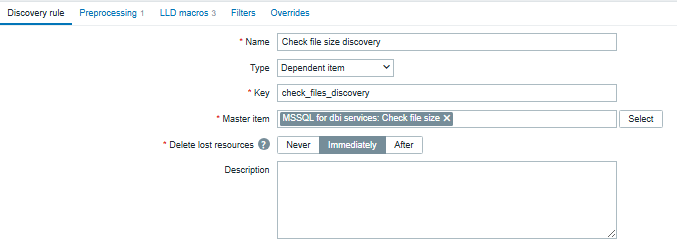
A dedicated blog explaining how to configure Low-Level Discovery in Zabbix is available here: Create DISCO Put the link here
Conclusion
Monitoring MSSQL database files in Zabbix can become challenging when working with multiple databases and dynamic environments.
While the initial query is perfectly suitable for manual analysis, its structure and dependency on the current database context make it difficult to integrate directly into Zabbix.
By using sp_MSforeachdb together with a centralized temporary table, we can transform multiple independent result sets into a single normalized dataset fully compatible with Zabbix Low-Level Discovery and dependent items.
This approach provides a scalable and reusable solution capable of automatically monitoring database and log file growth across an entire SQL Server instance while significantly reducing manual configuration and maintenance efforts.
![Thumbnail [60x60]](https://www.dbi-services.com/blog/wp-content/uploads/2023/01/APY_web-scaled.jpg)
![Thumbnail [90x90]](https://www.dbi-services.com/blog/wp-content/uploads/2022/08/FRJ_web-min-scaled.jpg)
![Thumbnail [90x90]](https://www.dbi-services.com/blog/wp-content/uploads/2024/01/HME_web.jpg)