

Problem defintion
I encountered an issue with the configuration of an external connector in the M-Files Server 25.1 (January 2025). In my case, this was the M-Files Network Folder Connector. The installation of the Vault Application proceeded smoothly, as usual. I then attempted to configure the connector in the M-Files Admin Tool, but encountered a problem: the configuration tab was not available. Restarting the vault and refreshing the M-Files Admin Tool resolved the issue.
I began to investigate the issue by checking various M-Files sources, including the M-Files community, the Partner space, and the support case portal. However, I was unable to find a solution that addressed this particular scenario. I did come across one article that described the prerequisites for the connector. After checking my new M-Files Server 25.1 (January 2025), I was able to confirm that all prerequisites are fulfilled.
The next step in the process was to install the connector in our test environments. It was discovered that one of our test servers was still on the December release, as automatic updates had not been enabled. It was then realised that the connector was working fine in the previous release.
I submitted a support case with M-Files and provided a detailed description of the issue with the new release. After a few hours, I received feedback with a possible solution. In addition, they also created a knowledge-base article to describe the solution.
Solution
The issue is related to the .Net 4.7.2 Runtime when used with Windows Server 2019. To resolve the issue, I installed the .Net 4.8 Runtime on the M-Files Server 25.1 (January 2025).
Should you require further details, please refer to the M-Files support article.
Questions about your own setup? A dbi services consultant can look at your case.
Talk to an expert (opens in a new tab)Conclusion
After implementation of the proposed workaround from M-Files the Network Folder Connector was working as expected and I was able to continue with the configuration of the M-Files Server 25.1 (January 2025).
Furthermore, the issue is not exclusive to the M-Files Network Folder Connector. The same symptoms can also be observed in external databases utilising the OleDB driver.
In the event that your environment is hosted on the M-Files Cloud, the issue may occur on the local Ground Link proxy server.
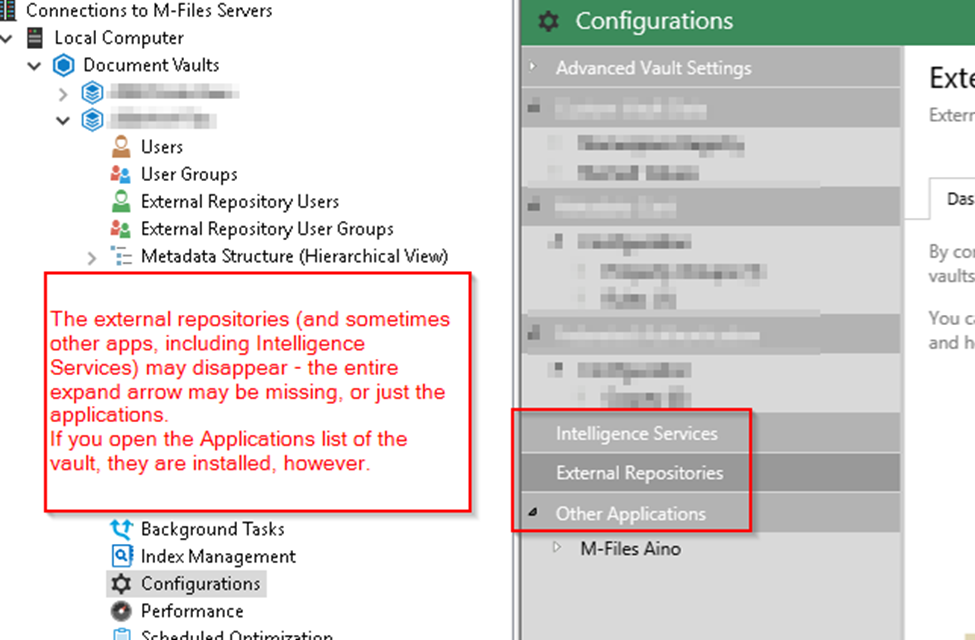
In some cases, the intelligence services from M-Files can also be affected. Please refer to the image below, which is from the M-Files article.
Should you encounter any issues or require support, we are here to assist you.