


After migrating from “Fast” to “xPlore” Documentum full-text search engine, our team discovered wrong icons in D2 search results. Documents in checked-out state continued to be displayed with the normal icon, even if xPlore indexed attribute value for “r_lock_owner”. This attribute contains the user name who has checked-out the document.
In the following picture, you can see the search result with the wrong icon, whereas in the “Version” window, the checked-out icon appears for the current version:
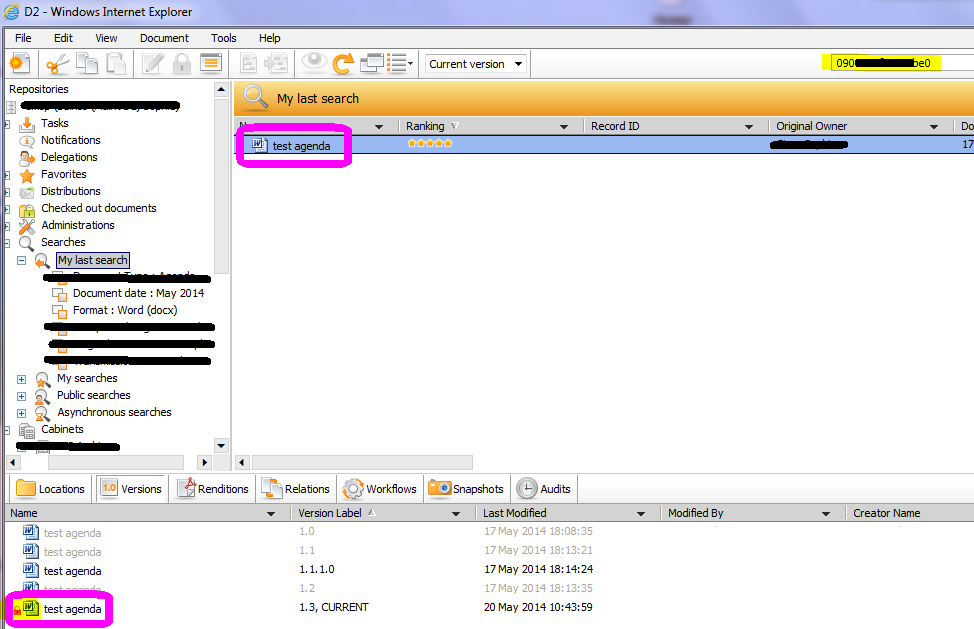
This result implies that D2 displays the results provided by xPlore directly, without any further check based on “r_object_id” for updated metadata values.
At this stage, xPlore only returned document information without value for “r_lock_owner”.
The reason is that after the user had checked-out the document, no queue item was created to tell the index-agent to re-index the document with a value for the “r_lock_owner” attribute.
In order to ask index agent to index again the document, we have to register the “dm_checkout” event on “dm_sysobject” type for “dm_fulltext_index_user”.
However, the reverse operation must also been registered, for “dm_unlock” and inform xPlore the document is not checked-out anymore.
First, we need to verify that the event is not registered for the user index. Using DQL, the following query must return no result:
select * from dmi_registry where user_name=’dm_fulltext_index_user’ and event=’dm_checkout’;
Then we need to retrieve r_object_id of the dm_sys_object type:
select r_object_id from dm_type where name =’dm_sysobject’;
Using API, request a login session ticket and open a session as ‘dm_fulltext_index_user’:
API> getlogin,c,dm_fulltext_index_user
…
DM_TICKET=T0JKIE5VTEwgMAoxMwp2ZXJzaW9uIElOVCBTIDAKMwpmbGFncyBJTlQgUyAwCjAKc2VxdWVuY2VfbnVtIElOVCBTIDAKMjE5OApjcmVhdGVfdGltZSBJTlQgUyAwCjE0MDA3NjU1NzQKZXhwaXJlX3RpbWUgSU5UIFMgMAoxNDAwNzY1ODc0CmRvbWFpbiBJTlQgUyAwCjAKdXNlcl9uYW1lIFNUUklORyBTIDAKQSAyMiBkbV9mdWxsdGV4dF9pbmRleF91c2VyCnBhc3N3b3JkIElOVCBTIDAKMApkb2NiYXNlX25hbWUgU1RSSU5HIFMgMApBIDYgRDJETVNVCmhvc3RfbmFtZSBTVFJJTkcgUyAwCkEgOCBsYm5kczEzMQpzZXJ2ZXJfbmFtZSBTVFJJTkcgUyAwCkEgNiBEMkRNU1UKc2lnbmF0dXJlX2xlbiBJTlQgUyAwCjU2CnNpZ25hdHVyZSBTVFJJTkcgUyAwCkEgNTYgZEl2MXgyTEVFWGloM2RrTFloNUJFcmZVT1lwQnRZMkxpMFU2M293MnJZcFJna29VbWtSOVRnPT0K
Copy login ticket result into the next command and update with:
API> connect,,dm_fulltext_index_user,DM_TICKET=T0JKIE5VTEwgMAoxMwp2ZXJzaW9uIElOVCBTIDAKMwpmbGFncyBJTlQgUyAwCjAKc2VxdWVuY2VfbnVtIElOVCBTIDAKMjE5OApjcmVhdGVfdGltZSBJTlQgUyAwCjE0MDA3NjU1NzQKZXhwaXJlX3RpbWUgSU5UIFMgMAoxNDAwNzY1ODc0CmRvbWFpbiBJTlQgUyAwCjAKdXNlcl9uYW1lIFNUUklORyBTIDAKQSAyMiBkbV9mdWxsdGV4dF9pbmRleF91c2VyCnBhc3N3b3JkIElOVCBTIDAKMApkb2NiYXNlX25hbWUgU1RSSU5HIFMgMApBIDYgRDJETVNVCmhvc3RfbmFtZSBTVFJJTkcgUyAwCkEgOCBsYm5kczEzMQpzZXJ2ZXJfbmFtZSBTVFJJTkcgUyAwCkEgNiBEMkRNU1UKc2lnbmF0dXJlX2xlbiBJTlQgUyAwCjU2CnNpZ25hdHVyZSBTVFJJTkcgUyAwCkEgNTYgZEl2MXgyTEVFWGloM2RrTFloNUJFcmZVT1lwQnRZMkxpMFU2M293MnJZcFJna29VbWtSOVRnPT0K
…
s1
“s1” is now the ‘dm_fulltext_index_user’ session descriptor.
Use this session descriptor to register “dm_checkout” and “dm_unlock” events for “dm_sysobject” type.
Replace in both lineswith r_object_id you have got previously:
API> register,s1,,dm_checkout,,F
…
OK
API> register,s1,,dm_unlock,,F
…
OK
In case you have configured another index agent for your repository, do not forget to reproduce same procedure for the other user: “dm_fulltext_index_user_01”.
I hope this information will be of help to you.
