When working with SQL Server environments, securing client connections can become an important requirement, especially when TLS encryption must be implemented using certificates. In this context, a customer asked us to develop an Ansible playbook and role to automate the configuration of TLS for SQL Server. The certificates are generated from the customer PKI and provided as PEM files containing the server certificate, the private key, and the certificate chain.
However, some extractions and conversions are required before these certificates can be used on Windows and configured for SQL Server.
Here, the idea is to propose a solution (the architecture) that prepares the certificate, imports it on the SQL Server host, and configures SQL Server to use it.
We will also see how to separate the preparation and activation steps in order to reduce the impact on the SQL Server service.
In this blog post, we will describe the global approach and the Ansible logic used to implement certificate-based TLS encryption for SQL Server.
Implementation logic
Before configuring TLS encryption on SQL Server, the first point was to understand the certificate format provided by the customer PKI.
In our case, the generated file is a <machine>.pem file. This file contains the server certificate used for TLS, the private key and the certificate chain with the intermediate and root certificates.
As this format cannot be directly used as-is on the Windows side for SQL Server, some extraction and conversion steps are required.
The general idea is to use the Ansible control node as a working area.
The PEM file is first copied into a temporary folder where the different parts of the certificate are extracted:
- the leaf certificate
- the intermediate certificate
- the root certificate
- the private key
These elements are then used to build a PFX file which can be imported on the Windows SQL Server host.
The PFX is installed in the LocalMachine\My certificate store while the intermediate and root certificates are imported into the appropriate Windows certificate stores.
The implementation has been designed around three different execution modes: stage, activate, and full.
The stage mode is used to prepare the certificate without any impact on the SQL Server service. It copies the PEM file, performs the extractions, builds the PFX file, copies it to the managed Windows node and imports the certificates into the Windows certificate stores. No registry change is performed, and the SQL Server service is not restarted. This mode is useful when we want to prepare the server in advance before switching SQL Server to the new certificate.
The activate mode assumes that the certificate is already present on the Windows server. Its role is to configure SQL Server to use the installed certificate and depending on the selected option, restart the SQL Server service or leave the change pending until the next planned reboot.
This can be useful when the certificate activation must be aligned with an existing maintenance window, for example during monthly OS patching.
The full mode executes the complete configuration from end to end. It performs the extraction and conversion steps, imports the certificates, grants the required permissions, configures SQL Server to use the expected certificate, and restarts the SQL Server service only if required. To avoid unnecessary impact, the role relies on the certificate thumbprint. If the expected certificate is already configured, no change is applied and the SQL Server service is not restarted. This behavior is important for idempotency.
For example, if the full mode is executed after an activate mode, nothing should be changed if the certificate is already the correct one. The same logic applies if the playbook is executed by mistake while the certificate has not been renewed.
Another point to manage is the restart of the SQL Server service. SQL Server loads the certificate configuration when the service starts. Therefore, when a new certificate is configured, the change is only effective after a restart of the SQL Server service.
For this reason the role should provide an option to control whether the restart is performed immediately or postponed to the next planned reboot.
We also have to consider DNS aliases. The standard use case is to generate a certificate containing at least the short name and the FQDN of the SQL Server host in the subjectAltName. If DNS aliases are used by client applications, they can also be added to the certificate SAN.
For example:
[alt_names]
DNS.1 = A-WS2022-2.lab.local
DNS.2 = A-WS2022-2
Finally, the customer confirmed that the private key included in the PEM file is not encrypted.
This simplifies the conversion process to PFX, but it also means that the PEM file must be handled carefully during the Ansible execution, especially in temporary folders and during file transfers. With this approach, the role provides a controlled way to prepare, activate, or fully configure TLS encryption for SQL Server while keeping the impact on the SQL Server service under control.
Logical workflow
The complete workflow can be represented as follows:
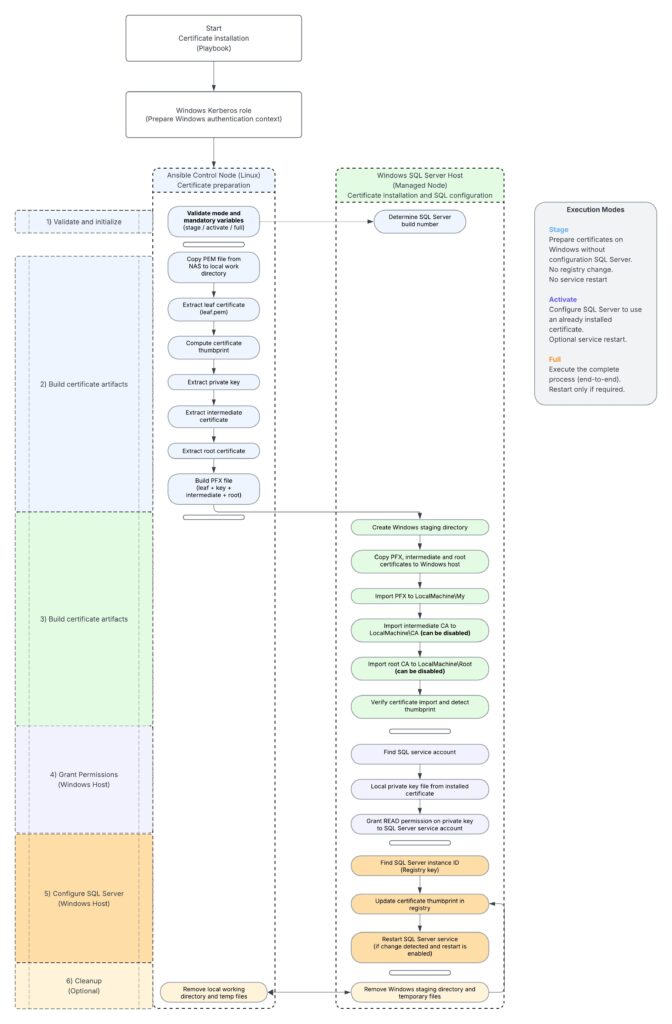
Architecture summary
The certificate manipulation is performed on the Ansible control node.
The Windows certificate import and SQL Server configuration are performed on the managed Windows SQL Server host.
This separation is useful because the PEM processing and PFX generation are handled with Linux tools such as OpenSSL while the certificate installation, private key permissions, registry configuration and SQL Server restart are handled through Windows modules and PowerShell. The design also supports a controlled deployment approach.
The certificate can first be staged without service impact then activated later during a maintenance window.
The full mode can be used when the complete implementation must be executed in a single run. The use of the certificate thumbprint is important for idempotency. It allows the role to detect whether SQL Server is already configured with the expected certificate and avoids unnecessary service restarts when no change is required.
Remarks
For certain reasons we do not disclose the code of the created role.
Thank you. Amine Haloui
![Thumbnail [60x60]](https://www.dbi-services.com/blog/wp-content/uploads/2024/03/AHI_web.jpg)
![Thumbnail [90x90]](https://www.dbi-services.com/blog/wp-content/uploads/2025/11/LTO_WEB.jpg)