Skip to content

Linux/UNIX

FreeBSD basics – 8 – Running Linux Containers

When people talk about containers in FreeBSD, they usually talk about Jails. We’ve already seen how this works in general here and here. An additional option you have, is to install Podman on FreeBSD. Podman is well known in the Linux world and can be used to build and run containers. With the release of FreeBSD 14.2, the FreeBSD project… 

FreeBSD basics – 7 – The Linux compatibility layer

Now that we know how to work with the ports collection let’s have a look another option you have in FreeBSD: Sometimes it might be required to run unmodified Linux binaries on FreeBSD and to achieve this, FreeBSD comes with a Linux compatibility layer. This is optional and not enabled by default, but pretty easy to setup and use. Before… 

FreeBSD basics – 6 – The ports collection

If you followed the previous introduction posts about FreeBSD (here, here, here, here and here) you should already know how to install binary packages. On FreeBSD this is done using pkg, and if you are familiar with apt, dnf, or zypper (or any other package manager on Linux) this should not be a big deal. There is, however, another official… 

FreeBSD basics – 5 – Providing services using Jails

This post builds on top of the previous post in which we’ve created a simple thin Jail. The goal of this post is, to put a bit of automation around this and to provide a simple PostgreSQL as a service platform. We want to do this by creating one PostgreSQL instance per Jail (without any restrictions on resource usage for… 

FreeBSD basics – 4 – Jails

Now that we know how to get started with FreeBSD, how to manage users and groups, and how to work with services, we’ll look a bit into Jails today. But before we do this, let’s look at what we have in Linux today when it comes to containerization and virtual machines. Obviously we can manage virtual machines, with either KVM… 

FreeBSD basics – 3 – Services

This is the third post in the series about getting started with FreeBSD. We’ve looked at the first steps here, and users and groups here. Today we’re looking at how FreeBSD handles services. For those who still don’t like systemd the good news is: There is nothing like systemd in FreeBSD. For those who do like systemd the maybe bad… 

FreeBSD basics – 2 – Users & Groups

In the last post, we’ve initially configured FreeBSD so that networking is up and running, additional packages can be installed, and the system was patched to the latest release. In this post we’ll look at how users and groups are managed in FreeBSD and what FreeBSD provides when it comes to additional security mechanisms. On Linux systems users are usually… 

FreeBSD basics – 1 – The first steps

In case you follow the blogs here, you might have noticed that I got interested in FreeBSD over the last months (or even year(s)). The reasons for this are multiple: FreeBSD development is organized in very much the same way as it is with PostgreSQL. The license is very much the same. The history is really interesting as it goes… 

Migrating from CentOS 8 to AlmaLinux 8

In our blogs we already talked about Migrating a CentOS 7 EC2 instance to Rocky Linux 8 and CentOS 8 machine to Red Hat 8 , but how does it look like if you want to migrate your CentOS8 machine to AlmaLinux 8? Indeed it is as simple as migrating from CentOS7 to Rocky Linux or to Red Hat 8,… 

Huawei Dorado 6000 V3 benchmark

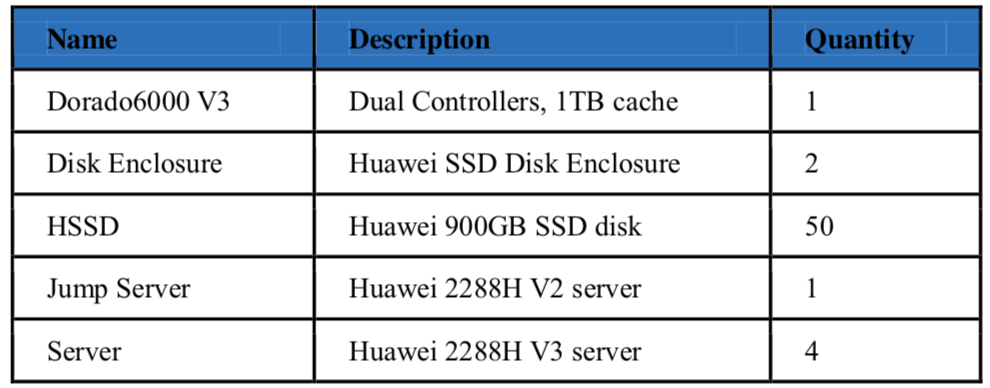
I had the opportunity to test the new Dorada 6000 V3 All-Flash storage system. See what the all-new Dorado 6000 V3 All-Flash Storage system is capable as storage for your database system. Before you read This is a series of different blog posts: In the first blog post, I talk about “What you should measure on your database storage and… 

Oooooops or how to undelete a file on an ext4 filesystem

It happens within the blink of an eye. A delete command was executed and half a second after you hit the enter button you knew it. That was a mistake. This is the scenario which leads to this blog entry in where I show you how you can get your files back if you are lucky… Short summary for the… 

Part 2 – vagrant up – get your Oracle infrastructure up an running

Last week in the first part of this blog we have seen a short introduction how to setup an Oracle Infrastructure with Vagrant and Ansible. Remember all the files for this example are available here https://github.com/nkadbi/oracle-db-12c-vagrant-ansible Get the example code: git clone https://github.com/nkadbi/oracle-db-12c-vagrant-ansible If you have prepared your environment with Ansible, Vagrant and Oracle Virtual Box installed – and provided…