When downloading Release Update 23.26.3., I could see this:
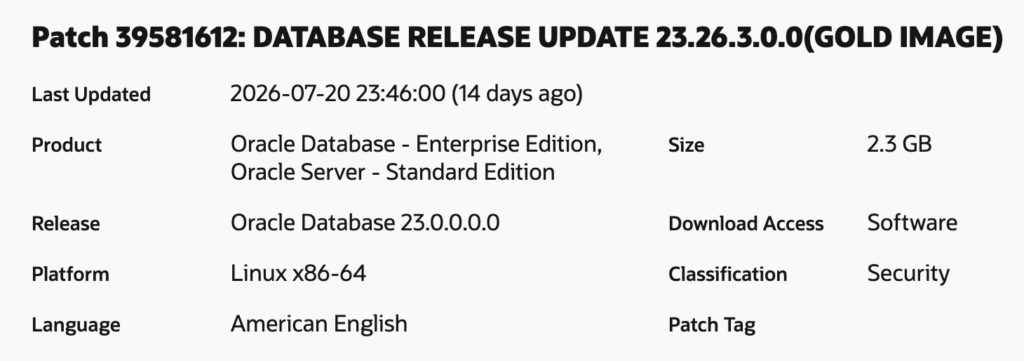
As you can see in the Product info it also has “Oracle Server – Standard Edition”. However, I haven’t found anything official yet.
I tried it and could install 23.26.3. as a Standard Edition ORACLE_HOME:
[oracle@oel10db26ai dbhome_1]$ mkdir -p /u01/app/oracle/product/26.0.0/dbhome_1
[oracle@oel10db26ai dbhome_1]$ cd /u01/app/oracle/product/26.0.0/dbhome_1
[oracle@oel10db26ai dbhome_1]$ unzip -q /tmp/p39581612_230000_Linux-x86-64.zip
[oracle@oel10db26ai dbhome_1]$ vi install/response/db_install_26ai.rsp
[oracle@oel10db26ai dbhome_1]$ cat install/response/db_install_26ai.rsp
oracle.install.responseFileVersion=/oracle/install/rspfmt_dbinstall_response_schema_v23.0.0
installOption=INSTALL_DB_SWONLY
UNIX_GROUP_NAME=oinstall
INVENTORY_LOCATION=/u01/app/oraInventory
ORACLE_HOME=/u01/app/oracle/product/26.0.0/dbhome_1
ORACLE_BASE=/u01/app/oracle
installEdition=SE2
OSDBA=oinstall
OSOPER=oinstall
OSBACKUPDBA=oinstall
OSDGDBA=oinstall
OSKMDBA=oinstall
OSRACDBA=oinstall
executeRootScript=false
dbType=GENERAL_PURPOSE
[oracle@oel10db26ai dbhome_1]$

[oracle@oel10db26ai dbhome_1]$ ./runInstaller -ignorePrereq -waitforcompletion -silent -responseFile install/response/db_install_26ai.rsp
Launching Oracle AI Database Setup Wizard...
...
[WARNING] [INS-13014] Target environment does not meet some optional requirements.
   CAUSE: Some of the optional prerequisites are not met. See logs for details. installActions2026-08-04_07-18-59PM.log.
   ACTION: Identify the list of failed prerequisite checks from the log: installActions2026-08-04_07-18-59PM.log. Then either from the log file or from installation manual find the appropriate configuration to meet the prerequisites and fix it manually.
The response file for this session can be found at:
 /u01/app/oracle/product/26.0.0/dbhome_1/install/response/db_2026-08-04_07-18-59PM.rsp

You can find the log of this install session at:
 /tmp/InstallActions2026-08-04_07-18-59PM/installActions2026-08-04_07-18-59PM.log


As a root user, run the following script(s):
	1. /u01/app/oraInventory/orainstRoot.sh
	2. /u01/app/oracle/product/26.0.0/dbhome_1/root.sh

Run /u01/app/oraInventory/orainstRoot.sh on the following nodes:
[oel10db26ai]
Run /u01/app/oracle/product/26.0.0/dbhome_1/root.sh on the following nodes:
[oel10db26ai]


Successfully Setup Software with warning(s).
Moved the install session logs to:
 /u01/app/oraInventory/logs/InstallActions2026-08-04_07-18-59PM
[oracle@oel10db26ai dbhome_1]$
After running the root-scripts I created a Database and verified that it is really a Standard Edition 2 DB:
[root@oel10db26ai ~]# mkdir /u02
[root@oel10db26ai ~]# chown oracle:oinstall /u02
[root@oel10db26ai ~]#

[oracle@oel10db26ai ~]$ mkdir /u02/oradata
[oracle@oel10db26ai ~]$
[oracle@oel10db26ai ~]$ . oraenv
ORACLE_SID = [oracle] ? dummyx
ORACLE_HOME = [/home/oracle] ? /u01/app/oracle/product/26.0.0/dbhome_1
The Oracle base has been set to /u01/app/oracle
[oracle@oel10db26ai ~]$

[oracle@oel10db26ai ~]$ export ORACLE_SID=DB26SE2
[oracle@oel10db26ai ~]$ export PDB_NAME=pdb1
[oracle@oel10db26ai ~]$ export DATA_DIR=/u02/oradata

[oracle@oel10db26ai ~]$ dbca -silent -createDatabase                                                   \
     -templateName General_Purpose.dbc                                         \
     -gdbname ${ORACLE_SID} -sid  ${ORACLE_SID} -responseFile NO_VALUE         \
     -characterSet AL32UTF8                                                    \
     -sysPassword HEllo01__01                                                 \
     -systemPassword HEllo01__01                                              \
     -createAsContainerDatabase true                                           \
     -numberOfPDBs 1                                                           \
     -pdbName ${PDB_NAME}                                                      \
     -pdbAdminPassword HEllo01__01                                            \
     -databaseType MULTIPURPOSE                                                \
     -memoryMgmtType auto_sga                                                  \
     -totalMemory 2000                                                         \
     -storageType FS                                                           \
     -datafileDestination "${DATA_DIR}"                                        \
     -redoLogFileSize 100                                                       \
     -emConfiguration NONE                                                     \
     -ignorePreReqs
...
And after the DB has been created I tested if it’s really a Standard Edition DB:
[oracle@oel10db26ai ~]$ sqlplus / as sysdba

SQL*Plus: Release 23.26.3.0.0 - Production on Wed Aug 5 10:42:48 2026
Version 23.26.3.0.0

Copyright (c) 1982, 2026, Oracle.  All rights reserved.


Connected to:
Oracle AI Database 26ai Standard Edition 2 Release 23.26.3.0.0 - Production
Version 23.26.3.0.0

SQL> select banner from v$version;

BANNER
--------------------------------------------------------------------------------
Oracle AI Database 26ai Standard Edition 2 Release 23.26.3.0.0 - Production

SQL> show pdbs

    CON_ID CON_NAME			  OPEN MODE  RESTRICTED
---------- ------------------------------ ---------- ----------
	 2 PDB$SEED			  READ ONLY  NO
	 3 PDB1 			  READ WRITE NO
SQL> show parameter control_management_pack_access

NAME				     TYPE	 VALUE
------------------------------------ ----------- ------------------------------
control_management_pack_access	     string	 NONE
SQL>
It really seems a Standard Edition 2 DB. But let me check if it restricts me for a command not allowed in SE2:
SQL> select min(snap_id), max(snap_id) from dba_hist_snapshot;

MIN(SNAP_ID) MAX(SNAP_ID)
------------ ------------
	   1	       14

SQL> var retval number;
SQL> exec :retval:=dbms_spm.load_plans_from_awr(1,14);
BEGIN :retval:=dbms_spm.load_plans_from_awr(1,14); END;

*
ERROR at line 1:
ORA-38153: Software edition is incompatible with SQL plan management.
ORA-06512: at "SYS.DBMS_SPM", line 4009
ORA-06512: at "SYS.DBMS_SPM_INTERNAL", line 6479
ORA-06512: at "SYS.DBMS_SPM", line 3991
ORA-06512: at line 1
Help: https://docs.oracle.com/error-help/db/ora-38153/


SQL> ! oerr ora 38153
38153, 00000, "Software edition is incompatible with SQL plan management."
// *Cause: SQL plan management could be used only with Oracle Database Enterprise Edition.
// *Action: Ensure that Oracle is linked with the Enterprise Edition options.
Yes, it does not allow me to run a command, which is restricted for the use in Enterprise Edition DBs.
Summary
Oracle has released Release Update 23.26.3. recently for on-premises installations. According the download screen it contains the possibility to run a Standard Edition 2 DB with it. First tests showed that you really can use 23.26.3. as an ORACLE_HOME for Standard Edition 2 DBs. However, Oracle has not officially published this yet. Before using this release with a Standard Edition 2 DB I would recommend to wait for the official announcement from Oracle.
If there are news on this, I’ll update this Blog.
![Thumbnail [60x60]](https://www.dbi-services.com/blog/wp-content/uploads/2022/11/CBL_web-min-min-scaled.jpg)
![Thumbnail [90x90]](https://www.dbi-services.com/blog/wp-content/uploads/2025/05/JDE_Web-1-scaled.jpg)
![Thumbnail [90x90]](https://www.dbi-services.com/blog/wp-content/uploads/2022/08/MAW_web-min-scaled.jpg)