

At a customer, we are upgrading Control-M Agents running on Windows/Unix from 9.0.00.400 to 9.0.19.200 using Agent Deployment, an upgrade of one agent fails with error talking about communication issue between Control-M/server and Control-M agent:
Testing Communication with Control-M/Server using new Control-M/Agent binaries failed, Control-M/Agent Upgrade aborted, please check Log and agent installation requirements
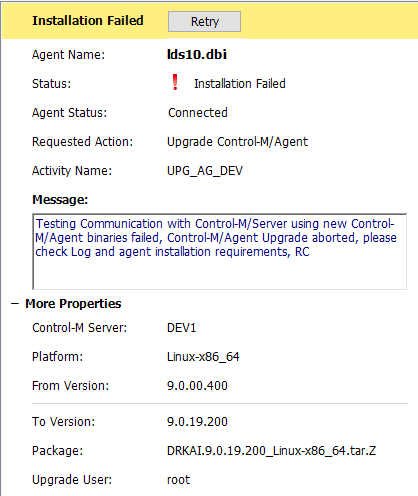
On the other hand, the agent seems to be Available as shown in the above screenshot “Connected”, and all jobs running on it are executing and Ended OK. So why this communication fails? I found the response 😉
Analysis
As said above, I made a check on this agent on CCM and it was Available:

Humm, maybe the CCM is not saying the truth, let’s ask ctm_diag_comm:
lds00% ctm_diag_comm

Enter Agent platform node ID: lds10.dbi

This procedure runs for about 30 seconds. Please wait

Time Stamp :
-------------
Fri Feb 21 18:54:18 CET 2020

Executing ctmping lds10.dbi as Regular Agent .

CONTROL-M/Server to CONTROL-M/Agent Communication Diagnostic Report
-------------------------------------------------------------------

 CTMS User Name                    : cmsv
 CTMS Directory                    : /pk/cntrlm/server/ctm_server
 CTMS Platform Architecture        : Linux-x86_64
 CTMS Installed Version            : PACTV.9.0.19.200
 CTMS Local IP Host Interface Name : ctlm9.dbi
 Server-to-Agent Port Number       : 7008
 Agent-to-Server Port Number       : 7005
 Server-Agent Comm. Protocol       : SSL
 Server-Agent Protocol Version     : 11
 Server-Agent Connection mode      : Transient
 Agent Platform Name               : lds10.dbi
 Agent Status                      : Available
 Agent known Type                  : Regular
 UNIX ping to Agent or Remote host : Succeeded
 CTMS ping to Agent or Remote host : Succeeded
 Agent IP Address                  : 10.25.35.1

 CTMS Ping lds10.dbi as Regular Agent
 ================================================
 Agent [lds10.dbi] is available
So, it is available… But why the communication fails during the upgrade.
Let’s check on the agent side, I execute ctmagcfg then choose 7 (Advanced parameters)
 cmag@lds10[~]> ctmagcfg

                Agent Configuration Utility

1)      Agent-to-Server Port Number . . . : [7005]
2)      Server-to-Agent Port Number . . . : [7008]
        For items 3 and 4 do not use IP address
3)      Primary Control-M/Server Host . . : [ctlm9.dbi]
4)      Authorized Control-M/Server Hosts : [ctlm9.dbi]
5)      Diagnostic Level. . . . . . . . . : [0]
6)      Comm Trace. . . . . .(0-OFF|1-ON) : [0]
7)      Advanced parameters

s)      Save
q)      Quit

Please enter your choice:7


                Agent Configuration Utility - advanced menu

1)      Days To Retain Log Files. . . . . : [1]
2)      Daily Log File Enabled. . .  (Y|N): [Y]
3)      Tracker Event Port. . . . . . . . : [29204]
4)      Logical Agent Name. . . . . . . . : [lds10]
5)      Persistent Connection . . . . . . : [N]
6)      Allow Comm Init. . .  . . . . . . : [Y]
7)      Foreign Language Support. . . . . : [LATIN-1]
8)      Locale (LATIN-1 mode only) . . .. : [C]
9)      Protocol Version. . . . . . . . . : [11]
10)     AutoEdit Inline. . . . . . . (Y|N): [Y]
11)     Listen to Network Interface . . . : [*ANY]
12)     CTMS Address Mode . . . . . (IP|) : []
13)     Timeout for Agent utilities . . . : [120]
14)     TCP/IP Timeout. . . . . . . . . . : [60]
15)     Tracker Polling Interval. . . . . : [60]

r)      Return to main menu
Ok ok ok, the Logical Agent Name seems to be not exactly the same as configured in CONTROL-M/Server, try to change that:
Please enter your choice:4

Please enter the value:lds10.dbi

                Agent Configuration Utility - advanced menu

1)      Days To Retain Log Files. . . . . : [1]
2)      Daily Log File Enabled. . .  (Y|N): [Y]
3)      Tracker Event Port. . . . . . . . : [29204]
4)      Logical Agent Name. . . . . . . . : [lds10.dbi]
5)      Persistent Connection . . . . . . : [N]
6)      Allow Comm Init. . .  . . . . . . : [Y]
7)      Foreign Language Support. . . . . : [LATIN-1]
8)      Locale (LATIN-1 mode only) . . .. : [C]
9)      Protocol Version. . . . . . . . . : [11]
10)     AutoEdit Inline. . . . . . . (Y|N): [Y]
11)     Listen to Network Interface . . . : [*ANY]
12)     CTMS Address Mode . . . . . (IP|) : []
13)     Timeout for Agent utilities . . . : [120]
14)     TCP/IP Timeout. . . . . . . . . . : [60]
15)     Tracker Polling Interval. . . . . : [60]
Return to menu and save the change!
Retried the upgrade of this agent, and it has been completed successfully:
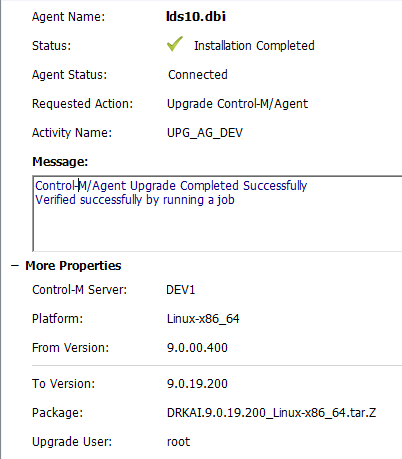
The agent is still Available in the CCM with the new version after upgrade:

Summary
Issue description
Upgrading Control-M/Agent running on Windows/Unix using Agent Deployment fails with error: “Testing Communication with Control-M/Server using new Control-M/Agent binaries failed, Control-M/Agent Upgrade aborted, please check Log and agent installation requirements”.
Cause
The agent’s Logical Agent Name parameter are not exactly the same as the Control-M/Agent’s host name that appears in the Control-M CCM.
Solution
Set the Control-M/Agent’s “Logical Agent Name” parameter to EXACTLY the same host name that appears in the Control-M Configuration Manager for this agent (follow above steps).
I hope that this blog help you to solve quickly this issue, if you have any question or doubt don’t hesitate to comment, also you can share other issue encountered during upgrade 😉