Skip to content

Documentum

OpenText Documentum as our consultants run it: installation, upgrades, Content Server, D2, xPlore, administration, scripting and troubleshooting.

OpenText Enterprise World Europe 2019 – Day 3

Last but not least, today was mainly dedicated to demos and customer cases. It started with the global stream presenting some OpenText applications like Core for Quality: An application developed with AppWorks and integrated to Magellan. It was meant to manage quality issues and connected to Documentum in order to link issues with SOP documents. In the different demos we… 

OpenText Enterprise World Europe 2019 – Day 2

Day 2 of OTEW, we followed the global stream this morning which was taking most of the points from yesterday. But we had the pleasure to have a session from Dr. Michio Kaku, Theoretical Physicist, Futurist and popularizer of science. He wrote several books about physics and how he sees the future. He sees us in the next 20 years… 

OpenText Enterprise World Europe 2019 – Partner Day

First day of the #OTEW here at the Austria International Center in Vienna, Guillaume Fuchs and I where invited to assist to the Partner Global sessions. Welcome to OTEW Vienna 2019 Mark J. Barrenechea, the OpenText’s CEO & CTO, started the day with some generic topics concerning the global trends and achievements like: More and More partners and sponsors Cloud… 

Documentum – Documents not transferred to WebConsumer

Receiving an incident is not always a pleasure, but it is always the case when we share the solution! A few days ago, I received an incident regarding WebConsumer on a production environment, saying that documents are not transferred as expected to WebConsumer. The issue didn’t happened for all documents, that’s why I directly suspect the High Availability configuration on… 

Documentum – MigrationUtil – 3 – Change Server Config Name

In the previous blog I changed the Docbase Name to repository1 instead of RepoTemplate using MigrationUtil, in this blog it is Server Config Name’s turn to be changed. In general, the repository name and the server config name are the same except in High availability case. You can find the Server Config Name in the server.ini file: [dmadmin@vmtestdctm01 ~]$ cat… 

Documentum – MigrationUtil – 2 – Change Docbase Name

You are attending the second episode of the MigrationUtil series, today we will change the Docbase Name. If you missed the first one, you can find it here. I did this change on Documentum CS 16.4 with Oracle database, on the same docbase I already used to change the docbase ID. My goal is to do both changes on the… 

Documentum – Process Builder Installation Fails

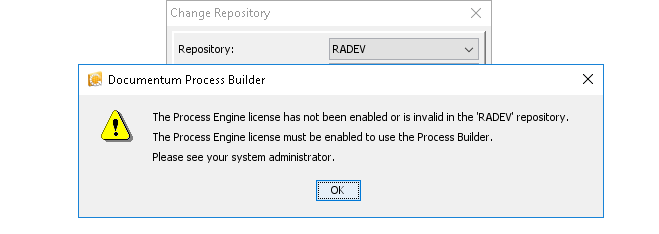
A couple of weeks ago, at a customer I received an incident from the application team regarding an error occurred when installing Process Builder. The error message was: “The Process Engine license has not been enabled or is invalid in the ‘RADEV’ repository. The Process Engine license must be enabled to use the Process Builder. Please see your system administrator.”… 

Documentum – MigrationUtil – 1 – Change Docbase ID

This blog is the first one of a series that I will publish in the next few days/weeks regarding how to change a Docbase ID, Docbase name, aso in Documentum CS. So, let’s dig in with the first one: Docbase ID. I did it on Documentum CS 16.4 with Oracle database on a freshly installed docbase. We will be interested… 

Documentum CS 7.* – 777 permission on jobs log

A few weeks ago at a customer, our team was involved in a security control. We tracked files with 777 permission and we detected that logs generated by Documentum jobs have 777 permissions. Security before anything else, that’s why this topic was my top priority! First of all, I checked the logs on some Content Servers, and I had the… 

Documentum Rest API

Introduction Nowadays, restful APIs are used in any product, almost. In the era of web services, it is normal to have the same for documentum. In this blog I’ll show you a part of this API for documentum, how to test it, how to use it, and what could be done with it. Installation In order to install the Documentum… 

Documentum 7+ internal error during installation or upgrade DBTestResult7092863812136784595.tmp

This blog will go straight to the topic. When upgrading/installing your content server to 7+, you may experience an internal error with a popup telling you to look into a file called something like: DBTestResult7092863812136784595.tmp In fact, the installation process failed to test the database connection. Even if it managed to find your schema previously. In the file you’ll find… 

Documentum – Silent Install – xPlore IndexAgent

In previous blogs, we installed in silent the Documentum binaries (CS), a docbroker (+licence(s) if needed), several repositories (here and here), D2 and finally the xPlore binaries & Dsearch. This blog will be the last one of this series related to silent installation on Documentum and it will be about how to install an xPlore IndexAgent on the existing docbase/repository…