Skip to content

SQL Server

Microsoft SQL Server in practice: installation, Always On availability groups, backup and restore, performance tuning, security, PowerShell automation, SQL Server on Linux and upgrades.

SQL Server 2014 CTP2: In-Memory Advisor for Tables and Stored Procedures

One of the best new functionalities of Microsoft SQL Server 2014 is the In-Memory part, which gives you the possibility to load tables and also Stored Procedures in-memory for a very fast response time. The Community Technology Preview 2 from Microsoft SQL Server 2014 went out some days ago with two new Advisors. These Advisors will help you manage the… 
SQL Server 2012 SP1: Sixth Cumulative Update (CU6) available

Some days ago, Microsoft published the sixth Cumulative Update (CU6) for Microsoft SQL Server 2012 Service Pack one, two months after the fifth one. As usual, if this Cumulative Update solves an issue you are facing, install it quickly – otherwise, do not install it and just have a look at it. Which issues are covered by this CU6? It… 

SQL Server 2012 SP1: Fifth Cumulative Update (CU5) available

On 16 July, Microsoft published the fifth Cumulative Update (CU5) for Microsoft SQL Server 2012 Service Pack One. As usual, if this Cumulative Update solves an issue you are facing, install it quickly – otherwise, do not install it. Which issues are covered by this CU5? This Cumulative Update contains 29 Hotfixes: 20 for the Engine 5 for SSRS 2 for… 

SQL Server 2014 CTP1 is available

Last week, I gave you some news about SQL Server 2014 (here). SQL Server 2014 Community Technology Preview 1 (CTP1) now is available for download on TechNet here (you need a TechNet subscription).   Attention: Only the new feature “in-memory OLTP – codename Hekaton” has been added to this CPT. 😕 I hope that other features will soon come with the… 

SQL Server 2014: In-memory OLTP project “Hekaton”

I have the chance to be during this week in Madrid to participate in the TechEd Europe 2013. I will give you a feedback of my best sessions along this week and I’m beginning with the SQL Server In-Memory OLTP project “Hekaton”! Microsoft has been working for four years on this new technology which will come with SQL Server 2014.… 

Three basic points on SQL Server Best Practice

A few weeks ago, I went to the Swiss Database Days 2013 and followed the “Practical SQL Server Performance Troubleshooting” workshop. During this workshop, I have seen a different way of troubleshooting, but I was surprised to see that some participants were not aware that some basic SQL Server Best Practice do not depend on the instance settings. This blog… 

SQL Server 2012 SP1: Fourth Cumulative Update (CU4) available

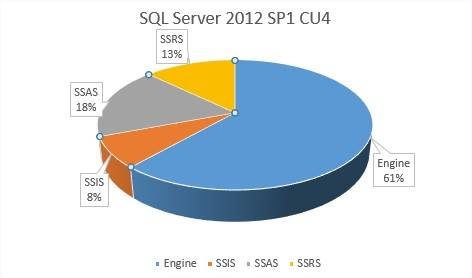
Microsoft has just published the Fourth Cumulative Update (CU4) for Microsoft SQL Server 2012 SP1. If this CU covers an issue you are experiencing, you should install it quickly. Otherwise, it is not mandatory. Which issues are covered by CU4? This CU4 contains 39 Hotfixes: 24 for the Engine 3 for SSIS 7 for SSAS 5 for SSRS If you… 

SQL Server 2014: the next version

At TechEd North America 2013, Microsoft introduced a lot of new versions: Windows Server 2012 R2, System Center 2012 R2, Windows 8.1, Visual Studio 2013 and, and, and… SQL Server 2014, of course!8-O You think I’m crazy or it’s a joke!;-) No, No, it’s for real. You can see the first page about SQL Server 2014 on Microsoft site here:… 

SQL Server 2012 SP 1: Third Cumulative Update (CU3) available

Three weeks ago, Microsoft published the third Cumulative Update (CU3) for Microsoft SQL Server 2012 Service Pack one. As usual, if this Cumulative Update solves an issue you are facing, install it quickly – otherwise, do not install it. Which issues are covered by this CU3? It contains 38 Hotfixes: 27 for the Engine 8 for SSAS 3 for SSRS To… 

SQL Server 2012: new perfmon counters

I have read some blog postings concerning the new perfmon counters, but I have not seen really extensive overviews yet. In this post, I would like to present not only what is new, but also what has changed (or not) and how to find it. The first step is to select all objects in SQL2008R2 and SQL2012 from the view sys.dm_os_performance_counters.…