

Building multi-architecture images become more and more useful. Indeed, many recent computers use ARM processors architecture. Examples include MacBooks using M(x) processors, and Amazon EC2 instances using AWS Graviton processors.
However, the diversification of processor architectures adds a new level of complexity to the creation of container images. Indeed, the construction has to cope with different instruction sets.
Docker buildx, the solution for building multi-architecture images
For the YaK project, we want to make amd64 (x86) and arm64 images available using GitLab CI/CD.
In order to create a build compatible with several architectures, I had to use “docker buildx” in my .gitlab-ci.yml file:
build:
  image: docker:latest
  stage: build
  services:
    - docker:dind
  before_script:
    - docker run --rm --privileged multiarch/qemu-user-static --reset -p yes
    - docker buildx create --name yakbuilder --use
  script:
    - docker buildx build --pull --builder=yakbuilder --platform linux/amd64,linux/arm64 -t [IMG]:[TAG] --push .
How it works:
- In the
"before_script"section , I initialize a QEMU container to emulate ARM architecture and to create a buildx context using the QEMU container - In the
"script"section itself, instead of a simple “docker build”, I use the"docker buildx build"command - I also pass the buildx context created in the
"before_script"with the--builderflag - Finally, I add the list of architectures required for the build with the
--platformflag
Build Result
With this method, the build is slower. That’s normal as several images are created (one per architecture) instead of just one.
Questions about your own setup? A dbi services consultant can look at your case.
Talk to an expert (opens in a new tab)The result can be seen in the GitLab container registry:
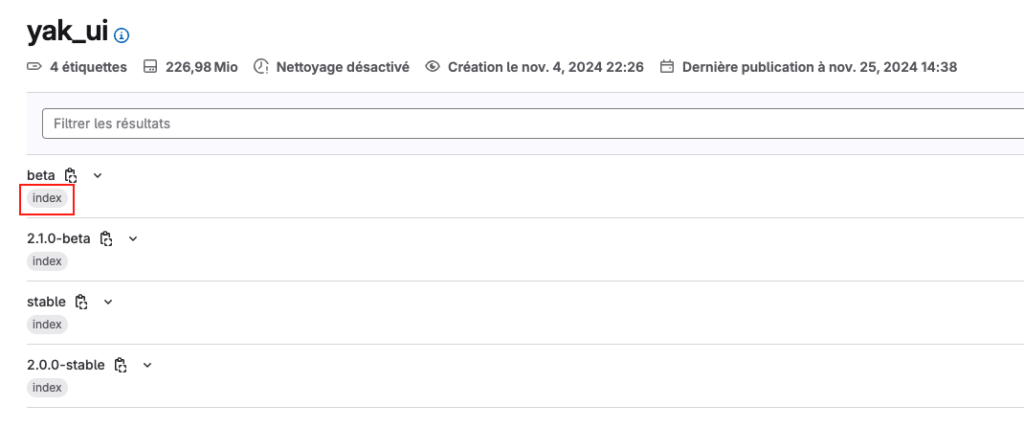
Now, below the image tag, a small “index” label is shown. This refers to the fact that several images are available for this tag. During the image pull, the container engine will choose the image version corresponding to its architecture.
Conclusion
With buildx and QEMU in GitLab CI/CD, building multi-architecture images is easy. You can manage different processor architectures and meet the needs of a wide range of users and ensure the compatibility of your container images.