
SQL Server Always-On: Centralizing Backup History Across Replicas
Replace brittle T-SQL links and manual checks with a central PowerShell orchestrator to reliably manage Always On backup data at scale.

Replace brittle T-SQL links and manual checks with a central PowerShell orchestrator to reliably manage Always On backup data at scale.

By one of our Customers, I have to use Qualys to patch their production SQL Server instances. And to be more precise the Qualys Patch Management application which provides a solution to manage vulnerabilities and deploy patches to secure and keep assets up-to-date.I will use the job functionality of Qualys Patch Management to automate the patching based on a specific…

A few days ago a customer called me to ask if I could help him with a problem with the log file. He tried to shrink it, but the system wasn’t doing anything and he didn’t know why. With the column ‘log_reuse_wait_desc’ you can find it out. When I asked him what was in the ‘log_reuse_wait_desc’ column for the database, there…

Introduction When it is not possible to have SQL Server Enterprise and there is a need to set up an AlwaysOn cluster, it is possible to use SQL Server Standard and implement basic availability groups. However, the Standard edition of SQL Server comes with certain limitations when it comes to availability groups. Here are some of these limitations However some…

In my previous post, I explained how to move SQL Server databases files programmatically by leveraging the high availability of an Availability Group (AG).But when you can afford to have a database unavailable for a short time, and if it is of a reasonable size, then an offline approach may be desirable. This will have the advantage of also working…
For some circumstances, you may want to move data and log files for a database to a different location.Usually, this operation has to be made offline. But with an Availability Group (AG) environment, it is possible to choose an approach which is slightly transparent. If you have a lot of databases to process, you may want to automate this operation:…
During the installation of a new SQL Server environment in a Project, we wanted to automate the whole process deployment and configuration when installing a new SQL Server Always On Availability Group (AAG). This installation requires to prestage cluster computer objects in Active Directory Domain Services, called Cluster Name Objects (CNOs) and Virutal Computer Objects (VCOs). For more information on…
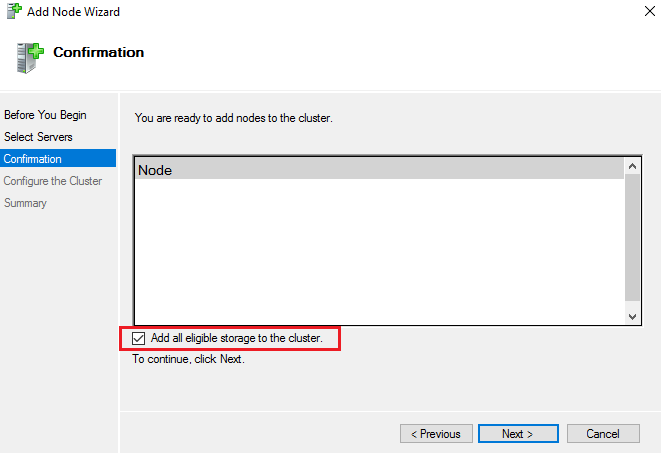
I made a mistake recently when adding a new node to an existing Windows Failover Cluster supporting AlwaysOn SQL Server instances. When adding a new node using the GUI there’s this option checked by default named “Add all eligible storage to the cluster”. Before performing the operation the disks on the 2 nodes of my cluster were used by the…

Introduction Sometimes you face interesting challenges with unusual environment. One of my customer needed a automated and flexible backup solution. Said like that nothing very complex you will say. But if I mention that some databases were 60TB big with more than 30 filegroups and around 600 database data files each and moreover synchronized in an AlwayOn availability group, it…
As you probably know Microsoft announced an official name for SQL Server vNext during the last Microsoft Data Amp event on April 19 2017. It becomes officially SQL Serve 2017. In my first blog post, I wrote about SQL Server on Linux and the introduction of availability groups features. At this moment the SQL Server release version was CTP 1.3. As…
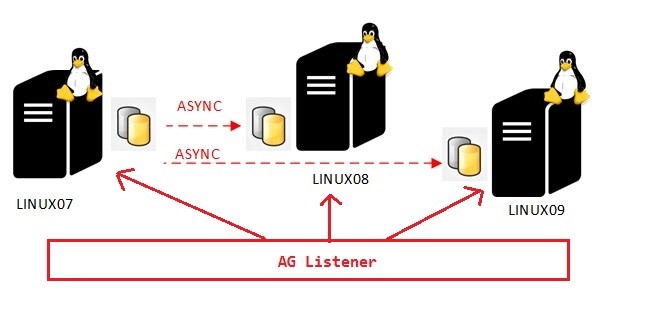
This blog post comes from a very interesting discussion with one of my friends about the read-only capabilities of secondary replicas in the context of distributed availability groups. Initially, distributed availability groups are designed to address D/R scenarios and some migration scenario types as well. I already discussed about of one possible migration scenario here. However, we may also take…
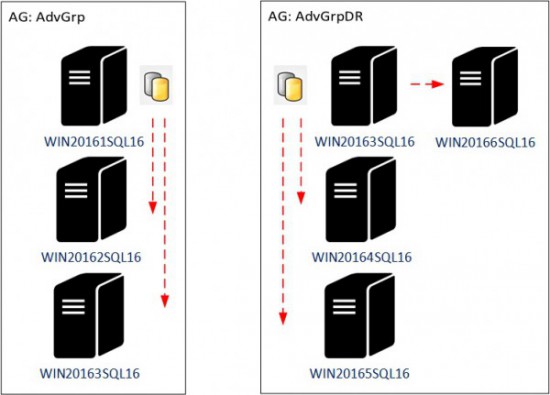
How to migrate an environment that includes availability groups from one Windows Failover Cluster to another one? This scenario is definitely uncommon and requires a good preparation. How to achieve this task depends mainly of your context. Indeed, we may use a plenty of scenarios according to the architecture in-place as well as the customer constraints in terms of maximum…
