

By a customer, I must migrate a database from a domain to another.
The goal is to keep the database-user permissions, take the new SID from the windows login of the new domain and change the database-user name.
In my blog, I will do it with two dbi’s domains:
– dbiservicech: The old domain
– dbiservicecorp: The new domain
I have two Windows groups dbiservicech\dbi-owner and dbiservicech\dbi-reader in my database test-dbi.
I create two new AD groups in the new domain dbiservicecorp\dbi-owner and dbiservicecorp\dbi-reader.
I add these 2 groups in the instance:
USE [master]

GO

CREATE LOGIN [dbiservicecorp\dbi-owner] FROM WINDOWS WITH DEFAULT_DATABASE=[master]

GO

CREATE LOGIN [dbiservicecorp\dbi-reader] FROM WINDOWS WITH DEFAULT_DATABASE=[master]

GO
The goal is to change the name of these groups inside the database:
– From dbiservicech\dbi-owner to dbiservicecorp\dbi-owner
– From dbiservicech\dbi-reader to dbiservicecorp\dbi-reader
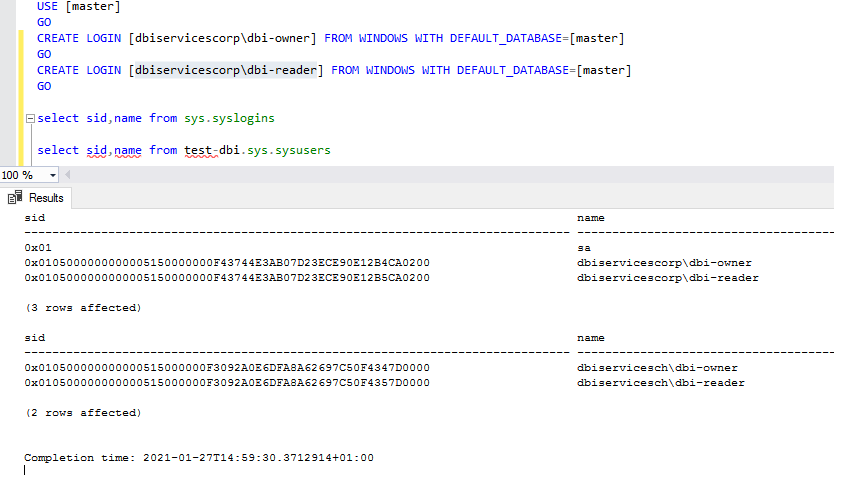
If I want to see the SID and name before the change, i use these select:
select sid,name from sys.syslogins

select sid,name from [test-dbi].sys.sysusers
The result told me that the SID and name are not aligned between the login & database-user:
sid 0x0105000000000005150000000F43744E3AB07D23ECE90E12B4CA0200 for the login dbiservicecorp\dbi-owner
sid 0x0105000000000005150000000F43744E3AB07D23ECE90E12B5CA0200 for the login dbiservicecorp\dbi-reader
sid 0x010500000000000515000000F3092A0E6DFA8A62697C50F4347D0000 for the database-user dbiservicech\dbi-owner
sid 0x010500000000000515000000F3092A0E6DFA8A62697C50F4357D0000 for the database-user dbiservicech\dbi-reader
To adapt the SID and name, I use the ALTER USER command:
USE [test-dbi];

GO

ALTER USER [dbiservicech\dbi-owner] WITH NAME = [dbiservicecorp\dbi-owner], LOGIN=[dbiservicecorp\dbi-owner]

GO

ALTER USER [dbiservicech\dbi-reader] WITH NAME = [dbiservicecorp\dbi-reader], LOGIN=[dbiservicecorp\dbi-reader]

GO
– “With Name = ” change the name inside the database to be the same as the login
– “With Login = “ change the SID to be the same as the login
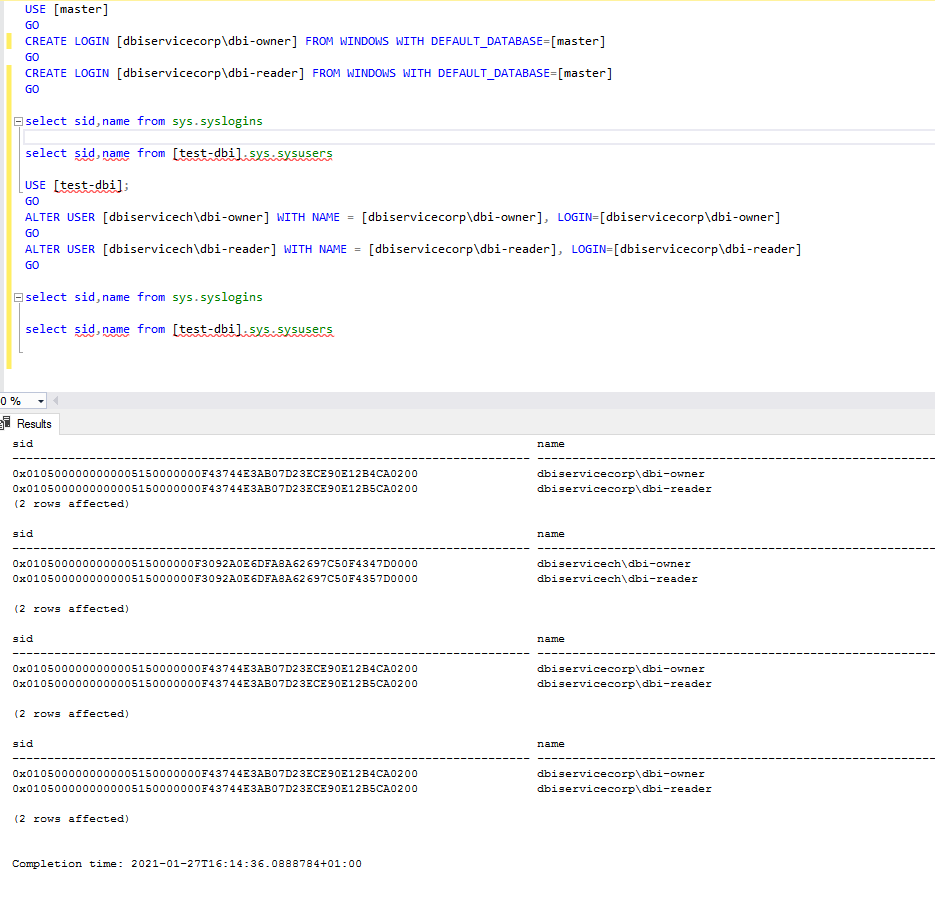
Et voila, with this simple command, you can easily migrate the database-users to a new domain without touching the permissions. 😎