

A couple of days ago, I was involved in a project about implementing availability groups with SQL Server 2014. My customer wanted to isolate the replication traffic from the public network. The idea behind was to get a better control of the network bandwidth as well as to be sure that the replication can be done without any latency issues in case of heavily network traffic issued by other applications or backup activities for instance.
The first option to meet this requirement consists in redirecting the replication traffic to the private cluster network. However, depending on the data modification workloads on the primary replica, the availability group messaging throughput requirements can be non-trivial and can have an impact on the heartbeat and intra-cluster communication. As a reminder, heartbeat communication is generally sensitive to latency and if they are delayed by a statured NIC, it could cause the cluster node to be removed from the cluster membership. => it could cause the removal of the cluster node from the cluster membership.
So, the second option is to dedicate a network for availability group replication traffic. However, for those that already tried to configure a dedicated network for hadr endpoints communications, you probably noticed that it cannot be configured completely by using SQL Server management studio and availability group wizard.
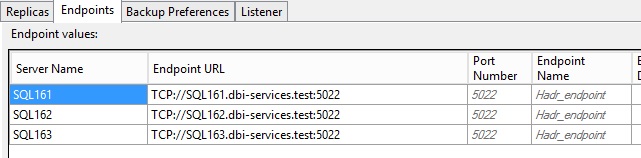
Let’s demonstrate … In my context, I already set up an availability group that includes 3 replicas and endpoints communications on the public network as shown below:
In order to move endpoints communication to a dedicated network, I have to use a set of T-SQL commands against my existing availability group.
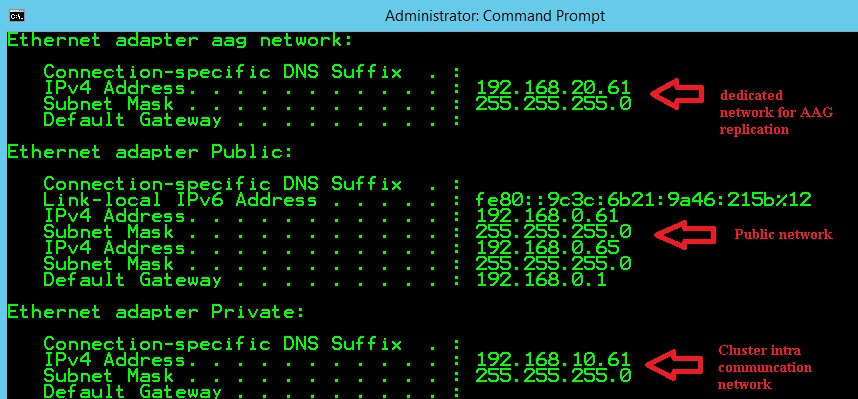
The first one will reconfigure the hadr endpoints:
:CONNECT SQL161
-- drop existing endpoint
DROP ENDPOINT [Hadr_endpoint];
GO

-- recreate endpoint with the specific dedicated network address
CREATE ENDPOINT [Hadr_endpoint]
    AS TCP (LISTENER_PORT = 5022, LISTENER_IP = (192.168.20.61))
    FOR DATA_MIRRORING (ROLE = ALL, ENCRYPTION = REQUIRED ALGORITHM AES);
GO

-- configure endpoint security
IF (SELECT state FROM sys.endpoints WHERE name = N'Hadr_endpoint') <> 0
BEGIN
    ALTER ENDPOINT [Hadr_endpoint] STATE = STARTED;
END
GO

USE [master];
GO

GRANT CONNECT ON ENDPOINT::[Hadr_endpoint] TO [DBI-SERVICES\sql_service];
GO


:CONNECT SQL162
DROP ENDPOINT [Hadr_endpoint];
GO

CREATE ENDPOINT [Hadr_endpoint]
    AS TCP (LISTENER_PORT = 5022, LISTENER_IP = (192.168.20.62))
    FOR DATA_MIRRORING (ROLE = ALL, ENCRYPTION = REQUIRED ALGORITHM AES);
GO

IF (SELECT state FROM sys.endpoints WHERE name = N'Hadr_endpoint') <> 0
BEGIN
    ALTER ENDPOINT [Hadr_endpoint] STATE = STARTED;
END
GO

USE [master];
GO

GRANT CONNECT ON ENDPOINT::[Hadr_endpoint] TO [DBI-SERVICES\sql_service];
GO

:CONNECT SQL163
DROP ENDPOINT [Hadr_endpoint];
GO

CREATE ENDPOINT [Hadr_endpoint]
    AS TCP (LISTENER_PORT = 5022, LISTENER_IP = (192.168.20.63))
    FOR DATA_MIRRORING (ROLE = ALL, ENCRYPTION = REQUIRED ALGORITHM AES);
GO

IF (SELECT state FROM sys.endpoints WHERE name = N'Hadr_endpoint') <> 0
BEGIN
    ALTER ENDPOINT [Hadr_endpoint] STATE = STARTED;
END
GO

USE [master];
GO

GRANT CONNECT ON ENDPOINT::[Hadr_endpoint] TO [DBI-SERVICES\sql_service];
GO
The second one will modify the configuration of each concerned availability replica:
-- Modify the availability group endpoints configuration
-- on all replicas
ALTER AVAILABILITY GROUP testgrp
MODIFY REPLICA ON 'SQL161'
WITH
(
	ENDPOINT_URL = N'TCP://192.168.20.61:5022'
);
GO

ALTER AVAILABILITY GROUP testgrp
MODIFY REPLICA ON 'SQL162'
WITH
(
	ENDPOINT_URL = N'TCP://192.168.20.62:5022'
);
GO

ALTER AVAILABILITY GROUP testgrp
MODIFY REPLICA ON 'SQL163'
WITH
(
	ENDPOINT_URL = N'TCP://192.168.20.63:5022'
);
GO
Voila …
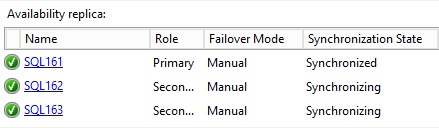
However, keep in mind that performing changes on both the endpoints and availability groups in this case will have an impact on the database replication process. So try to plan these changes during off-hours business.
See you.
By David Barbarin