

SQL Server 2019 added three new options in sp_configure and sys.configurations.
First, how can we find the difference between these SQL Server Versions.
This simple query will give us the number of options and the SQL Server Version:
select count(*) as number_of_configurations, @@version FROM sys.database_scoped_configurations
In SQL server 2016, we have 4 parameters for the database configuration:

In SQL server 2017, we have 5 parameters for the database configuration:

In SQL server 2019, we have 23 parameters for the database configuration:

As you can see, we have ~ 5 time more parameters in SQL Server 2019.
Go deeper into these parameters with the query:
select * from sys.database_scoped_configurations
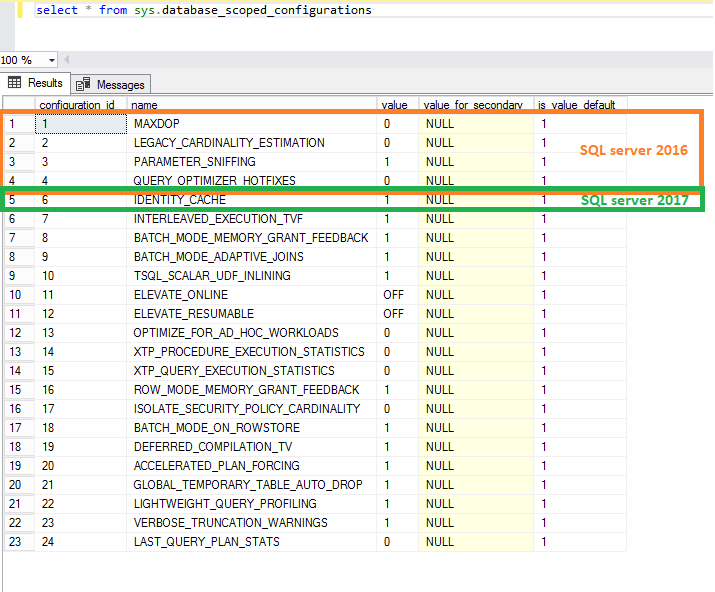
In SQL Server 2016, you have the paramerters MAXDOP, LEGACY_CARDINALITY_ESTIMATION, PARAMETER_SNIFFING and QUERY_OPTIMIZER_HOTFIXES. In SQL Server 2017, IDENTITY_CACHE is added and after in SQL Server 2019, 18 more parameters.
I will go through all parameters in this blog.
The goal is to discover and use these parameters and no more the old way…
The details of these parameters is here.
Many of these parameters are also only on the instance configuration and now they are on the database level like for example OPTIMIZE_FOR_AD_HOC_WORKLOADS
If I take this example,
On the server level, we use the query and all databases are impacted with this change:
SP_CONFIGURE 'Show Advanced Options', 1
GO
RECONFIGURE
GO
SP_CONFIGURE 'optimize for ad hoc workloads', 1
GO
RECONFIGURE
GO
On the database level, we use the query:
ALTER DATABASE [Database] SCOPED CONFIGURATION
SET OPTIMIZE_FOR_AD_HOC_WORKLOADS = ON;
It’s very important to know that we have new options on the database level and how to set these options.
I hope this little blog will help you to migrate to SQL Server 2019 and use these options at the database level.