

By Mouhamadou Diaw
In a previous blog , I talked about refreshable PDB technology which can be used to refresh a target PDB.
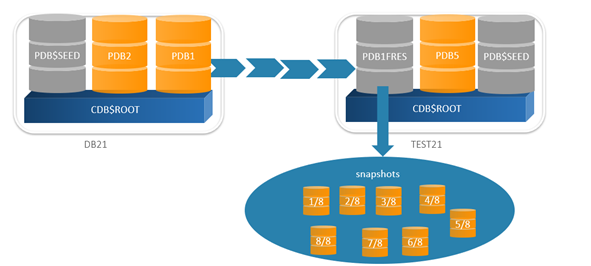
We have seen here how the target refreshable PDB can be used as a master to provide PDB snapshots.
In this blog we are going to continue in the same topic and talk about PDB Snapshot Carousel which is a library of PDB snaphots. It consists to automatically or manually generate a certain number of snapshots for a given PDB. The source PDB can be a normal PDB or a refreshable one.
As specified in documentation , a PDB snaphot carousel can be useful to maintain a library of recent PDB copies for PITR and cloning.
This feature is only available for following editions ( documentation )
EE-ES Oracle Database Enterprise Edition on Engineered Systems
DBCS EE Oracle Database Cloud Service Enterprise Edition
DBCS EE-HP Oracle Database Cloud Service Enterprise Edition – High Performance
DBCS EE-EP Oracle Database Cloud Service Enterprise Edition – Extreme Performance
ExaCS Oracle Database Exadata Cloud Service
ExaCC Oracle Database Exadata Cloud@Customer
However if you do not have such environment, you can set following parameter “_exadata_feature_on” to TRUE for testing.
Let’s consider PDB1FRES as the source for the snapshots. When configured PDB snapshot carousel can automatically generate a snapshot for each defined interval. The maximum snapshots that can be created is defined by the MAX_PDB_SNAPSHOTS in the CDB_PROPERTIES.
The default value is 8 and is the maximum.
|
1
2
3
4
5
6
7
8
9
10
|
SQL> col PROPERTY_NAME for a40SQL> col PROPERTY_VALUE for a40SQL> set lines 150SQL> select PROPERTY_NAME,PROPERTY_VALUE from cdb_properties where property_name='MAX_PDB_SNAPSHOTS';PROPERTY_NAME PROPERTY_VALUE---------------------------------------- ----------------------------------------MAX_PDB_SNAPSHOTS 8SQL> |
The MAX_PDB_SNAPSHOTS can be configured using for exemple
|
1
|
ALTER PLUGGABLE DATABASE SET MAX_PDB_SNAPSHOTS = 5 |
In this test the maximum is set to the default value. To configure PDB1FRES to generate snapshot every 2 minutes, let’s just run following
|
1
2
3
4
5
6
7
8
9
10
11
12
13
14
15
16
17
18
19
20
21
22
23
24
25
26
27
28
29
|
SQL> show pdbs; CON_ID CON_NAME OPEN MODE RESTRICTED---------- ------------------------------ ---------- ---------- 2 PDB$SEED READ ONLY NO 4 PDB1FRES READ ONLY NOSQL> alter session set container=PDB1FRES;Session altered.SQL> show pdbs; CON_ID CON_NAME OPEN MODE RESTRICTED---------- ------------------------------ ---------- ---------- 4 PDB1FRES READ ONLY NOSQL> ALTER PLUGGABLE DATABASE PDB1FRES SNAPSHOT MODE EVERY 2 MINUTES;Pluggable database altered.SQL>SQL> SELECT SNAPSHOT_MODE, SNAPSHOT_INTERVAL FROM DBA_PDBS;SNAPSH SNAPSHOT_INTERVAL------ -----------------AUTO 2 |
Not that we can also create a new PDB that will take snapshots every 2 minutes using the command CREATE PLUGGABLE DATABASE. The SNAPSHOT MODE can also be MANUAL or NONE
If we query the DBA_PDB_SNAPSHOTS later, we can see that snapshots are automatically being generated
|
1
2
3
4
5
6
7
8
9
10
11
12
13
14
15
16
|
SQL> SELECT CON_NAME, SNAPSHOT_NAME, scn_to_timestamp(snapshot_scn) as snaptime , SNAPSHOT_SCN FROM DBA_PDB_SNAPSHOTS ORDER BY SNAPSHOT_SCN;CON_NAME SNAPSHOT_NAME SNAPTIME SNAPSHOT_SCN--------- ------------------------- ----------------------------------- ------------PDB1FRES SNAP_745266373_1097421048 23-FEB-22 03.10.53.000000000 PM 45436486PDB1FRES SNAP_745266373_1097421168 23-FEB-22 03.12.51.000000000 PM 45436585PDB1FRES SNAP_745266373_1097421287 23-FEB-22 03.14.50.000000000 PM 45436668PDB1FRES SNAP_745266373_1097421407 23-FEB-22 03.16.50.000000000 PM 45436751PDB1FRES SNAP_745266373_1097421527 23-FEB-22 03.18.49.000000000 PM 45436830PDB1FRES SNAP_745266373_1097421647 23-FEB-22 03.20.50.000000000 PM 45436905PDB1FRES SNAP_745266373_1097421767 23-FEB-22 03.22.50.000000000 PM 45437166PDB1FRES SNAP_745266373_1097421887 23-FEB-22 03.24.50.000000000 PM 454372498 rows selected.SQL> |
What happen when the maximum number of snapshots (8) is reached. The database will remove the oldest snaphot and so on
|
1
2
3
4
5
6
7
8
9
10
11
12
|
SQL> SELECT CON_NAME, SNAPSHOT_NAME, scn_to_timestamp(snapshot_scn) as snaptime , SNAPSHOT_SCN FROM DBA_PDB_SNAPSHOTS ORDER BY SNAPSHOT_SCN;CON_NAME SNAPSHOT_NAME SNAPTIME SNAPSHOT_SCN--------- ------------------------- ----------------------------------- ------------PDB1FRES SNAP_745266373_1097421168 23-FEB-22 03.12.51.000000000 PM 45436585PDB1FRES SNAP_745266373_1097421287 23-FEB-22 03.14.50.000000000 PM 45436668PDB1FRES SNAP_745266373_1097421407 23-FEB-22 03.16.50.000000000 PM 45436751PDB1FRES SNAP_745266373_1097421527 23-FEB-22 03.18.49.000000000 PM 45436830PDB1FRES SNAP_745266373_1097421647 23-FEB-22 03.20.50.000000000 PM 45436905PDB1FRES SNAP_745266373_1097421767 23-FEB-22 03.22.50.000000000 PM 45437166PDB1FRES SNAP_745266373_1097421887 23-FEB-22 03.24.50.000000000 PM 45437249PDB1FRES SNAP_745266373_1097422007 23-FEB-22 03.26.50.000000000 PM 45437336 |
Not that you will not see snapshots PDB carousel with the SHOW PDBS command
|
1
2
3
4
5
6
7
|
SQL> show pdbs; CON_ID CON_NAME OPEN MODE RESTRICTED---------- ------------------------------ ---------- ---------- 2 PDB$SEED READ ONLY NO 4 PDB1FRES READ ONLY NOSQL> |
Now that we have our snapshots, we can for example create a new PDB using one snapshot
|
1
2
3
4
5
6
7
8
9
10
11
12
13
14
15
16
17
18
19
20
21
22
23
24
25
|
SQL> create pluggable database MYPDB from PDB1FRES using snapshot SNAP_745266373_1097421767;Pluggable database created.SQL> show pdbs; CON_ID CON_NAME OPEN MODE RESTRICTED---------- ------------------------------ ---------- ---------- 2 PDB$SEED READ ONLY NO 3 MYPDB MOUNTED 4 PDB1FRES READ ONLY NOSQL> alter pluggable database MYPDB open;Pluggable database altered.SQL> show pdbs CON_ID CON_NAME OPEN MODE RESTRICTED---------- ------------------------------ ---------- ---------- 2 PDB$SEED READ ONLY NO 3 MYPDB READ WRITE NO 4 PDB1FRES READ ONLY NOSQL> |
To drop a snapshot, just use the command
|
1
|
SQL> alter pluggable database drop snapshot SNAP_745266373_1097422487; |
To drop all snapshots we can find following lines in the documentation
To drop all snapshots in a PDB snapshot carousel, set the MAX_PDB_SNAPSHOTS database property to 0 (zero), as shown in the following statement:
ALTER PLUGGABLE DATABASE SET MAX_PDB_SNAPSHOTS=0;
This technique is faster than executing ALTER PLUGGABLE DATABASE … DROP SNAPSHOT snapshot_name for every snapshot.
To disable the snapshot mode
|
1
2
3
4
5
6
7
8
9
10
11
|
SQL> ALTER PLUGGABLE DATABASE PDB1FRES SNAPSHOT mode none;Pluggable database altered.SQL> SELECT SNAPSHOT_MODE, SNAPSHOT_INTERVAL FROM DBA_PDBS;SNAPSH SNAPSHOT_INTERVAL------ -----------------NONESQL> |
Conclusion
Hope this help.
Thanks to Tim for his useful blog