Recently, after a successful migration to GoldenGate 26ai, a customer complained that he was seeing a lot of the following error in the ggserr.log file of a GoldenGate deployment (I replaced the names for the purpose of this blog).
2026-05-18T14:32:35.948+0200 ERROR OGG-08502. Oracle GoldenGate Receiver Service for Oracle: Path path21 not found.More precisely, in that case, path21 is a distribution path sending trail files from deployment ogg_test_02 to ogg_test_01. And the error shown above appeared in the log file of the ogg_test_01 deployment.
While this error did not seem to indicate any operational issue in the replication, after checking on multiple environments, I confirmed that it appears everywhere. So what is happening exactly ?
If you get this error and do not know where it comes from, log in to the web UI of the affected deployment, and go to the Receiver Service Paths tab. You should see a list of the distribution paths that are connecting to your deployments. The example below shows the path21 that is mentioned in the error.
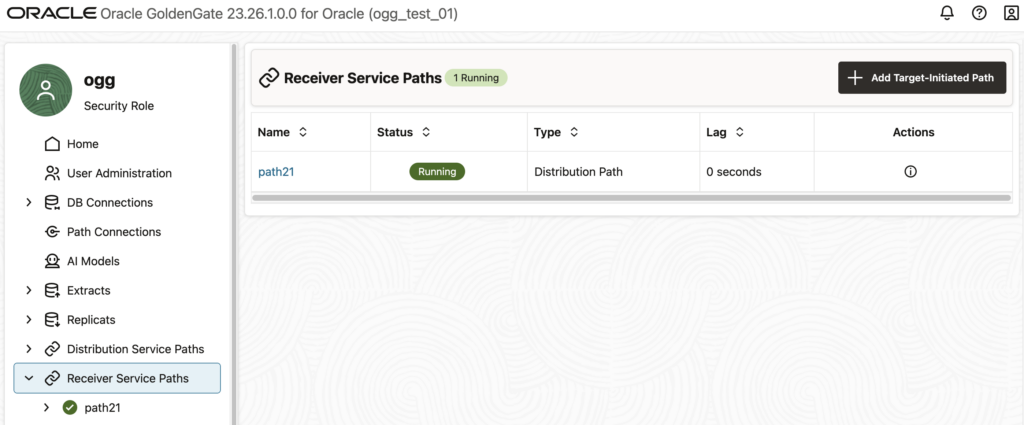
How to reproduce the error ?
If you click on this path… Nothing happens ! And by “nothing”, I mean “nothing abnormal”. In fact, the statistics are properly displayed (see below), and there is no error shown to the user. However, if you look at your ggserr.log file you will see that the error given above appears.
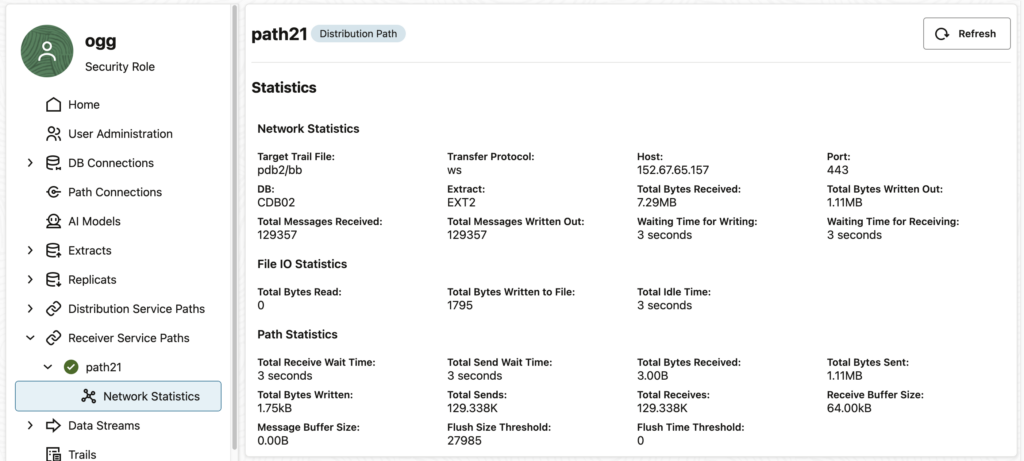
At first glance, this might not seem like a huge issue, because if you don’t click on the receiver path, you will not get the error. However, in the log file of the customer, the error appeared regularly. Every minute, to be precise.
Why do I get this error even when I’m not accessing the web UI ?
Luckily, when debugging this issue, I started by putting the target in a blackout in the Oracle Enterprise Manager. To my surprise, the error was gone during the blackout and reappeared right after.
In this case, the Enterprise Manager Plug-in for Oracle GoldenGate is monitoring the status of the deployment every minute and generates the error in the process.
When looking at the targets in the OEM, there is no error. Again, no operational impact.
Does it depend on the way you create the distribution path ?
GoldenGate offers multiple ways of managing deployments : REST API, adminclient, or the web UI. Unfortunately, some bugs (and some features…) mean that you should avoid managing some objects with some of these tools (read why you shouldn’t create profiles through the adminclient, for instance).
In this specific case, all distribution path creation methods lead to the same error in the log file. It doesn’t matter whether you create the distribution path with the adminclient, the REST API or the web UI. They will all lead to this error.
Advanced – What’s happening exactly ?
Let’s dig a bit to see what is happening behind the scenes. By looking at the restapi.log file (read my blog on how to analyze REST API logs efficiently), we can see the full error:
2026-05-18 09:08:58.402+0000 ERROR|RestAPI.recvsrvr | Request #9: {
     "context": {
         "httpContextKey": 140097141801744,
         "verbId": 2,
         "verb": "GET",
         "originalVerb": "GET",
         "uri": "/services/v2/targets/path21",
         "protocol": "http",
         "headers": {
             ...
         },
         "host": "vmogg",
         "securityEnabled": false,
         "authorization": {
             "authUserName": "ogg",
             "authUserRole": "Security",
             "authMode": "Cookie"
         },
         "requestId": 8,
         "uriTemplate": "/services/{version}/targets/{path}",
         "catalogUriTemplate": "/services/{version}/metadata-catalog/path"
     },
     "isScaRequest": true,
     "content": null,
     "parameters": {
         "uri": {
             "path": "path21",
             "version": "v2"
         },
         "query": {
             "WindowRef": "%2Fservices%2Fv2%2Fcontent%2F%23%2FrecvsrvrPaths%2Fpath21%2FpathNetworkStats"
         }
     }
 }
 Response: {
     "context": {
         ...
     },
     "isScaResponse": true,
     "content": {
         "$schema": "api:standardResponse",
         "links": [
             {
                 "rel": "canonical",
                 "href": "https://vmogg/services/ogg_test_01/recvsrvr/v2/targets/path21",
                 "mediaType": "application/json"
             },
             {
                 "rel": "self",
                 "href": "https://vmogg/services/ogg_test_01/recvsrvr/v2/targets/path21",
                 "mediaType": "application/json"
             }
         ],
         "messages": [
             {
                 "$schema": "ogg:message",
                 "title": "Path path21 not found",
                 "code": "OGG-08502",
                 "severity": "ERROR",
                 "issued": "2026-05-18T09:08:58Z",
                 "type": "https://www.rfc-editor.org/rfc/rfc9110.html#name-status-codes"
             }
         ]
     }
 }
The issue comes from the following endpoint : /services/v2/targets/path21. It is described in the documentation under Retrieve an existing Oracle GoldenGate Collector Path. But looking at another endpoint described in Get a list of distribution paths, we get the following response:
{
    "$schema": "api:standardResponse",
    "links": [
        {
            "rel": "canonical",
            "href": "https://vmogg/services/ogg_test_01/recvsrvr/v2/targets",
            "mediaType": "text/html"
        },
        {
            "rel": "self",
            "href": "https://vmogg/services/ogg_test_01/recvsrvr/v2/targets",
            "mediaType": "text/html"
        },
        {
            "rel": "describedby",
            "href": "https://vmogg/services/ogg_test_01/recvsrvr/v2/metadata-catalog/targets",
            "mediaType": "application/schema+json"
        }
    ],
    "messages": [],
    "response": {
        "$schema": "ogg:collection",
        "items": [
            {
                "links": [
                    {
                        "rel": "parent",
                        "href": "https://vmogg/services/ogg_test_01/recvsrvr/v2/targets",
                        "mediaType": "application/json"
                    },
                    {
                        "rel": "canonical",
                        "href": "https://vmogg/services/ogg_test_01/recvsrvr/v2/targets/path21_ogg26dist2_7811",
                        "mediaType": "application/json"
                    }
                ],
                "$schema": "ogg:collectionItem",
                "name": "path21",
                "status": "running",
                "targetInitiated": false
            }
        ]
    }
}
Here, we see that the endpoint associated with the path21 object is not recvsrvr/v2/targets/path21 but recvsrvr/v2/targets/path21_ogg26dist2_7811. And looking at this second endpoint, we do not get an error.
{
    "$schema": "api:standardResponse",
    "links": [
        {
            "rel": "canonical",
            "href": "https://vmogg/services/ogg_test_01/recvsrvr/v2/targets/path21_ogg26dist2_7811",
            "mediaType": "text/html"
        },
        {
            "rel": "self",
            "href": "https://vmogg/services/ogg_test_01/recvsrvr/v2/targets/path21_ogg26dist2_7811",
            "mediaType": "text/html"
        },
        {
            "rel": "describedby",
            "href": "https://vmogg/services/ogg_test_01/recvsrvr/v2/metadata-catalog/path",
            "mediaType": "application/schema+json"
        }
    ],
    "messages": [],
    "response": {
        "name": "path21",
        "status": "running",
        "$schema": "ogg:distPath",
        "source": {
            "uri": "trail://localhost:7811/services/v2/sources?trail=pdb2/bb"
        },
        "target": {
            "$schema": "ogg:distPathEndpoint",
            "uri": "ws://vmogg/services/v2/targets?trail=pdb2/bb"
        },
        "options": {
            "network": {
                "appOptions": {
                    "appFlushBytes": 27985,
                    "appFlushSecs": 1
                },
                "socketOptions": {
                    "tcpOptions": {
                        "ipDscp": "DEFAULT",
                        "ipTos": "DEFAULT",
                        "tcpNoDelay": false,
                        "tcpQuickAck": true,
                        "tcpCork": false,
                        "tcpSndBuf": 16384,
                        "tcpRcvBuf": 131072
                    }
                }
            }
        }
    }
}
The problem is that it was never decided for path21 to be referred to as path21_ogg26dist2_7811 internally. And it looks like GoldenGate does not know about it either… So until the bug is corrected, you will have to filter this OGG-08502 Path not found error out of the ggserr.log file if you use it for monitoring.
![Thumbnail [60x60]](https://www.dbi-services.com/blog/wp-content/uploads/2025/05/JDE_Web-1-scaled.jpg)