As I’ve said many times, I like M-Files because each monthly release not only fixes bugs, but also introduces new features. This time (December 2025), they worked on the sharing feature.
It’s not entirely new, as it was already possible to create links to share documents with external users. However, it was clearly not user-friendly and difficult to manage. Let’s take a closer look.
What is M-Files Sharing Center?
The Sharing Center in M-Files allows users to share content with external users by generating links that can be public or passcode-protected.
Key capabilities include:
Access Control: Modify or revoke permissions instantly to maintain security.
Audit & Compliance: Track sharing history for regulatory compliance and internal governance.
External Collaboration: Share documents with partners or clients without exposing your entire repository.
What’s on the horizon:
The capabilities will evolve in the next releases.
Centralized Overview: See all active shares in one place. No more guessing who has access!
Editing Permissions: Allow external users to update shared documents.
And lot of new features that will be added in the upcoming releases!
What are the advantages?
A good internal content management system is crucial for maintaining data consistency and integrity. But what about when you share these documents via email, a shared directory, or cloud storage?
You have control over your documents and can see who has accessed them and when.
Need to end a collaboration? With one click, you can immediately revoke access.
Providing an official way to share documents with external people helps prevent users from using untrusted cloud services and other methods that can break security policies.
How it works
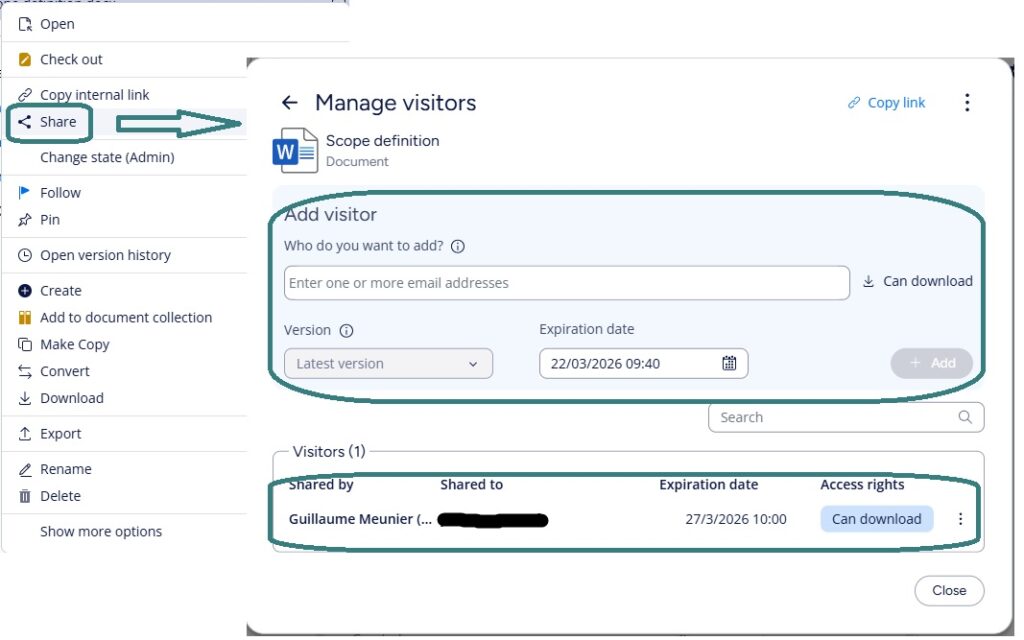
It’s hard to make it any simpler. Just right-click on the document and select “Share.”
A pop-up will ask you for an email address and an expiration date, and that’s it!
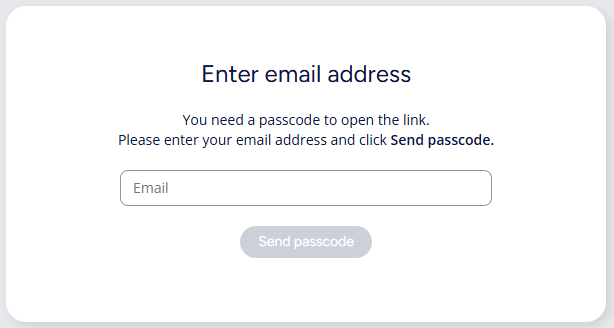
When an external user goes to the link, he or she will be asked to enter his or her email address. A passcode will then be sent to that email address for authentication.
Another interesting feature is that the generated link remains the same when you add or remove users, change permissions, or stop and resume sharing.
Small Tips
Set expiration dates: The easier it is to share a document, the easier it is to forget about it. Therefore, it is important to set an expiration date for shared documents.
Use role-based permissions: Sharing information outside the organization is sensitive, so controlling who can perform this action is important.
Regularly review active shares: Even if an expiration date has been set, it is a good habit to ensure that only necessary access remains.
At the end
M-Files already provides a great tool for external collaboration. Hubshare. With this collaboration portal, you can do much more than share documents. Of course, this tool incurs an additional cost. M-Files Sharing Center solves another problem: how to share documents occasionally outside the organization without compromising security or the benefits M-Files provides internally.
The first version of the Sharing Center is currently limited to downloading, but an editing feature and a dashboard for quickly identifying shared documents across the repository will be included in a next release. These features’ simplicity and relevance will undoubtedly make it stand out even more from its competitors.
If you are curious about it, feel free to ask us!
![Thumbnail [60x60]](https://www.dbi-services.com/blog/wp-content/uploads/2022/08/GME_web-min-scaled.jpg)

![Thumbnail [90x90]](https://www.dbi-services.com/blog/wp-content/uploads/2022/08/MOP_web-min-scaled.jpg)