The OpenText Directory Services (OTDS) is a pretty interesting piece of software, and it works quite well out-of-the-box. If you are starting to use the OTDS from scratch (when you have nothing internally), then there isn’t much problem, you can just use what they provide OOTB and that’s fine. But for big companies or if you already have a lot of specific use-cases and specific configurations that wouldn’t be considered “standard” usually, then it can quickly become (much) more complex.
Default configuration & behavior
In a previous blog, I talked about ways to configure OTDS to allow the login to Documentum with something else than the default “oTExternalID3” (c.f. this blog – mapped to “userPrincipalName” by default). That blog was on the Resource side of things, to populate the accounts in Documentum as well as perform a simple username/password login through OTDS. I also mentioned in that publication that the simplest way to achieve that would be to change the “AD/LDAP attribute” property of the Partition directly, but that’s only IF (and that’s a big IF) it doesn’t mess with other systems that you might have (e.g. other than Documentum).
But what about Single Sign-On if you aren’t using the default…? That’s what I will talk about in this new blog. I will use OTDS integrated with Azure OAuth 2 / OpenID Connect for that example. For my demo environment, I already setup the following things:
- A Partition, named “APP1“, with its “AD/LDAP attribute” property set to “sAMAccountName“. That means that “oTExternalID3” will have as value “MYUSERID” instead of the default “[email protected]” (which it would have had with the default “userPrincipalName“)
- An Auth Handler, named “SSO“, configured with OAuth 2.0 / OpenID Connect with its client ID, client secret, etc… So that all needed fields of the “Parameters” page are properly set for communications / exchanges. On the “Configuration” page, you can reduce the priority value from 10 to 5 (i.e. higher priority) and then there is a single field “Authentication principal attribute“. Based on the name only, you would probably set that to oTExternalID3, right?
With the above setup, the following will happen when you login through the SSO (with DEBUG enabled, to see the messages, otherwise you will have no clue why it fails):
==> otds.log <==
2025-07-28 09:05:24.070|DEBUG |[https-jsse-nio-8080-exec-33]|OtdsAuthenticationManager||Authentication attempt with handler SSO result {CLIENT_CONTINUE_NEEDED, null, null, null}

==> access.2025-07-28.log <==
2025-07-28 09:05:24,074 UTC code:302 thread:https-jsse-nio-8080-exec-33 user:- ip:172.1.1.1 req:'POST /otdsws/login HTTP/1.1' bytes:- session:- time-taken-ms:8

==> otds.log <==
2025-07-28 09:05:27.740|DEBUG |[https-jsse-nio-8080-exec-35]|OAuth2Handler||fetchURL received response code 200
2025-07-28 09:05:27.742|DEBUG |[https-jsse-nio-8080-exec-35]|OAuth2Handler||Obtained access token: eyJ0eXAiOiJKV1QiLCJub25jZSI...Kuj4re_gei97mSMsLGXcXZ3Os3g
2025-07-28 09:05:27.743|DEBUG |[https-jsse-nio-8080-exec-35]|OAuth2Handler||Obtained id_token: eyJ0eXAiOiJKV1QiCJhbGciOiJS...VTd_jsBFlPcxQLCOxKk85wdywQQ
2025-07-28 09:05:27.842|DEBUG |[https-jsse-nio-8080-exec-35]|OAuth2Handler||fetchURL received response code 200
2025-07-28 09:05:27.842|DEBUG |[https-jsse-nio-8080-exec-35]|OAuth2Handler||Obtained user object: {"@odata.context":"https://graph.microsoft.com/v1.0/$metadata#users/$entity","businessPhones":["+41 123456789"],"displayName":"Patou Morgan","givenName":"Morgan","jobTitle":"Technology Leader ECM","mail":"[email protected]","mobilePhone":null,"officeLocation":"CH","preferredLanguage":null,"surname":"Patou","userPrincipalName":"[email protected]","id":"77021...54e5c"}
2025-07-28 09:05:27.909|DEBUG |[https-jsse-nio-8080-exec-35]|ReplayCache||OTDS Replay Cache Cleaner started
2025-07-28 09:05:27.909|DEBUG |[https-jsse-nio-8080-exec-35]|ReplayCache||uuid added to replay cache: OIDC_https://login.microsoftonline.com/9b5...918/v2.0_bfb...d49
2025-07-28 09:05:27.909|DEBUG |[https-jsse-nio-8080-exec-35]|OtdsAuthenticationManager||Authentication attempt with handler SSO result {SUCCESS, null, null, [email protected]}
2025-07-28 09:05:27.921|DEBUG |[https-jsse-nio-8080-exec-35]|OtdsAuthenticationManager||Search for [email protected] using attributes [oTExternalID3] returned: null

==> directory-access.log <==
2025-07-28 09:05:27.921|WARN  ||0|0|Authentication Service|Failure Access|28,Initial authentication failed|172.1.1.1|""||"[email protected]"|"Authentication failure [ACCOUNT_NOT_EXIST]: [email protected] for resource __OTDS_AS__"
Azure user details
The SSO isn’t working… But why exactly? In the logs, we can see that the request is initiated on OTDS side, and a communication is sent to the OAuth 2 / OIDC provider. There is a response received by OTDS which includes the “access token” and “id_token“. You can check the exact content of these tokens with a JWT Decoder. So, if you have issues with setting up the OTDS-OAuth2 communications, that will probably tell you what is going on. In this case, I do receive the correct information, and my user object is retrieved properly (c.f. the “User Info Endpoint” field on the Auth Handler Parameters page, which is set to “https://graph.microsoft.com/v1.0/me” for Azure). It contains fields such as “businessPhones“, “displayName“, “givenName“, “jobTitle“, “mail“, “surname” or “userPrincipalName“. Unfortunately, “sAMAccountName” isn’t part of the user details provided by Azure.
Why it’s not working
In above example, the Auth Handler “SSO” result was actually “SUCCESS“. The problem comes after that… As you can see on the logs, once Azure confirmed the user details, it’s now up to OTDS to find that same account in its users list. Therefore, OTDS will look at the Auth Handler “User Identifier Field” field (Parameters page) and it will use that parameter from the received details. Then OTDS will look at the Auth Handler “Authentication principal attribute” (Configuration page) and it will try to find some accounts in its database that would match for both values.
Most Azure fields might not be very reliable so you will probably end-up using “userPrincipalName“… Indeed, multiple people can technically have the same first name or last name (or even both), the same job title and sometimes some of these fields might be empty like the phone number, etc. Therefore, “userPrincipalName” is most probably the one you will configure for the Auth Handler “User Identifier Field” field (Parameters page).
I don’t know if it’s possible to configure the fields that Microsoft returns but since I have no control over that, I can only impact the second part of the matching/searching process. With our example, the Auth Handler “Authentication principal attribute” (Configuration page) uses “oTExternalID3” as the one and only parameter that OTDS will use for that mapping. Again, in an out-of-the-box OTDS, where you kept the default Partition configuration, then oTExternalID3 would have had the value from the AD’s “userPrincipalName“. Therefore, by default, it would have worked. But in this example, since we changed the “AD/LDAP attribute” property of the Partition, then it doesn’t match anymore and therefore, OTDS isn’t able to find the user “[email protected]“, as in its user registry, this account has a value of “MYUSERID“.
Updated configuration to fix the issue
The solution in this case is then pretty simple once you understand how OTDS works. The first thing to do is to update the Partition so that OTDS can fill at least one of its properties with the value from the AD’s “userPrincipalName“. Therefore, on the Partition User Mappings page, you can define that a parameter like “oTExtraAttr0-9” or “oTUserID1-4” would take the value as needed. In this example, I will use “oTUserID1“:
OTDS Attribute(s)  ||  Active Directory Attribute(s)  ||  Format
audio              ||                                 ||  %s
birthDate          ||                                 ||  %s
...                ||  ...                            ||  ...
cn                 ||  cn                             ||  %s
...                ||  ...                            ||  ...
oTSAMAccountName   ||  sAMAccountName                 ||  %s
...                ||  ...                            ||  ...
oTUserID1          ||  userPrincipalName              ||  %s
...                ||  ...                            ||  ...

After a Partition consolidation, all OTDS users will have their parameter “oTUserID1” set to the value of the AD’s “userPrincipalName“. The second step is then to configure the Auth Handler to use that same parameter for the user search:
- Select the checkbox of the current value set and remove it
- Using the dropdown list, select the new parameter you want to use (“oTUserID1” in this case) and add it
- Note: there can be multiple parameters if you want, just make sure it’s unique enough…
- Save the Auth Handler
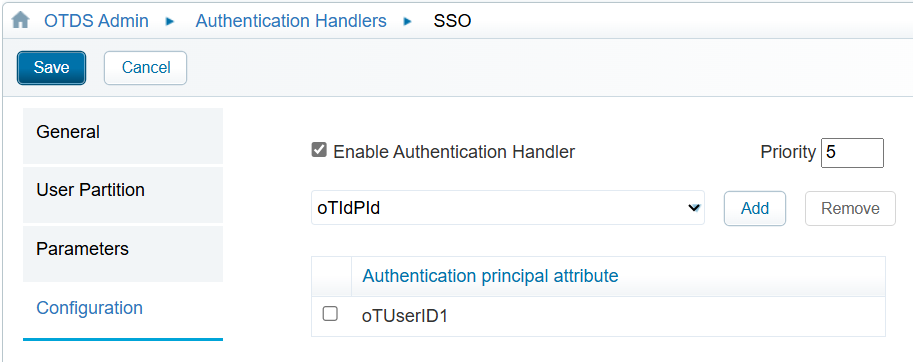
With the updated details, trying to login again through SSO will now generate these logs:
==> otds.log <==
2025-07-28 09:19:53.940|DEBUG |[https-jsse-nio-8080-exec-25]|OAuth2Handler||fetchURL received response code 200
2025-07-28 09:19:53.941|DEBUG |[https-jsse-nio-8080-exec-25]|OAuth2Handler||Obtained access token: eyJ0eXAiOiJKV1QiLCJub25jZSI...CypMuiNm3njnvRxjWGMF29pzwfx
2025-07-28 09:19:53.942|DEBUG |[https-jsse-nio-8080-exec-25]|OAuth2Handler||Obtained id_token: eyJ0eXAiOiJKV1QiLCJhbGciOiJ...EqlQtTgGqW3svHBV1fhyxOnTuYQ
2025-07-28 09:19:54.058|DEBUG |[https-jsse-nio-8080-exec-25]|OAuth2Handler||fetchURL received response code 200
2025-07-28 09:19:54.058|DEBUG |[https-jsse-nio-8080-exec-25]|OAuth2Handler||Obtained user object: {"@odata.context":"https://graph.microsoft.com/v1.0/$metadata#users/$entity","businessPhones":["+41 123456789"],"displayName":"Patou Morgan","givenName":"Morgan","jobTitle":"Technology Leader ECM","mail":"[email protected]","mobilePhone":null,"officeLocation":"CH","preferredLanguage":null,"surname":"Patou","userPrincipalName":"[email protected]","id":"77021...54e5c"}
2025-07-28 09:19:54.059|DEBUG |[https-jsse-nio-8080-exec-25]|ReplayCache||uuid added to replay cache: OIDC_https://login.microsoftonline.com/9b5...918/v2.0_f41...e95
2025-07-28 09:19:54.059|DEBUG |[https-jsse-nio-8080-exec-25]|OtdsAuthenticationManager||Authentication attempt with handler SSO result {SUCCESS, null, null, [email protected]}
2025-07-28 09:19:54.182|DEBUG |[https-jsse-nio-8080-exec-25]|OtdsAuthenticationManager||Search for [email protected] using attributes [oTUserID1] returned: oTPerson=779...bf4,orgunit=users,partition=APP1,dc=identity,dc=opentext,dc=net

==> directory-access.log <==
2025-07-28 09:19:54.193|INFO  ||0|0|Authentication Service|Success Access|27,Initial authentication successful|172.1.1.1|""|APP1|"MYUSERID"|"Authentication success: MYUSERID using authentication handler SSO for resource __OTDS_AS__"
2025-07-28 09:19:54.226|INFO  ||0|0|Authentication Service|Success Access|71,OAuth access token issued|172.1.1.1|""|APP1|"MYUSERID"|"Issued access_token with ID 952...c0e for session 95c...501 issued to client dctm-demo-d2 for grant_type implicit"
The SSO is now fully working, as OTDS can find a matching user by using the attribute “oTUserID1“. In some cases, you might be able to use the “mail” attribute instead, but you need to make sure that it is really unique for the users and partitions that you import into OTDS (right now, and in the future too). It can be a rather common practice for some customers to have multiple users with the same email, because there could be standard vs admin/high-privilege users (or different AD like lower environments, which might re-use the same email, etc…). So, use and configure OTDS as you need, but with caution!
![Thumbnail [60x60]](https://www.dbi-services.com/blog/wp-content/uploads/2022/08/MOP_web-min-scaled.jpg)
![Thumbnail [90x90]](https://www.dbi-services.com/blog/wp-content/uploads/2022/08/GME_web-min-scaled.jpg)