We have been facing one issue at one of our customer where the Oracle Client connections remained opened for days blocking some avaloq JobNetz. We have been doing some tests and we could fortunately find a solution resolving the problem thanks to Oracle Database 26ai supporting now SQLNET.EXPIRE_TIME on the client side. Through this blog, I would like to share with you the problem and then the tests that have been performed helping us to conclude to a solution.
Environment and problem description
At our customer environment, client connection run from the HelperVM does not establish database connections directly to the database listener. The connection goes through the Network Load Balancer, so called NLB, and the Oracle Connection Manager, so called CMAN.
The diagram below describes the database connection establishment process.
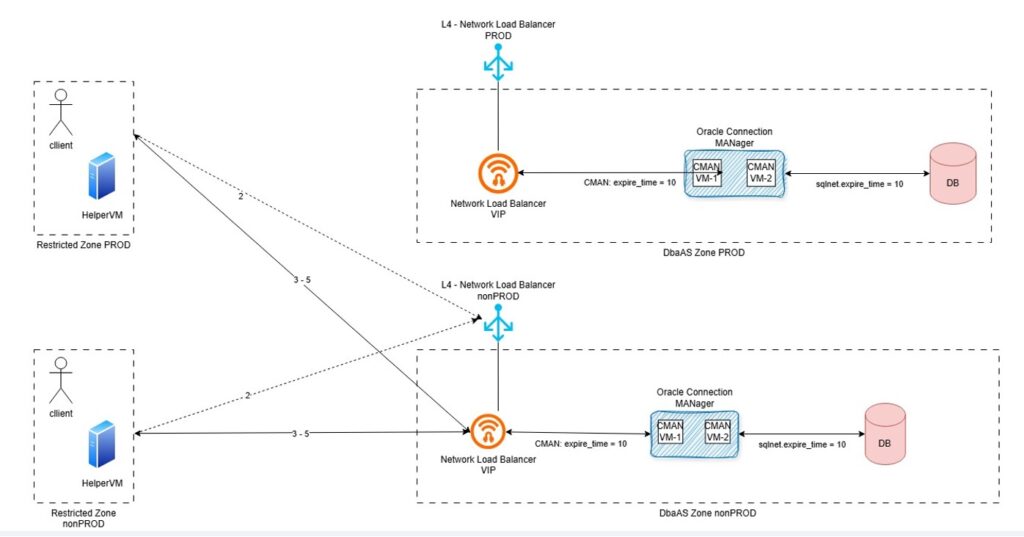
This is how it works.
- 1 – Client seeks for connection details (ideally, get the connection details from Oracle Directory Service)
- 2 – Client connects to Network Load Balancer
- 3 – Network Load Balancer “forwards” the request to Oracle Connection MANager using Virtual IP
- 4 – Oracle Connection MANager acts as a rule-based firewall and ensure the database target service is running on the “white listed targets (next_hop)
- 5 – Oracle Database establish connectivity upon credential validate (Oracle listener acts in between). The listener hands the connection over to the Oracle CMAN gateway process, which passes data back and forth between the client and the db-server and collects statistics.
We could observed per reverse engineering technique that the TCP connection established between the Oracle client and Oracle CMAN works upon Network Load Balancer Virtual IP.
The Network Load Balancer needs for Session persistence “statefullnes” to be enabled. This means that once the connection is established, the NLB “remembers” established connections and fails them over in case of planned downtime.
We have been facing some broken connectivity issue. Checking Linux socket connection with linux ss command (# ss -nop) we could see TCP connection hungs between client and NLB virtual IP (CNAME DNS entry). On CMAN and DB-Server side the connection were already cleaned up as per Dead Connection Detection configuration. We can see in the diagram that EXPIRE_TIME is setup with a value of 10 minutes on the CMAN side and the listener configuration from the VM Cluster database.
The connection was still opened on the client side because:
- The client was still waiting on a result which would never come
- TCP connection to the NLB Virtual IP was still existing albeit closed with the CMAN and database listener
- TCP connection to the NLB would remain alive for days
The problem is that by default Oracle client does not enable TCP Keepalive, which is an expected behavior. Oracle expects the keepalive to be set on the server side. The “Dead Connection Detection” will then be enforced for all clients.
TCP Keepalive should then be managed in our case on the client side. And we are currently running Oracle 19c Client.
EXPIRE_TIME handled on Oracle 19c Client
Oracle 19c client does not come with SQLNET.EXPIRE_TIME aka “Oracle dead connection detection”, unless hacked over connection string hidden (unsupported) parameter ENABLE_BROKEN.
See following blog from a one of my former colleagues:
sqlnet-expire_time and enablebroken
And what about Oracle 26ai Client? Let’s do some test…
Installation of Oracle 26ai Client
On the lab, I will use the VM called bastion to act as the client. The bastion has already an Oracle 19c Client installed. I’m going to installed new Oracle 26ai Client on it.
First we need to download the client version, which can be done from the following website:
https://www.oracle.com/database/technologies/oracle26ai-linux-downloads.html
I will install Oracle 26ai Client version in /opt/oracle.
[root@bastion oracle]# pwd
/opt/oracle

[root@bastion oracle]# ls -ld client*
drwxr-xr-x. 52 oracle oinstall 4096 Jun  6  2024 client19c
drwxr-xr-x. 47 oracle oinstall 4096 Nov 11  2025 client_21c
[root@bastion oracle]#
I will first unzip the downloaded oracle zip file.
[oracle@bastion oracle]$ pwd
/opt/oracle

[oracle@bastion oracle]$ unzip -q LINUX.X64_2326100_client.zip
I will then rename the client installation directory:
[oracle@bastion oracle]$ ls -ld client*
drwxr-xr-x.  5 oracle oinstall   90 Jan 17 13:59 client
drwxr-xr-x. 52 oracle oinstall 4096 Jun  6  2024 client19c
drwxr-xr-x. 47 oracle oinstall 4096 Nov 11  2025 client_21c

[oracle@bastion oracle]$ mv client client26ai
[oracle@bastion oracle]$

[oracle@bastion oracle]$ ls -ld client*
drwxr-xr-x. 52 oracle oinstall 4096 Jun  6  2024 client19c
drwxr-xr-x. 47 oracle oinstall 4096 Nov 11  2025 client_21c
drwxr-xr-x.  5 oracle oinstall   90 Jan 17 13:59 client26ai
[oracle@bastion oracle]$
I will prepare the response file for the command line installation.
[oracle@bastion client26ai]$ cp -p response/client_install.rsp response/client_install_custom.rsp

[oracle@bastion client26ai]$ vi response/client_install_custom.rsp

[oracle@bastion client26ai]$ diff response/client_install.rsp response/client_install_custom.rsp
22c22
 UNIX_GROUP_NAME=oinstall
26c26
 INVENTORY_LOCATION=/opt/oracle/oraInventory
30c30
 ORACLE_HOME=/opt/oracle/client26ai
34c34
 ORACLE_BASE=/opt/oracle
48c48
 oracle.install.client.installType=Administrator
[oracle@bastion client26ai]$
And I will run the Oracle 26ai Client installation.
[oracle@bastion client26ai]$ pwd
/opt/oracle/client26ai

[oracle@bastion client26ai]$ ls -ltrh
total 24K
-rwxrwx---.  1 oracle oinstall  500 Feb  6  2013 welcome.html
-rwxr-xr-x.  1 oracle oinstall 8.7K Jan 17 12:38 runInstaller
drwxr-xr-x.  4 oracle oinstall 4.0K Jan 17 12:38 install
drwxr-xr-x. 15 oracle oinstall 4.0K Jan 17 13:37 stage
drwxr-xr-x.  2 oracle oinstall   82 May 21 16:13 response

[oracle@bastion client26ai]$ ./runInstaller -silent -responseFile /opt/oracle/client26ai/response/client_install_custom.rsp
Starting Oracle Universal Installer...

Checking Temp space: must be greater than 415 MB.   Actual 5025 MB    Passed
Checking swap space: must be greater than 150 MB.   Actual 4095 MB    Passed
Preparing to launch Oracle Universal Installer from /tmp/OraInstall2026-05-21_04-16-17PM. Please wait ... [WARNING] [INS-32016] The selected Oracle home contains directories or files.
   ACTION: To start with an empty Oracle home, either remove its contents or specify a different location.
*********************************************
Package: compat-openssl10-1.0.2 (x86_64): This is a prerequisite condition to test whether the package "compat-openssl10-1.0.2 (x86_64)" is available on the system.
Severity: IGNORABLE
Overall status: VERIFICATION_FAILED
Error message: PRVF-7532 : Package "compat-openssl10(x86_64)-1.0.2" is missing on node "bastion"
Cause:  A required package is either not installed or, if the package is a kernel module, is not loaded on the specified node.
Action:  Ensure that the required package is installed and available.
-----------------------------------------------
[WARNING] [INS-13014] Target environment does not meet some optional requirements.
   CAUSE: Some of the optional prerequisites are not met. See logs for details. /opt/oraInventory/logs/installActions2026-05-21_04-16-17PM.log.
   ACTION: Identify the list of failed prerequisite checks from the log: /opt/oraInventory/logs/installActions2026-05-21_04-16-17PM.log. Then either from the log file or from installation manual find the appropriate configuration to meet the prerequisites and fix it manually.
The response file for this session can be found at:
 /opt/oracle/client26ai/install/response/client_2026-05-21_04-16-17PM.rsp

You can find the log of this install session at:
 /opt/oraInventory/logs/installActions2026-05-21_04-16-17PM.log

The installation of Oracle Client 26ai was successful.
Please check '/opt/oraInventory/logs/silentInstall2026-05-21_04-16-17PM.log' for more details.
Successfully Setup Software with warning(s).
[INS-10115] All configuration tools were previously ran successfully, no further configuration is required.

[oracle@bastion client26ai]$
And the Oracle 26ai Client is now installed.
Prepare target database
I will create a user on the target lab PDB, named TESTZ_TMR_003I, in order to establish sqlplus connection and test the EXPIRE_TIME configuration.
I will create a user test01 and grant the connect permissions.
[oracle@svl-oat ~]$ echo $ORACLE_SID
CDB001I

[oracle@svl-oat ~]$ sqlplus / as sysdba

SQL*Plus: Release 19.0.0.0.0 - Production on Thu May 21 14:30:39 2026
Version 19.23.0.0.0

Copyright (c) 1982, 2023, Oracle.  All rights reserved.


Connected to:
Oracle Database 19c EE High Perf Release 19.0.0.0.0 - Production
Version 19.23.0.0.0

SQL> show pdbs

    CON_ID CON_NAME           OPEN MODE  RESTRICTED
---------- ------------------------------ ---------- ----------
     2 PDB$SEED           READ ONLY  NO
     3 TESTZ_APP_006I         READ WRITE NO
     4 RCLON_TMR_003I         MOUNTED
     5 RCLON_TMR_002I         MOUNTED
     6 RCLON_TMR_001I         MOUNTED
     7 CLONZ_TMR_002I         MOUNTED
     8 TESTZ_TMR_003I         READ WRITE NO
    10 TESTZ_APP_004I         READ WRITE NO
    11 CLONZ_APP_001I         READ WRITE NO
    12 RCLON_APP_003I         READ WRITE NO

SQL> alter session set container=TESTZ_TMR_003I;

Session altered.

SQL> create user test01 identified by "test_expire";

User created.

SQL> grant connect to test01;

Grant succeeded.

SQL>
Test connection with Oracle 26ai Client
I will first set the ORACLE_HOME variable on the appropriate client directory.
[oracle@bastion client26ai]$ echo $ORACLE_HOME
/opt/oracle/client19c

[oracle@bastion client26ai]$ export ORACLE_HOME=/opt/oracle/client26ai

[oracle@bastion client26ai]$ echo $ORACLE_HOME
/opt/oracle/client26ai
[oracle@bastion client26ai]$
I will update the PATH variable to get tnsping and sqlplus binary from the appropriate Oracle 26ai Client.
[oracle@bastion client26ai]$ echo $PATH
/usr/share/Modules/bin:/usr/local/bin:/usr/bin:/usr/local/sbin:/usr/sbin:/opt/oracle/client19c/bin:/opt/oracle/sqlcl-24.1.0.087.0929//bin

[oracle@bastion client26ai]$ export PATH=/opt/oracle/client26ai/bin

[oracle@bastion client26ai]$ echo $PATH
/opt/oracle/client26ai/bin
[oracle@bastion client26ai]$
I will check that the appropriate tnsping and sqlplus is taken.
[oracle@bastion client26ai]$ which sqlplus
/opt/oracle/client26ai/bin/sqlplus

[oracle@bastion client26ai]$ which tnsping
/opt/oracle/client26ai/bin/tnsping
I checked that the connection to target PDB is working.
[oracle@bastion ~]$ tnsping svl-oat:1521/testz_tmr_003i.db.jewlab.oraclevcn.com

TNS Ping Utility for Linux: Version 23.26.1.0.0 - Production on 21-MAY-2026 16:28:56

Copyright (c) 1997, 2026, Oracle.  All rights reserved.

Used parameter files:
/opt/oracle/client19c/network/admin/sqlnet.ora

Used EZCONNECT adapter to resolve the alias
Attempting to contact (DESCRIPTION=(CONNECT_DATA=(SERVICE_NAME=testz_tmr_003i.db.jewlab.oraclevcn.com))(ADDRESS=(PROTOCOL=tcp)(HOST=X.X.1.135)(PORT=1521)))
OK (0 msec)
[oracle@bastion ~]$
The TNS_ADMIN used is from the 19c Oracle client directory, which is absolutely not a problem.
[oracle@bastion ~]$ echo $TNS_ADMIN
/opt/oracle/client19c/network/admin
[oracle@bastion ~]$
Test sqlplus connection with Oracle 26ai Client
As I can see on my client side, I do not have any sqlplus connection running right now.
[opc@bastion ~]$ ss -nop | grep 1521
[opc@bastion ~]$
I will generate a sqlplus connection.
[oracle@bastion client26ai]$ sqlplus test01/test_expire@svl-oat:1521/testz_tmr_003i.db.jewlab.oraclevcn.com

SQL*Plus: Release 23.26.1.0.0 - Production on Thu May 21 16:34:23 2026
Version 23.26.1.0.0

Copyright (c) 1982, 2025, Oracle.  All rights reserved.


Connected to:
Oracle Database 19c EE High Perf Release 19.0.0.0.0 - Production
Version 19.23.0.0.0

SQL>
And I can see that I have got a sqlplus connection with no timer/keepalive.
[opc@bastion ~]$ ss -nop | grep 1521
tcp   ESTAB  0      0   X.X.0.89:51404    X.X.1.135:1521
[opc@bastion ~]$
I will now configure Oracle Dead Connection Detection with SQLNET.EXPIRE_TIME parameter set in the client sqlnet.ora with a value of 1 minute.
[oracle@bastion ~]$ cd $TNS_ADMIN

[oracle@bastion admin]$ /usr/bin/grep -i expire sqlnet.ora
[oracle@bastion admin]$

[oracle@bastion admin]$ /usr/bin/vi sqlnet.ora

[oracle@bastion admin]$ /usr/bin/grep -i expire sqlnet.ora
SQLNET.EXPIRE_TIME=1
[oracle@bastion admin]$
I will run a new sqlplus connection.
[oracle@bastion admin]$ sqlplus test01/test_expire@svl-oat:1521/testz_tmr_003i.db.jewlab.oraclevcn.com

SQL*Plus: Release 23.26.1.0.0 - Production on Thu May 21 16:41:06 2026
Version 23.26.1.0.0

Copyright (c) 1982, 2025, Oracle.  All rights reserved.

Last Successful login time: Thu May 21 2026 16:34:23 +02:00

Connected to:
Oracle Database 19c EE High Perf Release 19.0.0.0.0 - Production
Version 19.23.0.0.0

SQL>
I can now see that I have got a connection configured with a timer and keep alive remaining of 38s.
[opc@bastion ~]$ ss -nop | grep 1521
tcp   ESTAB  0      0     X.X.0.89:62868    X.X.1.135:1521   timer:(keepalive,38sec,0)
[opc@bastion ~]$
Let’s configure the EXPIRE_TIME with a value of 15 minutes.
[oracle@bastion admin]$ /usr/bin/vi sqlnet.ora

[oracle@bastion admin]$ /usr/bin/grep -i expire sqlnet.ora
SQLNET.EXPIRE_TIME=15
I run a new sqlplus connection.
[oracle@bastion admin]$ sqlplus test01/test_expire@svl-oat:1521/testz_tmr_003i.db.jewlab.oraclevcn.com

SQL*Plus: Release 23.26.1.0.0 - Production on Thu May 21 16:43:25 2026
Version 23.26.1.0.0

Copyright (c) 1982, 2025, Oracle.  All rights reserved.

Last Successful login time: Thu May 21 2026 16:42:29 +02:00

Connected to:
Oracle Database 19c EE High Perf Release 19.0.0.0.0 - Production
Version 19.23.0.0.0

SQL>
And I now have got a connection configured with a timer and keep alive remaining of 14min.
[opc@bastion ~]$ ss -nop | grep 1521
tcp   ESTAB  0      0     X.X.0.89:60630    X.X.1.135:1521   timer:(keepalive,14min,0)
[opc@bastion ~]$
So, all good Oracle 26ai Client is supporting Dead Connection Detection with SQLNET.EXPIRE_TIME parameter.
Let’s test it with Oracle 19c Client
We can easily confirm again that Oracle 19c Client does not support Dead Connection Detection on the client side.
Let’s move back to Oracle 19c Client home.
[oracle@bastion admin]$ export PATH=/opt/oracle/client19c/bin

[oracle@bastion admin]$ which sqlplus
/opt/oracle/client19c/bin/sqlplus
Run a sqlplus connection.
[oracle@bastion admin]$ sqlplus test01/test_expire@svl-oat:1521/testz_tmr_003i.db.jewlab.oraclevcn.com

SQL*Plus: Release 19.0.0.0.0 - Production on Thu May 21 16:48:09 2026
Version 19.3.0.0.0

Copyright (c) 1982, 2019, Oracle.  All rights reserved.

Last Successful login time: Thu May 21 2026 16:46:07 +02:00

Connected to:
Oracle Database 19c EE High Perf Release 19.0.0.0.0 - Production
Version 19.23.0.0.0

SQL>
And check connection configuration.
[opc@bastion ~]$ ss -nop | grep 1521
tcp   ESTAB      0      0    X.X.0.89:64078    X.X.1.135:1521
[opc@bastion ~]$
There is no timer/keepalive handled with Oracle 19c Client.
To wrap up…
Oracle Database 26ai Client is now supporting Dead Connection Detection on the client side. For our customer configuration this will help the client to check every X minutes (EXPIRE_TIME configured value) for Dead Connection. So if the CMAN and listener connections have already died and if for any reason the Network Load Balancer is still keeping the connection with the client, the client will close the connection after X minutes.
![Thumbnail [60x60]](https://www.dbi-services.com/blog/wp-content/uploads/2022/08/MAW_web-min-scaled.jpg)
![Thumbnail [90x90]](https://www.dbi-services.com/blog/wp-content/uploads/2025/05/JDE_Web-1-scaled.jpg)
![Thumbnail [90x90]](https://www.dbi-services.com/blog/wp-content/uploads/2022/11/CBL_web-min-min-scaled.jpg)