Skip to content

dbatools

Contained Availability Group and login failed

A contained availability group is a special availability group which manages its owns logins, users, permissions, jobs… with a dedicated master and msdb system databases, more information here.At a customer place we found some unexpected “login failed” for the group managed service account in the SQL Server logs. The source of the issue is coming from a PowerShell script executing… 

Build SQL Server audit reports with Powershell

Introduction When you are tasked with conducting an audit at a client’s site or on the environment you manage, you might find it necessary to automate the audit process in order to save time. However, it can be challenging to extract information from either the PowerShell console or a text file. Here, the idea would be to propose a solution… 

dbachecks: how to add your own checks

As a DBA I used more and more the dbachecks at customer place to validate environments. It became part of our DBA toolkit at the same place than its famous brother the dbatools.My colleague Steven Naudet did a blog-post some weeks ago about it and today I will show you how is it possible to add your own checks if… 

Patch a SQL Server instance automatically with PowerShell

In my last blog post I explained how to automatically download the last Service Pack and Cumulative Update for all versions of SQL Server.Here I will show you how to patch your SQL Server instances automatically with some cmdlets from the dbatools. First we need a SQL Credential to be able to remotely connect to the server where we will… 

SQL Server: Synchronize logins on AlwaysOn replicas with dbatools

The SQL Server environment  I worked with today has dozens of SQL Server instances using AlwaysOn Availability Groups for High Availability.When a login is created on the Primary replica of an Availability Group it is not synchronized automatically on secondary replicas. This might cause some issues after a failover (Failed logins). Since this is not done automatically by SQL Server… 

SQL Server: Quickly clean backup history with dbatools

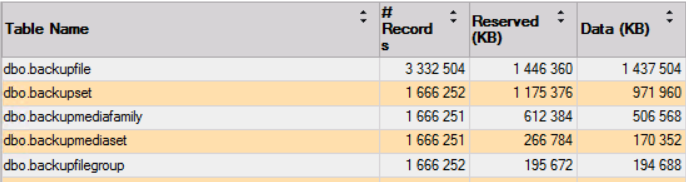
I just had to restore a database in production for my customer. Before doing the restore I have the habit to query the msdb.dbo.backupset table to get an overview of the last backups. When running my query, I felt it was taking longer than usual. So out of curiosity, I looked at the SSMS standard report “Disk Usage by Top…