

This post was written following a consulting day spent configuring the security of a client’s environment. While creating a TLS certificate, I was explaining what was at stake with the certificate and emphasizing that its validity date had to be monitored, either at the level of their CA or directly on each VM. But my client’s question left me puzzled: “How much time do I have to change it when it expires?? And is the whole instance blocked??”
This is the question I wanted to analyze in this article.
| New connection at 13:04:45 | Connection string | Result |
|---|---|---|
| Encrypted, certificate validated | Encrypt=True;TrustServerCertificate=False | OK |
| Encrypted, certificate not validated | Encrypt=True;TrustServerCertificate=True | OK |
| No encryption requested | Encrypt=False | OK |
Three successful connections to a SQL Server 2022 instance, including one that asks for encryption and validates the server certificate. Nothing special, except that the certificate presented by the instance had expired at 12:24:21, forty minutes earlier.
Ten minutes later, the same script against the same instance, from a freshly opened PowerShell window:
| New connection at 13:15:33 | Connection string | Result |
|---|---|---|
| Encrypted, certificate validated | Encrypt=True;TrustServerCertificate=False | FAILED: The received certificate has expired. |
| Encrypted, certificate not validated | Encrypt=True;TrustServerCertificate=True | OK |
The setup was absolutely identical, the only difference between the two runs is the process that opened the connection.
From these results, what I wanted to measure is which ones survive, for how long, and what makes them stop.
A certificate is the security piece that lets a client check that the server it is connecting is the one it asked for (authentication), before sending credentials and data to it. Encryption without that check protects against someone listening (confidentiality), and does not protect against someone answering in the server’s place. TLS therefore gives confidentiality, because the traffic is encrypted, and authentication, because the certificate proves who the server is.
Questions about your own setup? A dbi services consultant can look at your case.
Talk to an expert (opens in a new tab)The context in three facts
Nowadays, certificates tend to live shorter and shorter. With Ballot SC-081v3, voted by Apple, Google, Microsoft and Mozilla among others, the maximum validity of a public TLS certificate drops as follows. An internal CA is not bound by it, but more and more, security teams are asking for more frequent renewals.
| Certificate issued on or after | Certificate issued before | Maximum validity period |
|---|---|---|
| 2026-03-15 | 398 days | |
| 2026-03-15 | 2027-03-15 | 200 days |
| 2027-03-15 | 2029-03-15 | 100 days |
| 2029-03-15 | 47 days |
Source: Baseline Requirements for TLS Server Certificates, section 6.3.2, CA/Browser Forum.
The validity of the certificate is checked on the client side, not on the server side. Encrypt=True;TrustServerCertificate=False validates the chain, the name and the dates, while TrustServerCertificate=True encrypts the connection but accepts whatever certificate the server presents, without validating it. The certificate itself is chosen by SQL Server at startup: the thumbprint stored in the registry, else a suitable certificate from the Local Computer store, else a self-generated one that no client can validate.
The registry shows what will be loaded next time and the error log what was loaded last time:
$inst = "<INSTANCE_NAME>"
$id = (Get-ItemProperty "HKLM:\SOFTWARE\Microsoft\Microsoft SQL Server\Instance Names\SQL").$inst
$reg = "HKLM:\SOFTWARE\Microsoft\Microsoft SQL Server\$id\MSSQLServer\SuperSocketNetLib"
$svcName = "MSSQL`$$inst"
"registry = $((Get-ItemProperty $reg).Certificate)"
sqlcmd -S ".\$inst" -E -C -W -Q "EXEC xp_readerrorlog 0,1,N'certificate'"
registry = 051d1727dc7c0a68ec3b6aacaebdb6175b277635
2026-10-03 11:37:06.530 spid17s The certificate [Cert Hash(sha1) "051D1727DC7C0A68EC3B6AACAEBDB6175B277635"] was successfully loaded for encryption.
Let’s build an evil certificate that lives one hour
Everything below ran on SQL Server 2022, named instance TESTLB on sqlagvm1.lto.local, with an AD CS authority. The test client and server are the same machine, and every connection negotiated TLS 1.2.
Because I didn’t want to wait for a real certificate to expire, I duplicated the certificate template used for SQL Server and gave the copy a validity of one hour, with a renewal period of zero.
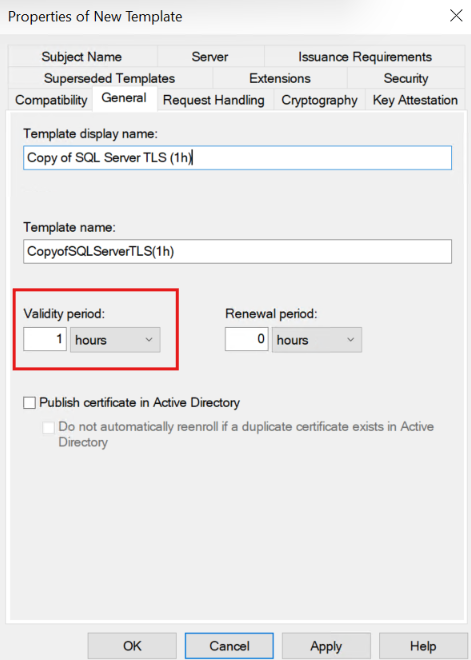
Once the template is published on the CA, the certificate is requested from the SQL Server machine, with a domain account:
$a = (Get-Certificate -Template "CopyofSQLServerTLS1h" -SubjectName "CN=sqlagvm1.lto.local" `
      -DnsName "sqlagvm1.lto.local" -CertStoreLocation Cert:\LocalMachine\My).Certificate
$a | Format-List Subject, DnsNameList, Thumbprint, NotAfter
Subject     : CN=sqlagvm1.lto.local
DnsNameList : {sqlagvm1.lto.local}
Thumbprint  : AFB7BBB468088FD141A0270F6B55F49D3FAEE2DA
NotAfter    : 03.10.2026 12:24:21
The service account gets Read on the private key (certlm.msc, Manage Private Keys), then the thumbprint goes into the registry and the instance restarts:
Set-ItemProperty $reg -Name Certificate -Value "afb7bbb468088fd141a0270f6b55f49d3faee2da"
Restart-Service $svcName -Force
2026-10-03 11:47:59.910 spid17s The certificate [Cert Hash(sha1) "AFB7BBB468088FD141A0270F6B55F49D3FAEE2DA"] was successfully loaded for encryption.
The test script opens three connections, one per client behaviour. I set Pooling=False because with a pool, Open() would hand back an existing connection and prove nothing.
$srv = "tcp:sqlagvm1.lto.local\TESTLB"
$cas = [ordered]@{
  "Encrypt + validation" = "Encrypt=True;TrustServerCertificate=False"
  "Encrypt + trust"      = "Encrypt=True;TrustServerCertificate=True"
  "Without encryption"   = "Encrypt=False"
}
"--- $(Get-Date -Format HH:mm:ss) ---"
foreach ($c in $cas.GetEnumerator()) {
  $cn = New-Object System.Data.SqlClient.SqlConnection("Server=$srv;Integrated Security=True;Pooling=False;$($c.Value)")
  try { $cn.Open(); "$($c.Key) : OK" }
  catch { "$($c.Key) : FAILED - $($_.Exception.Message)" }
  finally { $cn.Close() }
}
--- 11:48:30 ---
Encrypt + validation : OK
Encrypt + trust : OK
Without encryption : OK
Two more things before the expiry. I opened one validated connection and kept it:
$keep = New-Object System.Data.SqlClient.SqlConnection("Server=$srv;Integrated Security=True;Pooling=False;Encrypt=True;TrustServerCertificate=False")
$keep.Open()
And around 11:50 I pointed the registry back to the long-lived certificate, without restarting:
Set-ItemProperty $reg -Name Certificate -Value "051d1727dc7c0a68ec3b6aacaebdb6175b277635"
The script still returned three OKs, which is expected: the instance keeps presenting what it loaded at 11:47:59. The registry is read at startup only.
After 12:24:21
Forty minutes after the expiry, in the PowerShell window that had been running the script since 11:48, I ran the same 3 checks as before:
--- 13:04:45 ---
Encrypt + validation : OK
Encrypt + trust : OK
Without encryption : OK
The connection opened before the expiry was still alive too, which at least proved the instance had not restarted in the meantime:
$cmd = $keep.CreateCommand(); $cmd.CommandText = "SELECT GETDATE()"; $cmd.ExecuteScalar()

Saturday, 3 October 2026 13:05:05
Is the driver ignoring the dates, or is this process spared a new validation? A second driver and a second process answer that.
sqlcmd with -N asks for encryption, and without -C it validates the certificate:
C:\>sqlcmd -S "tcp:sqlagvm1.lto.local\TESTLB" -E -N -Q "SELECT 1"
Sqlcmd: Error: Microsoft ODBC Driver 17 for SQL Server : SSL Provider: The received certificate has expired.
Sqlcmd: Error: Microsoft ODBC Driver 17 for SQL Server : Client unable to establish connection.
Then the original script, unchanged, in a new PowerShell window:
--- 13:15:33 ---
Encrypt + validation : FAILED - Exception calling "Open" with "0" argument(s): "A connection was successfully established with the server, but then an error occurred during the login process. (provider: SSL Provider, error: 0 - The received certificate has expired.)"
Encrypt + trust : OK
So System.Data.SqlClient does check the dates. It fails in a new process and succeeds in the old one, at the same moment, against the same expired certificate.
| Connection | Result after expiry |
|---|---|
| Already open before the expiry | keeps working |
New, TrustServerCertificate=True | OK |
| New, validated, from a process started after the expiry | fails: The received certificate has expired |
| New, validated, from a process that had connected before the expiry | OK (but for how long?) |
In the last line, the old process never receives the certificate again, so it has nothing to validate.
Looking at the TLS session cache with Wireshark
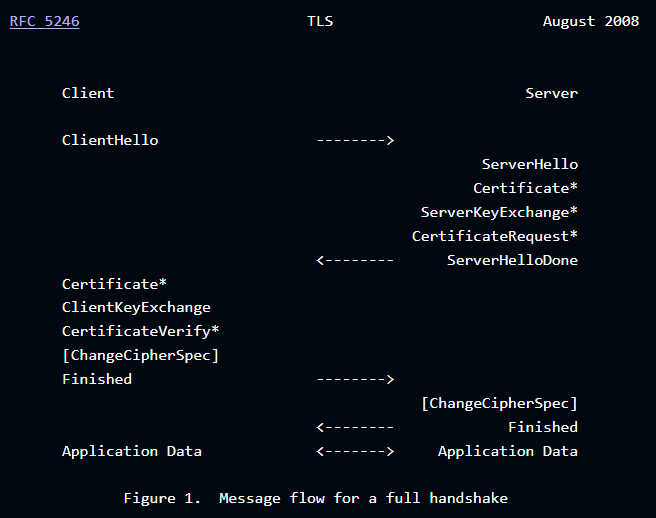
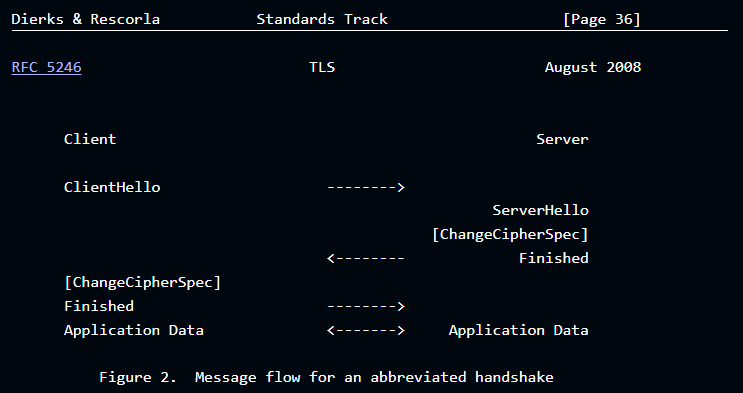
TLS 1.2 has two handshake modes: RFC 5246, section 7.3 describes the full one, where the server sends its Certificate, and the abbreviated one, where the client puts the Session ID of an earlier session in its ClientHello, the server finds it in its session cache, answers with the same ID, and both sides go straight to ChangeCipherSpec and Finished. No certificate is sent in an abbreviated handshake, so there is nothing for the client to validate.
The full handshake, where the server sends its certificate:
And the abbreviated one, used when a session is resumed:
Unfortunately, Windows has no command to list its TLS session cache. What can be observed is the handshake itself. I had to restart the VM before capturing, so the captures below were taken with the valid certificate back in place. Therefore, they show the mechanism but not the expired certificate.
The setup in Wireshark, on the server:
- capture on Adapter for loopback traffic capture, since client and server are the same machine
- find the instance port in the error log (
Server is listening on [ 'any' <ipv4> 55203]) - Decode As… TDS on that server port, because SQL Server wraps the TLS handshake inside TDS pre-login packets and a named instance does not listen on 1433
- display filter
tls.handshake
One new PowerShell process, the same validated connection opened twice:

Packets 23 to 29 are a full handshake: Server Hello, Certificate, Server Key Exchange, Server Hello Done, 1941 bytes from the server. Packets 52 to 56 are the second connection: Server Hello, Change Cipher Spec, Encrypted Handshake Message, 193 bytes, and no Certificate. The second Client Hello is also 32 bytes larger than the first once the IPv6 and IPv4 headers are accounted for, which is the size of a Session ID.
Now two different PowerShell processes, one connection each, seven seconds apart:

Two full handshakes, two Certificate messages, two identical 252-byte Client Hello. The second process did not benefit from the session the first one had just established.
This is the key of these tests: with SQLClient, a process that validated the certificate once resumes its session on later connections, and the certificate is never looked at again. A new process starts with an empty cache, receives the certificate, checks the dates and refuses.
How long does it last? The client cache lifetime is the ClientCacheTime value under HKLM\SYSTEM\CurrentControlSet\Control\SecurityProviders\SCHANNEL, in milliseconds. It does not exist by default, and the documented default is 10 hours. On my machine:
Get-ItemProperty "HKLM:\SYSTEM\CurrentControlSet\Control\SecurityProviders\SCHANNEL" |
  Select-Object ClientCacheTime, ServerCacheTime

ClientCacheTime ServerCacheTime
--------------- ---------------
Both empty, so the defaults (10 hours) apply.
To check that this setting really is the one behind the behaviour, I set it to 0, which the documentation says turns the client cache off:
$sch = "HKLM:\SYSTEM\CurrentControlSet\Control\SecurityProviders\SCHANNEL"
New-ItemProperty $sch -Name ClientCacheTime -PropertyType DWord -Value 0 -Force
Without a restart, nothing changed: the second connection of a new process was still resumed. After a restart of the machine, the same two connections from one PowerShell process with 10 seconds interval:

Two full handshakes and two Certificate messages, where the same test had shown a resumption before. The value is read at boot, and it does control the cache the SQL Server drivers go through. With the cache off, every new connection receives the certificate again and validates it.
Following these tests, I proposed a clarification to the Microsoft documentation. Microsoft reproduced the behavior, scoped it to the drivers it applies to, and updated the Expired certificates section of Certificate requirements for SQL Server.
Renewing the certificate in SQL Server
The test answers the practical question as well. I had pointed the registry to the long-lived certificate at 11:50 and left it. When the VM restarted:
2026-10-03 13:24:35.010 spid17s The certificate [Cert Hash(sha1) "051D1727DC7C0A68EC3B6AACAEBDB6175B277635"] was successfully loaded for encryption.
--- 13:25:01 ---
Encrypt + validation : OK
Encrypt + trust : OK
Without encryption : OK
Everything can be prepared online, and the restart does the switch.
| Step | Interruption |
|---|---|
| Request the new certificate and put it in the Local Computer store | none |
| Grant the service account Read on its private key | none |
Write the new thumbprint to SuperSocketNetLib\Certificate | none |
| Restart the SQL Server service | yes |
| Check the thumbprint in the error log | none |
Three points to keep in mind as well for this process to run without any errors :
- The private key permission. The documentation warns that without read permission for the service account the restart can fail.
- The names. The Subject Alternative Name must hold every name clients connect to. In an availability group that means the host name and FQDN of the replica and the listener names, on each replica’s certificate.
- The deadline. The restart has to happen before the old certificate expires.
Keep the old certificate in the store until the new thumbprint shows up in the error log because if you need to rollback, just set the old thumbprint back in the registry.
What to take from this
SQL Server loads its TLS certificate at startup and presents it until the next restart. A renewal is therefore three online steps (the store, the private key permission, the thumbprint) and one restart, which has to be done before the old certificate expires.
But missing the timing before expiration doesn’t always make clients connexion to be refused. Indeed, the clients that validate the certificate do fail, but not together: open connections survive, a process that connected before the expiry keeps resuming its TLS session without ever seeing the certificate again, for up to 10 hours by default on Windows, and a process started afterwards fails on its first connection.
None of this is something you want to repeat by hand on every instance, several times a year. My colleague Nathan Courtine scripts the whole sequence in PowerShell in Automate encryption-in-transit for SQL Server: find the certificate in the store, grant the service account Read on its private key, write the thumbprint to the registry, restart, and check that the connection is encrypted. His post covers the first deployment, and a renewal goes through the same steps with a new certificate.