

First, a little explanation about TLS, DTLS & SSL:
- TLS is Transport Layer Security. It’s a cryptographic protocol to provide communication security over the network.
- DTLS is the abbreviation of Datagram Transport Layer Security. It’s also a cryptographic protocol providing security to datagram-based applications. It is used to prevent eavesdropping, tampering or message forgery.
- SSL is Secure Sockets Layer. It’s the standard security technology
We can find 3 versions of SSL (1.0,2.0 & 3.0) and 4 versions of TLS (1.0,1.1,1.2 & 1.3) actually.
Even if some protocols are deprecated or no more used, it’s good to verify.
TLS 1.0 is available for Windows Server 2008 and more
TLS 1.1& 1.2 is available from Windows Server 2012 version and more
Questions about your own setup? A dbi services consultant can look at your case.
Talk to an expert (opens in a new tab)TLS 1.3 is available for Windows Server 2022
All these protocols expect for TLS 1.3 are under the key:
HKLM\SYSTEM\CurrentControlSet\Control\SecurityProviders\SCHANNEL\Protocols
After this key, you will have the protocol, like for example for TLS 1.2:
HKLM\SYSTEM\CurrentControlSet\Control\SecurityProviders\SCHANNEL\Protocols\TLS 1.2
Under this key with the protocol version, we will find 2 other keys: Client & Server
HKLM\SYSTEM\CurrentControlSet\Control\SecurityProviders\SCHANNEL\Protocols\TLS 1.2\Client
HKLM\SYSTEM\CurrentControlSet\Control\SecurityProviders\SCHANNEL\Protocols\TLS 1.2\Server
And finally, the value name will be Enabled as a DWORD with 1 if it’s enabled or 0 if it’s disable.
Under Windows Server 2022, the TLS 1.3 will be under the key:
HKLM\SYSTEM\CurrentControlSet\Services\HTTP\Parameters
The value name will be EnableHTTP3 as a DWORD with 1 if it’s enabled or 0 if it’s disable
Now, go to the query..
The first step is to declare and set all variables:
DECLARE @value SQL_VARIANT
DECLARE @key VARCHAR(100)
DECLARE @Protocol_status varchar(20)

DECLARE @RegistryKey varchar(70)
--SSL Protocols
DECLARE @RegistryKeySSL10 varchar(10)
DECLARE @RegistryKeySSL20 varchar(10)
DECLARE @RegistryKeySSL30 varchar(10)
-- TLS protocols
DECLARE @RegistryKeyTLS10 varchar(10)
DECLARE @RegistryKeyTLS11 varchar(10)
DECLARE @RegistryKeyTLS12 varchar(10)
DECLARE @RegistryKeyTLS13 varchar(50)
-- DTLS protocols
DECLARE @RegistryKeyDTLS10 varchar(10)
DECLARE @RegistryKeyDTLS11 varchar(10)
DECLARE @RegistryKeyDTLS12 varchar(10)

DECLARE @RegistryKeyServer varchar(10)
DECLARE @RegistryKeyClient varchar(10)

Set @RegistryKey = 'SYSTEM\CurrentControlSet\Control\SecurityProviders\SCHANNEL\Protocols'

Set @RegistryKeySSL10 = 'SSL 1.0'
Set @RegistryKeySSL20 = 'SSL 2.0'
Set @RegistryKeySSL30 = 'SSL 3.0'

Set @RegistryKeyTLS10 = 'TLS 1.0'
Set @RegistryKeyTLS11 = 'TLS 1.1'
Set @RegistryKeyTLS12 = 'TLS 1.2'
Set @RegistryKeyTLS13 = 'SYSTEM\CurrentControlSet\Services\HTTP\Parameters'

Set @RegistryKeyDTLS10 = 'DTLS 1.0'
Set @RegistryKeyDTLS11 = 'DTLS 1.1'
Set @RegistryKeyDTLS12 = 'DTLS 1.2'

Set @RegistryKeyServer = 'Server'
Set @RegistryKeyClient = 'Client'
The result will be store in a temporary table with the protocol version, function (client /server, the key value in Hexadecimal and the status (Disable/Enable)):
 -- Search for SSL 1.0
SET @value = 0
SET @key = @RegistryKey+'\'+@RegistryKeySSL10+'\'+@RegistryKeyServer
EXEC xp_regread @rootkey = 'HKEY_LOCAL_MACHINE',@key = @key,@value_name = 'Enabled', @value = @value OUTPUT
IF (CONVERT(int,CONVERT(VARBINARY(MAX), @value))  <> 0) SET @Protocol_status = 'Enable' ELSE SET @Protocol_status = 'Disable'
INSERT INTO  #result VALUES (@RegistryKeySSL10,@RegistryKeyServer,CONVERT(VARBINARY(MAX), @value),@Protocol_status)
The temporary table will give a result like this for a server:
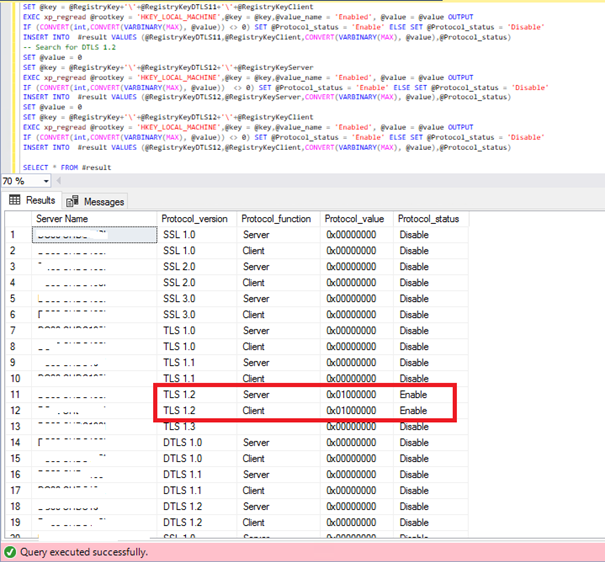
In this example TLS 1.2 is enable.
You can easy go through a CMS (Central Management Server) and select only the status “Enable”:
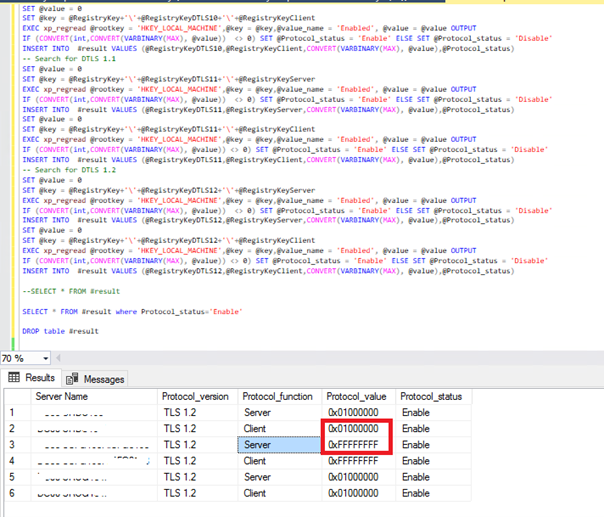
In this example, I have 3 SQL server with the TLS1.2 enable.
You can notice that 2 types of value are given: 0x01000000 & 0xFFFFFFFF
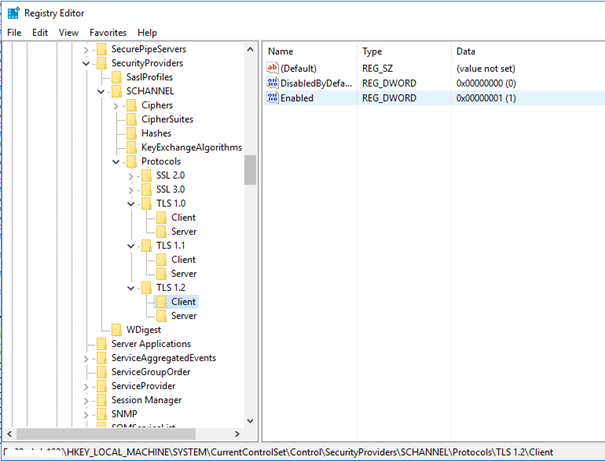
In the first case, the registry is:
In the second case, the registry is
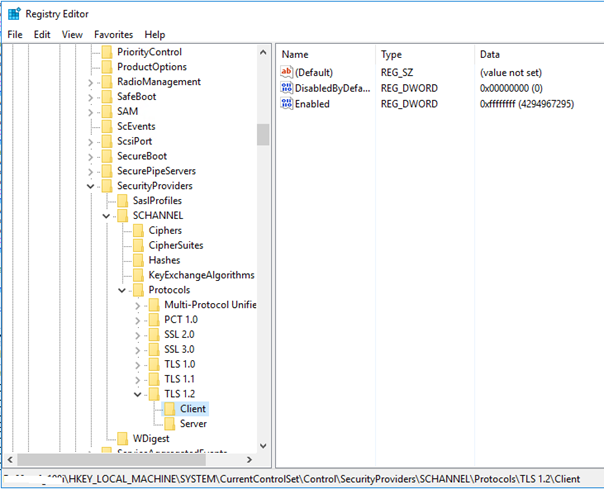
For both, the TLS 1.2 is enabled.
To finish, I give you the script to retrieve all security protocols from a SQL Server query:
DECLARE @value SQL_VARIANT
DECLARE @key VARCHAR(100)
DECLARE @Protocol_status varchar(20)

DECLARE @RegistryKey varchar(70)
--SSL Protocols
DECLARE @RegistryKeySSL10 varchar(10)
DECLARE @RegistryKeySSL20 varchar(10)
DECLARE @RegistryKeySSL30 varchar(10)
-- TLS protocols
DECLARE @RegistryKeyTLS10 varchar(10)
DECLARE @RegistryKeyTLS11 varchar(10)
DECLARE @RegistryKeyTLS12 varchar(10)
DECLARE @RegistryKeyTLS13 varchar(50)
-- DTLS protocols
DECLARE @RegistryKeyDTLS10 varchar(10)
DECLARE @RegistryKeyDTLS11 varchar(10)
DECLARE @RegistryKeyDTLS12 varchar(10)

DECLARE @RegistryKeyServer varchar(10)
DECLARE @RegistryKeyClient varchar(10)

SET @RegistryKey = 'SYSTEM\CurrentControlSet\Control\SecurityProviders\SCHANNEL\Protocols'

SET @RegistryKeySSL10 = 'SSL 1.0'
SET @RegistryKeySSL20 = 'SSL 2.0'
SET @RegistryKeySSL30 = 'SSL 3.0'

SET @RegistryKeyTLS10 = 'TLS 1.0'
SET @RegistryKeyTLS11 = 'TLS 1.1'
SET @RegistryKeyTLS12 = 'TLS 1.2'
SET @RegistryKeyTLS13 = 'SYSTEM\CurrentControlSet\Services\HTTP\Parameters'

SET @RegistryKeyDTLS10 = 'DTLS 1.0'
SET @RegistryKeyDTLS11 = 'DTLS 1.1'
SET @RegistryKeyDTLS12 = 'DTLS 1.2'

SET @RegistryKeyServer = 'Server'
SET @RegistryKeyClient = 'Client'

CREATE TABLE #result
(
	Protocol_version varchar(10),
	Protocol_function varchar(10),
	Protocol_value varbinary(max),
	Protocol_status varchar (20)

)

-- Search for SSL 1.0
SET @value = 0
SET @key = @RegistryKey+'\'+@RegistryKeySSL10+'\'+@RegistryKeyServer
EXEC xp_regread @rootkey = 'HKEY_LOCAL_MACHINE',@key = @key,@value_name = 'Enabled', @value = @value OUTPUT
IF (CONVERT(int,CONVERT(VARBINARY(MAX), @value))  <> 0) SET @Protocol_status = 'Enable' ELSE SET @Protocol_status = 'Disable'
INSERT INTO  #result VALUES (@RegistryKeySSL10,@RegistryKeyServer,CONVERT(VARBINARY(MAX), @value),@Protocol_status)
SET @value = 0
SET @key = @RegistryKey+'\'+@RegistryKeySSL10+'\'+@RegistryKeyClient
EXEC xp_regread @rootkey = 'HKEY_LOCAL_MACHINE',@key = @key,@value_name = 'Enabled', @value = @value OUTPUT
IF (CONVERT(int,CONVERT(VARBINARY(MAX), @value))  <> 0) SET @Protocol_status = 'Enable' ELSE SET @Protocol_status = 'Disable'
INSERT INTO  #result VALUES (@RegistryKeySSL10,@RegistryKeyClient,CONVERT(VARBINARY(MAX), @value),@Protocol_status)
-- Search for SSL 2.0
SET @value = 0
SET @key = @RegistryKey+'\'+@RegistryKeySSL20+'\'+@RegistryKeyServer
EXEC xp_regread @rootkey = 'HKEY_LOCAL_MACHINE',@key = @key,@value_name = 'Enabled', @value = @value OUTPUT
IF (CONVERT(int,CONVERT(VARBINARY(MAX), @value))  <> 0) SET @Protocol_status = 'Enable' ELSE SET @Protocol_status = 'Disable'
INSERT INTO  #result VALUES (@RegistryKeySSL20,@RegistryKeyServer,CONVERT(VARBINARY(MAX), @value),@Protocol_status)
SET @value = 0
SET @key = @RegistryKey+'\'+@RegistryKeySSL20+'\'+@RegistryKeyClient
EXEC xp_regread @rootkey = 'HKEY_LOCAL_MACHINE',@key = @key,@value_name = 'Enabled', @value = @value OUTPUT
IF (CONVERT(int,CONVERT(VARBINARY(MAX), @value)) <> 0) SET @Protocol_status = 'Enable' ELSE SET @Protocol_status = 'Disable'
INSERT INTO  #result VALUES (@RegistryKeySSL20,@RegistryKeyClient,CONVERT(VARBINARY(MAX), @value),@Protocol_status)
-- Search for SSL 3.0
SET @value = 0
SET @key = @RegistryKey+'\'+@RegistryKeySSL30+'\'+@RegistryKeyServer
EXEC xp_regread @rootkey = 'HKEY_LOCAL_MACHINE',@key = @key,@value_name = 'Enabled', @value = @value OUTPUT
IF (CONVERT(int,CONVERT(VARBINARY(MAX), @value)) = 1) SET @Protocol_status = 'Enable' ELSE SET @Protocol_status = 'Disable'
INSERT INTO  #result VALUES (@RegistryKeySSL30,@RegistryKeyServer,CONVERT(VARBINARY(MAX), @value),@Protocol_status)
SET @value = 0
SET @key = @RegistryKey+'\'+@RegistryKeySSL30+'\'+@RegistryKeyClient
EXEC xp_regread @rootkey = 'HKEY_LOCAL_MACHINE',@key = @key,@value_name = 'Enabled', @value = @value OUTPUT
IF (CONVERT(int,CONVERT(VARBINARY(MAX), @value))  <> 0) SET @Protocol_status = 'Enable' ELSE SET @Protocol_status = 'Disable'
INSERT INTO  #result VALUES (@RegistryKeySSL30,@RegistryKeyClient,CONVERT(VARBINARY(MAX), @value),@Protocol_status)

-- Search for TLS 1.0
SET @value = 0
SET @key = @RegistryKey+'\'+@RegistryKeyTLS10+'\'+@RegistryKeyServer
EXEC xp_regread @rootkey = 'HKEY_LOCAL_MACHINE',@key = @key,@value_name = 'Enabled', @value = @value OUTPUT
IF (CONVERT(int,CONVERT(VARBINARY(MAX), @value)) <> 0) SET @Protocol_status = 'Enable' ELSE SET @Protocol_status = 'Disable'
INSERT INTO  #result VALUES (@RegistryKeyTLS10,@RegistryKeyServer,CONVERT(VARBINARY(MAX), @value),@Protocol_status)
SET @value = 0
SET @key = @RegistryKey+'\'+@RegistryKeyTLS10+'\'+@RegistryKeyClient
EXEC xp_regread @rootkey = 'HKEY_LOCAL_MACHINE',@key = @key,@value_name = 'Enabled', @value = @value OUTPUT
IF (CONVERT(int,CONVERT(VARBINARY(MAX), @value))  <> 0) SET @Protocol_status = 'Enable' ELSE SET @Protocol_status = 'Disable'
INSERT INTO  #result VALUES (@RegistryKeyTLS10,@RegistryKeyClient,CONVERT(VARBINARY(MAX), @value),@Protocol_status)
-- Search for TLS 1.1
SET @value = 0
SET @key = @RegistryKey+'\'+@RegistryKeyTLS11+'\'+@RegistryKeyServer
EXEC xp_regread @rootkey = 'HKEY_LOCAL_MACHINE',@key = @key,@value_name = 'Enabled', @value = @value OUTPUT
IF (CONVERT(int,CONVERT(VARBINARY(MAX), @value))  <> 0) SET @Protocol_status = 'Enable' ELSE SET @Protocol_status = 'Disable'
INSERT INTO  #result VALUES (@RegistryKeyTLS11,@RegistryKeyServer,CONVERT(VARBINARY(MAX), @value),@Protocol_status)
SET @value = 0
SET @key = @RegistryKey+'\'+@RegistryKeyTLS11+'\'+@RegistryKeyClient
EXEC xp_regread @rootkey = 'HKEY_LOCAL_MACHINE',@key = @key,@value_name = 'Enabled', @value = @value OUTPUT
IF (Convert(int,CONVERT(VARBINARY(MAX), @value)) <> 0) SET @Protocol_status = 'Enable' ELSE SET @Protocol_status = 'Disable'
INSERT INTO  #result VALUES (@RegistryKeyTLS11,@RegistryKeyClient,CONVERT(VARBINARY(MAX), @value),@Protocol_status)
-- Search for TLS 1.2
SET @value = 0
SET @key = @RegistryKey+'\'+@RegistryKeyTLS12+'\'+@RegistryKeyServer
EXEC xp_regread @rootkey = 'HKEY_LOCAL_MACHINE',@key = @key,@value_name = 'Enabled', @value = @value OUTPUT
IF (CONVERT(int,CONVERT(VARBINARY(MAX), @value))  <> 0) SET @Protocol_status = 'Enable' ELSE SET @Protocol_status = 'Disable'
INSERT INTO  #result VALUES (@RegistryKeyTLS12,@RegistryKeyServer,CONVERT(VARBINARY(MAX), @value),@Protocol_status)
SET @value = 0
SET @key = @RegistryKey+'\'+@RegistryKeyTLS12+'\'+@RegistryKeyClient
EXEC xp_regread @rootkey = 'HKEY_LOCAL_MACHINE',@key = @key,@value_name = 'Enabled', @value = @value OUTPUT
IF (CONVERT(int,CONVERT(VARBINARY(MAX), @value)) <> 0) SET @Protocol_status = 'Enable' ELSE SET @Protocol_status = 'Disable'
INSERT INTO  #result VALUES (@RegistryKeyTLS12,@RegistryKeyClient,CONVERT(VARBINARY(MAX), @value),@Protocol_status)
-- TLS 1.3
SET @value = 0
SET @key = @RegistryKeyTLS13
EXEC xp_regread @rootkey = 'HKEY_LOCAL_MACHINE',@key = @key,@value_name = 'EnableHTTP3', @value = @value OUTPUT
IF (CONVERT(int,CONVERT(VARBINARY(MAX), @value)) <> 0) SET @Protocol_status = 'Enable' ELSE SET @Protocol_status = 'Disable'
INSERT INTO  #result VALUES ('TLS 1.3','',CONVERT(VARBINARY(MAX), @value),@Protocol_status)

-- Search for DTLS 1.0
SET @value = 0
SET @key = @RegistryKey+'\'+@RegistryKeyDTLS10+'\'+@RegistryKeyServer
EXEC xp_regread @rootkey = 'HKEY_LOCAL_MACHINE',@key = @key,@value_name = 'Enabled', @value = @value OUTPUT
IF (CONVERT(int,CONVERT(VARBINARY(MAX), @value)) <> 0) SET @Protocol_status = 'Enable' ELSE SET @Protocol_status = 'Disable'
INSERT INTO  #result VALUES (@RegistryKeyDTLS10,@RegistryKeyServer,CONVERT(VARBINARY(MAX), @value),@Protocol_status)
SET @value = 0
SET @key = @RegistryKey+'\'+@RegistryKeyDTLS10+'\'+@RegistryKeyClient
EXEC xp_regread @rootkey = 'HKEY_LOCAL_MACHINE',@key = @key,@value_name = 'Enabled', @value = @value OUTPUT
IF (CONVERT(int,CONVERT(VARBINARY(MAX), @value))  <> 0) SET @Protocol_status = 'Enable' ELSE SET @Protocol_status = 'Disable'
INSERT INTO  #result VALUES (@RegistryKeyDTLS10,@RegistryKeyClient,CONVERT(VARBINARY(MAX), @value),@Protocol_status)
-- Search for DTLS 1.1
SET @value = 0
SET @key = @RegistryKey+'\'+@RegistryKeyDTLS11+'\'+@RegistryKeyServer
EXEC xp_regread @rootkey = 'HKEY_LOCAL_MACHINE',@key = @key,@value_name = 'Enabled', @value = @value OUTPUT
IF (CONVERT(int,CONVERT(VARBINARY(MAX), @value))  <> 0) SET @Protocol_status = 'Enable' ELSE SET @Protocol_status = 'Disable'
INSERT INTO  #result VALUES (@RegistryKeyDTLS11,@RegistryKeyServer,CONVERT(VARBINARY(MAX), @value),@Protocol_status)
SET @value = 0
SET @key = @RegistryKey+'\'+@RegistryKeyDTLS11+'\'+@RegistryKeyClient
EXEC xp_regread @rootkey = 'HKEY_LOCAL_MACHINE',@key = @key,@value_name = 'Enabled', @value = @value OUTPUT
IF (CONVERT(int,CONVERT(VARBINARY(MAX), @value)) <> 0) SET @Protocol_status = 'Enable' ELSE SET @Protocol_status = 'Disable'
INSERT INTO  #result VALUES (@RegistryKeyDTLS11,@RegistryKeyClient,CONVERT(VARBINARY(MAX), @value),@Protocol_status)
-- Search for DTLS 1.2
SET @value = 0
SET @key = @RegistryKey+'\'+@RegistryKeyDTLS12+'\'+@RegistryKeyServer
EXEC xp_regread @rootkey = 'HKEY_LOCAL_MACHINE',@key = @key,@value_name = 'Enabled', @value = @value OUTPUT
IF (CONVERT(int,CONVERT(VARBINARY(MAX), @value))  <> 0) SET @Protocol_status = 'Enable' ELSE SET @Protocol_status = 'Disable'
INSERT INTO  #result VALUES (@RegistryKeyDTLS12,@RegistryKeyServer,CONVERT(VARBINARY(MAX), @value),@Protocol_status)
SET @value = 0
SET @key = @RegistryKey+'\'+@RegistryKeyDTLS12+'\'+@RegistryKeyClient
EXEC xp_regread @rootkey = 'HKEY_LOCAL_MACHINE',@key = @key,@value_name = 'Enabled', @value = @value OUTPUT
IF (CONVERT(int,CONVERT(VARBINARY(MAX), @value)) <> 0) SET @Protocol_status = 'Enable' ELSE SET @Protocol_status = 'Disable'
INSERT INTO  #result VALUES (@RegistryKeyDTLS12,@RegistryKeyClient,CONVERT(VARBINARY(MAX), @value),@Protocol_status)

SELECT * FROM #result

SELECT * FROM #result where Protocol_status='Enable'

DROP table #result
I hope this script can help you and you will enjoy searching the security protocols enabled…