

By Franck Pachot
.
When we have a tablespace with multiple datafiles, we are used to seeing the datafiles filled evenly, the extents being allocated in a round-robin fashion. In the old time, we used that to maximize performance, distributing the tables to all disks. Today, we use LVM striping, maximum Inter-Policy, ASM even distribution. And we may even use bigfile tablespaces, so that we don’t care about having multiple datafiles.
But recently, during test phase of migration, I came upon something like this:
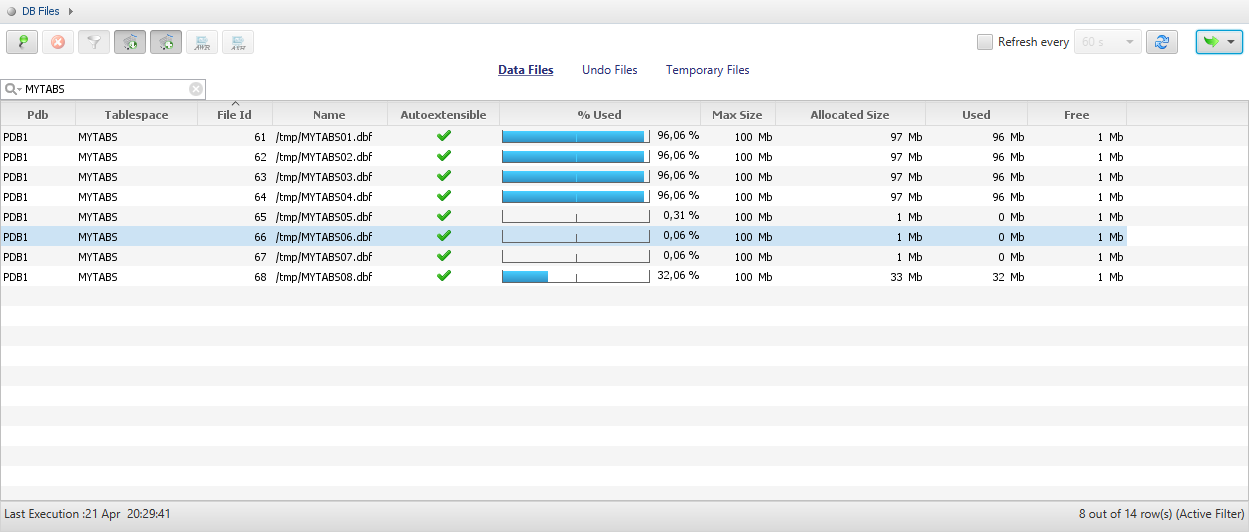
To reproduce the case, I’ve created a tablespace with 8 datafiles:
SQL> create tablespace MYTABS datafile
  2  '/tmp/MYTABS01.dbf' size 1M autoextend on maxsize 100M,
  3  '/tmp/MYTABS02.dbf' size 1M autoextend on maxsize 100M,
  4  '/tmp/MYTABS03.dbf' size 1M autoextend on maxsize 100M,
  5  '/tmp/MYTABS04.dbf' size 1M autoextend on maxsize 100M,
  6  '/tmp/MYTABS05.dbf' size 1M autoextend on maxsize 100M,
  7  '/tmp/MYTABS06.dbf' size 1M autoextend on maxsize 100M,
  8  '/tmp/MYTABS07.dbf' size 1M autoextend on maxsize 100M,
  9  '/tmp/MYTABS08.dbf' size 1M autoextend on maxsize 100M
 10  /

Tablespace created.
SecureFiles
This was a 11g to 12c migration, with Data Pump, and a good occasion to convert all LOB to SecureFiles with the transform=lob_storage:securefile parameter. And this tablespace is the one where the LOB segments are stored. I reproduced it with:
SQL> create table MYTABLE ( x clob ) tablespace USERS
  2  LOB(x) store as securefile MYLOBSEG (tablespace MYTABS disable storage in row);

Table created.
Then I inserted about 80MB:
SQL> insert into MYTABLE select lpad('x',100000) from xmltable('1 to 8000') ;
8000 rows created.

SQL> select file_id,file_name,blocks,user_blocks from dba_data_files where tablespace_name='MYTABS' order by file_id;

   FILE_ID FILE_NAME                          BLOCKS USER_BLOCKS
---------- ------------------------------ ---------- -----------
        61 /tmp/MYTABS01.dbf                     128         120
        62 /tmp/MYTABS02.dbf                     128         120
        63 /tmp/MYTABS03.dbf                     128         120
        64 /tmp/MYTABS04.dbf                    9344        9336
        65 /tmp/MYTABS05.dbf                     128         120
        66 /tmp/MYTABS06.dbf                     128         120
        67 /tmp/MYTABS07.dbf                     128         120
        68 /tmp/MYTABS08.dbf                     128         120

8 rows selected.

SQL> select file_id,segment_type,sum(blocks) from dba_extents where tablespace_name='MYTABS' group by file_id,segment_type order by file_id,segment_type;

   FILE_ID SEGMENT_TYPE       SUM(BLOCKS)
---------- ------------------ -----------
        64 LOBSEGMENT                9216
        65 LOBINDEX                     8
        65 LOBSEGMENT                  24
And I continued to load rows, and observed the datafiles filled to their maxsize one after the other, without numeric or alphabetical order.
SQL> select file_id,file_name,blocks,user_blocks from dba_data_files where tablespace_name='MYTABS' order by file_id;

   FILE_ID FILE_NAME                          BLOCKS USER_BLOCKS
---------- ------------------------------ ---------- -----------
        61 /tmp/MYTABS01.dbf                    8320        8312
        62 /tmp/MYTABS02.dbf                   12416       12408
        63 /tmp/MYTABS03.dbf                   12416       12408
        64 /tmp/MYTABS04.dbf                   12416       12408
        65 /tmp/MYTABS05.dbf                     128         120
        66 /tmp/MYTABS06.dbf                     128         120
        67 /tmp/MYTABS07.dbf                     128         120
        68 /tmp/MYTABS08.dbf                     128         120

8 rows selected.

SQL> select file_id,segment_type,sum(blocks) from dba_extents where tablespace_name='MYTABS' group by file_id,segment_type order by file_id,segment_type;

   FILE_ID SEGMENT_TYPE       SUM(BLOCKS)
---------- ------------------ -----------
        61 LOBSEGMENT                8192
        62 LOBSEGMENT               12288
        63 LOBSEGMENT               12288
        64 LOBSEGMENT               12288
        65 LOBINDEX                     8
        65 LOBSEGMENT                  24
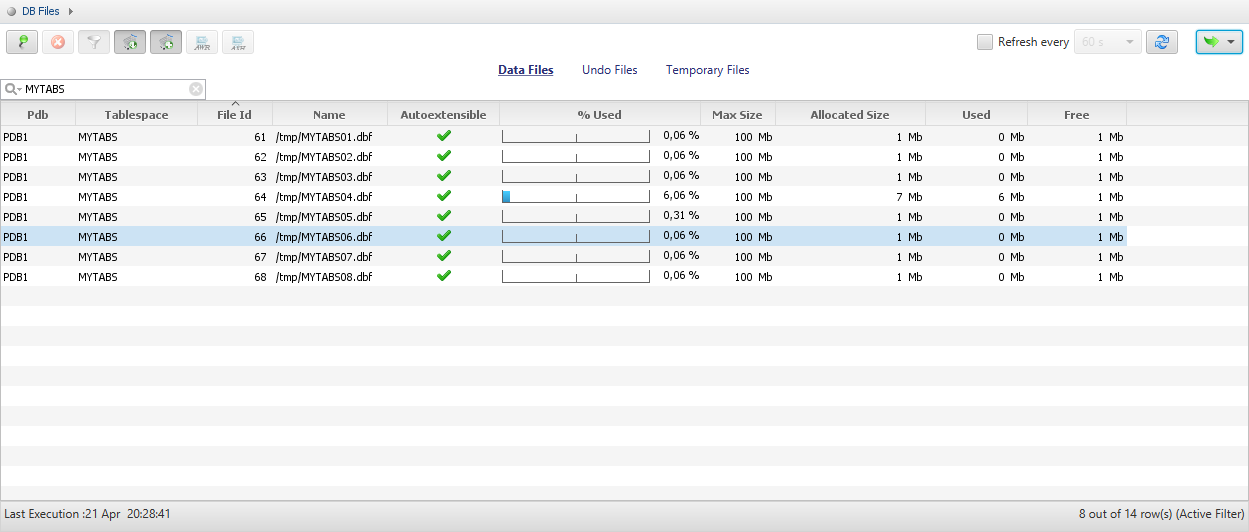
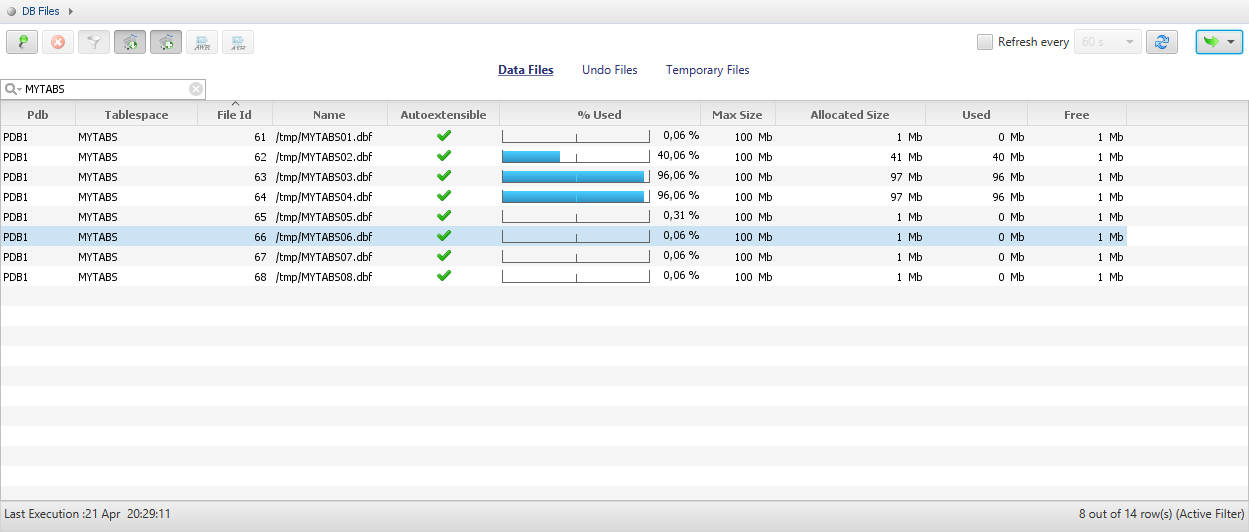
Here are some screenshots during this load
BasicFiles
This occurs only with SecureFiles. With the same load into LOB stored as BasicFile I got the following distribution:
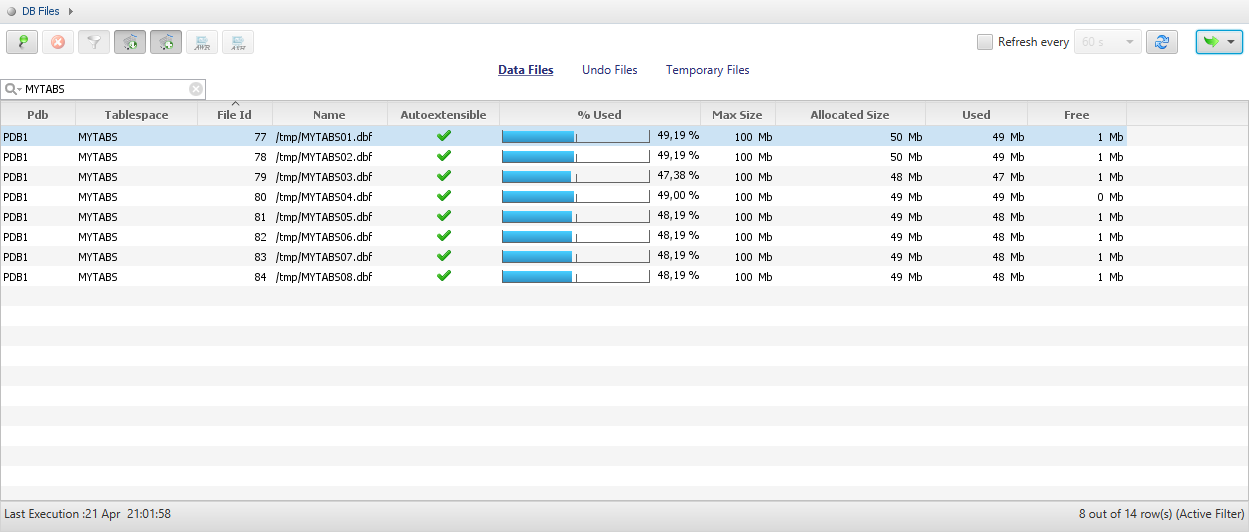
Note that the inserts to BasicFile were about two times slower than the same into SecureFiles.
So what?
I don’t see any bad consequences about that, and this may even be an improvement when concurrent sessions are loading the LOBs. When the datafile picked-up looks random, a guess is that it depends on a process ID to try to distribute the concurrent load. And if you want to distribute data over multiple disks, then you should do it at a lower level. However, it is 30 years behavior that changes and it’s better to be aware of it: datafiles may reach their maxsize even when the tablespace is not full. I order to be sure that it is the expected behavior, I opened an SR with easy to reproduce testcase. Status is ‘review update’ for 9 days (SR 3-14677784041) and I’ll update this post is I get an answer.