In GoldenGate, processes have a few options that can be managed to fit your needs. When creating an extract, for instance, you can act on the following parameters:
autoStart.enabled: whether the process will start automatically after the Administration Server starts.autoStart.delay: delay in seconds before starting the process.autoRestart.enabled: whether to restart the process after it fails.autoRestart.onSuccess: the process is only restarted if it fails.autoRestart.delay: waiting time (in seconds) before attempting to restart a process once it fails.autoRestart.retries: maximum number of retries before stopping restart attempts.autoRestart.window: timeframe before GoldenGate will attempt to restart the process again.autoRestart.disableOnFailure: if set to True, GoldenGate will disable the restart if it fails to restart within theretries/windowsetting. You will have to start the process manually if this happens.
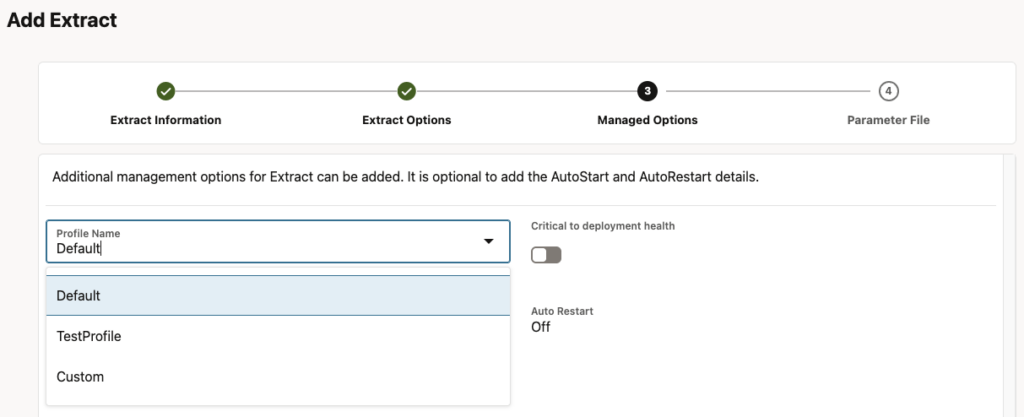
In the web UI, an extract profile can be customized during the third step of an extract creation called Managed Options. Here, you can choose to use the default profile, a user-defined profile or custom settings specific to the new process.
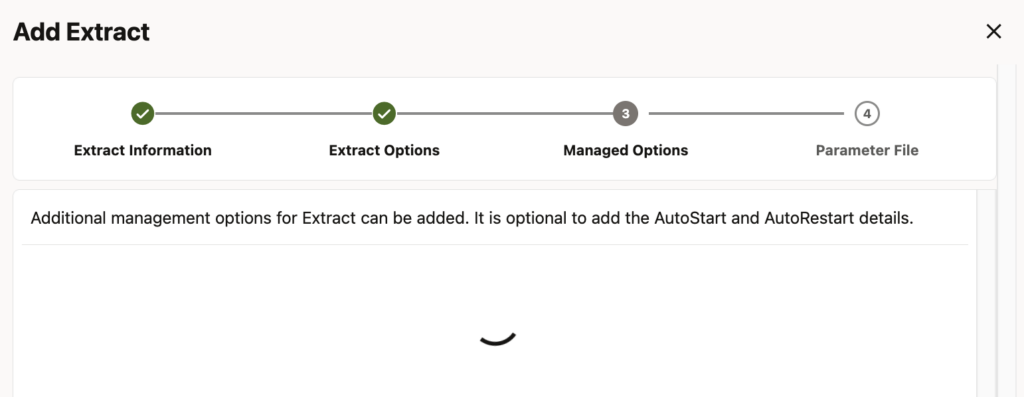
However, a bug was introduced in GoldenGate 26ai. If you create a custom profile with the adminclient, the web UI will sometimes hang when creating any new extract or replicat. This also affects 23ai installations that are patched to 26ai, so be very careful when patching an existing GoldenGate 23ai setup containing custom profiles ! After patching, you will not be able to access and manage your profiles anymore from the web UI.
What is the bug exactly ?
To reproduce the bug, simply create an extract from the adminclient.
OGG (https://vmogg ogg_test_01) 1> info profile *
                                   Auto     Delay     Auto                Wait     Reset     Disable
Name                              Start   Seconds  Restart   Retries   Seconds   Seconds  on Failure
--------------------------------  -----  --------  -------  --------  --------  --------  ----------
Default                              No                 No
OGG (https://vmogg ogg_test_01) 2> add profile TestProfile autostart no
OGG (https://vmogg ogg_test_01) 3> info profile *
                                   Auto     Delay     Auto                Wait     Reset     Disable
Name                              Start   Seconds  Restart   Retries   Seconds   Seconds  on Failure
--------------------------------  -----  --------  -------  --------  --------  --------  ----------
Default                              No                 No
TestProfile                          No                 No
In a GoldenGate 23ai web UI, you will see the following when creating an extract, in the Managed Options step:
However, in GoldenGate 26ai, the extract creation hangs indefinitely, and no error gets reported.
Before the bug is solved by Oracle, what can you do ? The first thing you can do is modify the Default GoldenGate profile, so that all extracts with this profile are affected. However, it means that you cannot fine-tune the settings for different processes, with different needs. After all, it is the reason why you should define profiles in the first place.
Is there a workaround ?
But if you still want to overcome this bug and having working profiles on 26ai until the bug gets corrected, you have two ways of doing this:
- Create profiles from the web UI. You can do this in the Managed Process Profiles tab of your deployment. Profiles created through this tab do not make the web UI hang indefinitely.
- Create profiles with the REST API. As presented in this blog, you can do this in two steps :
- Creation of a new profile with the Create Configuration Value endpoint on the
ogg:managedProcessSettingstype. - Creation of a new configuration
isDefaultset toFalseon theogg:configDataDescriptiontype.
- Creation of a new profile with the Create Configuration Value endpoint on the
This way, you can create or recreate your profiles until the bug is solved.
![Thumbnail [60x60]](https://www.dbi-services.com/blog/wp-content/uploads/2025/05/JDE_Web-1-scaled.jpg)
![Thumbnail [90x90]](https://www.dbi-services.com/blog/wp-content/uploads/2025/05/martin_bracher_2048x1536.jpg)