During the preparation of an Oracle Fusion Middleware upgrade from 12.2.1.4 to 14.1.2, the Upgrade Assistant readiness check flagged the WebLogic schema in an ADF domain. The error identified during the investigation was INVALID_WLS_COMPONENT_SCHEMA_OWNER.
I was already aware of the documented change to WLSSchemaDataSource in 14.1.2. Before modifying the existing domain, however, I wanted to establish whether the failure matched that prerequisite and whether the readiness checks exposed anything else that needed attention.
I am sharing the findings because the same message can appear in other Fusion Middleware environments. The useful part is connecting what the assistant selected, what the database actually contains, and what Oracle expects for the upgrade.
The findings below were collected before changing the data sources, upgrading the schemas, or reconfiguring the domains. Schema prefixes are retained to make the evidence readable; database hosts and connection strings are omitted.
The Oracle requirement
Oracle documents this prerequisite in Upgrading to the Oracle Fusion Middleware Infrastructure 14c, under Verify the Database User for the WLSSchemaDataSource Data Source.
For a domain-based schema upgrade, Upgrade Assistant uses WLSSchemaDataSource to obtain schema information. If it references <PREFIX>_WLS_RUNTIME, Oracle requires changing the user to <PREFIX>_WLS. The WLS schema page must also identify the correct owner.
Oracle recommends making the data source change through the existing 12c Administration Console so that subsequent upgrade and reconfiguration screens receive the appropriate values. In 14.1.2, the runtime account has a separate data source, WLSRuntimeSchemaDataSource, created during domain reconfiguration.
The intended mapping is therefore:
| Data source | Database user |
|---|---|
WLSSchemaDataSource | <PREFIX>_WLS |
WLSRuntimeSchemaDataSource | <PREFIX>_WLS_RUNTIME |
Knowing this requirement gave me a strong starting point. I still wanted evidence from the environment before applying it.
What the ADF readiness screen actually showed
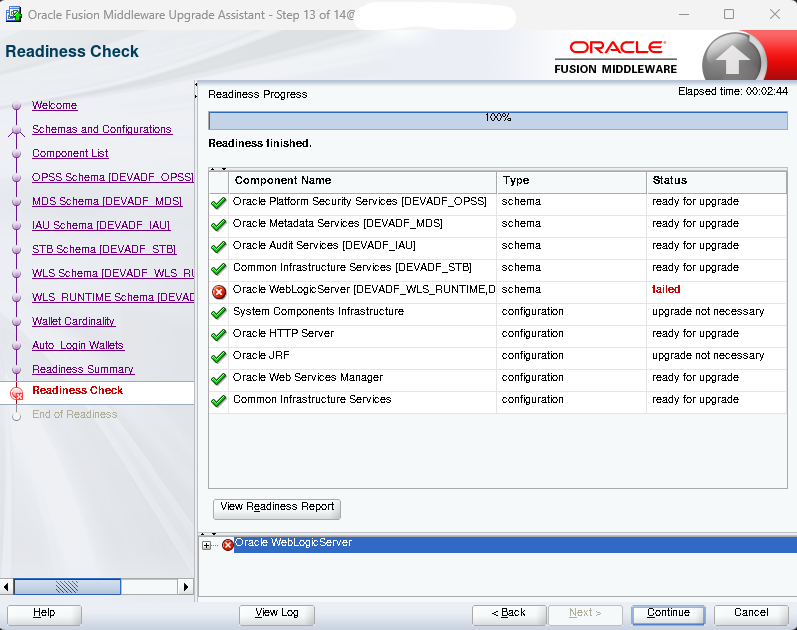
The readiness check reached 100%, with the WebLogic schema marked as failed. OPSS, MDS, IAU and STB were marked ready for upgrade.
The failed WebLogic entry referenced DEVADF_WLS_RUNTIME. That was the first useful clue: the account selected for the check was the runtime account.
The screen did not establish an ADF application defect or a failed schema migration. It showed a failed readiness check for a shared infrastructure component. That distinction matters when deciding where to investigate.
Checking the database before changing the configuration
The database checks established the following:
| Check | Observed result |
|---|---|
| Database version | Oracle Database 19c, 19.24 |
DEVADF_WLS account | OPEN |
DEVADF_WLS_RUNTIME account | OPEN |
Registered owner for component WLS | DEVADF_WLS |
| Registered WLS schema version | 12.2.1.0.0 |
| Registered WLS schema status | VALID |
User configured in WLSSchemaDataSource | DEVADF_WLS_RUNTIME |
For readers reproducing these checks, the following read-only queries show the relevant account and registry information. Execute them with an appropriately privileged account in the database service or container used by the domain:
SELECT username, account_status
FROM dba_users
WHERE username IN ('DEVADF_WLS', 'DEVADF_WLS_RUNTIME')
ORDER BY username;

SELECT comp_id, owner, version, status
FROM schema_version_registry
WHERE comp_id = 'WLS'
AND owner IN ('DEVADF_WLS', 'DEVADF_WLS_RUNTIME');
These queries are provided as a reproducible check; the table above summarizes the observed findings rather than reproducing a terminal transcript.
The registered component owner and the data source user differed in exactly the way described by Oracle. Both accounts existed and were open, so a missing or locked account did not explain the observed state. An OPEN account does not, by itself, prove that its configured password is correct or that a JDBC connection succeeds. Similarly, VALID in the registry is not a complete object-integrity or application-health check.
Those limits matter: the evidence supported the documented owner mismatch without justifying broader claims about the entire environment.
Applying the correction
The following steps describe the correction to apply to the existing 12c domain before continuing with the upgrade.
- Open the existing WebLogic 12c Administration Console. Navigate to Services → Data Sources → WLSSchemaDataSource. If configuration locking is enabled, select Lock & Edit.
- Update the database user. Under Configuration → Connection Pool, change the
userproperty fromDEVADF_WLS_RUNTIMEtoDEVADF_WLS. Keep the existing JDBC URL unless a separate connection issue requires changing it. - Set the corresponding credentials. Enter and confirm the password for
DEVADF_WLS. Do not assume that the component owner and runtime account share the same password. - Save and activate the change. Click Save, then Activate Changes where applicable. Follow any restart requirement displayed by the console. With the target server running, use Monitoring → Testing to test the data source connection on its target. A successful connection validates connectivity and authentication; readiness still needs to be checked separately.
- Rerun Upgrade Assistant in readiness mode. Start the tool from the new 14.1.2 Oracle Home:
"$ORACLE_HOME/oracle_common/upgrade/bin/ua" -readinessHere,ORACLE_HOMEmust point to the target 14.1.2 installation. Select the same domain and check that the WLS Schema page identifiesDEVADF_WLS. Review the new report and resolve any remaining failures before proceeding with the schema upgrade.
This change applies to WLSSchemaDataSource. Keep the DEVADF_WLS_RUNTIME database account: Oracle uses it with the separate WLSRuntimeSchemaDataSource introduced in 14.1.2.
Conclusion
The findings were consistent with the prerequisite I had already identified in Oracle’s documentation. Checking the database and domain configuration first gave me a clear basis for applying the change. The next step was to update WLSSchemaDataSource to use DEVADF_WLS with the corresponding credentials, then rerun readiness before proceeding with the upgrade.
If you encounter the same error, comparing the selected schema user, the data source configuration and the registered component owner is a useful starting point. It helps establish whether the documented change applies to your environment before you modify it.
![Thumbnail [60x60]](https://www.dbi-services.com/blog/wp-content/uploads/2022/09/DDI_web-min-scaled.jpg)