
Summer is already around the corner, but it’s not too late for some spring cleaning!
If you manage SQL Server databases with In-Memory tables, you may have already tried to delete a MEMORY_OPTIMIZED_DATA file or FILEGROUP, only to find that SQL Server simply won’t let you.
This limitation has existed since the debut of In-Memory with SQL Server 2014, and the only workaround until now was to recreate the database from scratch.
It is with SQL Server 2025 that Microsoft finally lifts this restriction. In this article, we will analyze these behavioral differences before and after this version.
To conclude, we will draw on the key points presented by Thodoris Katsimanis, DBA Team Technology Manager at Kaizen Gaming, during his session at SQLBits 2026 on In-Memory tables, in order to summarize the challenges and benefits this feature can bring to production.
The Legacy Struggle: In-Memory Limitations from 2014 to 2022
To demonstrate this difference in behavior, we will create a database under SQL Server 2022 with an In-Memory table loaded with data, and then attempt to delete the associated files and FILEGROUP:
DECLARE @DataPath NVARCHAR(512) = '<YOUR_DATA_FOLDER>';
DECLARE @LogPath  NVARCHAR(512) = '<YOUR_LOG_FOLDER>';
DECLARE @SQL      NVARCHAR(MAX);

SET @SQL = N'
CREATE DATABASE TestInMemory
ON PRIMARY (
    NAME = TestInMemory_data,
    FILENAME = ''' + @DataPath + N'TestInMemory.mdf''
),
FILEGROUP XTP_FG CONTAINS MEMORY_OPTIMIZED_DATA (
    NAME = TestInMemory_XTP,
    FILENAME = ''' + @DataPath + N'TestInMemory_XTP''
)
LOG ON (
    NAME = TestInMemory_log,
    FILENAME = ''' + @LogPath + N'TestInMemory_log.ldf''
);';

EXEC sp_executesql @SQL;

USE TestInMemory;
GO

CREATE TABLE dbo.TestTable
(
    ID    INT          NOT NULL,
    Val   NVARCHAR(50) NOT NULL,
    CONSTRAINT PK_TestTable PRIMARY KEY NONCLUSTERED HASH (ID)
        WITH (BUCKET_COUNT = 1024)
)
WITH (MEMORY_OPTIMIZED = ON, DURABILITY = SCHEMA_AND_DATA);
GO

INSERT INTO dbo.TestTable VALUES (1, 'Hello'), (2, 'World');
GO
Once our table is loaded (to ensure the table exists and is not just metadata), we can then delete it:
DROP TABLE dbo.TestTable;
GO

SELECT name, type_desc
FROM sys.tables
WHERE is_memory_optimized = 1;
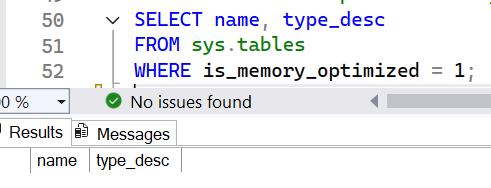
The verification clearly shows that no more In-Memory objects exist. We can therefore proceed with the famous cleanup of the files linked to the table we deleted:
ALTER DATABASE TestInMemory
REMOVE FILE TestInMemory_XTP;
GO

ALTER DATABASE TestInMemory
REMOVE FILEGROUP XTP_FG;
GO
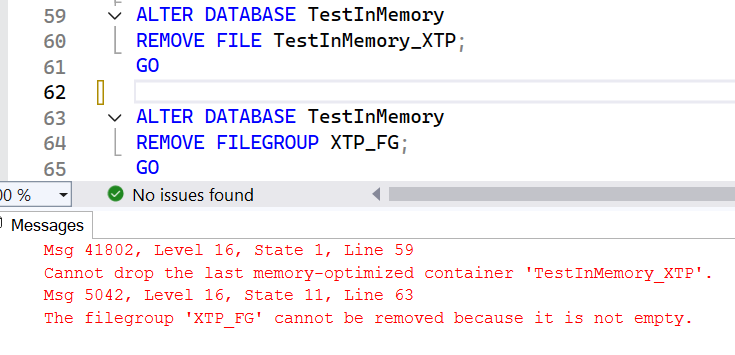
And here is the famous error, impossible to bypass it and sort things out.
Note: This cleanup challenge specifically affects tables using DURABILITY = SCHEMA_AND_DATA, as they are the only ones where data persists within physical files on disk.
SQL Server 2025: Breaking the In-Memory Cleanup Barrier
SQL Server 2025 does not just lift the restriction: it also introduces a new DMV, sys.dm_db_xtp_undeploy_status, which exposes the precise reason why the deletion is not yet possible.
By querying it at the same stage as our previous example, here is what it returns:
USE TestInMemory;
GO

SELECT
    deployment_state,
    deployment_state_desc,
    undeploy_lsn,
    start_of_log_lsn
FROM sys.dm_db_xtp_undeploy_status;
GO
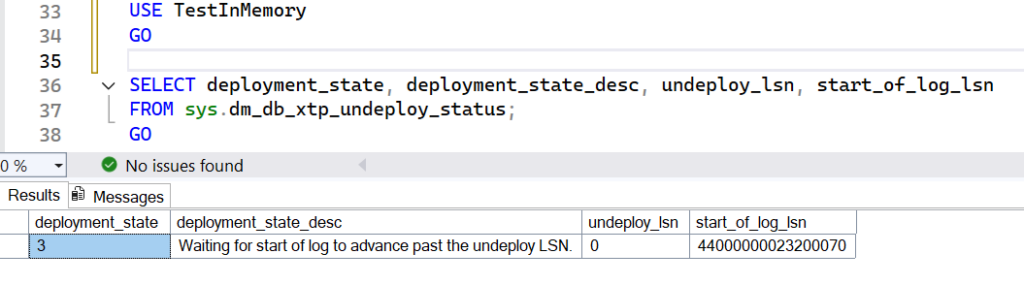
Now we have a clear reason: the start_of_log_lsn is too old, which prevents SQL Server from releasing the FILEGROUP. To resolve this, the LSNs must be advanced. A FULL backup is first required to initialize the backup chain, followed by a LOG backup to effectively advance the position in the logs:
CHECKPOINT;
GO

BACKUP DATABASE TestInMemory TO DISK = 'NUL';
GO

BACKUP LOG TestInMemory TO DISK = 'NUL';
GO
Once the LOG backup is executed and the LSNs are sufficiently advanced, the files can finally be deleted. The sys.dm_db_xtp_undeploy_status view confirms that the XTP engine is no longer deployed and that the cleanup has been successfully performed.

SQL Server 2025 not only introduces the ability to purge empty files that were linked to an In-Memory object but also the ability to troubleshoot their deletion!
From Milliseconds to Microseconds: Thodoris Katsimanis at SQLBits 2026
To conclude this article, let’s look back at the key points covered by Thodoris Katsimanis during his session at SQLBits 2026, entitled “Revolutionizing Database Performance: Deep Dive into SQL InMemory Technology”.
His context is particularly telling: at Kaizen Gaming, SQL Server databases handle thousands of transactions per second in real time, in an environment where every millisecond has a direct impact on the user experience. It is precisely in this type of workload that In-Memory tables reveal their full potential.
Eliminating Page Contention with Latch-Free Architecture
The presentation exposed limitations of the SQL Server engine: in a high-performance system, latches on disk pages (PAGELATCH_EX) create bottlenecks that can lead to Thread Pool exhaustion. The In-Memory architecture solves this problem at its root via a latch-free structure. By relying on optimistic concurrency control and multi-versioning (MVCC), SQL Server no longer waits for locks. Each row has a Begin-Timestamp and an End-Timestamp, allowing transactions to read the valid version of the data without blocking writes.
Maximizing Performance: The Crucial Choice between Hash and BW-Tree
The choice between a Hash index and a Nonclustered index is crucial. The Hash index is perfectly suited for Point Lookups (searches on an exact value): it points directly to the memory address via a hash function. Conversely, the Nonclustered index relies on a BW-Tree structure, which is essential for range scans and sorting, where Hash is of little use. To learn more about indexes for In-Memory tables, check the Microsoft’s documentation.
The Critical Impact of BUCKET_COUNT Misconfiguration
As Thodoris points out, the success of a Hash index relies on tuning the BUCKET_COUNT. This parameter defines the number of entry points in the index. If it is too low, the system generates collision chains: multiple values end up in the same bucket, forcing the engine to scan a linked list, which degrades performance. If it is too high, it consumes memory unnecessarily. Thodoris also highlights a crucial observation: using a Nonclustered index for an equality search can consume significantly more memory than a properly sized Hash index.
Final Thoughts: Embracing the In-Memory Revolution
SQL Server 2025 finally lifts a limitation that has hampered the lifecycle management of In-Memory databases for over ten years. Being able to cleanly delete associated files and FILEGROUPs, understanding why the engine blocks this operation thanks to sys.dm_db_xtp_undeploy_status, and having a clear procedure to remedy it: this is concrete progress for everyone operating this technology in production.
Thodoris Katsimanis’s session at SQLBits 2026 reminds us that the care given to maintenance and monitoring matters just as much as the initial design. In-Memory tables are not a simple performance lever to be activated and forgotten: they require a mastery of their internal mechanisms, thread management to eliminate contention, and rigorous sizing of the BUCKET_COUNT. As he summarizes: the millisecond is no longer a sufficient unit of measurement. In-Memory OLTP aims for the microsecond and in hyper-transactional environments, that is precisely what makes the difference.
![Thumbnail [60x60]](https://www.dbi-services.com/blog/wp-content/uploads/2025/11/LTO_WEB.jpg)
![Thumbnail [90x90]](https://www.dbi-services.com/blog/wp-content/uploads/2022/08/NAC_web-min-scaled.jpg)