This blog refers to an older version of EDB’s Postgres on Kubernetes offering that is no longer available.
A few days ago EnterpriseDB announced the availability of version 2.3 of the EDB containers for OpenShift. The main new feature in this release is the integration of PEM (Postgres Enterprise Manager), so in this post we’ll look at how we can bring up a PEM server in OpenShift. If you did not follow the lats posts about EDB containers in OpenShift here is the summary:
- Deploying EDB containers in MiniShift/OpenShift
- Scaling the EDB containers in MiniShift/OpenShift
- Customizing PostgreSQL parameters in EDB containers in MiniShift/OpenShift
- EDB Failover Manager in EDB containers in Minishift/OpenShift
- EDB Failover Manager in EDB containers in Minishift/OpenShift – Failovers
- Backing up and restoring EDB containers in MiniShift/OpenShift
The first step you need to do is to download the updated container images. You’ll notice that there are two new containers which have not been available before the 2.3 release:
- edb-pemserver: Obviously this is the PEM server
- admintool: a utility container for supporting database upgrades and launching PEM agents on the database containers
For downloading the latest release of the EDB container images for OpenShift, the procedure is the following:
docker run -d -p 5000:5000 --restart=always --name registry registry:2
docker login containers.enterprisedb.com

docker pull containers.enterprisedb.com/edb/edb-as:v10
docker tag containers.enterprisedb.com/edb/edb-as:v10 localhost:5000/edb/edb-as:v10
docker push localhost:5000/edb/edb-as:v10

docker pull containers.enterprisedb.com/edb/edb-pgpool:v3.6
docker tag containers.enterprisedb.com/edb/edb-pgpool:v3.6 localhost:5000/edb/edb-pgpool:v3.6
docker push localhost:5000/edb/edb-pgpool:v3.6

docker pull containers.enterprisedb.com/edb/edb-pemserver:v7.3
docker tag containers.enterprisedb.com/edb/edb-pemserver:v7.3 localhost:5000/edb/edb-pemserver:v7.3
docker push localhost:5000/edb/edb-pemserver:v7.3

docker pull containers.enterprisedb.com/edb/edb-admintool
docker tag containers.enterprisedb.com/edb/edb-admintool localhost:5000/edb/edb-admintool
docker push localhost:5000/edb/edb-admintool

docker pull containers.enterprisedb.com/edb/edb-bart:v2.1
docker tag containers.enterprisedb.com/edb/edb-bart:v2.1 localhost:5000/edb/edb-bart:v2.1
docker push localhost:5000/edb/edb-bart:v2.1
In my case I have quite a few EDB containers available now (…and I could go ahead and delete the old ones, of course):
docker@minishift:~$ docker images | grep edb
containers.enterprisedb.com/edb/edb-as          v10                 1d118c96529b        45 hours ago        1.804 GB
localhost:5000/edb/edb-as                       v10                 1d118c96529b        45 hours ago        1.804 GB
containers.enterprisedb.com/edb/edb-admintool   latest              07fda249cf5c        10 days ago         531.6 MB
localhost:5000/edb/edb-admintool                latest              07fda249cf5c        10 days ago         531.6 MB
containers.enterprisedb.com/edb/edb-pemserver   v7.3                78954c316ca9        10 days ago         1.592 GB
localhost:5000/edb/edb-pemserver                v7.3                78954c316ca9        10 days ago         1.592 GB
containers.enterprisedb.com/edb/edb-bart        v2.1                e2410ed4cf9b        10 days ago         571 MB
localhost:5000/edb/edb-bart                     v2.1                e2410ed4cf9b        10 days ago         571 MB
containers.enterprisedb.com/edb/edb-pgpool      v3.6                e8c600ab993a        10 days ago         561.1 MB
localhost:5000/edb/edb-pgpool                   v3.6                e8c600ab993a        10 days ago         561.1 MB
containers.enterprisedb.com/edb/edb-as                              00adaa0d4063        3 months ago        979.3 MB
localhost:5000/edb/edb-as                                           00adaa0d4063        3 months ago        979.3 MB
localhost:5000/edb/edb-pgpool                   v3.5                e7efdb0ae1be        4 months ago        564.1 MB
containers.enterprisedb.com/edb/edb-pgpool      v3.5                e7efdb0ae1be        4 months ago        564.1 MB
localhost:5000/edb/edb-as                       v10.3               90b79757b2f7        4 months ago        842.7 MB
containers.enterprisedb.com/edb/edb-bart        v2.0                48ee2c01db92        4 months ago        590.6 MB
localhost:5000/edb/edb-bart                     2.0                 48ee2c01db92        4 months ago        590.6 MB
localhost:5000/edb/edb-bart                     v2.0                48ee2c01db92        4 months ago        590.6 MB
The only bits I changed in the yaml file that describes my EDB AS deployment compared to the previous posts are these (check the high-lightened lines, there are only two):
apiVersion: v1
kind: Template
metadata:
   name: edb-as10-custom
   annotations:
    description: "Custom EDB Postgres Advanced Server 10.0 Deployment Config"
    tags: "database,epas,postgres,postgresql"
    iconClass: "icon-postgresql"
objects:
- apiVersion: v1
  kind: Service
  metadata:
    name: ${DATABASE_NAME}-service
    labels:
      role: loadbalancer
      cluster: ${DATABASE_NAME}
  spec:
    selector:
      lb: ${DATABASE_NAME}-pgpool
    ports:
    - name: lb
      port: ${PGPORT}
      targetPort: 9999
    sessionAffinity: None
    type: LoadBalancer
- apiVersion: v1
  kind: DeploymentConfig
  metadata:
    name: ${DATABASE_NAME}-pgpool
  spec:
    replicas: 2
    selector:
      lb: ${DATABASE_NAME}-pgpool
    strategy:
      resources: {}
      rollingParams:
        intervalSeconds: 1
        maxSurge: 25%
        maxUnavailable: 25%
        timeoutSeconds: 600
        updatePeriodSeconds: 1
      type: Rolling
    template:
      metadata:
        labels:
          lb: ${DATABASE_NAME}-pgpool
          role: queryrouter
          cluster: ${DATABASE_NAME}
      spec:
        containers:
        - name: edb-pgpool
          env:
          - name: DATABASE_NAME
            value: ${DATABASE_NAME}
          - name: PGPORT
            value: ${PGPORT}
          - name: REPL_USER
            value: ${REPL_USER}
          - name: ENTERPRISEDB_PASSWORD
            value: 'postgres'
          - name: REPL_PASSWORD
            value: 'postgres'
          - name: ACCEPT_EULA
            value: ${ACCEPT_EULA}
          image: localhost:5000/edb/edb-pgpool:v3.6
          imagePullPolicy: IfNotPresent
          readinessProbe:
            exec:
              command:
              - /var/lib/edb/testIsReady.sh
            initialDelaySeconds: 60
            timeoutSeconds: 5
    triggers:
    - type: ConfigChange
- apiVersion: v1
  kind: DeploymentConfig
  metadata:
    name: ${DATABASE_NAME}-as10-0
  spec:
    replicas: 1
    selector:
      db: ${DATABASE_NAME}-as10-0
    strategy:
      resources: {}
      rollingParams:
        intervalSeconds: 1
        maxSurge: 25%
        maxUnavailable: 25%
        timeoutSeconds: 600
        updatePeriodSeconds: 1
      type: Rolling
    template:
      metadata:
        creationTimestamp: null
        labels:
          db: ${DATABASE_NAME}-as10-0
          cluster: ${DATABASE_NAME}
      spec:
        containers:
        - name: edb-as10
          env:
          - name: DATABASE_NAME
            value: ${DATABASE_NAME}
          - name: DATABASE_USER
            value: ${DATABASE_USER}
          - name: DATABASE_USER_PASSWORD
            value: 'postgres'
          - name: ENTERPRISEDB_PASSWORD
            value: 'postgres'
          - name: REPL_USER
            value: ${REPL_USER}
          - name: REPL_PASSWORD
            value: 'postgres'
          - name: PGPORT
            value: ${PGPORT}
          - name: RESTORE_FILE
            value: ${RESTORE_FILE}
          - name: LOCALEPARAMETER
            value: ${LOCALEPARAMETER}
          - name: CLEANUP_SCHEDULE
            value: ${CLEANUP_SCHEDULE}
          - name: EFM_EMAIL
            value: ${EFM_EMAIL}
          - name: NAMESERVER
            value: ${NAMESERVER}
          - name: POD_NAMESPACE
            valueFrom:
              fieldRef:
                fieldPath: metadata.namespace
          - name: POD_NODE
            valueFrom:
              fieldRef:
                fieldPath: spec.nodeName
          - name: POD_IP
            valueFrom:
              fieldRef:
                fieldPath: status.podIP
          - name: ACCEPT_EULA
            value: ${ACCEPT_EULA}
          image: localhost:5000/edb/edb-as:v10
          imagePullPolicy: IfNotPresent
          readinessProbe:
            exec:
              command:
              - /var/lib/edb/testIsReady.sh
            initialDelaySeconds: 60
            timeoutSeconds: 5
          livenessProbe:
            exec:
              command:
              - /var/lib/edb/testIsHealthy.sh
            initialDelaySeconds: 600
            timeoutSeconds: 60
          ports:
          - containerPort: ${PGPORT}
          volumeMounts:
          - name: ${PERSISTENT_VOLUME}
            mountPath: /edbvolume
          - name: ${BACKUP_PERSISTENT_VOLUME}
            mountPath: /edbbackup
          - name: pg-initconf
            mountPath: /initconf
        dnsPolicy: ClusterFirst
        restartPolicy: Always
        volumes:
        - name: ${PERSISTENT_VOLUME}
          persistentVolumeClaim:
            claimName: ${PERSISTENT_VOLUME_CLAIM}
        - name: ${BACKUP_PERSISTENT_VOLUME}
          persistentVolumeClaim:
            claimName: ${BACKUP_PERSISTENT_VOLUME_CLAIM}
        - name: pg-initconf
          configMap:
            name: postgres-map
    triggers:
    - type: ConfigChange
parameters:
- name: DATABASE_NAME
  displayName: Database Name
  description: Name of Postgres database (leave edb for default)
  value: 'edb'
- name: DATABASE_USER
  displayName: Default database user (leave enterprisedb for default)
  description: Default database user
  value: 'enterprisedb'
- name: REPL_USER
  displayName: Repl user
  description: repl database user
  value: 'repl'
- name: PGPORT
  displayName: Database Port
  description: Database Port (leave 5444 for default)
  value: "5444"
- name: LOCALEPARAMETER
  displayName: Locale
  description: Locale of database
  value: ''
- name: CLEANUP_SCHEDULE
  displayName: Host Cleanup Schedule
  description: Standard cron schedule - min (0 - 59), hour (0 - 23), day of month (1 - 31), month (1 - 12), day of week (0 - 6) (0 to 6 are Sunday to Saturday, or use names; 7 is Sunday, the same as 0). Leave it empty if you dont want to cleanup.
  value: '0:0:*:*:*'
- name: EFM_EMAIL
  displayName: Email
  description: Email for EFM
  value: '[email protected]'
- name: NAMESERVER
  displayName: Name Server for Email
  description: Name Server for Email
  value: '8.8.8.8'
- name: PERSISTENT_VOLUME
  displayName: Persistent Volume
  description: Persistent volume name
  value: ''
  required: true
- name: PERSISTENT_VOLUME_CLAIM
  displayName: Persistent Volume Claim
  description: Persistent volume claim name
  value: ''
  required: true
- name: BACKUP_PERSISTENT_VOLUME
  displayName: Backup Persistent Volume
  description: Backup Persistent volume name
  value: ''
  required: false
- name: BACKUP_PERSISTENT_VOLUME_CLAIM
  displayName: Backup Persistent Volume Claim
  description: Backup Persistent volume claim name
  value: ''
  required: false
- name: RESTORE_FILE
  displayName: Restore File
  description: Restore file location
  value: ''
- name: ACCEPT_EULA
  displayName: Accept end-user license agreement (leave 'Yes' for default)
  description: Indicates whether user accepts the end-user license agreement
  value: 'Yes'
  required: true
As the template starts with one replica I scaled that to three so finally the setup we start with for PEM is this (one master and two replicas, which is the minimum you need for automated failover anyway):
dwe@dwe:~$ oc get pods -o wide -L role
edb-as10-0-1-4ptdr   1/1       Running   0          7m        172.17.0.5   localhost   standbydb
edb-as10-0-1-8mw7m   1/1       Running   0          5m        172.17.0.6   localhost   standbydb
edb-as10-0-1-krzpp   1/1       Running   0          8m        172.17.0.9   localhost   masterdb
edb-pgpool-1-665mp   1/1       Running   0          8m        172.17.0.8   localhost   queryrouter
edb-pgpool-1-mhgnq   1/1       Running   0          8m        172.17.0.7   localhost   queryrouter
Nothing special happened so far except that we downloaded the new container images, pushed that to the local registry and adjusted the deployment yaml to reference the latest version of the containers. What we want to do now is to create the PEM repository container so that we can add the database to PEM which will give us monitoring and alerting. As PEM requires persistent storage as well we need a new storage definition:
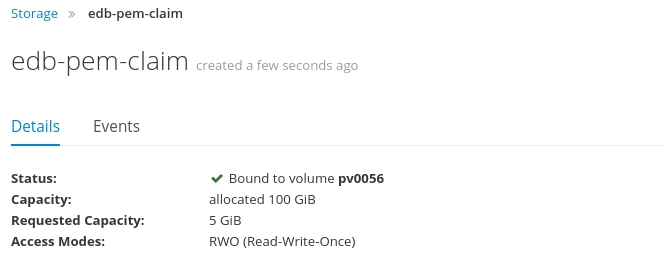
You can of course also get the storage definition using the “oc” command:
dwe@dwe:~$ oc get pvc
NAME                STATUS    VOLUME    CAPACITY   ACCESS MODES   STORAGECLASS   AGE
edb-bart-claim      Bound     pv0091    100Gi      RWO,ROX,RWX                   16h
edb-pem-claim       Bound     pv0056    100Gi      RWO,ROX,RWX                   50s
edb-storage-claim   Bound     pv0037    100Gi      RWO,ROX,RWX                   16h
The yaml file for the PEM server is this one (notice that the container image referenced is coming from the local registry):
apiVersion: v1
kind: Template
metadata:
   name: edb-pemserver
   annotations:
    description: "Standard EDB Postgres Enterprise Manager Server 7.3 Deployment Config"
    tags: "pemserver"
    iconClass: "icon-postgresql"
objects:
- apiVersion: v1
  kind: Service
  metadata:
    name: ${DATABASE_NAME}-webservice
    labels:
      name: ${DATABASE_NAME}-webservice
  spec:
    selector:
      role: pemserver
    ports:
    - name: https
      port: 30443
      nodePort: 30443
      protocol: TCP
      targetPort: 8443
    - name: http
      port: 30080
      nodePort: 30080
      protocol: TCP
      targetPort: 8080
    type: NodePort
- apiVersion: v1
  kind: DeploymentConfig
  metadata:
    name: edb-pemserver
  spec:
    replicas: 1
    selector:
      app: pemserver
    strategy:
      resources: {}
      rollingParams:
        intervalSeconds: 1
        maxSurge: 25%
        maxUnavailable: 25%
        timeoutSeconds: 600
        updatePeriodSeconds: 1
      type: Rolling
    template:
      metadata:
        creationTimestamp: null
        labels:
          app: pemserver
          cluster: ${DATABASE_NAME}
      spec:
        containers:
        - name: pem-db
          env:
          - name: DATABASE_NAME
            value: ${DATABASE_NAME}
          - name: DATABASE_USER
            value: ${DATABASE_USER}
          - name: ENTERPRISEDB_PASSWORD
            value: "postgres"
          - name: POD_NAMESPACE
            valueFrom:
              fieldRef:
                fieldPath: metadata.namespace
          - name: POD_NODE
            valueFrom:
              fieldRef:
                fieldPath: spec.nodeName
          - name: POD_IP
            valueFrom:
              fieldRef:
                fieldPath: status.podIP
          - name: PGPORT
            value: ${PGPORT}
          - name: RESTORE_FILE
            value: ${RESTORE_FILE}
          - name: ENABLE_HA_MODE
            value: "No"
          - name: ACCEPT_EULA
            value: ${ACCEPT_EULA}
            image: localhost:5000/edb/edb-as:v10
          imagePullPolicy: Always
          volumeMounts:
          - name: ${PERSISTENT_VOLUME}
            mountPath: /edbvolume
        - name: pem-webclient
          image: localhost:5000/edb/edb-pemserver:v7.3
          imagePullPolicy: Always
          env:
          - name: DATABASE_NAME
            value: ${DATABASE_NAME}
          - name: DATABASE_USER
            value: ${DATABASE_USER}
          - name: ENTERPRISEDB_PASSWORD
            value: "postgres"
          - name: POD_NAMESPACE
            valueFrom:
              fieldRef:
                fieldPath: metadata.namespace
          - name: POD_NODE
            valueFrom:
              fieldRef:
                fieldPath: spec.nodeName
          - name: POD_IP
            valueFrom:
              fieldRef:
                fieldPath: status.podIP
          - name: PGPORT
            value: ${PGPORT}
          - name: CIDR_ADDR
            value: ${CIDR_ADDR}
          - name: ACCEPT_EULA
            value: ${ACCEPT_EULA}
          - name: DEBUG_MODE
            value: ${DEBUG_MODE}
          ports:
          - containerPort: ${PGPORT}
          volumeMounts:
          - name: ${PERSISTENT_VOLUME}
            mountPath: /edbvolume
          - name: httpd-shm
            mountPath: /run/httpd
        volumes:
        - name: ${PERSISTENT_VOLUME}
          persistentVolumeClaim:
            claimName: ${PERSISTENT_VOLUME_CLAIM}
        - name: httpd-shm
          emptyDir:
            medium: Memory
        dnsPolicy: ClusterFirst
        restartPolicy: Always
    triggers:
    - type: ConfigChange
parameters:
- name: DATABASE_NAME
  displayName: Database Name
  description: Name of Postgres database (leave edb for default)
  value: 'pem'
  required: true
- name: DATABASE_USER
  displayName: Default database user (leave enterprisedb for default)
  description: Default database user
  value: 'enterprisedb'
- name: PGPORT
  displayName: Database Port
  description: Database Port (leave 5444 for default)
  value: '5444'
  required: true
- name: PERSISTENT_VOLUME
  displayName: Persistent Volume
  description: Persistent volume name
  value: 'edb-data-pv'
  required: true
- name: PERSISTENT_VOLUME_CLAIM
  displayName: Persistent Volume Claim
  description: Persistent volume claim name
  value: 'edb-data-pvc'
  required: true
- name: RESTORE_FILE
  displayName: Restore File
  description: Restore file location
  value: ''
- name: CIDR_ADDR
  displayName: CIDR address block for PEM
  description: CIDR address block for PEM (leave '0.0.0.0/0' for default)
  value: '0.0.0.0/0'
- name: ACCEPT_EULA
  displayName: Accept end-user license agreement (leave 'Yes' for default)
  description: Indicates whether user accepts the end-user license agreement
  value: 'Yes'
  required: true
Again, don’t process the template right now, just save it as a template:
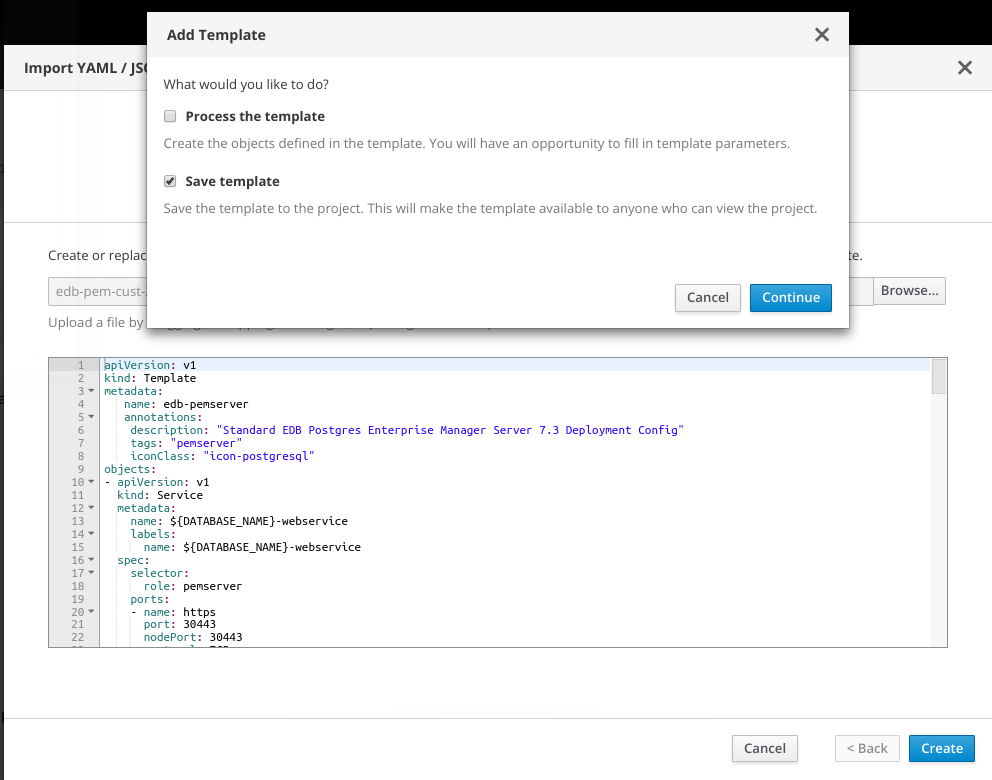
Once we have that available we can start to deploy the PEM server from the catalog:
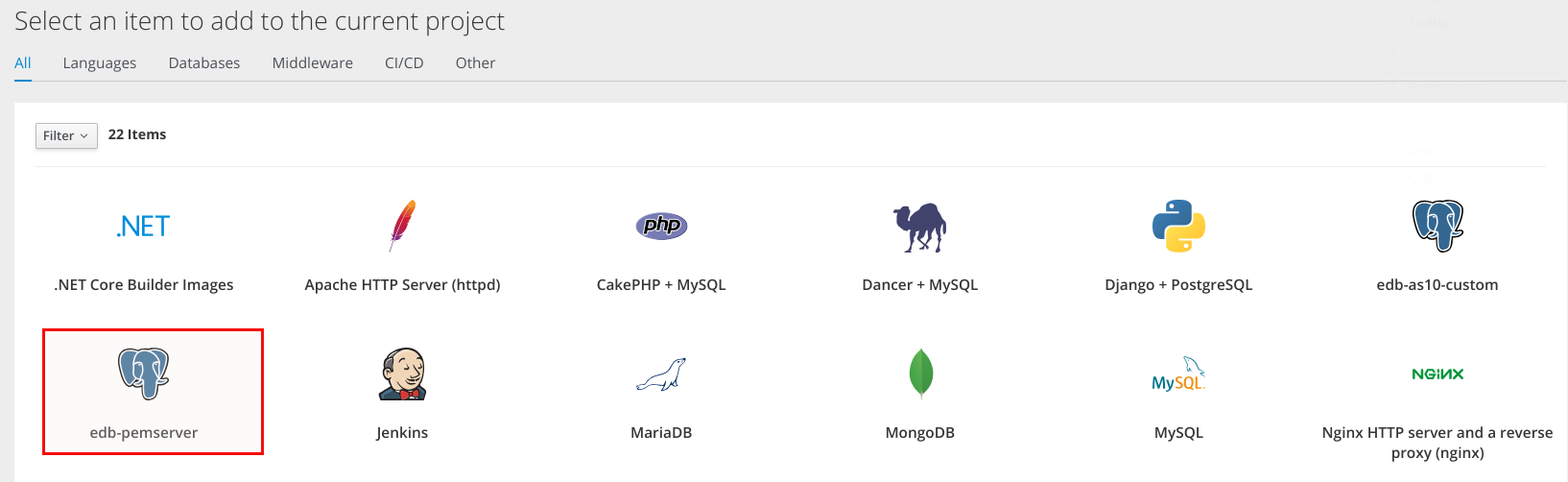
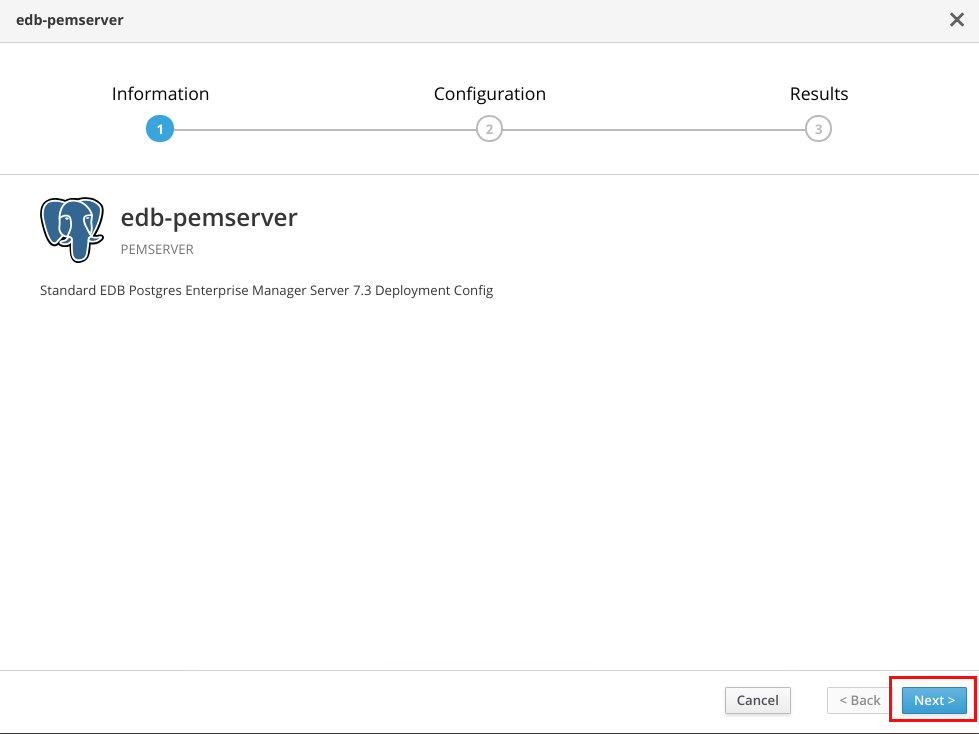
Of course we need to reference the storage definition we created above:
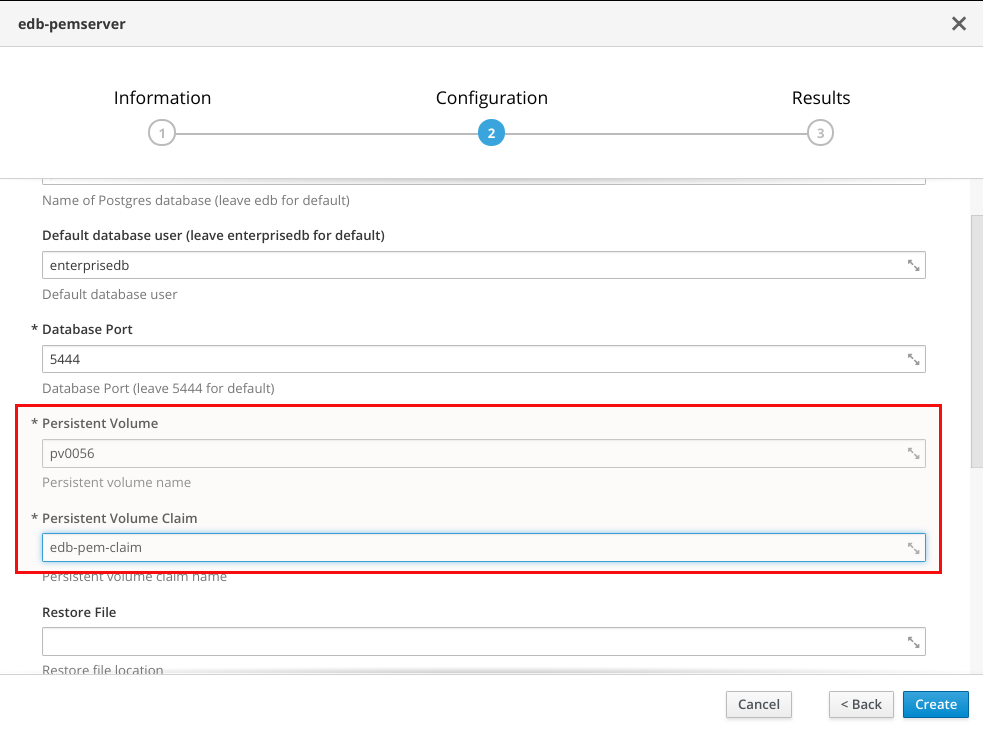
Leave everything else at its defaults and create the deployment:
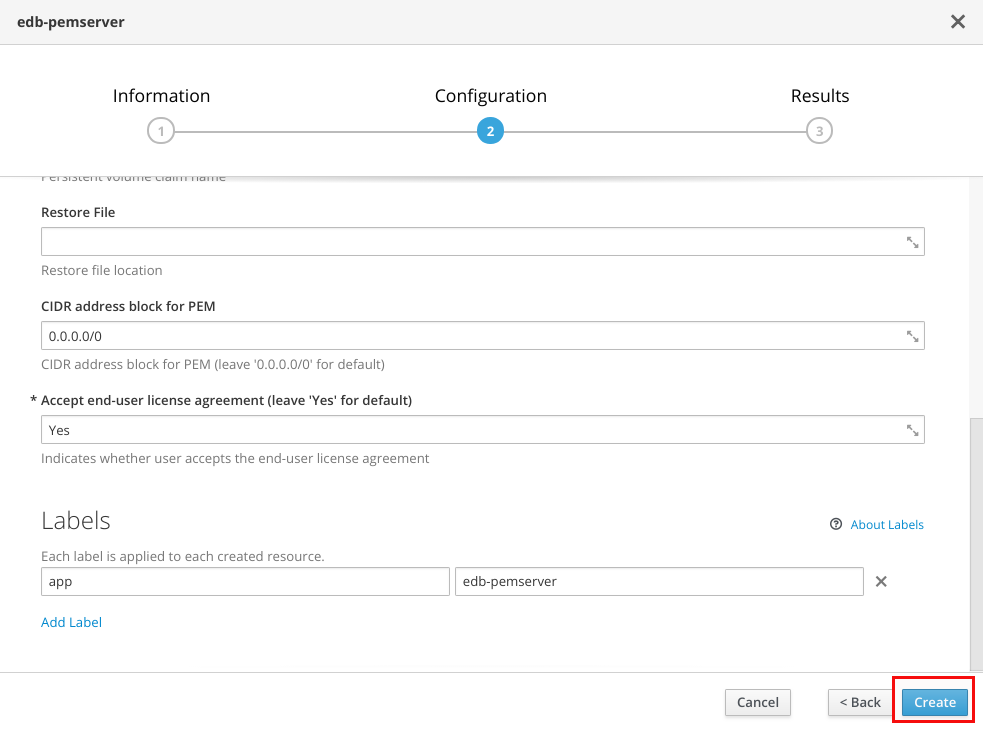
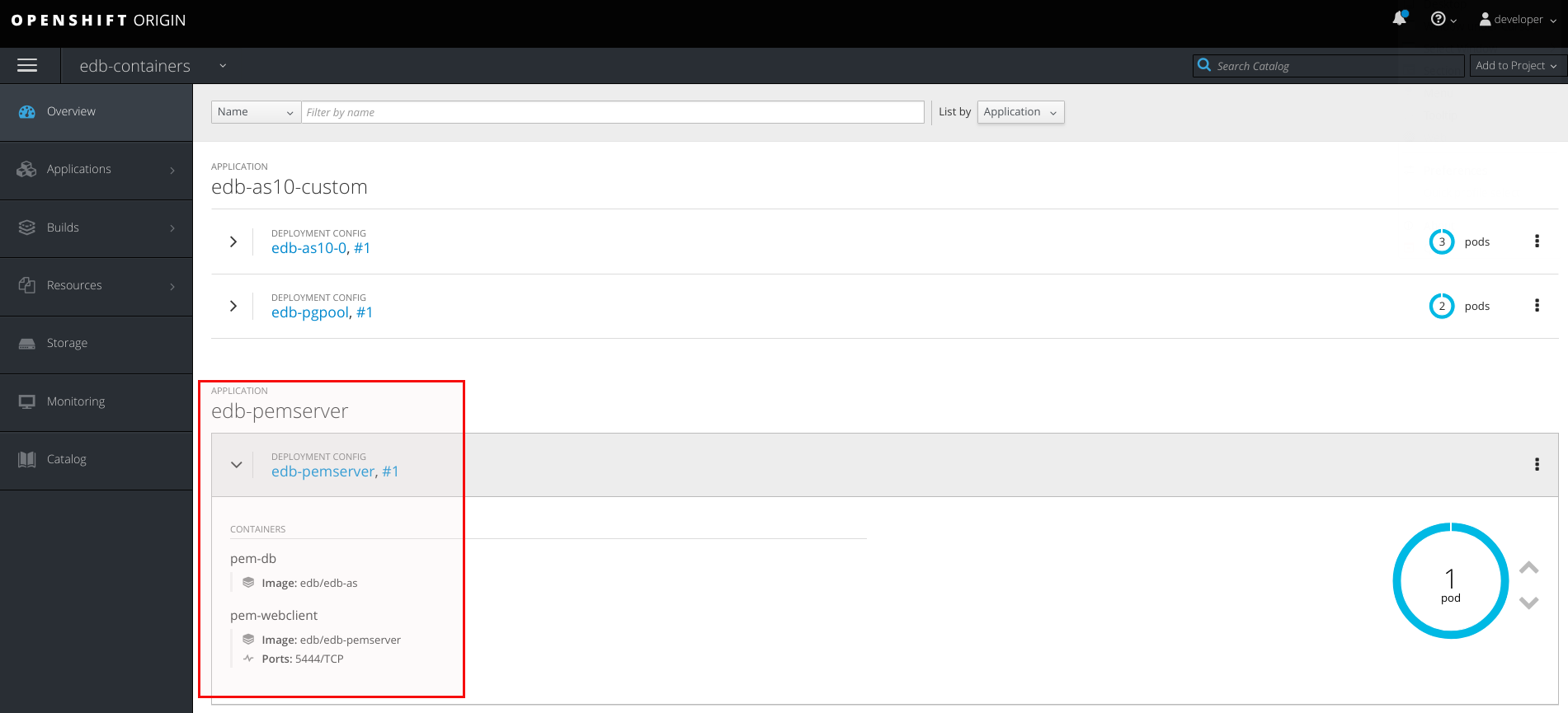
A few minutes later you should have PEM ready:
For connecting to PEM with your browser have a look at the service definition to get the port:
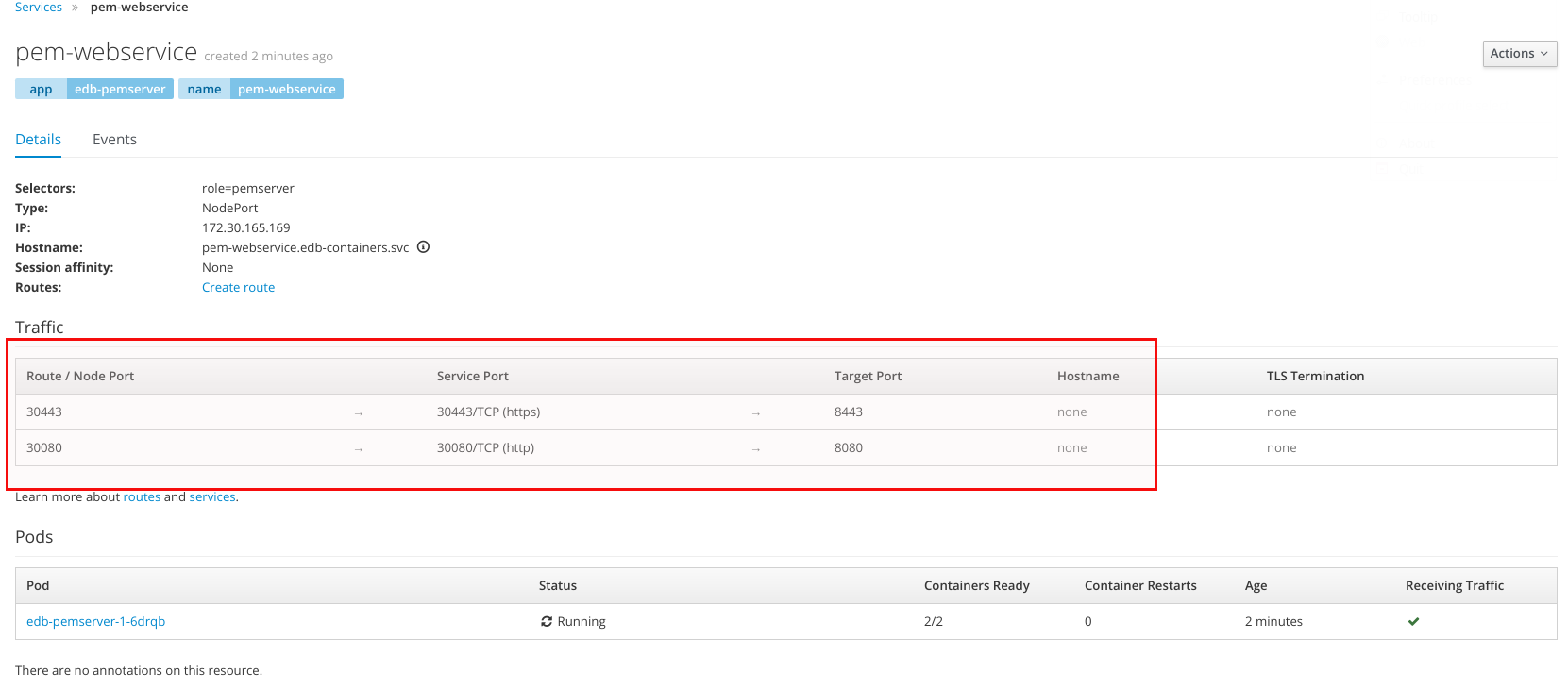
Once you have that you can connect to PEM:
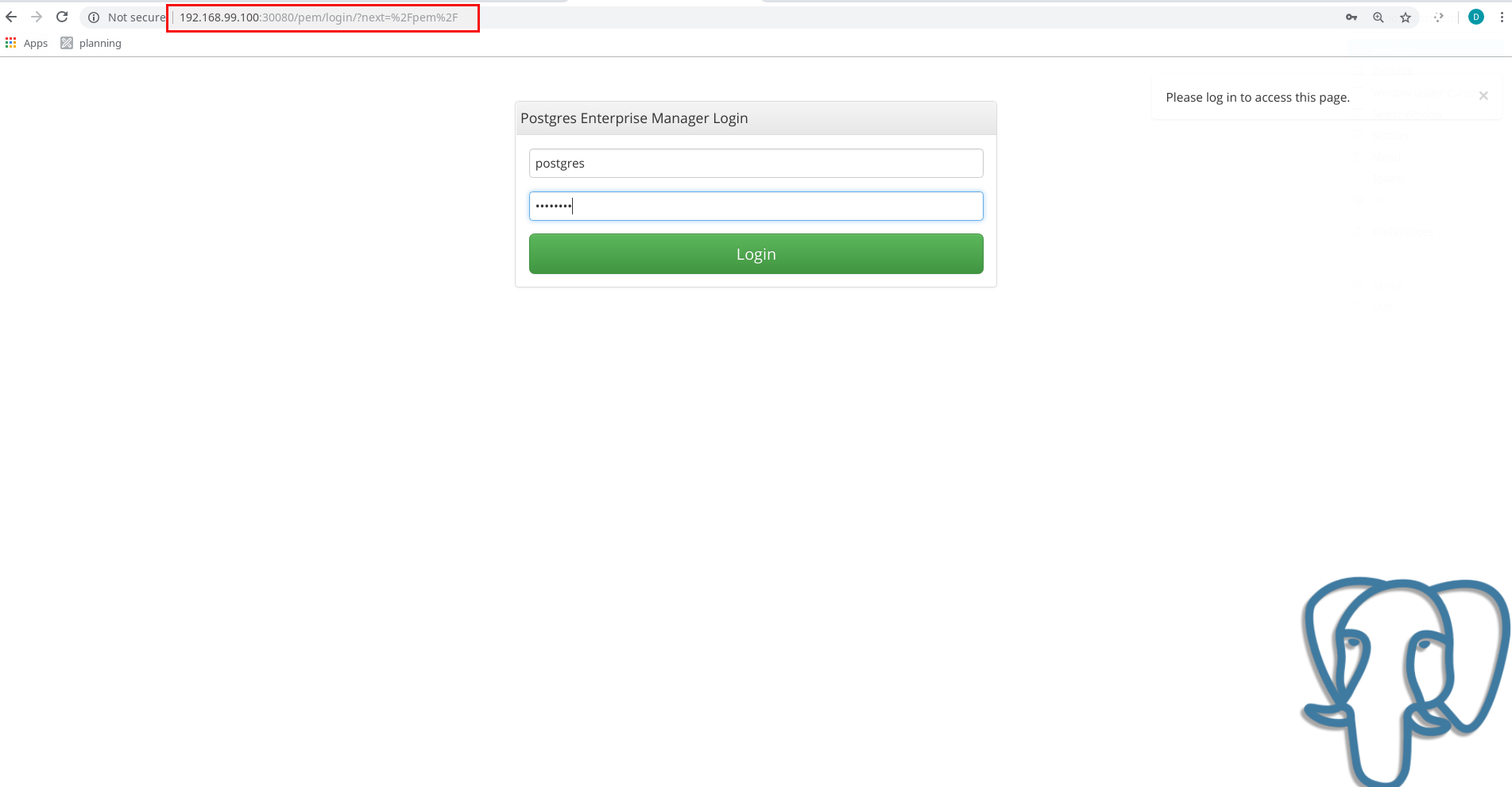
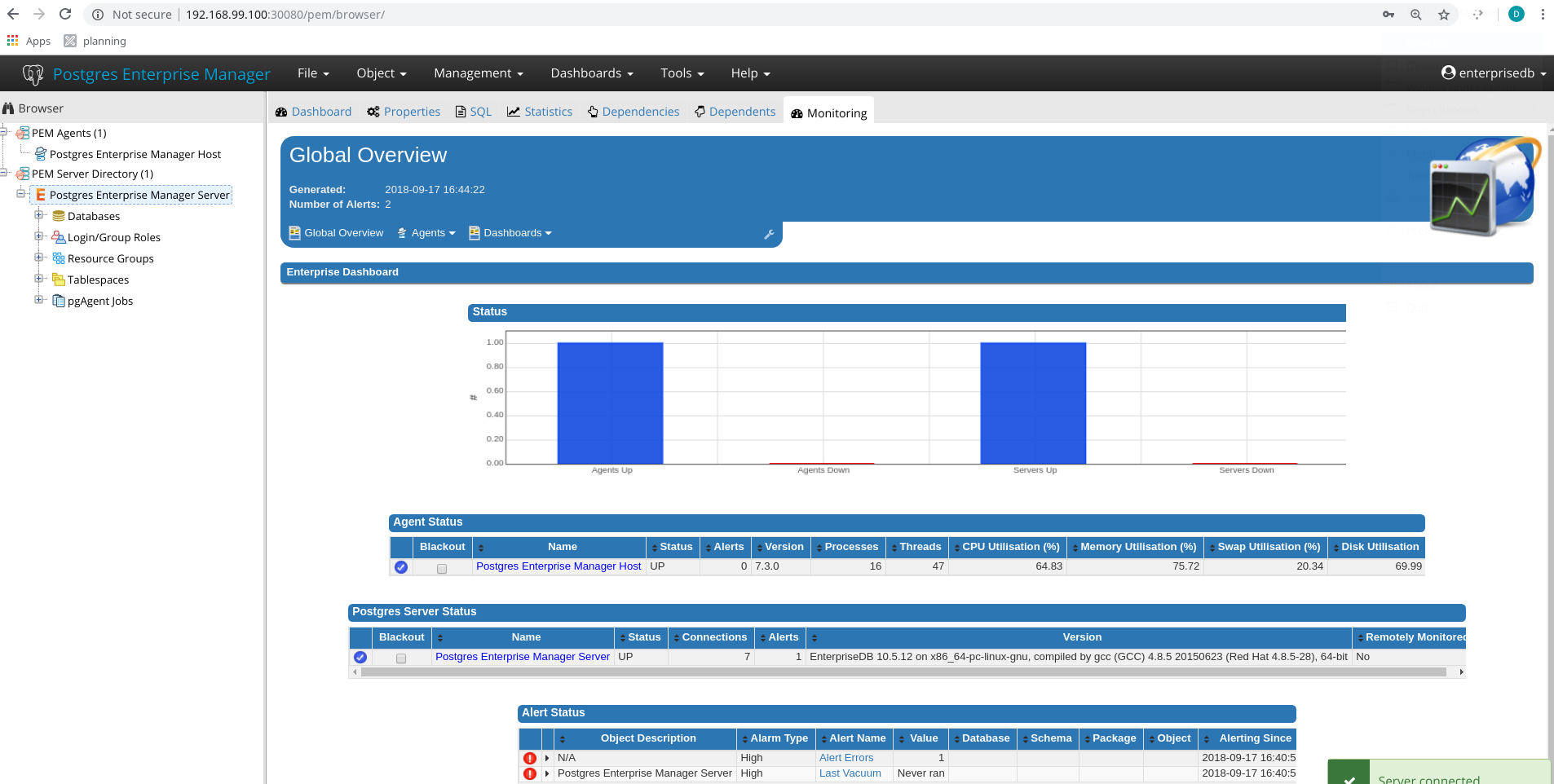
In the next post we’ll look at how we can add our existing database deployment to our just created PEM server so we can monitor the instances and configure alerting.
![Thumbnail [60x60]](https://www.dbi-services.com/blog/wp-content/uploads/2022/08/DWE_web-min-scaled.jpg)
![Thumbnail [90x90]](https://www.dbi-services.com/blog/wp-content/uploads/2025/05/martin_bracher_2048x1536.jpg)
![Thumbnail [90x90]](https://www.dbi-services.com/blog/wp-content/uploads/2025/11/LTO_WEB.jpg)
![Thumbnail [90x90]](https://www.dbi-services.com/blog/wp-content/uploads/2022/08/STH_web-min-scaled.jpg)
![Thumbnail [90x90]](https://www.dbi-services.com/blog/wp-content/uploads/2024/03/AHI_web.jpg)