Recently, I was asked how to recreate a GoldenGate deployment if the password for the Security user (the first user created with the deployment) was lost. This is an interesting question that I figured was worth writing about.
As a reminder, you have two main ways of creating and deleting deployments in GoldenGate:
- Using the configuration assistant
oggca.sh - Using the REST API and its deployment endpoints
I already covered the creation and removal of deployments with the configuration assistant in a previous blog. I also wrote about deployment creation with the REST API, but not yet about deletion.
Deleting the deployment from oggca.sh won’t work
From the GoldenGate Configuration Assistant (oggca.sh script), deleting a deployment is straightforward, but as shown below, you will be asked to input the Service Manager credentials and the deployment credentials !
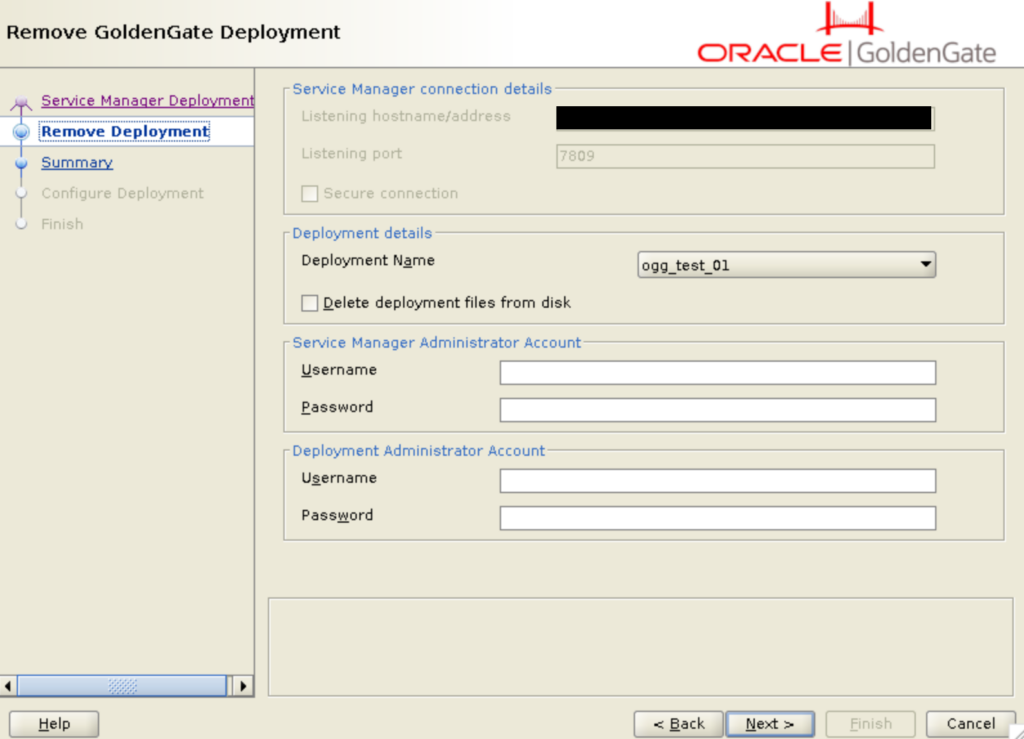
This means that oggca.sh cannot be used for such a task.
Deleting a deployment with the REST API
To overcome this issue, let’s list the steps taken by oggca.sh when deleting GoldenGate deployment:
- Verify the deployment credentials
- Stop the deployment services
- Unregister the deployment in the Service Manager
While asking for the deployment’s password might be relevant to avoid deleting the wrong deployment, you do not strictly need it. In fact, you can stop the deployment services from the Service Manager itself. To do so, use the update_deployment endpoint (PATCH /services/{version}/deployments/{deployment}) to change the status of the deployment to stopped. Using the Python client I presented in another blog, I will open a connection to the Service Manager and stop the deployment ogg_test_01.
>>> from oggrestapi import OGGRestAPI
>>> ogg_client = OGGRestAPI(url="http://vmogg:7809", username="ogg", password="***")
>>> ogg_client.update_deployment('ogg_test_01', data={"status":"stopped"})
{'$schema': 'api:standardResponse', 'links': [{'rel': 'canonical', 'href': 'https://vmogg/services/ServiceManager/v2/deployments/ogg_test_01', 'mediaType': 'application/json'}, {'rel': 'self', 'href': 'https://vmogg/services/ServiceManager/v2/deployments/ogg_test_01', 'mediaType': 'application/json'}], 'messages': []}
Once this is done, you can unregister the deployment from the Service Manager with the delete_deployment endpoint (DELETE /services/{version}/deployments/{deployment})
>>> ogg_client.delete_deployment('ogg_test_01')And for this, we never needed the deployment password !
To clean your installation, make sure to remove all files related to the old deployment. More specifically:
- The
deploymentConfiguration.datof your Service Manager was already edited, you do not need to clean it manually. - You can delete or archive the deployment main directory.
- The
$OGG_SM_HOME/var/rundirectory should be cleaned of the.datfiles named after the deployment :rm $OGG_SM_HOME/var/run/ogg_test_01*
That’s it. You have successfully deleted your deployment, and you can re-create it anytime you want. And this time, remember to store the password !
![Thumbnail [60x60]](https://www.dbi-services.com/blog/wp-content/uploads/2025/05/JDE_Web-1-scaled.jpg)