A crucial step after installing a Veridata server is to set up Veridata agents. And, as mentioned in a previous blog post about GoldenGate Veridata installation, Oracle didn’t bother to indicate when an agent is failing. For instance, the following agent named vdt_agent1 starts successfully:
[oracle@vmvdt vdt_agent1]$ ./agent.sh start agent.properties
Formatter type set to TEXT in odl.xml.
[oracle@vmvdt vdt_agent1]$ ps -ef|grep java | grep agent
oracle     56408       1  0 12:47 pts/0    00:00:00 /u01/app/oracle/product/jdk-17.0.17/bin/java -Djava.util.logging.config.class=oracle.core.ojdl.logging.LoggingConfiguration -Doracle.core.ojdl.logging.config.file=/u01/app/oracle/product/vdt_agent1/config/odl.xml -Dhome=/u01/app/oracle/product/vdt23/agent -DagentHome=/u01/app/oracle/product/vdt_agent1 -XX:+UseParallelGC -Xms1024M -Dagent-manifest.jar=/u01/app/oracle/product/vdt23/agent/agent-manifest.jar -jar /u01/app/oracle/product/vdt23/agent/JavaAgent.jar agent.properties
And this agent named vdt_agent2 fails to start:
[oracle@vmvdt vdt_agent2]$ ./agent.sh start agent.properties
Formatter type set to TEXT in odl.xml.
[oracle@vmvdt vdt_agent2]$ ps -ef|grep java | grep agent
Zero difference in the agent.sh output, yet one agent is started, while the other is not. It is quite sad, when you compare the Veridata solution to other Oracle solutions, where you usually have a return on the status of what you’re starting.
The first thing to do would be to look at the logs, right ? So let’s see how this looks in practice:
[oracle@vmvdt3 product]$ pwd
/u01/app/oracle/product
[oracle@vmvdt3 product]$ ls -lrt vdt_agent*
vdt_agent1:
total 32
-rw-r-----. 1 oracle oinstall   79 Dec 21 10:49 VAOH.sh
-rw-r-----. 1 oracle oinstall 5037 Dec 21 10:49 agent.properties.sample
-rw-r-----. 1 oracle oinstall  172 Dec 21 10:49 ReadMe.txt
-rwxr-----. 1 oracle oinstall  261 Dec 21 10:49 configure_agent_ssl.sh
-rwxr-----. 1 oracle oinstall 1057 Dec 21 10:49 agent.sh
-rw-r-----. 1 oracle oinstall 5094 Dec 21 12:45 agent.properties
drwxr-x---. 3 oracle oinstall   62 Dec 21 12:47 config
drwxr-----. 2 oracle oinstall   57 Dec 21 12:47 logs

vdt_agent2:
total 32
-rw-r-----. 1 oracle oinstall   79 Dec 21 14:11 VAOH.sh
-rw-r-----. 1 oracle oinstall  172 Dec 21 14:11 ReadMe.txt
-rw-r-----. 1 oracle oinstall 5037 Dec 21 14:11 agent.properties.sample
-rwxr-----. 1 oracle oinstall  261 Dec 21 14:11 configure_agent_ssl.sh
-rwxr-----. 1 oracle oinstall 1057 Dec 21 14:11 agent.sh
-rw-r-----. 1 oracle oinstall 5050 Dec 21 14:12 agent.properties
drwxr-x---. 3 oracle oinstall   62 Dec 21 14:12 config
vdt_agent2 didn’t start, so there is no logs folder yet. But even if it had started before, the logs would not necessarily be updated. So, are we completely lost in this situation ? We first have to understand why there is no log at startup. Looking at the agent.sh script, we see the following:
...
  6 SCRIPT_DIR="`dirname "$0"`"
  7 AGENT_HOME="`cd "$SCRIPT_DIR" ; pwd`"
  8 export AGENT_HOME
  9
 10 . $AGENT_HOME/VAOH.sh
...
 24   sed -i "0,/class=['\"][^'\"]*['\"]/s|class=['\"][^'\"]*['\"]|cla    ss='oracle.core.ojdl.logging.ODLHandlerFactory'|" "$ODL_XML_PATH"
 25   echo "Formatter type set to TEXT in odl.xml."
 26 fi
 27
 28 $AGENT_ORACLE_HOME/agent_int.sh "$@"
AGENT_HOME refers to the agent deployed location, in our case it is /u01/app/oracle/product/vdt_agent2. As for AGENT_ORACLE_HOME, it is defined in the VAOH.sh script sourced earlier.
AGENT_ORACLE_HOME=/u01/app/oracle/product/vdt23/agent
export AGENT_ORACLE_HOME
It simply refers to the agent directory inside your Veridata home directory. So all options of agent.sh are passed to agent_int.sh, which looks like this:
...
 59 case "$1" in
 60     start)
 61         nohup "$JAVA_EXECUTABLE" $JAVA_OPTS -jar "$JAR_FILE" $2 >/    dev/null 2>&1 &
 62         ;;
 63     run)
 64         exec "$JAVA_EXECUTABLE" $JAVA_OPTS -jar "$JAR_FILE" $2
 65         ;;
 66     version)
 67         exec "$JAVA_EXECUTABLE" $JAVA_OPTS -jar "$JAR_FILE" versio    n $2
 68         ;;
...
We have the culprit here ! The start and run options are identical: start discards any error message and moves the process to the background, while run displays errors in the terminal. Let’s try to start the agent with this option instead:
[oracle@vmvdt vdt_agent2]$ ./agent.sh run agent.properties
Formatter type set to TEXT in odl.xml.
#server.jdbcDriver=ojdbc11-23.2.0.0.jar
[VERIAGT-BOOT] INFO Looking for home directory.
[VERIAGT-BOOT] INFO Found bootstrap class in file:/u01/app/oracle/product/vdt23/agent/JavaAgent.jar!/com/goldengate/veridata/agent/BootstrapNextGen.class.
[VERIAGT-BOOT] INFO Home directory: /u01/app/oracle/product/vdt23/agent
[VERIAGT-BOOT] INFO AGENT_DEPLOY_PATH not set, falling back to homeDir.
[VERIAGT-BOOT] INFO Preparing classpath.
[VERIAGT-BOOT] ERROR /u01/app/oracle/product/vdt_agent2/ojdbc11-23.9.0.25.07.jar does not exist. Check agent.properties configuration
In this case, the combination of the server.driversLocation and server.jdbcDriver parameters does not allow Veridata to locate the driver.
And for automation ?
Apart from the java process that you can search for, once started, the agent home will have a logs folder with two log files.
[oracle@vmvdt logs]$ pwd
/u01/app/oracle/product/vdt_agent3/logs
[oracle@vmvdt logs]$ ll
total 4
-rw-r-----. 1 oracle oinstall   0 Dec 21 18:57 vdtperf-agent.log
-rw-r-----. 1 oracle oinstall 778 Dec 21 18:57 veridata-agent.log
If you don’t have one after starting the agent for the first time, you know for sure something went wrong. However, if you want to automatically detect if the agent was started, you should search for the following message in veridata-agent.log.
[2025-12-21T19:01:21.570+00:00] [veridata] [NOTIFICATION] [OGGV-60002] [oracle.veridata.agent] [tid: 1] [ecid: 0000Ph2IQNqFk305zzDCiW1dI4G1000001,0] Veridata Agent running on vmvdt port 8833How to change the log level of the agent ?
To change the log level of the agent, edit the config/odl.xml file in your agent deployed location. See the documentation for a list of all the options available. For instance, you can change the oracle.veridata logger from NOTIFICATION:1 to TRACE:1 to generate detailed debugging information.
        <logger name='oracle.veridata' level='NOTIFICATION:1'
            useParentHandlers='false'>
            <handler name='odl-handler' />
            <handler name='my-console-handler' />
        </logger>
Testing Agent Connection
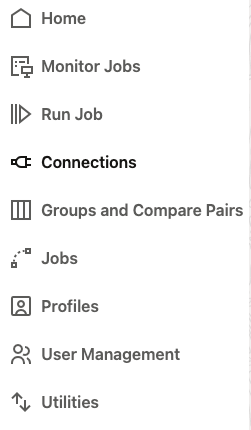
Once the agent is started, you can test the connection from the Veridata Web UI. Once logged in, go to the Connections panel, and click on Create.
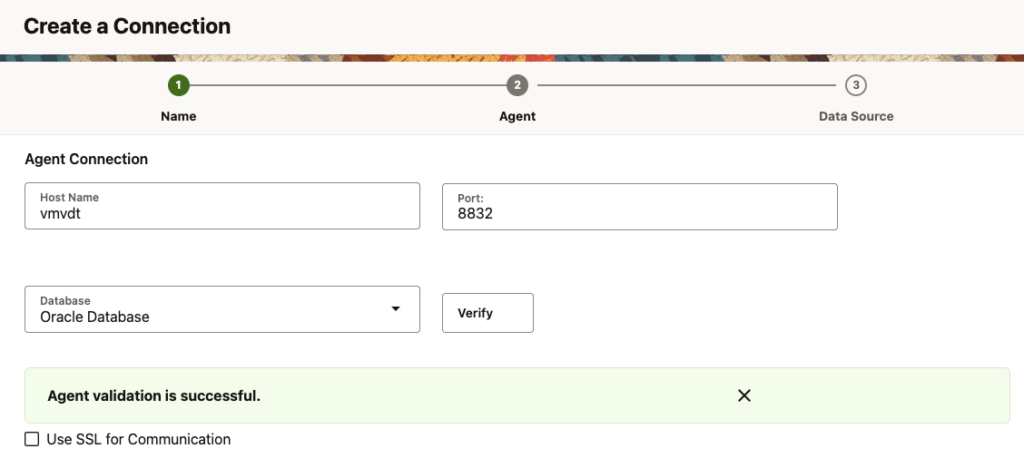
In the agent connection creation panel, indicate the agent port, the host name and the database type. After testing the connection, you will know if your agent is correctly configured with the red ribbon showing “Agent validation is successful”.
A good practice when using the agent.sh script is to first run the agent, and then start it. This way, you will quickly know is something went wrong.
![Thumbnail [60x60]](https://www.dbi-services.com/blog/wp-content/uploads/2025/05/JDE_Web-1-scaled.jpg)