680,000 rows in 863 seconds. That is 788 rows per second, and the table I was loading holds 229,881,717 of them.
Eighty-one hours. For one table. There were five more behind it.
SSMA is well documented but migrations at this scale are not done often enough to have plenty of materials. Most of what you find is either a step-by-step guide against a sample database, or a vendor case study with no numbers in it. This post has the numbers, in the order I actually got them, including the ones I got wrong first.
To keep my sanity through a long and intricate migration, I kept a logbook. This first part is about getting the data across: the brief, the type negotiation, and the settings that took the load from 788 rows per second to 42,170. Part 2 picks up exactly where this one stops, with 3.2 TB sitting in heaps and not a single index on it.
Day 1. The brief, and the one sentence that mattered
An Oracle 19c production database running an asset management package, to be archived into SQL Server 2025 Standard Edition. Roughly 5,600 tables, 4,800 views, a little under 5 TB depending on how you count (more on that later).
Three facts shaped everything that followed.
The target is read-only. Nothing will ever write to it once the load is finished, because the whole point of the exercise is to keep fifteen years of records available to people who need to look something up rather than to keep an application running. Auditors come by, rarely and unpredictably, to find one specific row.
That is the entire performance requirement, and it decided more of this project than any measurement did. It is why the indexes are broad rather than targeted at known queries, why PAGE compression costs nothing here, why 25,000 triggers went straight in the bin, and why two views that take thirty seconds are perfectly acceptable. Every one of those decisions comes back later in this series.
The freeze has no deadline. This is unusual enough to state plainly. Most migrations are built around a cutover window measured in hours, and every technical decision bends to it. Here the source was frozen since the beginning and simply stayed frozen.
The data travels in two hops, which becomes the story of the whole load:

Getting in without asking for the keys
The source is critical production, so the migration account got the minimum that actually works: CREATE SESSION, dictionary read, and SELECT on the tables in scope.
SSMA also asks for CREATE ANY PROCEDURE, CREATE ANY TYPE and CREATE ANY TRIGGER. Those three serve server-side extraction and SSMA’s own testing feature and at the end of the project a single DROP USER <user_name> CASCADE removes the whole thing.
There is a decision hiding here that is worth making deliberately. SELECT ANY TABLE is convenient and gives your account read access to the entire database, including schemas you are not migrating. Granting SELECT table by table on the schemas in scope is more work and produces an auditable perimeter.
Day 2. Negotiating with numbers
We agreed the type mapping with the client before converting anything, which I recommend for the political reasons as much as the technical ones:
| Oracle | SQL Server |
|---|---|
| NUMBER(38) to NUMBER(*) | FLOAT |
| NUMBER(19) to NUMBER(38) | DECIMAL[19-38] |
| NUMBER(11) to NUMBER(18) | BIGINT |
| NUMBER(5) to NUMBER(10) | INT |
| NUMBER(1) to NUMBER(4) | SMALLINT |
| DATE | DATETIME2(0) |
| XMLTYPE | XML |
| VARCHAR2(n CHAR) | NVARCHAR(n) |
| CHAR(n CHAR) | NCHAR(n) |
38 digits against 51
Then the conversions started failing on decimal overflow, and the reason is more interesting than “the numbers were too big“.
Oracle NUMBER without precision is a floating decimal: 38 significant digits, with an exponent range running from 1e-130 to just under 1e126. SQL Server DECIMAL is fixed point: the precision bounds the magnitude. DECIMAL(38,0) stops at 1e38 and there is no exponent to escape with.
So the values that broke were not unusually precise, they were unusually large. A value carrying 51 digits and two significant figures is perfectly ordinary in Oracle, sails through every constraint it meets on the way out, and then has no DECIMAL representation waiting for it at the other end.
The answer is FLOAT, which is also a floating type and reaches ±1.79e308. Eleven tables were reloaded after switching the mapping.
Be careful what you promise the client here, because FLOAT keeps 15 significant digits, not 38. For the values that actually overflowed, large magnitude and few significant figures, the loss is zero. For a value in those columns carrying more than 15 significant digits, the loss is real. That is countable rather than arguable, so count it before you write the reassuring email.
25,000 triggers, none converted
The source carried roughly 25,000 triggers, almost all in one schema. I converted none of them and unticked them all before Convert Schema.
The reasoning fits in one line: on a read-only database, a trigger never fires. Converting and testing 25,000 objects that will never execute would have consumed weeks and produced nothing.
Tables went first, with their types and sequences, to unblock the data migration. Packages, views and procedures came later. Indexes are not a separate step: SSMA converts them alongside their table, turning bitmap indexes into nonclustered ones, handling function-based indexes case by case, and skipping XMLTYPE indexes entirely.
Then 103 tables failed extraction with ORA-00904, all because of hidden SYS_C…$ columns left behind by function-based indexes. I had already set “Ignore hidden system columns” to Yes, which is why this took longer than it should have: in our project that option governed schema conversion and did not stop the extraction from asking for the column. The fix is a custom select that aliases NULL into the missing name (see my previous blog about this problem).
Day 3. Turning everything off
The loading method is three switches and a recovery model.
Disable the nonclustered indexes. A disabled index stores nothing and is not maintained row by row during the load.
Disable the foreign keys with NOCHECK CONSTRAINT.
Drop the clustered primary keys on the largest tables and load into heaps.
Then set the recovery model to SIMPLE. With heaps and bulk insert, logging is already minimal.
The script that does this across every schema needs to be restartable and needs to log what it did. A load that runs for days will be interrupted, and you want to know exactly which of 22’000 indexes were disabled when it was.
Script to disable all nonclustered indexes:
USE <DB_NAME>;
GO


IF OBJECT_ID(N'tempdb..#Schemas') IS NOT NULL DROP TABLE #Schemas;
CREATE TABLE #Schemas (schema_name sysname PRIMARY KEY);

INSERT INTO #Schemas (schema_name) VALUES (N'<SCHEMA_NAME>'); --Insert your schema name here
    ;

SELECT schema_name AS schemas_a_traiter FROM #Schemas;
GO


-- Disable all NC Indexes

SET NOCOUNT ON;
DECLARE @Execute bit = 0;   -- 0 = preview ; 1 = execute

DECLARE @cmd nvarchar(max);
DECLARE @n   int = 0;

DECLARE idx_cur CURSOR LOCAL FAST_FORWARD FOR
    SELECT N'ALTER INDEX ' + QUOTENAME(i.name)
         + N' ON ' + QUOTENAME(s.name) + N'.' + QUOTENAME(t.name)
         + N' DISABLE;'
    FROM   sys.indexes  i
    JOIN   sys.tables   t ON i.object_id = t.object_id
    JOIN   sys.schemas  s ON t.schema_id = s.schema_id
    WHERE  s.name IN (SELECT schema_name FROM #Schemas)
      AND  i.type_desc            in (N'NONCLUSTERED')
      AND  i.is_disabled          = 0
    ORDER BY s.name, t.name, i.name;

OPEN idx_cur;
FETCH NEXT FROM idx_cur INTO @cmd;
WHILE @@FETCH_STATUS = 0
BEGIN
    SET @n += 1;
    PRINT @cmd;
    IF @Execute = 1
    BEGIN
        BEGIN TRY
            EXEC sys.sp_executesql @cmd;
        END TRY
        BEGIN CATCH
            PRINT N'   -- ECHEC : ' + ERROR_MESSAGE();
        END CATCH
    END
    FETCH NEXT FROM idx_cur INTO @cmd;
END
CLOSE idx_cur;
DEALLOCATE idx_cur;

PRINT N'---';
PRINT CONVERT(nvarchar(10), @n) + N' index nonclustered '
    + CASE WHEN @Execute = 1 THEN N'disabled.' ELSE N'te be disabled (preview).' END;
GO


----------------------------------------------


SET NOCOUNT ON;
DECLARE @Execute bit = 0;   -- 0 = preview ; 1 = executer

DECLARE @cmd nvarchar(max);
DECLARE @n   int = 0;

DECLARE fk_cur CURSOR LOCAL FAST_FORWARD FOR
    SELECT N'ALTER TABLE ' + QUOTENAME(s.name) + N'.' + QUOTENAME(t.name)
         + N' NOCHECK CONSTRAINT ' + QUOTENAME(fk.name) + N';'
    FROM   sys.foreign_keys fk
    JOIN   sys.tables  t ON fk.parent_object_id = t.object_id
    JOIN   sys.schemas s ON t.schema_id = s.schema_id
    WHERE  s.name IN (SELECT schema_name FROM #Schemas)
      AND  fk.is_disabled = 0;

OPEN fk_cur;
FETCH NEXT FROM fk_cur INTO @cmd;
WHILE @@FETCH_STATUS = 0
BEGIN
    SET @n += 1;
    PRINT @cmd;
    IF @Execute = 1
    BEGIN
        BEGIN TRY EXEC sys.sp_executesql @cmd; END TRY
        BEGIN CATCH PRINT N'   -- FAILED: ' + ERROR_MESSAGE(); END CATCH
    END
    FETCH NEXT FROM fk_cur INTO @cmd;
END
CLOSE fk_cur;
DEALLOCATE fk_cur;

PRINT N'---';
PRINT CONVERT(nvarchar(10), @n) + N' FK '
    + CASE WHEN @Execute = 1 THEN N'disabled.' ELSE N'to be disabled (preview).' END;
GO
There is a second script that puts all of this back, with PAGE compression, once the data is in. It belongs with the rebuild rather than with the load, so it is in part 2.
Day 4. ×53, on the same architecture
The first load ran client-side: the hop server reads from Oracle and writes to SQL Server.
On the SQL Server side the dominant wait was ASYNC_NETWORK_IO, which is the engine telling you it has finished its work and is sitting there waiting for the next batch to arrive. Meanwhile CPU and memory on the hop VM stayed low throughout. Nothing anywhere in the chain was short of power; the pipeline was simply underfed.
The answer for this was not a different architecture (with for example a linked server directly from Oracle to SQL Server), it was three settings on the one I already had.
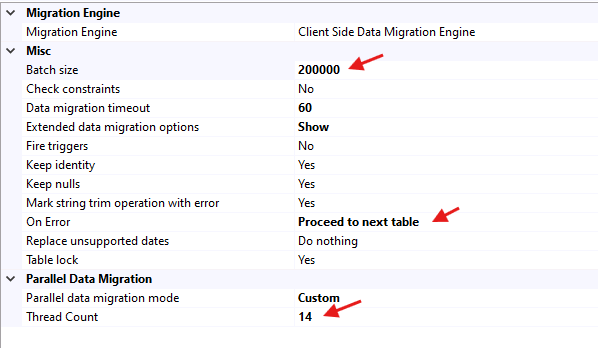
Load into heaps with the nonclustered indexes disabled. Parallelise across tables, not within one, which is the part most people have backwards about SSMA: Thread Count 14 with Table lock = No, because TABLOCK plus multithreading deadlocks. Batch size at 200’000.
Measured with the two-timestamp method: 7,000,000 rows in 166 seconds, about 42,170 rows per second. Against 788, that is ×53.
It is worth being explicit about why write-side changes fixed a network wait, because the two do not obviously connect. Of the three levers only one touches writing. Parallelising across tables fills a pipe that was carrying a single stream and fast writes remove the back-pressure that was leaving the sender idle.
Two volumetry traps
Ranking tables by dba_segments with segment_type = 'TABLE' ignores LOBs, which live in their own segment. One table that looked unremarkable carried 123 GB of LOB. Redo the ranking with LOB segments included before you plan anything. And row count does not rank the same way as volume. One table held 2.8 billion rows in 67 GB. Another held a tenth of that in fourteen times the space.
What I would tell the next person, about the load
The bottleneck was the feed rate rather than the hardware. 788 rows per second, with ASYNC_NETWORK_IO at the top of the wait list, on a chain where nothing was short of CPU or memory. Three settings took it to 42,170: heaps, disabled indexes and parallelism across tables. Reach for the settings before you reach for a new architecture, because the new architecture takes a week to build and may not be the thing that was slow.
On types, the failure was one of magnitude and not of precision, which is worth knowing before you try to diagnose it. Oracle NUMBER is a floating decimal whose exponent runs far past anything DECIMAL can address, so a value with 51 digits and two significant figures breaks a conversion that a value with 38 significant digits survives without trouble. And when you move those columns to FLOAT, count what you are actually giving up before you write the email saying nothing was lost.
At this point the data is across and the database is useless. Every nonclustered index is disabled, the largest tables have no primary key, the foreign keys are off, and none of the four thousand views compile. Part 2 is about putting all of that back.
![Thumbnail [60x60]](https://www.dbi-services.com/blog/wp-content/uploads/2025/11/LTO_WEB.jpg)
![Thumbnail [90x90]](https://www.dbi-services.com/blog/wp-content/uploads/2025/07/ALK_MIN.jpeg)
![Thumbnail [90x90]](https://www.dbi-services.com/blog/wp-content/uploads/2023/05/AEA_web_min.jpg)
![Thumbnail [90x90]](https://www.dbi-services.com/blog/wp-content/uploads/2025/05/martin_bracher_2048x1536.jpg)
![Thumbnail [90x90]](https://www.dbi-services.com/blog/wp-content/uploads/2025/05/JDE_Web-1-scaled.jpg)