

Oracle Real Application cluster is clustering solution for high load database systems giving you possibility to load balance your application traffic and dynamically (online) scale our cluster by increasing or decreasing number of nodes.
However, for proper working systems you should always follow official oracle recommendations for infrastructure requirements.
If you are buying Oracle Appliances systems like Exadata/ODA they already come with most of the settings.
But if your company implementing RAC on their own bare metal hardware, they need to follow oracle requirements related to system settings and network setup.
For Oracle RAC is very important Interconnect network communication for high load systems which is use for Oracle Fusion Cache.
If interconnect network is slow / not properly configured / or have not stable latency, it will sooner or later impact your database performance.
You will observe increase numbers of gc wait events in your AWR reports and some queries execution can become slower.
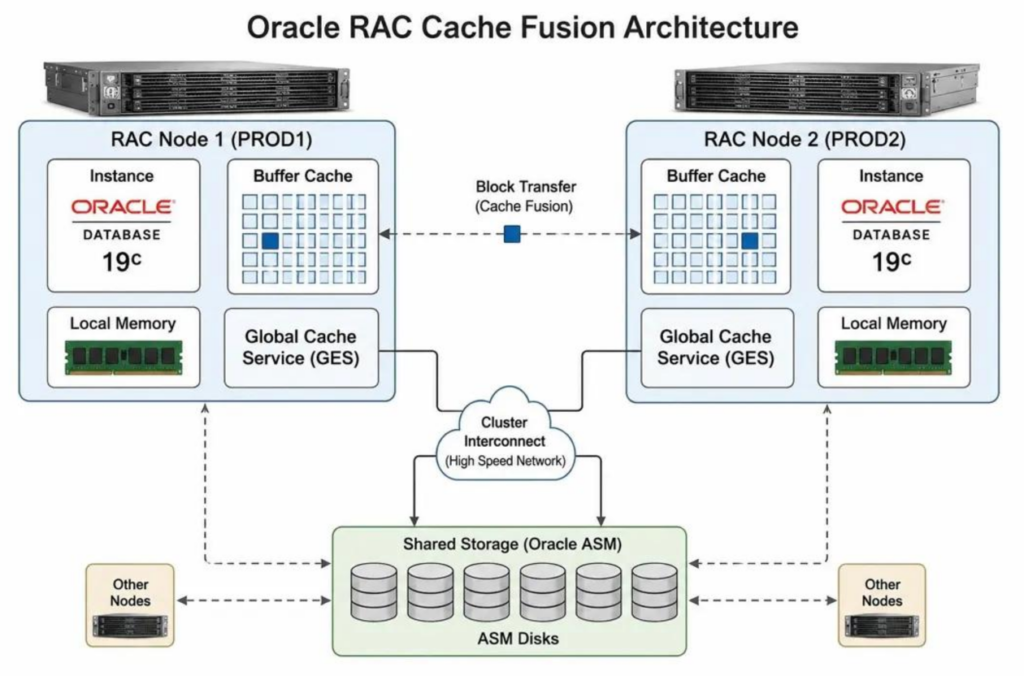
is important when you build your RAC systems is to plan your RAC nodes in your Datacenter (close to each other) ideally maximum 1/2 redundant network switches for interconnect maximally).
Questions about your own setup? A dbi services consultant can look at your case.
Talk to an expert (opens in a new tab)Many customers confuse
RAC which is HA (High availability) and
Dataguard with is DR (disaster recovery solution)
building not fully supported infrastructure for them.
So let’s clear that out:
RAC – real application cluster , 1 database with many instances, many nodes, next to each other, connected by fast interconnect network
Data guard – usually 2 databases copied between 2 data centers for disaster recovery solution mainly purpose.
they can be and are often combine together most common settings are
Data-center 1(2 nodes RAC )+ Data-center 2( 2 nodes RAC STANDBY for DR)
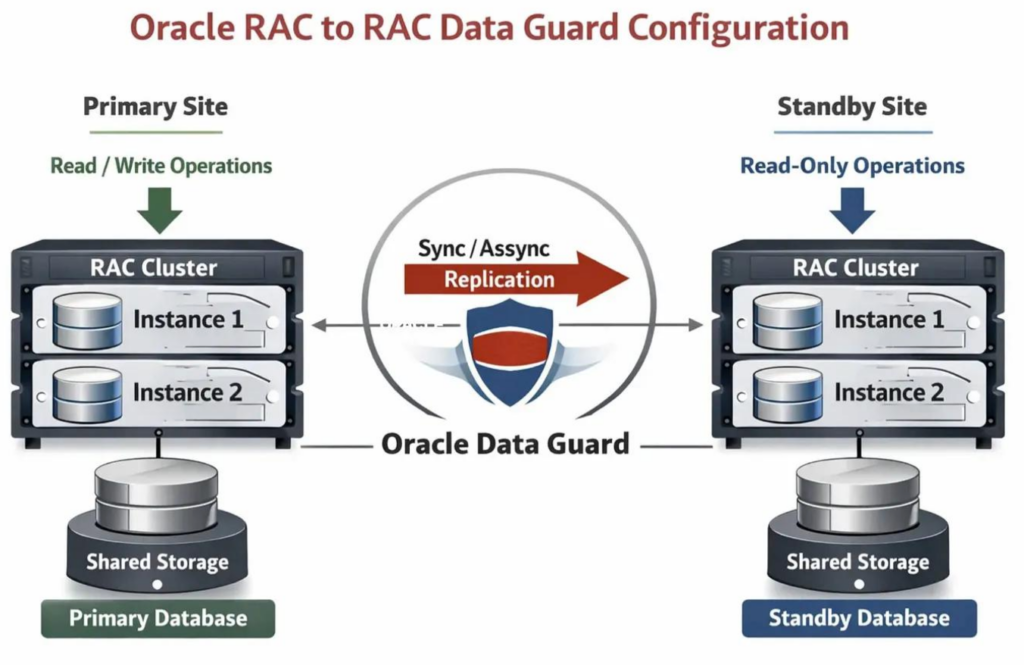
Oracle also offer solution named extended Cluster stretch RAC which each instance is in different datacenter (but its require super-fast and reliable link for interconnect and there are limit distance between sites , this is not often managed configuration in customers.
For regular RAC configuration:
The prerequisites for RAC are stricter than prerequisites for Dataguard.
And for Interconnect communication its important, if possible, in your Infrastructure to set MTU9000
- Adapters: Each node must have at least one private network adapter network interface cards (NIC) (usually its 2 for redundancy used as BOND or HAIP). Oracle also supports the use of link aggregations, bonded, trunked or teamed networks for improved bandwidth and high availability.
- Protocol: User datagram protocol (UDP) using high-speed network adapters and switches that support TCP/IP, or Reliable Datagram Sockets (RDS) with InfiniBand.
- Switches: You must use switches for interconnects that support TCP/IP. Oracle recommends that you use dedicated switches. The minimum switch speed is 1 Gigabit Ethernet.
- Oracle recommends that you configure Jumbo Frames with an MTU size of 9000 (MTU=9000) on your private network.
And the last point is the topic i would like to focus on this blog
Please be aware that:
When configuring Jumbo Frames, ensure that all the components of the private network including host adapters, network drivers, and switches support using Jumbo Frames.
First I would like to explain why Jumbo Frames MTU 9000 are important.
Standard Database block size is 8kb.
If there is standard MTU1500 set on interconnect interface its your System need to spread, it for 6 packages for TCP.
If you have MTU 9000 each cached block can be sent in one package. This reduce overall
On our testing system this speed you network performance 3 times.
Oracle Rac will work fine with MTU1500 for interconnect, however if you want to have full performance always configure MTU9000 on itrconnect nodes.
This sometimes is not easy task and Infrastructure not always was built to set it.
As oracle mentioning they need to be set on Linux network card level, but also first on Switches ports to allow MTU9000. Depends on switch manufacture this could be easier or harder to set.
Also always test if settings really work especially if you change them for working nodes.
1. apply changes on network devices switches ports, etc.
2. stop fully RAC cluster on both nodes:
crsctl stop crs3. Change Linux interfaces MTU settings. on both RAC nodes, example for LINUX 9 with network manager, depends your OS type and version procedure will be different
nmcli connection show

DEVICE TYPE STATE CONNECTION
bond1 bond connected bond1
ens1f0 ethernet connected bond1-port1
ens1f1 ethernet connected bond1-port2


#set mtu on bond:
nmcli connection modify bond1 \
  802-3-ethernet.mtu 9000

#set mtu on NIC
nmcli connection modify bond1-port1 \
  802-3-ethernet.mtu 9000

nmcli connection modify bond1-port2 \
  802-3-ethernet.mtu 9000
activate configuration

nmcli connection up bond1-port1
nmcli connection up bond1-port2
nmcli connection up bond1
ip link show bond1
ip link show ens1f0
ip link show ens1f1

ip link show bond1

bond1: <BROADCAST,MULTICAST,MASTER,UP,LOWER_UP> mtu 9000 qdisc noqueue state UP mode DEFAULT group default qlen 1000

ip link show eno7

eno7: <BROADCAST,MULTICAST,SLAVE,UP,LOWER_UP> mtu 9000 qdisc mq master bond1 state UP mode DEFAULT group default qlen 1000
    link/ether 00:XX:XX:XX:XX:XX brd ff:ff:ff:ff:ff:ff

ip link show eno8

eno8: <BROADCAST,MULTICAST,SLAVE,UP,LOWER_UP> mtu 9000 qdisc mq master bond1 state UP mode DEFAULT group default qlen 1000
    link/ether 00:XX:XX:XX:XX:XX brd ff:ff:ff:ff:ff:ff
on the output for interfaces you should see MTU 9000
4. Test with ping from BOTH nodes if second node is reachable and tcp packages 9000 can pass through.
ping -M do -s 8972 192.168.10.102
PING 192.168.10.102 (192.168.10.102) 8972(9000) bytes of data.
8980 bytes from 192.168.10.102: icmp_seq=1 ttl=64 time=0.125 ms
8980 bytes from 192.168.10.102: icmp_seq=2 ttl=64 time=0.118 ms
8980 bytes from 192.168.10.102: icmp_seq=3 ttl=64 time=0.121 ms
8980 bytes from 192.168.10.102: icmp_seq=4 ttl=64 time=0.119 ms
8980 bytes from 192.168.10.102: icmp_seq=5 ttl=64 time=0.123 ms

--- 192.168.10.102 ping statistics ---
5 packets transmitted, 5 received, 0% packet loss, time 4006ms
rtt min/avg/max/mdev = 0.118/0.121/0.125/0.002 ms
5. Start cluster again on both nodes
crsctl start crsIf you cannot ping and see packages loss, recheck your configuration and Network devices if they allow MTU9000
If cards on operating systems are set to MTU9000 but switches ports or other switch settings block them, your RAC cluster will be hanging during starting and you will not able to communicate on these interfaces.
So it’s important to test this before you start your cluster configuration, from my experience ping with size 8790 is usually enough to test that this works properly.