One of our customers needed to archive a 4T Oracle database. Several options have been chosen, one of them being archiving the data to SIARD format using SIARD Suite from Swiss Federal Archives. This blog posts explains the basics: what SIARD Suite is, how it works, and examples in command line mode.
Meeting SIARD Suite
SIARD Suite is software developed and made freely available by Swiss Federal Archives for long-term archiving of data stored in the following relational database management systems:
- MS Access 2007 or newer
- DB/2 or newer
- MySQL (or MariaDB) 5.5 or newer
- Oracle 10 or newer
- PostgreSQL 11 or newer
- SQL Server 2012 or newer
Data is extracted and stored in a custom SIARD format based on XML, SQL:2008, UNICODE and ZIP64 standards, thus enabling long-term storage of data archives (often required by audit projects, governance and legal frameworks).
Archive data files can later on be used to load the data in a new database if required.
The software can be downloaded from GitHub through this link.
Concepts
Archived data is stored in an XML files collection conforming to SQL:2008 standard.
Code and custom application objects are not extracted. However, table and columns definition are exported as XML metadata. BLOBs and CLOBs are stored as binary files outside of the XML files.
To unload more metadata, database features can be used such as Data Pump or DBMS_METADATA package procedures/functions when dealing with an Oracle database as the source database.
Basic principles of database archiving with SIARD Suite
The following list summarizes what to take into account and anticipate before starting a new archiving project:
- clearly define the data archiving scope: which tables, views or schemas, which records, and so on
- create a dedicated user with the least privileges (typically read-only) on the objects belonging to the archiving scope
- create views in case you need to filter data (columns and/or rows) to be archived
- the source database must be frozen during archiving jobs (use whatever features the source database provides to bring the database in such a state)
- to check thoroughly the end result of the archiving jobs, load the archive data into another database
- define additional metadata to archive based on your specific business needs ; this will later (think of several years in the future) lead to a better understanding of data archives : PL/SQL code, application documentation, data model entity-relation diagrams, and so on.
How SIARD Suite works
SIARD Suite is a JavaFX application, requiring JRE17 with JavaFX support in its latest release (v2.2.167) and can be used on Windows, Linux and MacOS.
Based on our experience, it is recommended to download the binary file with the right Java version embedded (always better not having to manage a separate stack).
There are two interfaces available:
- Graphical User Interface (GUI)
- Command Line Interface (CLI)
Take care, if you are planning to use the CLI, to not use “native” binaries because they don’t include the CLI.
Application installation
Binary files are downloaded as ZIP files and can be installed anywhere on your system. For our customer project, we decided to create a separate Virtual Machine with adequate storage space thanks to the high performance link between the two VMs.
Once SIARD Suite has been unzipped, the directory looks like:
SIARD-Suite.2.2.161-linux
├── bin
├── conf
├── legal
├── lib
└── release
As expected, the bin directory contains all relevant utilities to perform the archiving or loading jobs:
SIARD-Suite.2.2.161-linux/bin
├── java
├── jfr
├── jrunscript
├── keytool
├── siard-from-db
├── siard-from-db.bat
├── SIARD-Suite
├── SIARD-Suite.bat
├── siard-to-db
└── siard-to-db.bat
| Utility name | Description |
| SIARD-Suite | To launch the GUI |
| siard-from-db | To launch archiving jobs in CLI; several parameters can be provided to customize some aspects of the jobs |
| siard-to-db | To launch a loading job in CLI |
Command line interface
‘siard-from-db’ utility
Using the ‘siard-from-db’ utility is quite straightforward since there is no fine grained configurations/options/parameters to choose from:
siard-from-db [-h] | [-o] [-v] [-l=<login timeout>] [-q=<query timeout>] [-i=<import
meta data>] [-x=<external lob folder>] [-m=<mime type>] -j=<JDBC URL> -u=<database
user> -p=<database password> -s=<siard file> -e=<export meta data>"
The following table, pulled from the SIARD Suite documentation, details each parameter’s goal and usage pattern:
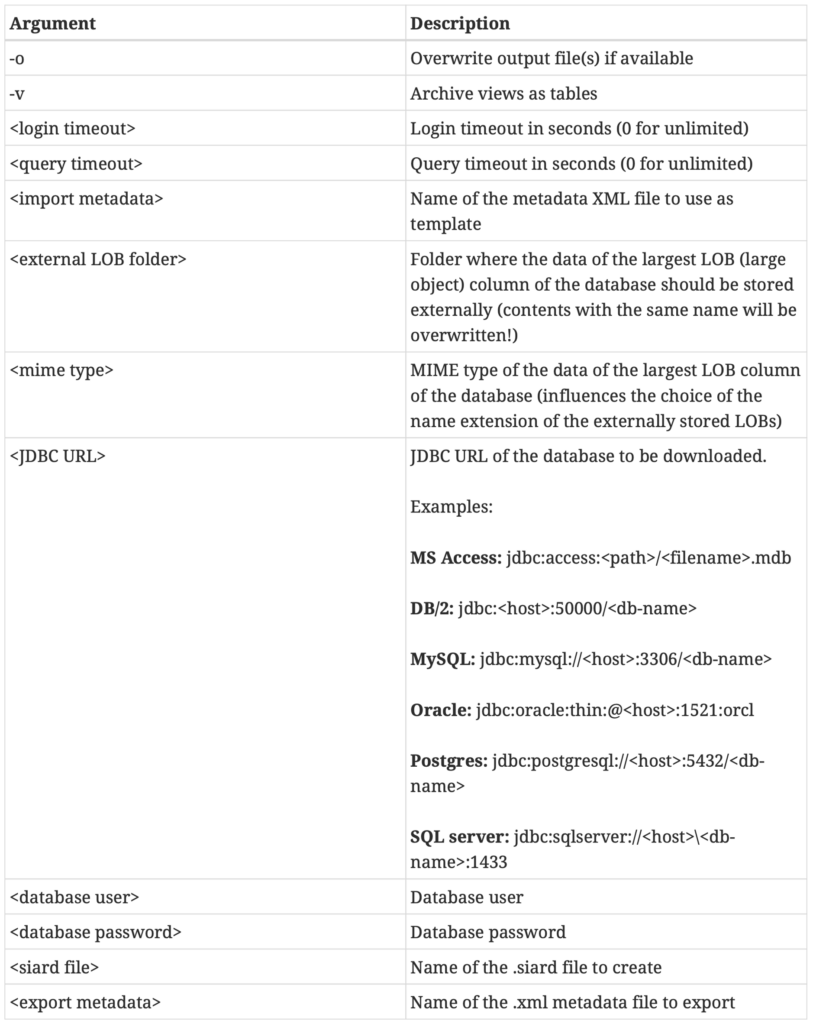
For instance, to extract the Oracle HR sample schema, we could use the following command:
./siard-from-db -l=10 -q=120 \
-j=jdbc:oracle:thin:@[hostname|ip]:listening_port/pdb_name \
-u=hr -p=hr_password -s=hr.siard -e=hr_metadata.xml
The archive job produces the following two files:
| File name | Content |
| hr.siard | Archive file in ZIP format ; content can be listed with ‘unzip -l hr.siard’ and extracted with ‘unzip hr.siard’ |
| hr_metadata.xml | Contains the HR schema metadata exported |
Running the Linux ‘file’ command on the ‘hr.siard’ file confirms it is a Zip archive file:
file hr.siard
hr.siard: Zip archive data, at least v2.0 to extract
Listing the content of the archive file returns:
unzip -l hr.siard
Archive:  hr.siard
  Length      Date    Time    Name
---------  ---------- -----   ----
        0  07-27-2026 08:15   content/
        0  07-27-2026 08:16   content/schema0/
        0  07-27-2026 08:16   content/schema0/table0/
        0  07-27-2026 08:16   content/schema0/table1/
        0  07-27-2026 08:16   content/schema0/table2/
        0  07-27-2026 08:16   content/schema0/table3/
        0  07-27-2026 08:16   content/schema0/table4/
        0  07-27-2026 08:16   content/schema0/table5/
        0  07-27-2026 08:16   content/schema0/table6/
     1595  07-27-2026 08:16   content/schema0/table0/table0.xml
     4857  07-27-2026 08:16   content/schema0/table0/table0.xsd
     1884  07-27-2026 08:16   content/schema0/table1/table1.xml
     4910  07-27-2026 08:16   content/schema0/table1/table1.xsd
    19577  07-27-2026 08:16   content/schema0/table2/table2.xml
     5323  07-27-2026 08:16   content/schema0/table2/table2.xsd
     1786  07-27-2026 08:16   content/schema0/table3/table3.xml
     4909  07-27-2026 08:16   content/schema0/table3/table3.xsd
     1345  07-27-2026 08:16   content/schema0/table4/table4.xml
     4951  07-27-2026 08:16   content/schema0/table4/table4.xsd
     2740  07-27-2026 08:16   content/schema0/table5/table5.xml
     5036  07-27-2026 08:16   content/schema0/table5/table5.xsd
      455  07-27-2026 08:16   content/schema0/table6/table6.xml
     4793  07-27-2026 08:16   content/schema0/table6/table6.xsd
        0  07-27-2026 08:16   header/
        0  07-27-2026 08:16   header/siardversion/
        0  07-27-2026 08:16   header/siardversion/2.2/
    38441  07-27-2026 08:16   header/metadata.xsd
     4825  07-27-2026 08:16   header/table.xsd
    32980  07-27-2026 08:16   header/metadata.xml
---------                     -------
   140407                     29 files
For each table, SIARD Suite generates an XML file containing the data unloaded from the database and an XSD file with the XML schema definition used.
The header/metadata.xml file contains the list of schemas, list of tables, list of table columns, and so on.
Here is an extract from header/metadata.xml file produced by the HR archiving job:
<?xml version="1.0" encoding="UTF-8" standalone="yes"?>
<siardArchive xmlns="http://www.bar.admin.ch/xmlns/siard/2/metadata.xsd" xmlns:xsi="http://www.w3.org/2001/XMLSchema-instance" version="2.2" xsi:schemaLocation="http://www.bar.admin.ch/xmlns/siard/2/metadata.xsd metadata.xsd">
    <dbname>(...)</dbname>
    <dataOwner>(...)</dataOwner>
    <dataOriginTimespan>(...)</dataOriginTimespan>
    <producerApplication>SiardFromDb 2.2.26 Swiss Federal Archives, Berne, Switzerland, 2008-2016</producerApplication>
    <archivalDate>2026-07-27Z</archivalDate>
    <messageDigest>
        <digestType>MD5</digestType>
        <digest>8DC757A5338AA000234CC6199FEFE0AA</digest>
    </messageDigest>
    <clientMachine>srvsiard</clientMachine>
    <databaseProduct>Oracle Oracle AI Database 26ai Enterprise Edition Release 23.26.2.0.0 - Production</databaseProduct>
    <connection>jdbc:oracle:thin:@xxx.xxx.xxx.xxx:yyyy/pdb_name</connection>
    <databaseUser>HR</databaseUser>
    <schemas>
        <schema>
            <name>HR</name>
            <folder>schema0</folder>
            <tables>
                <table>
                    <name>COUNTRIES</name>
                    <folder>table0</folder>
                    <description>country table. References with locations table.</description>
                    <columns>
                        <column>
                            <name>COUNTRY_ID</name>
                            <type>CHAR(2)</type>
                            <typeOriginal>CHAR(2)</typeOriginal>
                            <nullable>false</nullable>
                            <description>Primary key of countries table.</description>
                        </column>
                        <column>
                            <name>COUNTRY_NAME</name>
                            <type>VARCHAR(60)</type>
                            <typeOriginal>VARCHAR2(60)</typeOriginal>
                            <description>Country name</description>
                        </column>
                        <column>
                            <name>REGION_ID</name>
                            <type>FLOAT(38)</type>
                            <typeOriginal>NUMBER</typeOriginal>
                            <description>Region ID for the country. Foreign key to region_id column in the departments table.</description>
                        </column>
                    </columns>
                    <primaryKey>
                        <name>COUNTRY_C_ID_PK</name>
                        <column>COUNTRY_ID</column>
                    </primaryKey>
                    <foreignKeys>
                        <foreignKey>
                            <name>COUNTR_REG_FK</name>
                            <referencedSchema>HR</referencedSchema>
                            <referencedTable>REGIONS</referencedTable>
                            <reference>
<column>REGION_ID</column>
<referenced>REGION_ID</referenced>
                            </reference>
                            <deleteAction>RESTRICT</deleteAction>
                            <updateAction>CASCADE</updateAction>
                        </foreignKey>
                    </foreignKeys>
                    <rows>25</rows>
                </table>
                <table>
                    <name>DEPARTMENTS</name>
                    <folder>table1</folder>
                    <description>Departments table that shows details of departments where employees\u000Awork. references with locations, employees, and job_history tables.</description>
                    <columns>
                        <column>
                            <name>DEPARTMENT_ID</name>
                            <type>SMALLINT</type>
                            <typeOriginal>NUMBER(4,0)</typeOriginal>
                            <nullable>false</nullable>
                            <description>Primary key column of departments table.</description>
                        </column>
                        <column>
                            <name>DEPARTMENT_NAME</name>
                            <type>VARCHAR(30)</type>
                            <typeOriginal>VARCHAR2(30)</typeOriginal>
                            <nullable>false</nullable>
                            <description>A not null column that shows name of a department. Administration,\u000AMarketing, Purchasing, Human Resources, Shipping, IT, Executive, Public\u000ARelations, Sales, Finance, and Accounting.\u0020</description>
                        </column>
                        <column>
                            <name>MANAGER_ID</name>
                            <type>INT</type>
                            <typeOriginal>NUMBER(6,0)</typeOriginal>
                            <description>Manager_id of a department. Foreign key to employee_id column of employees table. The manager_id column of the employee table references this column.</description>
                        </column>
                        <column>
                            <name>LOCATION_ID</name>
                            <type>SMALLINT</type>
                            <typeOriginal>NUMBER(4,0)</typeOriginal>
                            <description>Location id where a department is located. Foreign key to location_id column of locations table.</description>
                        </column>
                    </columns>
                    <primaryKey>
                        <name>DEPT_ID_PK</name>
                        <column>DEPARTMENT_ID</column>
                    </primaryKey>
                    <foreignKeys>
                        <foreignKey>
                            <name>DEPT_MGR_FK</name>
                            <referencedSchema>HR</referencedSchema>
                            <referencedTable>EMPLOYEES</referencedTable>
                            <reference>
<column>MANAGER_ID</column>
<referenced>EMPLOYEE_ID</referenced>
                            </reference>
                            <deleteAction>RESTRICT</deleteAction>
                            <updateAction>CASCADE</updateAction>
                        </foreignKey>
                        <foreignKey>
                            <name>DEPT_LOC_FK</name>
                            <referencedSchema>HR</referencedSchema>
                            <referencedTable>LOCATIONS</referencedTable>
                            <reference>
<column>LOCATION_ID</column>
<referenced>LOCATION_ID</referenced>
                            </reference>
                            <deleteAction>RESTRICT</deleteAction>
                            <updateAction>CASCADE</updateAction>
                        </foreignKey>
                    </foreignKeys>
                    <rows>27</rows>
                </table>
Complete metadata include definitions for:
- tables
- columns
- descriptions
- primary keys
- foreign keys
- check constraints
- triggers
- views
- procedures/functions (name and parameters but not the code)
Important note: as already mentioned, the tool doesn’t provide fine grained tuning of archiving jobs: extraction scope is based on the security perimeter of the user performing the job, which metadata is unloaded is fixed by the tool and data is fully extracted (no way to filter with utility parameters).
That said, you can use the source database features to configure more fine grained behaviour, for instance by:
- creating a dedicated user
- defining user permissions tailored to the archiving scope defined
- creating views for column or row filtering purposes
To get an idea of how big an archive file can be when exporting a big table, we made a first test with a three columns table containing 26,300,300 rows and whose segment size is 50G: the archive file size is 27G. During the tests, other intermediary sizes were used for the table and each time, the archive file was a little more than 50% of the segment size.
What’s next
In upcoming blog posts, we will dive in the GUI interface and the various challenges encountered on real schemas.
![Thumbnail [60x60]](https://www.dbi-services.com/blog/wp-content/uploads/2025/07/ALK_MIN.jpeg)
![Thumbnail [90x90]](https://www.dbi-services.com/blog/wp-content/uploads/2023/05/AEA_web_min.jpg)
![Thumbnail [90x90]](https://www.dbi-services.com/blog/wp-content/uploads/2025/05/martin_bracher_2048x1536.jpg)
![Thumbnail [90x90]](https://www.dbi-services.com/blog/wp-content/uploads/2025/05/JDE_Web-1-scaled.jpg)