How often do I come across this sort of problem when visiting clients? Even more with our customers’ service desk (support) SLAs.
We turn up on a Monday morning and there are alerts from the weekend saying
[MSSQL] – Instance Dark_Vador-Data(F:): Disk space in GB on server Death_Star is critical
Info: NOT OK – Free space: 20 MB out of 200 GB
The storage is almost full and:
– no projects were deployed over the weekend
– no exceptional data loads were scheduled
– nobody works at the weekend
A strange phenomenon to come across on a Monday morning….
On closer inspection, the findings are surprising; we can see that a database within the instance has been undergoing regular autogrowth for weeks…
Every day, there are several regular autogrowth on the data file for this database until the saturation of the disk.
Who is the culprit?
Not the business data, but one or more tables named xxxxLog or Historyxxx, or the combination of both HistoryLog!
PS: It’s an example but in the reality before the weekend, we will have Warnings and in the majority of the cases we react before the critical alert of course!
Data created to diagnose a problem, track an activity or maintain a history, which is then never cleaned up or has a default retention period that is too long and unsuitable for the context, is not always easy to detect.
On the other hand, it’s always easier to expand disk capacity without too much effort, and everything runs smoothly in an ideal world…
We, however, are Green SQL Server DBA; we’ll look deeper.
Our curiosity will lead us to challenge the business on these points.
The AUDIT
First, you need to know the autogrowth settings for these databases and how the data file growth.
Here is a simple script that shows the settings:
SELECT
    DB_NAME(database_id) AS DatabaseName,
    name AS LogicalFileName,
    type_desc AS FileType,
    physical_name AS PhysicalFileName,
    size / 128.0 AS CurrentSizeMB,
    CASE
        WHEN is_percent_growth = 1
            THEN CAST(growth AS VARCHAR(10)) + ' %'
        ELSE CAST(growth / 128 AS VARCHAR(10)) + ' MB'
    END AS AutoGrowth,
    max_size,
    CASE
        WHEN max_size = -1 THEN 'Unlimited'
        ELSE CAST(max_size / 128 AS VARCHAR(20)) + ' MB'
    END AS MaxSize
FROM sys.master_files where type_desc='ROWS' AND database_id > 4
ORDER BY
    DatabaseName,
    FileType,
    LogicalFileName;
Like for my precedent blog “Green SQL Server DBA Tips #1 – Are unnecessary indexes cluttering up your database?”, I use the Dynamics database as example:
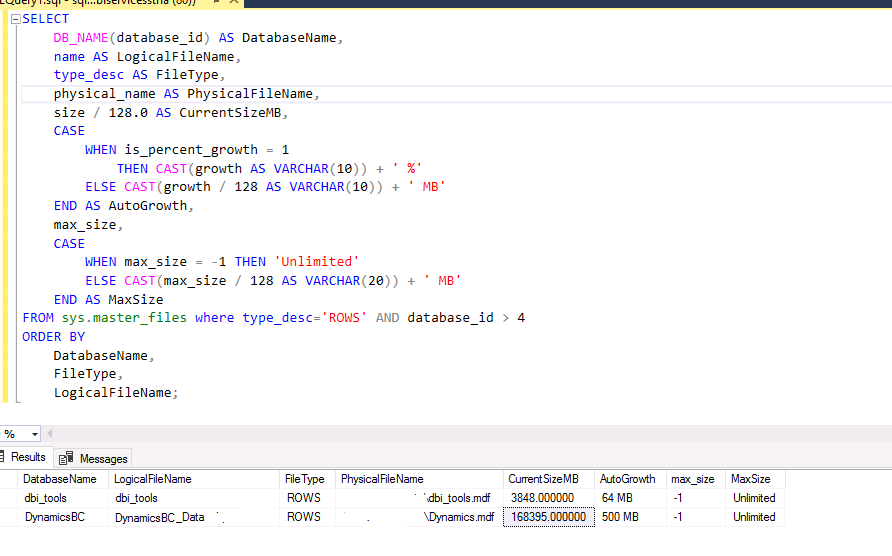
In my script, I exclude all system databases and the Log File to be concentrated to the Data File.
Now, I need to have the data file growth. This is through the default trace file and the event 92:
DECLARE @TraceFile NVARCHAR(500);

SELECT @TraceFile = path
FROM sys.traces
WHERE is_default = 1;

IF @TraceFile IS NULL
BEGIN
    RAISERROR('Default Trace is disabled.',16,1);
    RETURN;
END

;WITH GrowthEvents AS
(
    SELECT
        DB_NAME(DatabaseID) AS DatabaseName, FileName, CAST(StartTime AS DATE) AS GrowthDate,
        DATEPART(YEAR, StartTime) AS YearNum, DATEPART(WEEK, StartTime) AS WeekNum,
        DATEPART(MONTH, StartTime) AS MonthNum, IntegerData * 8.0 / 1024 AS GrowthMB
    FROM fn_trace_gettable(@TraceFile, DEFAULT)
    WHERE EventClass IN (92) -- 92 is data growth
)

SELECT DatabaseName,FileName,GrowthDate,COUNT(*) AS GrowthEvents,SUM(GrowthMB) AS TotalGrowthMB
FROM GrowthEvents GROUP BY DatabaseName,FileName,GrowthDate ORDER BY DatabaseName, GrowthDate
As I don’t have any growth on the dynamicsBC database, I switch to the M-Files database for my example:
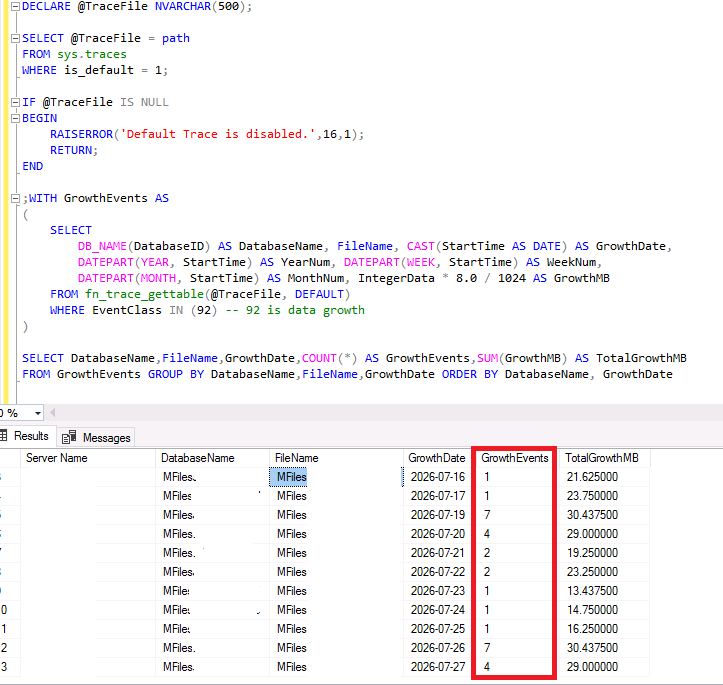
We have here some daily growth…
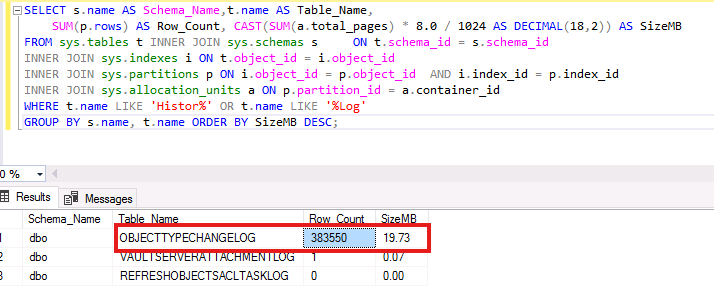
Go to see if we have historical or log tables in M-Files with this simple script who give us the table and the row count and MB:
SELECT s.name AS Schema_Name,t.name AS Table_Name,
    SUM(p.rows) AS Row_Count, CAST(SUM(a.total_pages) * 8.0 / 1024 AS DECIMAL(18,2)) AS SizeMB
FROM sys.tables t INNER JOIN sys.schemas s     ON t.schema_id = s.schema_id
INNER JOIN sys.indexes i ON t.object_id = i.object_id
INNER JOIN sys.partitions p ON i.object_id = p.object_id  AND i.index_id = p.index_id
INNER JOIN sys.allocation_units a ON p.partition_id = a.container_id
WHERE t.name LIKE 'Histor%' OR t.name LIKE '%Log'
GROUP BY s.name, t.name ORDER BY SizeMB DESC;
The ANALISYS
In my case, we can see that we have 383550 lignes (19.73Mb) on the table named OBJECTTYPECHANGELOG for a M-Files database.
It’s only ~20MB here but in few months perhaps 20 GB or more…
As a Green SQL Server DBA, I will contact the owner of M-Files project otherwise don’t forget that dbi services has also the expertise in ECM tools like M-Files.
The IMPACT
Like in my precedent post, we will have the same impacts
The first impact is on DML INSERT operations.
With every insertion, the log or historical information is written to the table and update perhaps also index and at the end is never used by a query.
The second impact is the storage and the backup
If the log table represents ~20 GB of the database.
It’s 20 GB backed up unnecessarily, 20 GB restored unnecessarily and, above all, 20 GB stored unnecessarily and just for one environment.
If you have Dev, Test, PreProd & Prod and all in HA… I let you do the calculation but it’s more 100 GB!
The third impact is on the maintenance plan
The following operations must also handle the log/historical tables:
– Rebuild Index
– Reorganise Index
– CheckDB
– Backups
– Restores
Each growth of log/historical tables extends the maintenance windows…
The ADVISE
You really need to be careful before deleting anything in these table.
Don’t Truncate the table because you see it!
First see with the vendor if a purge or a retention parameter exists through the application.
In my case with M-Files and the table OBJECTTYPECHANGELOG, in the administration interface, you can configure the retention. Go to challenge your M-Files team on it! 😉
Finally, for every large log or historical table, you need to ask yourself the following questions:
– Who uses it?
– How often?
– Is there a legal obligation?
– What retention period is required?
– Can it be archived?
– Can it be purged?
The Green SQL Server DBA Score
Like for my precedent post, I setup a ‘SQL Server DBA Score’ to use for my tips on the subject:
| Data growth per month | Score |
| 0 to 2 | 10 |
| 3 to 5 | 8 |
| 6 to 10 | 5 |
| 11 to 20 | 2 |
| > 20 | 0 |
Conclusion
A traditional SQL Server DBA or system administrator will see a data disk full and says:
“How much GB need we to extend the disk?”
A Green SQL Server DBA sees a data disk full and says:
“Why is my disk full and what can I do?”
Just like adding a larger trunk doesn’t make a car more efficient, adding more GB doesn’t make a database healthier.
The greenest SQL Server DBA is not the one with the largest disks but it’s the one that keeps only data that continues to deliver value. 🚀
Think about it and begin now to see if you have cases!
See you soon for the next one!
![Thumbnail [60x60]](https://www.dbi-services.com/blog/wp-content/uploads/2022/08/STH_web-min-scaled.jpg)
![Thumbnail [90x90]](https://www.dbi-services.com/blog/wp-content/uploads/2025/05/martin_bracher_2048x1536.jpg)
![Thumbnail [90x90]](https://www.dbi-services.com/blog/wp-content/uploads/2025/05/JDE_Web-1-scaled.jpg)
![Thumbnail [90x90]](https://www.dbi-services.com/blog/wp-content/uploads/2025/11/LTO_WEB.jpg)