I recently had to upgrade an Oracle Linux production server running 19.30 Oracle databases for one of our customer. In this post, I will share with you the full set of steps that need to be carried out to run an in-place Oracle Linux upgrade when running Oracle databases. The method will be the same to upgrade from Oracle Linux 7 to 8, or 8 to 9 or 9 to 10 version. In my case, customer was running Oracle Linux 7, and I had to perform an in-place upgrade to version 8.
Backup your current server
Knowing we are going to run an in-place upgrade, it is important that we backup the server in order to restore it if something would not run smoothly.
There is several why to do this.
- You are running a VM and can take a snapshot. This is the easiest and quicker way to backup and restore.
- Take a full backup or image
- Have any tool like Veeam backup that will secure your operating system
- Look for existing free tool that will help you to create a bootable disaster recovery backup (to be previously tested)
- Perform a manual backup
What is also important is to ensure your backup is usable.
In my case, it was a physical server, no backup tool, no snapshot possibility. So I had to perform some manual backup.
- I ensured to have database backups and also my server was only running standby databases
- I wrote a script to save all the important linux configurations that will help me to restore the system reinstalling it from scratch if needed
Here is my script:
#!/bin/bash
#-----------------------------------------------------------------
#
# Author: Marc Wagner, dbi services
#
# Purpose:To backup OS configuration before OS patching
#
# To be run as root: ./OS_backup.sh
#
# History:
# 28.05.2026 - Initial
#
#
#-----------------------------------------------------------------

# Create backup directory if not existing
if [ ! -d "/rdbms/OS_backup" ]; then
    mkdir -p "/rdbms/OS_backup"
fi

# Backup OS configuration file into tar file
cd /
tar czpf /rdbms/OS_backup/ol7-os-backup-$(hostname)-$(date +%Y%m%d_%H%M).tgz \
--xattrs \
--acls \
./etc \
./boot \
./home \
./root \
./usr/local \
./var/spool/cron \
./opt \
./var/lib/rpm

# Backup Package inventory
rpm -qa > /rdbms/OS_backup/rpm-list-$(hostname)-$(date +%Y%m%d_%H%M).txt

# Backup current release version
cat /etc/oracle-release > /rdbms/OS_backup/OS-release-$(hostname)-$(date +%Y%m%d_%H%M).txt

# Backup Boot loader metadata
grub2-mkconfig -o /rdbms/OS_backup//grub-$(hostname)-$(date +%Y%m%d_%H%M).cfg
echo "*************************************" > /rdbms/OS_backup/lsblk-$(hostname)-$(date +%Y%m%d_%H%M).txt
echo "# lsblk" >> /rdbms/OS_backup/lsblk-$(hostname)-$(date +%Y%m%d_%H%M).txt
echo "*************************************" >> /rdbms/OS_backup/lsblk-$(hostname)-$(date +%Y%m%d_%H%M).txt
lsblk >> /rdbms/OS_backup/lsblk-$(hostname)-$(date +%Y%m%d_%H%M).txt
echo  >> /rdbms/OS_backup/lsblk-$(hostname)-$(date +%Y%m%d_%H%M).txt
echo  >> /rdbms/OS_backup/lsblk-$(hostname)-$(date +%Y%m%d_%H%M).txt
echo "*************************************" >> /rdbms/OS_backup/lsblk-$(hostname)-$(date +%Y%m%d_%H%M).txt
echo "# lsblk -f" >> /rdbms/OS_backup/lsblk-$(hostname)-$(date +%Y%m%d_%H%M).txt
echo "*************************************" >> /rdbms/OS_backup/lsblk-$(hostname)-$(date +%Y%m%d_%H%M).txt
lsblk -f >> /rdbms/OS_backup/lsblk-$(hostname)-$(date +%Y%m%d_%H%M).txt
echo  >> /rdbms/OS_backup/lsblk-$(hostname)-$(date +%Y%m%d_%H%M).txt
echo  >> /rdbms/OS_backup/lsblk-$(hostname)-$(date +%Y%m%d_%H%M).txt
echo "*************************************" >> /rdbms/OS_backup/lsblk-$(hostname)-$(date +%Y%m%d_%H%M).txt
echo "# blkid" >> /rdbms/OS_backup/lsblk-$(hostname)-$(date +%Y%m%d_%H%M).txt
echo "*************************************" >> /rdbms/OS_backup/lsblk-$(hostname)-$(date +%Y%m%d_%H%M).txt
blkid >> /rdbms/OS_backup/lsblk-$(hostname)-$(date +%Y%m%d_%H%M).txt

# Backup service
systemctl list-unit-files > /rdbms/OS_backup/systemd-units-$(hostname)-$(date +%Y%m%d_%H%M).txt

# Backup live Network configuration
ip addr > /rdbms/OS_backup/ip-$(hostname)-$(date +%Y%m%d_%H%M).txt
ip route > /rdbms/OS_backup/routes-$(hostname)-$(date +%Y%m%d_%H%M).txt

# Backup LVM configuration
echo "*************************************" > /rdbms/OS_backup/LVM-$(hostname)-$(date +%Y%m%d_%H%M).txt
echo "# vgs" >> /rdbms/OS_backup/LVM-$(hostname)-$(date +%Y%m%d_%H%M).txt
echo "*************************************" >> /rdbms/OS_backup/LVM-$(hostname)-$(date +%Y%m%d_%H%M).txt
vgs >> /rdbms/OS_backup/LVM-$(hostname)-$(date +%Y%m%d_%H%M).txt
echo >> /rdbms/OS_backup/LVM-$(hostname)-$(date +%Y%m%d_%H%M).txt
echo >> /rdbms/OS_backup/LVM-$(hostname)-$(date +%Y%m%d_%H%M).txt
echo "*************************************" >> /rdbms/OS_backup/LVM-$(hostname)-$(date +%Y%m%d_%H%M).txt
echo "# lvs" >> /rdbms/OS_backup/LVM-$(hostname)-$(date +%Y%m%d_%H%M).txt
echo "*************************************" >> /rdbms/OS_backup/LVM-$(hostname)-$(date +%Y%m%d_%H%M).txt
lvs >> /rdbms/OS_backup/LVM-$(hostname)-$(date +%Y%m%d_%H%M).txt
echo >> /rdbms/OS_backup/LVM-$(hostname)-$(date +%Y%m%d_%H%M).txt
echo >> /rdbms/OS_backup/LVM-$(hostname)-$(date +%Y%m%d_%H%M).txt
echo "*************************************" >> /rdbms/OS_backup/LVM-$(hostname)-$(date +%Y%m%d_%H%M).txt
echo "# pvs" >> /rdbms/OS_backup/LVM-$(hostname)-$(date +%Y%m%d_%H%M).txt
echo "*************************************" >> /rdbms/OS_backup/LVM-$(hostname)-$(date +%Y%m%d_%H%M).txt
pvs >> /rdbms/OS_backup/LVM-$(hostname)-$(date +%Y%m%d_%H%M).txt
echo >> /rdbms/OS_backup/LVM-$(hostname)-$(date +%Y%m%d_%H%M).txt
echo >> /rdbms/OS_backup/LVM-$(hostname)-$(date +%Y%m%d_%H%M).txt

# SELinux
echo "*************************************" > /rdbms/OS_backup/SELinux-$(hostname)-$(date +%Y%m%d_%H%M).txt
echo "# getenforce" >> /rdbms/OS_backup/SELinux-$(hostname)-$(date +%Y%m%d_%H%M).txt
echo "*************************************" >> /rdbms/OS_backup/SELinux-$(hostname)-$(date +%Y%m%d_%H%M).txt
getenforce >> /rdbms/OS_backup/SELinux-$(hostname)-$(date +%Y%m%d_%H%M).txt
echo >> /rdbms/OS_backup/SELinux-$(hostname)-$(date +%Y%m%d_%H%M).txt
echo >> /rdbms/OS_backup/SELinux-$(hostname)-$(date +%Y%m%d_%H%M).txt
echo "*************************************" >> /rdbms/OS_backup/SELinux-$(hostname)-$(date +%Y%m%d_%H%M).txt
echo "# sestatus" >> /rdbms/OS_backup/SELinux-$(hostname)-$(date +%Y%m%d_%H%M).txt
echo "*************************************" >> /rdbms/OS_backup/SELinux-$(hostname)-$(date +%Y%m%d_%H%M).txt
sestatus >> /rdbms/OS_backup/SELinux-$(hostname)-$(date +%Y%m%d_%H%M).txt
echo >> /rdbms/OS_backup/SELinux-$(hostname)-$(date +%Y%m%d_%H%M).txt
echo >> /rdbms/OS_backup/SELinux-$(hostname)-$(date +%Y%m%d_%H%M).txt
echo "*************************************" >> /rdbms/OS_backup/SELinux-$(hostname)-$(date +%Y%m%d_%H%M).txt
echo "# selinux config file" >> /rdbms/OS_backup/SELinux-$(hostname)-$(date +%Y%m%d_%H%M).txt
echo "*************************************" >> /rdbms/OS_backup/SELinux-$(hostname)-$(date +%Y%m%d_%H%M).txt
cat /etc/selinux/config >> /rdbms/OS_backup/SELinux-$(hostname)-$(date +%Y%m%d_%H%M).txt
echo >> /rdbms/OS_backup/SELinux-$(hostname)-$(date +%Y%m%d_%H%M).txt
echo >> /rdbms/OS_backup/SELinux-$(hostname)-$(date +%Y%m%d_%H%M).txt
echo "*************************************" >> /rdbms/OS_backup/SELinux-$(hostname)-$(date +%Y%m%d_%H%M).txt
echo "# SELinux is enabled at kernel level?" >> /rdbms/OS_backup/SELinux-$(hostname)-$(date +%Y%m%d_%H%M).txt
echo "*************************************" >> /rdbms/OS_backup/SELinux-$(hostname)-$(date +%Y%m%d_%H%M).txt
cat /proc/cmdline | grep -i selinux >> /rdbms/OS_backup/SELinux-$(hostname)-$(date +%Y%m%d_%H%M).txt
echo >> /rdbms/OS_backup/SELinux-$(hostname)-$(date +%Y%m%d_%H%M).txt
echo >> /rdbms/OS_backup/SELinux-$(hostname)-$(date +%Y%m%d_%H%M).txt
echo "*************************************" >> /rdbms/OS_backup/SELinux-$(hostname)-$(date +%Y%m%d_%H%M).txt
echo "# detailed policy and booleans" >> /rdbms/OS_backup/SELinux-$(hostname)-$(date +%Y%m%d_%H%M).txt
echo "*************************************" >> /rdbms/OS_backup/SELinux-$(hostname)-$(date +%Y%m%d_%H%M).txt
semanage boolean -l >> /rdbms/OS_backup/SELinux-$(hostname)-$(date +%Y%m%d_%H%M).txt
echo >> /rdbms/OS_backup/SELinux-$(hostname)-$(date +%Y%m%d_%H%M).txt
echo >> /rdbms/OS_backup/SELinux-$(hostname)-$(date +%Y%m%d_%H%M).txt
I ran the scripts:
[root@SRV scripts]# ./OS_backup.sh
Generating grub configuration file ...
Found linux image: /boot/vmlinuz-5.4.17-2036.102.0.2.el7uek.x86_64
Found initrd image: /boot/initramfs-5.4.17-2036.102.0.2.el7uek.x86_64.img
Found linux image: /boot/vmlinuz-5.4.17-2036.100.6.1.el7uek.x86_64
Found initrd image: /boot/initramfs-5.4.17-2036.100.6.1.el7uek.x86_64.img
Found linux image: /boot/vmlinuz-4.14.35-2025.402.2.1.el7uek.x86_64
Found initrd image: /boot/initramfs-4.14.35-2025.402.2.1.el7uek.x86_64.img
Found linux image: /boot/vmlinuz-3.10.0-1160.11.1.el7.x86_64
Found initrd image: /boot/initramfs-3.10.0-1160.11.1.el7.x86_64.img
Found linux image: /boot/vmlinuz-3.10.0-1160.6.1.el7.x86_64
Found linux image: /boot/vmlinuz-0-rescue-939798bf09ac467188081e34260fbcfd
Found initrd image: /boot/initramfs-0-rescue-939798bf09ac467188081e34260fbcfd.img
done
lsblk: nvme2c2n1: hidden, ignore
lsblk: nvme1c1n1: hidden, ignore
lsblk: nvme0c0n1: hidden, ignore
lsblk: nvme5c5n1: hidden, ignore
lsblk: nvme4c4n1: hidden, ignore
lsblk: nvme3c3n1: hidden, ignore
lsblk: nvme2c2n1: hidden, ignore
lsblk: nvme1c1n1: hidden, ignore
lsblk: nvme0c0n1: hidden, ignore
lsblk: nvme5c5n1: hidden, ignore
lsblk: nvme4c4n1: hidden, ignore
lsblk: nvme3c3n1: hidden, ignore
[root@SRV scripts]#
And I checked the backup files:
[root@SRV OS_backup]# pwd
/rdbms/OS_backup

[root@SRV OS_backup]# ls -ltrh
total 2.6G
-rw-r--r--. 1 root root 2.6G Jun 17 14:38 ol7-os-backup-SRV.INT.CUSTNAME.CH-20260617_1436.tgz
-rw-r--r--. 1 root root  17K Jun 17 14:38 rpm-list-SRV.INT.CUSTNAME.CH-20260617_1438.txt
-rw-r--r--. 1 root root   32 Jun 17 14:38 OS-release-SRV.INT.CUSTNAME.CH-20260617_1438.txt
-rw-r--r--. 1 root root 8.3K Jun 17 14:38 grub-SRV.INT.CUSTNAME.CH-20260617_1438.cfg
-rw-r--r--. 1 root root 9.0K Jun 17 14:38 lsblk-SRV.INT.CUSTNAME.CH-20260617_1438.txt
-rw-r--r--. 1 root root  16K Jun 17 14:38 systemd-units-SRV.INT.CUSTNAME.CH-20260617_1438.txt
-rw-r--r--. 1 root root 2.0K Jun 17 14:38 ip-SRV.INT.CUSTNAME.CH-20260617_1438.txt
-rw-r--r--. 1 root root  131 Jun 17 14:38 routes-SRV.INT.CUSTNAME.CH-20260617_1438.txt
-rw-r--r--. 1 root root 1.6K Jun 17 14:38 LVM-SRV.INT.CUSTNAME.CH-20260617_1438.txt
-rw-r--r--. 1 root root  26K Jun 17 14:38 SELinux-SRV.INT.CUSTNAME.CH-20260617_1438.txt
[root@SRV OS_backup]#
I also saved this file on a NFS mount point to get them out of the server.
Check Oracle Linux current version
I confirmed we are currently running OL 7.9.
[root@SRV scripts]# cat /etc/oracle-release
Oracle Linux Server release 7.9
Stop Oracle resources: databases and listener
Databases and listener need to be stop during the in-place upgrade process and we need to ensure that will not be started during reboot. We will therefore stop the oracle resources and update /etc/oratab.
Check current running oracle resources
oracle@SRV:~/ [rdbms193000] ps -ef | grep -i [p]mon
oracle    5761     1  0 14:12 ?        00:00:00 ora_pmon_DB6
oracle    5763     1  0 14:12 ?        00:00:00 ora_pmon_DB1
oracle    5767     1  0 14:12 ?        00:00:00 ora_pmon_DB8
oracle    5797     1  0 14:12 ?        00:00:00 ora_pmon_DB2
oracle    5803     1  0 14:12 ?        00:00:00 ora_pmon_DB7
oracle    5805     1  0 14:12 ?        00:00:00 ora_pmon_DB4
oracle    5807     1  0 14:12 ?        00:00:00 ora_pmon_DB3
oracle    5809     1  0 14:12 ?        00:00:00 ora_pmon_DB5
oracle    5855     1  0 14:12 ?        00:00:00 ora_pmon_DB9

oracle@SRV:~/ [rdbms193000] ps -ef | grep -i [t]nslsn
oracle    2316     1  0 14:12 ?        00:00:00 /rdbms/u01/app/oracle/product/19.30.260120/bin/tnslsnr LISTENER_DB1 -inherit
oracle    2545     1  0 14:12 ?        00:00:00 /rdbms/u01/app/oracle/product/19.30.260120/bin/tnslsnr LISTENER_DB2 -inherit
oracle    2731     1  0 14:12 ?        00:00:00 /rdbms/u01/app/oracle/product/19.30.260120/bin/tnslsnr LISTENER_DG -inherit
oracle    2938     1  0 14:12 ?        00:00:00 /rdbms/u01/app/oracle/product/19.30.260120/bin/tnslsnr LISTENER_DB3 -inherit
oracle    3133     1  0 14:12 ?        00:00:00 /rdbms/u01/app/oracle/product/19.30.260120/bin/tnslsnr LISTENER_DB4 -inherit
oracle    3416     1  0 14:12 ?        00:00:00 /rdbms/u01/app/oracle/product/19.30.260120_MX/bin/tnslsnr LISTENER_DB5 -inherit
oracle    3639     1  0 14:12 ?        00:00:00 /rdbms/u01/app/oracle/product/19.30.260120_MX/bin/tnslsnr LISTENER_DB6 -inherit
oracle    3822     1  0 14:12 ?        00:00:00 /rdbms/u01/app/oracle/product/19.30.260120/bin/tnslsnr LISTENER_DB7 -inherit
oracle    4005     1  0 14:12 ?        00:00:00 /rdbms/u01/app/oracle/product/19.30.260120/bin/tnslsnr LISTENER_DB8 -inherit
oracle    4189     1  5 14:12 ?        00:02:07 /rdbms/u01/app/oracle/product/19.30.260120/bin/tnslsnr LISTENER_DB9 -inherit
oracle    4372     1  0 14:12 ?        00:00:00 /rdbms/u01/app/oracle/product/19.30.260120/bin/tnslsnr LISTENER_DB10 -inherit
oracle@SRV:~/ [rdbms193000]
Also I ensured all the running databases are standby databases (see below mo for mount status and mrp for physical standby database). Switchover has been run previously.
DB DB1 mo mrp /rdbms/u01/app/oracle/product/19.30.260120
DB DB2 mo mrp /rdbms/u01/app/oracle/product/19.30.260120
DB DB3 mo mrp /rdbms/u01/app/oracle/product/19.30.260120
DB DB4 mo mrp /rdbms/u01/app/oracle/product/19.30.260120
DB DB5 mo mrp /rdbms/u01/app/oracle/product/19.30.260120_MX
DB DB6 mo mrp /rdbms/u01/app/oracle/product/19.30.260120_MX
DB DB7 mo mrp /rdbms/u01/app/oracle/product/19.30.260120
DB DB8 mo mrp /rdbms/u01/app/oracle/product/19.30.260120
DB DB9 mo mrp /rdbms/u01/app/oracle/product/19.30.260120
DB DB10 of /rdbms/u01/app/oracle/product/19.30.260120
Update oratab
Put all DB to N in oratab to ensure they will not start automatically on reboot.
oracle@SRV:~/ [rdbms193000] vi /etc/oratab
oracle@SRV:~/ [rdbms193000] cat /etc/oratab
#


# This file is used by ORACLE utilities.  It is created by root.sh
# and updated by either Database Configuration Assistant while creating
# a database or ASM Configuration Assistant while creating ASM instance.

# A colon, ':', is used as the field terminator.  A new line terminates
# the entry.  Lines beginning with a pound sign, '#', are comments.
#
# Entries are of the form:
#   $ORACLE_SID:$ORACLE_HOME::
#
# The first and second fields are the system identifier and home
# directory of the database respectively.  The third field indicates
# to the dbstart utility that the database should , "Y", or should not,
# "N", be brought up at system boot time.
#
# Multiple entries with the same $ORACLE_SID are not allowed.
#
#
DB10:/rdbms/u01/app/oracle/product/19.30.260120:N
DB3:/rdbms/u01/app/oracle/product/19.30.260120:N
DB9:/rdbms/u01/app/oracle/product/19.30.260120:N
DB4:/rdbms/u01/app/oracle/product/19.30.260120:N
DB1:/rdbms/u01/app/oracle/product/19.30.260120:N
DB8:/rdbms/u01/app/oracle/product/19.30.260120:N
DB7:/rdbms/u01/app/oracle/product/19.30.260120:N
DB2:/rdbms/u01/app/oracle/product/19.30.260120:N
DB5:/rdbms/u01/app/oracle/product/19.30.260120_MX:N
DB6:/rdbms/u01/app/oracle/product/19.30.260120_MX:N
oracle@SRV:~/ [rdbms193000]
Stop databases
I then stopped all databases. I was using our dmk tool, and I’m sure everybody knows how to stop Oracle databases. shutdown immediate command will make the job.
oracle@SRV:~/ [rdbms193000] database.ksh stop
2026-06-17_14:52:48::database.ksh::ProcessAllDB         ::INFO ==> Number of database(s) to process: 10
2026-06-17_14:52:48::database.ksh::ProcessAllDB         ::INFO ==> Number of available CPUs        : 16
2026-06-17_14:52:48::database.ksh::ProcessAllDB         ::INFO ==> Number of usable CPUs           : 15
2026-06-17_14:52:48::database.ksh::ProcessAllDB         ::INFO ==> Nbr of database(s) to process per CPU: 1
2026-06-17_14:52:48::database.ksh::ProcessAllDB         ::INFO ==> Nbr of database(s) undispached       : 0
...
2026-06-17_14:53:13::database.ksh::CheckStatus          ::INFO ==> Current Status for DB7 is ... stopped
2026-06-17_14:53:13::database.ksh::CheckStatus          ::INFO ==> Current Status for DB2 is ... stopped
2026-06-17_14:53:13::database.ksh::CheckStatus          ::INFO ==> Current Status for DB4 is ... stopped
2026-06-17_14:53:13::database.ksh::CheckStatus          ::INFO ==> Current Status for DB5 is ... stopped
2026-06-17_14:53:13::database.ksh::CheckStatus          ::INFO ==> Current Status for DB9 is ... stopped
oracle@SRV:~/ [rdbms193000]
Stop listeners
I also stopped all listeners. I used our dmk took but you could run lsnrctl stop command.
oracle@SRV:~/ [rdbms193000] listener.ksh stop
...
...
...
LSNRCTL for Linux: Version 19.0.0.0.0 - Production on 17-JUN-2026 14:53:49

Copyright (c) 1991, 2025, Oracle.  All rights reserved.

Connecting to (ADDRESS=(PROTOCOL=TCP)(HOST=SRV.INT.custname.CH)(PORT=1560))
The command completed successfully
2026-06-17_14:53:49::listener.ksh::CheckStatus          ::INFO ==> Current Status for LISTENER_DB5 is ... stopped
2026-06-17_14:53:49::listener.ksh::DoCommand            ::INFO ==> Command Return Code : 0
2026-06-17_14:53:49::listener.ksh::DoCommand            ::INFO ==> STOP listener LISTENER_DB6
2026-06-17_14:53:49::listener.ksh::CheckStatus          ::INFO ==> Status for LISTENER_DB6 is ... started

LSNRCTL for Linux: Version 19.0.0.0.0 - Production on 17-JUN-2026 14:53:49

Copyright (c) 1991, 2025, Oracle.  All rights reserved.

Connecting to (ADDRESS=(PROTOCOL=TCP)(HOST=SRV.INT.custname.CH)(PORT=1561))
The command completed successfully
2026-06-17_14:53:49::listener.ksh::CheckStatus          ::INFO ==> Current Status for LISTENER_DB6 is ... stopped
2026-06-17_14:53:49::listener.ksh::DoCommand            ::INFO ==> Command Return Code : 0
2026-06-17_14:53:49::listener.ksh::CleanExit            ::INFO ==> Program exited with ExitCode : 0
oracle@SRV:~/ [rdbms193000]
Check Oracle running resources
Let’s ensure all Oracle resources have been stopped:
oracle@SRV:~/ [rdbms193000] ps -ef | grep -i [p]mon
oracle@SRV:~/ [rdbms193000] ps -ef | grep -i [t]nslsn
oracle@SRV:~/ [rdbms193000]
Install leapp
The in-place upgrade will be done with leapp. We need to install the leapp package.
I checked existing leapp package:
[root@SRV scripts]# rpm -qa | grep -i leapp
[root@SRV scripts]#
Leapp package is not installed.
I installed the package and could see none is existing in current repo, and I do not have any leapp repo:
[root@SRV scripts]# yum install -y leapp-upgrade --enablerepo=ol7_leapp,ol7_latest
Loaded plugins: ulninfo
epel/x86_64/metalink                                                                                                                                               | 3.5 kB  00:00:00
ol7_UEKR6                                                                                                                                                          | 3.0 kB  00:00:00
ol7_latest                                                                                                                                                         | 3.6 kB  00:00:00
No package leapp-upgrade available.
Error: Nothing to do

[root@SRV scripts]# yum repolist all | grep -i leapp
[root@SRV scripts]#

[root@SRV scripts]# ls -ltrh /etc/yum.repos.d/
total 20K
-rw-r--r--. 1 root root  226 Oct  1  2020 virt-ol7.repo
-rw-r--r--. 1 root root 2.6K Oct  1  2020 uek-ol7.repo
-rw-r--r--. 1 root root 4.0K Oct  1  2020 oracle-linux-ol7.repo
-rw-r--r--. 1 root root 1.5K Sep  4  2021 epel-testing.repo
-rw-r--r--. 1 root root 1.4K Sep  4  2021 epel.repo
[root@SRV scripts]#
I updated the oraclelinux-release-el7 repository release package to last 1.0-17.el7 version:
[root@SRV scripts]# yum update oraclelinux-release-el7
Loaded plugins: ulninfo
Resolving Dependencies
There are unfinished DB8actions remaining. You might consider running yum-complete-DB8action, or "yum-complete-DB8action --cleanup-only" and "yum history redo last", first to finish them. If those don't work you'll have to try removing/installing packages by hand (maybe package-cleanup can help).
--> Running DB8action check
---> Package oraclelinux-release-el7.x86_64 0:1.0-13.1.el7 will be updated
---> Package oraclelinux-release-el7.x86_64 0:1.0-17.el7 will be an update
--> Finished Dependency Resolution

Dependencies Resolved

==========================================================================================================================================================================================
 Package                                                Arch                                  Version                                     Repository                                 Size
==========================================================================================================================================================================================
Updating:
 oraclelinux-release-el7                                x86_64                                1.0-17.el7                                  ol7_latest                                 22 k

DB8action Summary
==========================================================================================================================================================================================
Upgrade  1 Package

Total download size: 22 k
Is this ok [y/d/N]: y
Downloading packages:
Delta RPMs disabled because /usr/bin/applydeltarpm not installed.
oraclelinux-release-el7-1.0-17.el7.x86_64.rpm                                                                                                                      |  22 kB  00:00:00
Running DB8action check
Running DB8action test
DB8action test succeeded
Running DB8action
  Updating   : oraclelinux-release-el7-1.0-17.el7.x86_64                                                                                                                              1/2
  Cleanup    : oraclelinux-release-el7-1.0-13.1.el7.x86_64                                                                                                                            2/2
  Verifying  : oraclelinux-release-el7-1.0-17.el7.x86_64                                                                                                                              1/2
  Verifying  : oraclelinux-release-el7-1.0-13.1.el7.x86_64                                                                                                                            2/2

Updated:
  oraclelinux-release-el7.x86_64 0:1.0-17.el7

Complete!
Now I have a ol7_leapp repository:
[root@SRV scripts]# yum repolist all | grep -i leapp
ol7_leapp/x86_64                  Leapp Upgrade Utilities for Or disabled
[root@SRV scripts]#
And I could installed leapp package:
[root@SRV scripts]# yum install -y leapp-upgrade --enablerepo=ol7_leapp,ol7_latest
Loaded plugins: ulninfo
ol7_leapp                                                                                                                                                          | 3.0 kB  00:00:00
(1/2): ol7_leapp/x86_64/updateinfo                                                                                                                                 |  47 kB  00:00:00
(2/2): ol7_leapp/x86_64/primary_db                                                                                                                                 |  44 kB  00:00:00
...
Installed:
  leapp-upgrade-el7toel8.noarch 0:0.20.0-2.0.11.el7_9

Dependency Installed:
  dnf.noarch 0:4.0.9.2-1.el7_6                                dnf-data.noarch 0:4.0.9.2-1.el7_6          leapp.noarch 0:0.17.0-1.0.2.el7_9         leapp-deps.noarch 0:0.17.0-1.0.2.el7_9
  leapp-upgrade-el7toel8-deps.noarch 0:0.20.0-2.0.11.el7_9    libcomps.x86_64 0:0.1.8-14.el7             libdnf.x86_64 0:0.22.5-1.el7_8            libmodulemd.x86_64 0:1.6.3-1.el7
  librepo.x86_64 0:1.8.1-8.el7_9                              libsolv.x86_64 0:0.6.34-4.el7              libyaml.x86_64 0:0.1.4-11.el7_0           python-backports.x86_64 0:1.0-8.el7
  python-backports-ssl_match_hostname.noarch 0:3.5.0.1-1.el7  python-enum34.noarch 0:1.0.4-1.el7         python-ipaddress.noarch 0:1.0.16-2.el7    python-requests.noarch 0:2.6.0-10.el7
  python-setuptools.noarch 0:0.9.8-7.0.1.el7                  python-six.noarch 0:1.9.0-2.el7            python-urllib3.noarch 0:1.10.2-7.0.1.el7  python2-dnf.noarch 0:4.0.9.2-1.el7_6
  python2-hawkey.x86_64 0:0.22.5-1.el7_8                      python2-leapp.noarch 0:0.17.0-1.0.2.el7_9  python2-libcomps.x86_64 0:0.1.8-14.el7    python2-libdnf.x86_64 0:0.22.5-1.el7_8

Complete!
And I could confirm leapp rpm has been successfully installed and is available:
[root@SRV scripts]# rpm -qa | grep -i leapp
leapp-deps-0.17.0-1.0.2.el7_9.noarch
leapp-upgrade-el7toel8-deps-0.20.0-2.0.11.el7_9.noarch
leapp-0.17.0-1.0.2.el7_9.noarch
python2-leapp-0.17.0-1.0.2.el7_9.noarch
leapp-upgrade-el7toel8-0.20.0-2.0.11.el7_9.noarch
[root@SRV scripts]#
System prechecks and prepare system for the upgrade
There is a few requirements that needs to be done before starting in-place upgrade with leapp.
Set PermitRootLogin to yes
[root@SRV ~]# grep -i PermitRootLogin /etc/ssh/sshd_config
#PermitRootLogin yes
# the setting of "PermitRootLogin without-password".

[root@SRV ~]# vi /etc/ssh/sshd_config

[root@SRV ~]# grep -i PermitRootLogin /etc/ssh/sshd_config
PermitRootLogin yes
# the setting of "PermitRootLogin without-password".
[root@SRV ~]#
Restart sshd service
[root@SRV ~]# systemctl restart sshd
[root@SRV ~]#
Deactivate CIFS
No CIFS mount point should be existing during the upgrade. Use command mount -t cifs to check if some are existing. If it is the case they should be visible with df -h command. All should be unmounted with root user using command umount.
It is also important to comment out the CIFS mount point from the /etc/fstab file to ensure they will be not automatically mounted during upgrade reboot.
Check secureboot is disabled
Ensure secure boot is disabled:
[root@SRV ~]# bootctl status
System:
   Machine ID: 939798bf09ac467188081e34260fbcfd
      Boot ID: 50f116f91fe1424c97890e75a8f48915
  Secure Boot: disabled
   Setup Mode: user

Selected Firmware Entry:
        Title: Oracle Linux
    Partition: /dev/disk/by-partuuid/27483f47-6405-48f9-a000-23e722ff4add
         File: └─/EFI/redhat/shimx64.efi

No suitable data is provided by the boot manager. See:
  http://www.freedesktop.org/wiki/Software/systemd/BootLoaderInterface
  http://www.freedesktop.org/wiki/Specifications/BootLoaderSpec
for details.

[root@SRV ~]#
Configure proxy in yum.conf if needed
If proxy is needed to connect to outside, it is important to have it configured in yum.conf.
[root@SRV ~]# grep -i proxy /etc/yum.conf
proxy=http://172.X.X.X:3128
Check if version lock installed
No version lock rpm should be installed.
[root@SRV ~]# rpm -qa | grep -i yum-plugin-versionlock
[root@SRV ~]#
Get last el7 package version
Ensure we are getting last version for all installed packages.
[root@SRV ~]# yum update -y
Loaded plugins: ulninfo
Resolving Dependencies
There are unfinished DB8actions remaining. You might consider running yum-complete-DB8action, or "yum-complete-DB8action --cleanup-only" and "yum history redo last", first to finish them. If those don't work you'll have to try removing/installing packages by hand (maybe package-cleanup can help).
--> Running DB8action check
---> Package NetworkManager.x86_64 1:1.18.8-1.el7 will be updated
---> Package NetworkManager.x86_64 1:1.18.8-2.el7_9 will be updated
---> Package NetworkManager.x86_64 1:1.18.8-2.0.1.el7_9 will be an update
---> Package NetworkManager-config-server.noarch 1:1.18.8-2.el7_9 will be updated
---> Package NetworkManager-config-server.noarch 1:1.18.8-2.0.1.el7_9 will be an update
---> Package NetworkManager-glib.x86_64 1:1.18.8-2.el7_9 will be updated
---> Package NetworkManager-glib.x86_64 1:1.18.8-2.0.1.el7_9 will be an update
---> Package NetworkManager-libnm.x86_64 1:1.18.8-1.el7 will be updated
---> Package NetworkManager-libnm.x86_64 1:1.18.8-2.el7_9 will be updated
---> Package NetworkManager-libnm.x86_64 1:1.18.8-2.0.1.el7_9 will be an update
---> Package NetworkManager-team.x86_64 1:1.18.8-1.el7 will be updated
---> Package NetworkManager-team.x86_64 1:1.18.8-2.el7_9 will be updated
---> Package NetworkManager-team.x86_64 1:1.18.8-2.0.1.el7_9 will be an update
---> Package NetworkManager-tui.x86_64 1:1.18.8-2.el7_9 will be updated
---> Package NetworkManager-tui.x86_64 1:1.18.8-2.0.1.el7_9 will be an update
---> Package bash.x86_64 0:4.2.46-34.el7 will be updated
---> Package bash.x86_64 0:4.2.46-35.el7_9 will be an update
...
...
...
(181/183): zlib-1.2.7-21.el7_9.x86_64.rpm                                                                                                                          |  90 kB  00:00:00
(182/183): kernel-uek-5.4.17-2136.338.4.2.el7uek.x86_64.rpm                                                                                                        | 112 MB  00:00:33
(183/183): linux-firmware-20241003-999.35.git95bfe086.el7.noarch.rpm                                                                                               | 382 MB  00:00:56
------------------------------------------------------------------------------------------------------------------------------------------------------------------------------------------
Total                                                                                                                                                     9.9 MB/s | 731 MB  00:01:13
Running DB8action check
Running DB8action test
DB8action test succeeded
Running DB8action
  Updating   : 1:grub2-common-2.02-0.87.0.26.el7_9.14.noarch                                                                                                                        1/415
  Updating   : 1:redhat-release-server-7.9-6.0.1.el7_9.x86_64                                                                                                                       2/415
  Updating   : 32:bind-license-9.11.4-26.0.1.P2.el7_9.16.noarch                                                                                                                     3/415
  Updating   : 1:grub2-pc-modules-2.02-0.87.0.26.el7_9.14.noarch                                                                                                                    4/415
  Updating   : kbd-misc-1.15.5-16.el7_9.noarch                                                                                                                                      5/415
  Updating   : libX11-common-1.6.7-5.el7_9.noarch                                                                                                                                   6/415
  Updating   : kernel-headers-3.10.0-1160.119.1.0.5.el7.x86_64                                                                                                                      7/415
  Updating   : firewalld-filesystem-0.6.3-13.0.1.el7_9.noarch                                                                                                                       8/415
  Updating   : libreport-filesystem-2.1.11-53.0.3.el7.x86_64                                                                                                                        9/415
  Updating   : kbd-legacy-1.15.5-16.el7_9.noarch                                                                                                                                   10/415
  Installing : 999:iwlax2xx-firmware-20241003-999.35.el7.noarch [###########################                                                                                    ]  11/415...
...
...
...
  Cleanup    : glibc-common-2.17-317.0.1.el7.x86_64                                                                                                                               409/415
  Cleanup    : bash-4.2.46-34.el7.x86_64                                                                                                                                          410/415
  Cleanup    : nspr.x86_64                                                                                                                                                        411/415
  Cleanup    : nss-util.x86_64                                                                                                                                                    412/415
  Cleanup    : nss-softokn-freebl.x86_64                                                                                                                                          413/415
  Cleanup    : glibc-2.17-317.0.1.el7.x86_64                                                                                                                                      414/415
  Cleanup    : tzdata-2020f-1.el7.noarch                                                                                                                                          415/415
  ...
  ...
  ...
  rpm-build-libs.x86_64 0:4.11.3-48.0.3.el7_9                 rpm-libs.x86_64 0:4.11.3-48.0.3.el7_9                             rpm-python.x86_64 0:4.11.3-48.0.3.el7_9
  rsync.x86_64 0:3.1.2-12.el7_9                               rsyslog.x86_64 0:8.24.0-57.0.3.el7_9.3                            samba-client-libs.x86_64 0:4.10.16-25.0.5.el7_9
  samba-common.noarch 0:4.10.16-25.0.5.el7_9                  samba-common-libs.x86_64 0:4.10.16-25.0.5.el7_9                   selinux-policy.noarch 0:3.13.1-268.0.25.el7_9.2
  selinux-policy-targeted.noarch 0:3.13.1-268.0.25.el7_9.2    shim-x64.x86_64 0:15.8-1.0.3.el7                                  strace.x86_64 0:4.24-7.el7_9
  sudo.x86_64 0:1.8.23-10.el7_9.3                             sysstat.x86_64 0:10.1.5-20.0.3.el7_9                              systemd.x86_64 0:219-78.0.17.el7_9.9
  systemd-libs.x86_64 0:219-78.0.17.el7_9.9                   systemd-sysv.x86_64 0:219-78.0.17.el7_9.9                         tuned.noarch 0:2.11.0-12.0.3.el7_9
  tzdata.noarch 0:2024b-2.el7                                 unzip.x86_64 0:6.0-24.0.1.el7_9                                   util-linux.x86_64 0:2.23.2-65.0.4.el7_9.1
  virt-what.x86_64 0:1.18-4.el7_9.1                           wpa_supplicant.x86_64 1:2.6-12.el7_9.2                            xz.x86_64 0:5.2.2-2.el7_9
  xz-libs.x86_64 0:5.2.2-2.el7_9                              yum.noarch 0:3.4.3-168.0.5.el7                                    zlib.x86_64 0:1.2.7-21.el7_9

Complete!
[root@SRV ~]#
It is important to reboot the server so it can start on the last kernel, otherwise we will have a leapp report error.
[root@SRV ~]# systemctl reboot

login as: root
root@SRV's password:
Last failed login: Wed Jun 17 15:26:51 CEST 2026 from ts3-back.int.custname.ch on ssh:notty
There was 1 failed login attempt since the last successful login.
Last login: Wed Jun 17 14:37:30 2026 from ts3-back.int.custname.ch


[root@SRV ~]# uptime
 15:26:56 up 1 min,  1 user,  load average: 0.49, 0.23, 0.09
[root@SRV ~]#
ULN Registration
Check that system is not register with ULN.
[root@SRV ~]# rpm -qa | grep -Ei 'uln|rhn'
rhnsd-5.0.13-10.0.1.el7.x86_64
rhn-setup-2.0.2-24.0.11.el7.x86_64
rhn-check-2.0.2-24.0.11.el7.x86_64
yum-plugin-ulninfo-0.2-13.el7.noarch
yum-rhn-plugin-2.0.1-10.0.1.el7.noarch
rhn-client-tools-2.0.2-24.0.11.el7.x86_64
rhnlib-2.5.65-8.0.5.el7.noarch

[root@SRV ~]# ls -l /etc/sysconfig/rhn
total 8
drwxr-xr-x. 4 root root   39 Aug  1  2023 allowed-actions
drwxr-xr-x. 2 root root    6 Aug  1  2023 clientCaps.d
-rw-r--r--. 1 root root   13 Jun 17  2013 rhnsd
-rw-r--r--. 1 root root 1897 Aug  1  2023 up2date

[root@SRV ~]# yum repolist all | grep -iE 'uln|oraclelinux|linux.oracle.com'
Loaded plugins: ulninfo
ol8_oraclelinuxmanager210_client/x86_64 Oracle Linux Manager Cli disabled

[root@SRV ~]# grep -Ri "linux.oracle.com\|uln" /etc/yum.repos.d/

[root@SRV ~]# uln-channel -l
Unable to locate SystemId file. Is this system registered?
[root@SRV ~]#
Run pre-upgrade
We can now run the preupgrade.
[root@SRV ~]# leapp preupgrade --oraclelinux
==> Processing phase `configuration_phase`
====> * ipu_workflow_config
        IPU workflow config actor
==> Processing phase `FactsCollection`
====> * DB8action_workarounds
        Provides additional RPM DB8action tasks based on bundled RPM packages.
====> * scan_kernel_cmdline
        No documentation has been provided for the scan_kernel_cmdline actor.
====> * persistentnetnames
        Get network interface information for physical ethernet interfaces of the original system.
====> * common_leapp_dracut_modules
        Influences the generation of the initram disk
====> * scanmemory
        Scan Memory of the machine.
...
...
...
====> * target_userspace_creator
        Initializes a directory to be populated as a minimal environment to run binaries from the target system.
Latest Unbreakable Enterprise Kernel Release 6  0.0  B/s |   0  B     00:00
Oracle Linux 8 Application Stream (x86_64)      0.0  B/s |   0  B     00:00
Oracle Linux 8 BaseOS Latest (x86_64)           0.0  B/s |   0  B     00:00
No match for argument: dnf
No match for argument: util-linux
No match for argument: dnf-command(config-manager)

============================================================
                           ERRORS
============================================================

2026-06-17 15:42:12.075669 [ERROR] Actor: target_userspace_creator
Message: Unable to install OL 8 userspace packages.
Summary:
    Details: DNF failed to install userspace packages, likely due to the proxy configuration detected in the YUM/DNF configuration file. Make sure the proxy is properly configured in /etc/dnf/dnf.conf. It's also possible the proxy settings in the DNF configuration file are incompatible with the target system. A compatible configuration can be placed in /etc/leapp/files/dnf.conf which, if present, will be used during the upgrade instead of /etc/dnf/dnf.conf. In such case the configuration will also be applied to the target system.
    Stderr: Host and machine ids are equal (939798bf09ac467188081e34260fbcfd): refusing to link journals
            Failed to synchronize cache for repo 'ol8_UEKR6', ignoring this repo.
            Failed to synchronize cache for repo 'ol8_appstream', ignoring this repo.
            Failed to synchronize cache for repo 'ol8_baseos_latest', ignoring this repo.
            Error: Unable to find a match: dnf util-linux dnf-command(config-manager)

============================================================
                       END OF ERRORS
============================================================

Debug output written to /var/log/leapp/leapp-preupgrade.log

============================================================
                      REPORT OVERVIEW
============================================================

Following errors occurred and the upgrade cannot continue:
    1. Actor: target_userspace_creator
       Message: Unable to install OL 8 userspace packages.

HIGH and MEDIUM severity reports:
    1. Packages available in excluded repositories will not be installed
    2. Packages not signed by Oracle found on the system
    3. Detected customized configuration for dynamic linker.
    4. Difference in Python versions and support in OL 8
    5. Default Boot Kernel

Reports summary:
    Errors:                      1
    Inhibitors:                  0
    HIGH severity reports:       4
    MEDIUM severity reports:     1
    LOW severity reports:        5
    INFO severity reports:       3

Before continuing consult the full report:
    A report has been generated at /var/log/leapp/leapp-report.json
    A report has been generated at /var/log/leapp/leapp-report.txt

============================================================
                   END OF REPORT OVERVIEW
============================================================

Answerfile has been generated at /var/log/leapp/answerfile
[root@SRV ~]#
Check preupgrade report
From the preupgrade command output, we can see the number of errors. All errors and inhibitor are mandatory to be resolved. I would fully recommend to resolve as well all high severity issues and to, at least review the medium, low and info severity.
Some issues need to be resolved before the upgrade, some after.
I can have details of the issue from the leapp-report.txt file. Here extract of mine:
[root@SRV ~]# cat /var/log/leapp/leapp-report.txt
Risk Factor: high (error)
Title: Unable to install OL 8 userspace packages.
Summary: {"details": "DNF failed to install userspace packages, likely due to the proxy configuration detected in the YUM/DNF configuration file. Make sure the proxy is properly configured in /etc/dnf/dnf.conf. It's also possible the proxy settings in the DNF configuration file are incompatible with the target system. A compatible configuration can be placed in /etc/leapp/files/dnf.conf which, if present, will be used during the upgrade instead of /etc/dnf/dnf.conf. In such case the configuration will also be applied to the target system.", "stderr": "Host and machine ids are equal (939798bf09ac467188081e34260fbcfd): refusing to link journals
Failed to synchronize cache for repo 'ol8_UEKR6', ignoring this repo.
Failed to synchronize cache for repo 'ol8_appstream', ignoring this repo.
Failed to synchronize cache for repo 'ol8_baseos_latest', ignoring this repo.
Error: Unable to find a match: dnf util-linux dnf-command(config-manager)
"}
Key: d090c9f87ad7eae313bd4101ba68dbcf8697f3e4
----------------------------------------
Risk Factor: high
Title: Packages available in excluded repositories will not be installed
Summary: 4 packages will be skipped because they are available only in target system repositories that are intentionally excluded from the list of repositories used during the upgrade. See the report message titled "Excluded target system repositories" for details.
The list of these packages:
- libnsl2-devel (repoid: ol8_codeready_builder)
- python3-pyxattr (repoid: ol8_codeready_builder)
- rpcgen (repoid: ol8_codeready_builder)
- rpcsvc-proto-devel (repoid: ol8_codeready_builder)
Key: 2437e204808f987477c0e9be8e4c95b3a87a9f3e
----------------------------------------
Risk Factor: high
Title: Packages not signed by Oracle found on the system
Summary: The following packages have not been signed by Oracle and may be removed during the upgrade process in case Oracle-signed packages to be removed during the upgrade depend on them:
- collectd
- epel-release
- libzstd
Key: f5a5d58476a97bf0a8904d00df5d1321189849ad
----------------------------------------
Risk Factor: high
Title: Detected customized configuration for dynamic linker.
Summary: Custom configurations to the dynamic linker could potentially impact the upgrade in a negative way. The custom configuration includes modifications to /etc/ld.so.conf, custom or modified drop in config files in the /etc/ld.so.conf.d directory and additional entries in the LD_LIBRARY_PATH or LD_PRELOAD variables. These modifications configure the dynamic linker to use different libraries that might not be provided by Oracle products or might not be present during the whole upgrade process. The following custom configurations were detected by leapp:
- The following drop in config files were marked as custom:
    - /etc/ld.so.conf.d/mariadb-x86_64.conf
Remediation: [hint] Remove or revert the custom dynamic linker configurations and apply the changes using the ldconfig command. In case of possible active software collections we suggest disabling them persistently.
Key: cc9bd972af70b7a27f66a37b11a00dcfcb73b1bc
----------------------------------------
Risk Factor: high
Title: Difference in Python versions and support in OL 8
Summary: In OL 8, there is no 'python' command. Python 3 (backward incompatible) is the primary Python version and Python 2 is available with limited support and limited set of packages. If you no longer require Python 2 packages following the upgrade, please remove them. Read more here: https://docs.oracle.com/en/operating-systems/oracle-linux/8/python/
Related links:
    - Difference in Python versions and support in OL 8: https://docs.oracle.com/en/operating-systems/oracle-linux/8/python/
Remediation: [hint] Please run "alternatives --set python /usr/bin/python3" after upgrade
Key: 2f3a43f4f448995eec953217d54f388ed94838b2
...
...
...
Resolve issues
I resolved the issue that needs to be resolved before the upgrade: 1 error and 2 high severity. In this chapter I describe how I resolved them.
Solve issue #1 : Unable to install OL 8 userspace packages. – high (error)
The problem here is that leapp can not download the OL 8 packages because the proxy is not part of the dnf configuration. Let’s add it.
[root@SRV ~]# grep -i proxy /etc/yum.conf
proxy=http://172.X.X.X:3128

[root@SRV ~]# grep -i proxy /etc/dnf/dnf.conf
[root@SRV ~]# vi /etc/dnf/dnf.conf

[root@SRV ~]# grep -i proxy /etc/dnf/dnf.conf
proxy=http://172.X.X.X:3128
[root@SRV ~]#
Solve issue #2 – Detected customized configuration for dynamic linker. – (high)
Looking to the next command, it seems the MariaDB library installation is broken. Not sure what happened during a previous yum installation.
[root@SRV ~]# ls -ltrh /etc/ld.so.conf.d/mariadb-x86_64.conf
-rw-r--r--. 1 root root 17 Oct  1  2020 /etc/ld.so.conf.d/mariadb-x86_64.conf

[root@SRV ~]# cat /etc/ld.so.conf.d/mariadb-x86_64.conf
/usr/lib64/mysql

[root@SRV ~]# rpm -qa | grep -i mariadb
mariadb-libs-5.5.65-1.el7.x86_64
mariadb-libs-5.5.68-1.el7.x86_64

[root@SRV ~]# rpm -qa | grep -i mysql
[root@SRV ~]# ldconfig -p | grep -i maria
[root@SRV ~]#

[root@SRV ~]# rpm -qf /etc/ld.so.conf.d/mariadb-x86_64.conf
mariadb-libs-5.5.65-1.el7.x86_64
mariadb-libs-5.5.68-1.el7.x86_64
[root@SRV ~]#
Moreover there is 2 versions of the same mariadb package installed simultaneously, which should never happened.
I decided to check if there were other duplicated packages:
[root@SRV ~]# package-cleanup --dupes
libcroco-0.6.12-6.el7_9.x86_64
libcroco-0.6.12-4.el7.x86_64
lz4-1.8.3-1.el7.x86_64
lz4-1.7.5-3.el7.x86_64
iprutils-2.4.17.1-3.el7.x86_64
iprutils-2.4.17.1-3.el7_7.x86_64
numactl-libs-2.0.12-5.el7.x86_64
numactl-libs-2.0.12-5.0.3.el7.x86_64
file-libs-5.11-36.el7.x86_64
file-libs-5.11-37.el7.x86_64
sed-4.2.2-6.el7.x86_64
sed-4.2.2-7.el7.x86_64
lshw-B.02.18-17.el7.x86_64
lshw-B.02.18-14.el7.x86_64
file-5.11-36.el7.x86_64
file-5.11-37.el7.x86_64
kmod-20-28.0.1.el7.x86_64
kmod-20-28.0.3.el7.x86_64
coreutils-8.22-24.0.1.el7.x86_64
coreutils-8.22-24.0.1.el7_9.2.x86_64
dbus-libs-1.10.24-13.0.1.el7_6.x86_64
dbus-libs-1.10.24-15.0.1.el7.x86_64
elfutils-libelf-0.176-5.el7.x86_64
elfutils-libelf-0.176-4.el7.x86_64
freetype-2.8-14.el7.x86_64
freetype-2.8-14.el7_9.1.x86_64
plymouth-core-libs-0.8.9-0.34.20140113.0.1.el7.x86_64
plymouth-core-libs-0.8.9-0.33.20140113.0.1.el7.x86_64
cpio-2.11-27.el7.x86_64
cpio-2.11-28.el7.x86_64
kmod-libs-20-28.0.3.el7.x86_64
kmod-libs-20-28.0.1.el7.x86_64
libpng-1.5.13-8.el7.x86_64
libpng-1.5.13-7.el7_2.x86_64
libteam-1.29-1.el7.x86_64
libteam-1.29-3.el7.x86_64
elfutils-libs-0.176-4.el7.x86_64
elfutils-libs-0.176-5.el7.x86_64
dbus-1.10.24-13.0.1.el7_6.x86_64
dbus-1.10.24-15.0.1.el7.x86_64
mariadb-libs-5.5.65-1.el7.x86_64
mariadb-libs-5.5.68-1.el7.x86_64
elfutils-default-yama-scope-0.176-5.el7.noarch
elfutils-default-yama-scope-0.176-4.el7.noarch
teamd-1.29-3.el7.x86_64
teamd-1.29-1.el7.x86_64
device-mapper-persistent-data-0.8.5-2.el7.x86_64
device-mapper-persistent-data-0.8.5-3.el7_9.2.x86_64
[root@SRV ~]#
There were many!
For each of them I checked, which package is really the oldest:
[root@SRV ~]# rpm -q --last libcroco
libcroco-0.6.12-6.el7_9.x86_64                Mon 16 Nov 2020 02:37:57 PM CET
libcroco-0.6.12-4.el7.x86_64                  Wed 28 Oct 2020 10:35:18 AM CET
[root@SRV ~]#
And removed the oldest one:
[root@SRV ~]# yum remove libcroco-0.6.12-4.el7.x86_64
Loaded plugins: ulninfo
Resolving Dependencies
--> Running DB8action check
---> Package libcroco.x86_64 0:0.6.12-4.el7 will be erased
--> Finished Dependency Resolution

Dependencies Resolved

=========================================================================================================================================================================================================================
 Package                                           Arch                                            Version                                                  Repository                                              Size
=========================================================================================================================================================================================================================
Removing:
 libcroco                                          x86_64                                          0.6.12-4.el7                                             @anaconda/7.8                                          313 k

DB8action Summary
=========================================================================================================================================================================================================================
Remove  1 Package

Installed size: 313 k
Is this ok [y/N]: y
Downloading packages:
Running DB8action check
Running DB8action test
DB8action test succeeded
Running DB8action
  Erasing    : libcroco-0.6.12-4.el7.x86_64                                                                                                                                                                          1/1
  Verifying  : libcroco-0.6.12-4.el7.x86_64                                                                                                                                                                          1/1

Removed:
  libcroco.x86_64 0:0.6.12-4.el7

Complete!
[root@SRV ~]#
And I did this for all duplicate packages, removing the oldest one.
To finally have a clean system:
[root@SRV ~]# package-cleanup --dupes
[root@SRV ~]#
Knowing maria package was not used, I removed mariadb libs one.
[root@SRV ~]# rpm -qf /etc/ld.so.conf.d/mariadb-x86_64.conf
mariadb-libs-5.5.68-1.el7.x86_64

[root@SRV ~]# yum remove mariadb-libs
Loaded plugins: ulninfo
Resolving Dependencies
--> Running DB8action check
---> Package mariadb-libs.x86_64 1:5.5.68-1.el7 will be erased
--> Processing Dependency: libmysqlclient.so.18()(64bit) for package: 2:postfix-2.10.1-9.el7.x86_64
--> Processing Dependency: libmysqlclient.so.18(libmysqlclient_18)(64bit) for package: 2:postfix-2.10.1-9.el7.x86_64
--> Running DB8action check
---> Package postfix.x86_64 2:2.10.1-9.el7 will be erased
--> Finished Dependency Resolution

Dependencies Resolved

=========================================================================================================================================================================================================================
 Package                                              Arch                                           Version                                                 Repository                                             Size
=========================================================================================================================================================================================================================
Removing:
 mariadb-libs                                         x86_64                                         1:5.5.68-1.el7                                          installed                                             4.4 M
Removing for dependencies:
 postfix                                              x86_64                                         2:2.10.1-9.el7                                          @anaconda/7.8                                          12 M

DB8action Summary
=========================================================================================================================================================================================================================
Remove  1 Package (+1 Dependent package)

Installed size: 17 M
Is this ok [y/N]: N
Exiting on user command
Your DB8action was saved, rerun it with:
 yum load-DB8action /tmp/yum_save_tx.2026-06-17.17-17.bwc_7l.yumtx
[root@SRV ~]#
I checked system cache libraries:
[root@SRV ~]# ldconfig -p | grep -i maria
[root@SRV ~]# ldconfig -p | grep -i mysql
        libmysqlclient.so.18 (libc6,x86-64) => /usr/lib64/mysql/libmysqlclient.so.18
[root@SRV ~]#
And knowing there were none for mariadb package I decided to move the mariadb configuration file that tells ldconfig where MariaDB’s shared libraries are located. In any case, customer was not using mariadb and mysql.
[root@SRV ~]# mkdir /root/leap_issue

[root@SRV ~]# mv /etc/ld.so.conf.d/mariadb-x86_64.conf /root/leap_issue/

[root@SRV ~]# ls -ltrh /etc/ld.so.conf.d/mariadb-x86_64.conf
ls: cannot access /etc/ld.so.conf.d/mariadb-x86_64.conf: No such file or directory

[root@SRV ~]# ls -ltrh /root/leap_issue/
total 4.0K
-rw-r--r--. 1 root root 17 Oct  1  2020 mariadb-x86_64.conf

[root@SRV ~]# ldconfig
[root@SRV ~]#
Remove old kernel
I also made some free space in the /boot file system removing old kernel.
I check boot file system occupency:
[root@SRV ~]# df -h /boot
Filesystem      Size  Used Avail Use% Mounted on
/dev/sdb2       482M  318M  165M  66% /boot
I checked the kernel that I’m currently running:
[root@SRV ~]# uname -r
5.4.17-2136.338.4.2.el7uek.x86_64
I checked the installed kernel:
[root@SRV ~]# rpm -qa | grep -i kernel
kernel-tools-3.10.0-1160.119.1.0.5.el7.x86_64
kernel-tools-libs-3.10.0-1160.119.1.0.5.el7.x86_64
kernel-uek-5.4.17-2036.102.0.2.el7uek.x86_64
kernel-3.10.0-1160.6.1.el7.x86_64
kernel-3.10.0-1160.119.1.0.5.el7.x86_64
kernel-uek-5.4.17-2136.338.4.2.el7uek.x86_64
kernel-uek-5.4.17-2036.100.6.1.el7uek.x86_64
kernel-3.10.0-1160.11.1.el7.x86_64
kernel-headers-3.10.0-1160.119.1.0.5.el7.x86_64
[root@SRV ~]#
And removed the old one:
[root@SRV ~]# rpm -e kernel-uek-5.4.17-2036.102.0.2.el7uek.x86_64
[root@SRV ~]# rpm -e kernel-uek-5.4.17-2036.100.6.1.el7uek.x86_64
And I could then free some space in the file system:
[root@SRV ~]# df -h /boot
Filesystem      Size  Used Avail Use% Mounted on
/dev/sdb2       482M  218M  264M  46% /boot
Run a preupgrade report again
I ran a preupgrade report again:
[root@SRV ~]# leapp preupgrade --oraclelinux
==> Processing phase `configuration_phase`
====> * ipu_workflow_config
        IPU workflow config actor
==> Processing phase `FactsCollection`
====> * scan_systemd_source
        Provides info about systemd on the source system
====> * scan_source_files
        Scan files (explicitly specified) of the source system.
====> * repository_mapping
...
...
...
Latest Unbreakable Enterprise Kernel Release 6   10 MB/s | 148 MB     00:14
Oracle Linux 8 Application Stream (x86_64)       11 MB/s |  82 MB     00:07
Oracle Linux 8 BaseOS Latest (x86_64)            11 MB/s | 145 MB     00:13
Last metadata expiration check: 0:00:23 ago on Thu Jun 18 07:55:00 2026.
Dependencies resolved.
================================================================================
 Package              Arch   Version                    Repository         Size
================================================================================
Installing:
 dnf                  noarch 4.7.0-21.0.1.el8_10        ol8_baseos_latest 542 k
 dnf-plugins-core     noarch 4.0.21-25.0.1.el8          ol8_baseos_latest  76 k
 util-linux           x86_64 2.32.1-48.0.2.el8_10       ol8_baseos_latest 2.5 M
Installing dependencies:
 libcom_err           x86_64 1.46.2-2.el8               ol8_UEKR6          51 k

...
...
...

 irqbalance                                x86_64  2:1.9.2-1.el8                                  ol8_baseos_latest   72 k
 libcgroup                                 x86_64  0.41-19.el8                                    ol8_baseos_latest   70 k
 libcroco                                  x86_64  0.6.12-4.el8_2.1                               ol8_baseos_latest  113 k
 libzstd                                   x86_64  1.4.4-1.0.1.el8                                ol8_baseos_latest  266 k
 oracle-database-preinstall-19c            x86_64  1.0-2.el8                                      ol8_appstream       31 k
 sg3_utils                                 x86_64  1.44-6.el8                                     ol8_baseos_latest  918 k
 sg3_utils-libs                            x86_64  1.44-6.el8                                     ol8_baseos_latest   99 k
Enabling module streams:
 gimp                                              2.8
 mariadb                                           10.3
 python27                                          2.7
 python36                                          3.6
 satellite-5-client                                1.0

DB8action Summary
==========================================================================================================================
Install    231 Packages
Upgrade    373 Packages
Remove      72 Packages
Downgrade    8 Packages

Total size: 1.3 G
Total download size: 1.1 G
Downloading Packages:
Check completed.
==> Processing phase `Reports`
====> * verify_check_results
        Check all dialogs and notify that user needs to make some choices.
====> * verify_check_results
        Check all generated results messages and notify user about them.

Debug output written to /var/log/leapp/leapp-preupgrade.log

============================================================
                      REPORT OVERVIEW
============================================================

Upgrade has been inhibited due to the following problems:
    1. Missing required answers in the answer file

HIGH and MEDIUM severity reports:
    1. Packages available in excluded repositories will not be installed
    2. Packages not signed by Oracle found on the system
    3. Difference in Python versions and support in OL 8
    4. Default Boot Kernel

Reports summary:
    Errors:                      0
    Inhibitors:                  1
    HIGH severity reports:       3
    MEDIUM severity reports:     1
    LOW severity reports:        5
    INFO severity reports:       3

Before continuing consult the full report:
    A report has been generated at /var/log/leapp/leapp-report.json
    A report has been generated at /var/log/leapp/leapp-report.txt

============================================================
                   END OF REPORT OVERVIEW
============================================================

Answerfile has been generated at /var/log/leapp/answerfile
[root@SRV ~]#
I could already see that now leapp can download the OL8 packages.
I have 1 inhibitors errors to resolve and let’s see the 3 high issues.
Check leapp preupgrade new report
I checked the report for details on the issue:
root@SRV ~]# ls -ltrh /var/log/leapp/leapp-report.txt
-rw-r--r--. 1 root root 8.7K Jun 18 07:57 /var/log/leapp/leapp-report.txt

[root@SRV ~]# date
Thu Jun 18 07:59:45 CEST 2026

[root@SRV ~]# cat /var/log/leapp/leapp-report.txt
Risk Factor: high (inhibitor)
Title: Missing required answers in the answer file
Summary: One or more sections in answerfile are missing user choices: remove_pam_pkcs11_module_check.confirm
For more information consult https://docs.oracle.com/en/operating-systems/oracle-linux/8/leapp/leapp-UpgradingtheSystem.html#preupgrade-report.
Remediation: [hint] Please register user choices with leapp answer cli command or by manually editing the answerfile.
[command] leapp answer --section remove_pam_pkcs11_module_check.confirm=True
Key: d35f6c6b1b1fa6924ef442e3670d90fa92f0d54b
----------------------------------------
Risk Factor: high
Title: Packages available in excluded repositories will not be installed
Summary: 4 packages will be skipped because they are available only in target system repositories that are intentionally excluded from the list of repositories used during the upgrade. See the report message titled "Excluded target system repositories" for details.
The list of these packages:
- libnsl2-devel (repoid: ol8_codeready_builder)
- python3-pyxattr (repoid: ol8_codeready_builder)
- rpcgen (repoid: ol8_codeready_builder)
- rpcsvc-proto-devel (repoid: ol8_codeready_builder)
Key: 2437e204808f987477c0e9be8e4c95b3a87a9f3e
----------------------------------------
Risk Factor: high
Title: Packages not signed by Oracle found on the system
Summary: The following packages have not been signed by Oracle and may be removed during the upgrade process in case Oracle-signed packages to be removed during the upgrade depend on them:
- collectd
- epel-release
- libzstd
Key: f5a5d58476a97bf0a8904d00df5d1321189849ad
----------------------------------------
Risk Factor: high
Title: Difference in Python versions and support in OL 8
Summary: In OL 8, there is no 'python' command. Python 3 (backward incompatible) is the primary Python version and Python 2 is available with limited support and limited set of packages. If you no longer require Python 2 packages following the upgrade, please remove them. Read more here: https://docs.oracle.com/en/operating-systems/oracle-linux/8/python/
Related links:
    - Difference in Python versions and support in OL 8: https://docs.oracle.com/en/operating-systems/oracle-linux/8/python/
Remediation: [hint] Please run "alternatives --set python /usr/bin/python3" after upgrade
Key: 2f3a43f4f448995eec953217d54f388ed94838b2
There is only 1 inhibitor error to resolve, the 3 others high issue will be resolved after the upgrade.
Resolve the inhibitor issue
We just need to update the answer file by running following command:
[root@SRV ~]# leapp answer --section remove_pam_pkcs11_module_check.confirm=True
And I can check the answer file:
[root@SRV ~]# ls -ltrh /var/log/leapp/answerfile
-rw-r--r--. 1 root root 49 Jun 18 08:02 /var/log/leapp/answerfile
[root@SRV ~]# cat /var/log/leapp/answerfile
[remove_pam_pkcs11_module_check]
confirm = True

[root@SRV ~]#
A last preupgrade leapp report
I decided to run the preupgrade one last time and could see that I do not have any inhibitor error any more. And the 3 high severity are known and will be addressed at the end.
[root@SRV ~]# leapp preupgrade --oraclelinux
...
...
...
Reports summary:
    Errors:                      0
    Inhibitors:                  0
    HIGH severity reports:       3
    MEDIUM severity reports:     2
    LOW severity reports:        5
    INFO severity reports:       3

Before continuing consult the full report:
    A report has been generated at /var/log/leapp/leapp-report.json
    A report has been generated at /var/log/leapp/leapp-report.txt

============================================================
                   END OF REPORT OVERVIEW
============================================================

Answerfile has been generated at /var/log/leapp/answerfile
[root@SRV ~]#
Check file system occupancy
I checked file system occupancy:
[root@SRV ~]# df -h
Filesystem                     Size  Used Avail Use% Mounted on
devtmpfs                       252G     0  252G   0% /dev
tmpfs                          252G     0  252G   0% /dev/shm
tmpfs                          252G   11M  252G   1% /run
tmpfs                          252G     0  252G   0% /sys/fs/cgroup
/dev/mapper/vgroot--lv-root    7.5G  3.2G  4.3G  43% /
/dev/mapper/vgroot--lv-usr      12G  2.4G  8.9G  21% /usr
/dev/mapper/vgdata-lv--data    8.8T  5.0T  3.8T  57% /data
/dev/mapper/vgroot--lv-home    7.5G  3.9G  3.6G  53% /home
/dev/mapper/vgroot--lv-tmp     4.7G   33M  4.7G   1% /tmp
/dev/mapper/vgroot--lv-var     9.4G  3.4G  6.0G  36% /var
/dev/sdb2                      482M  218M  264M  46% /boot
/dev/mapper/vgrdbms-lv--rdbms   11T  1.9T  8.7T  18% /rdbms
/dev/mapper/vgroot--lv-opt      15G  623M   15G   5% /opt
/dev/sdb1                      952M  7.4M  944M   1% /boot/efi
tmpfs                           51G     0   51G   0% /run/user/0
[root@SRV ~]#
Which is ok.
Leapp answer file
I checked leapp answer file:
[root@SRV ~]# cat /var/log/leapp/answerfile
[remove_pam_pkcs11_module_check]
# Title:              None
# Reason:             Confirmation
# =================== remove_pam_pkcs11_module_check.confirm ==================
# Label:              Disable pam_pkcs11 module in PAM configuration? If no, the upgrade process will be interrupted.
# Description:        PAM module pam_pkcs11 is no longer available in OL-8 since it was replaced by SSSD.
# Reason:             Leaving this module in PAM configuration may lock out the system.
# Type:               bool
# Default:            None
# Available choices: True/False
confirm = True

[root@SRV ~]#
All good.
Run the upgrade
Now I’m ready to run the upgrade.
It is important to have a console opened. I decided to run the upgrade in the console, but I could do it in a ssh session. The console is a must so we can see what is happening once we will reboot after the first part of the upgrade is done.
Starting leapp upgrade with the command leapp upgrade --oraclelinux.
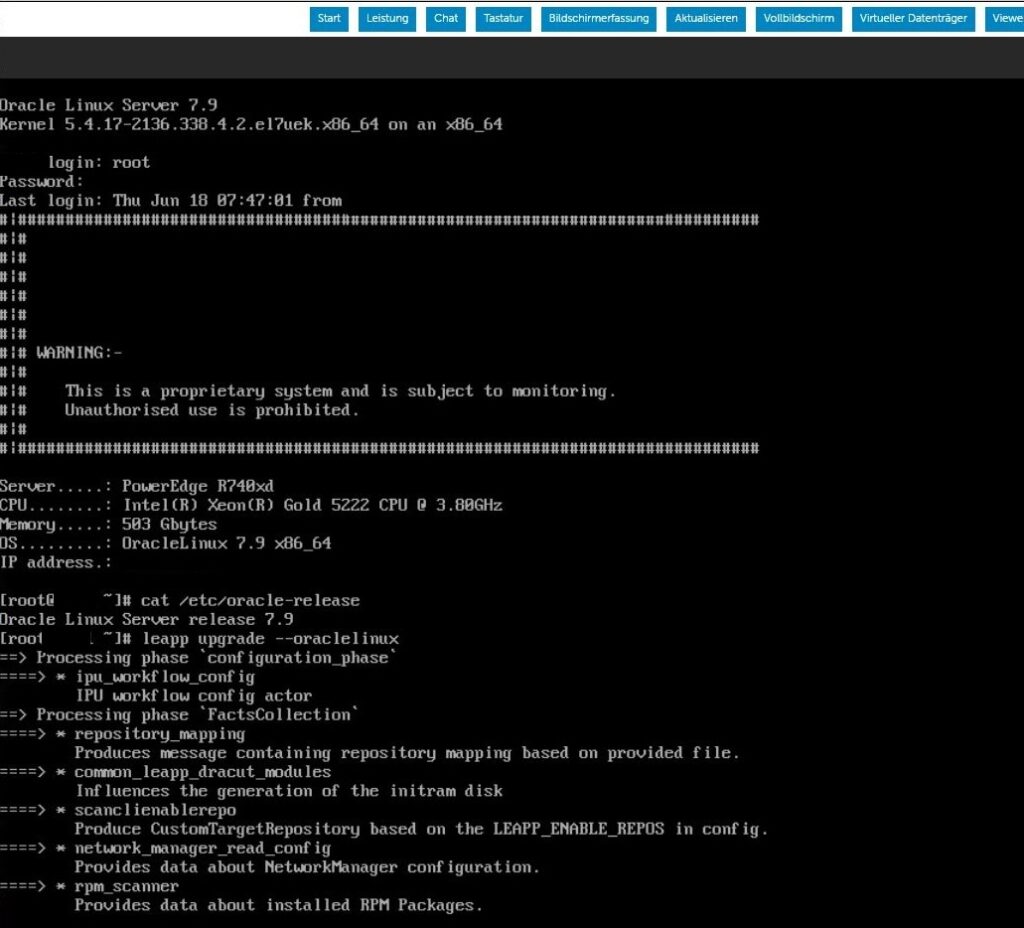
End of the first upgrade execution:
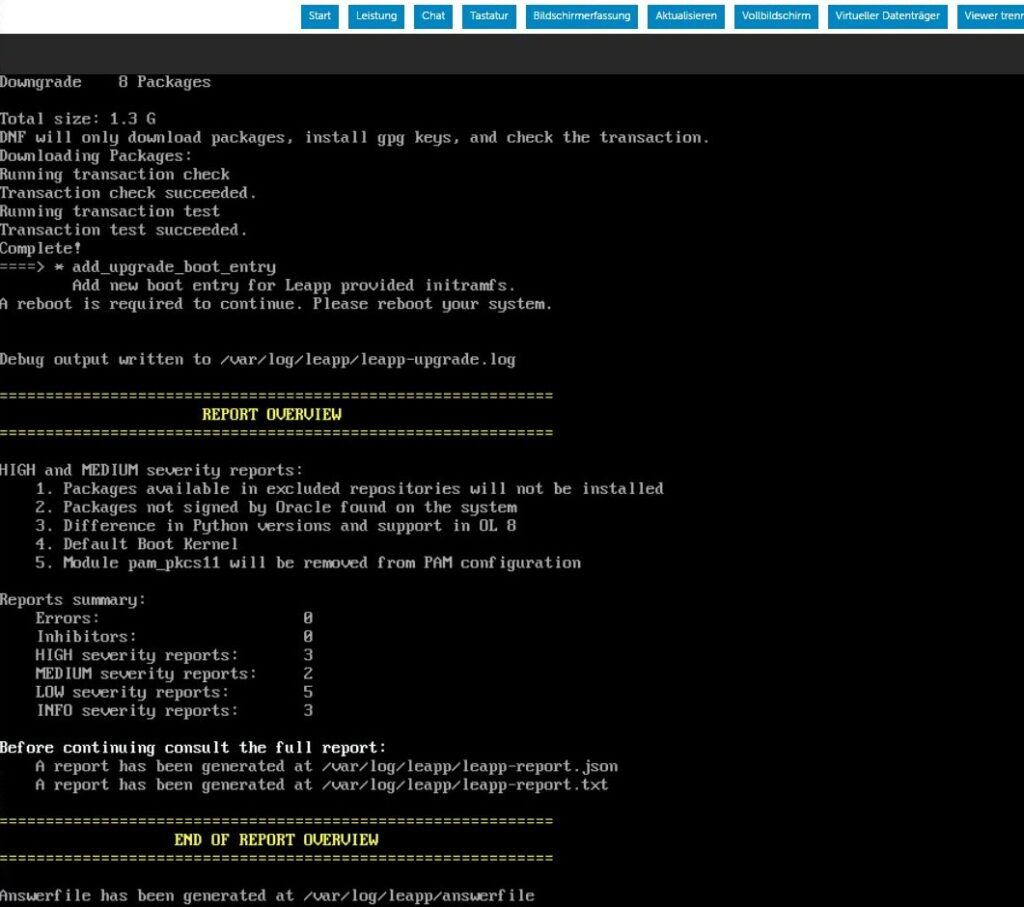
During this execution, I can also tail the leapp upgrade log file:
[root@SRV ~]# ls -ltrh /var/log/leapp/leapp-upgrade.log
-rw-r--r--. 1 root root 224K Jun 18 08:52 /var/log/leapp/leapp-upgrade.log

[root@SRV ~]# tail -f /var/log/leapp/leapp-upgrade.log
2026-06-18 08:52:27.495 DEBUG    PID: 32639 leapp.workflow.FactsCollection.rpm_scanner: python|2.7.5|94.0.1.el7_9|0|(none)|x86_64|RSA/SHA256, Mon 13 Nov 2023 10:38:45 AM CET, Key ID 72f97b74ec551f03
2026-06-18 08:52:27.496 DEBUG    PID: 32639 leapp.workflow.FactsCollection.rpm_scanner: kmod|20|28.0.3.el7|0|(none)|x86_64|RSA/SHA256, Mon 20 Jul 2020 09:02:02 AM CEST, Key ID 72f97b74ec551f03
2026-06-18 08:52:27.497 DEBUG    PID: 32639 leapp.workflow.FactsCollection.rpm_scanner: bind-libs|9.11.4|26.0.1.P2.el7_9.16|32|(none)|x86_64|RSA/SHA256, Mon 14 Oct 2024 09:41:52 PM CEST, Key ID 72f97b74ec551f03
2026-06-18 08:52:27.497 DEBUG    PID: 32639 leapp.workflow.FactsCollection.rpm_scanner: rhnlib|2.5.65|8.0.5.el7|0|(none)|noarch|RSA/SHA256, Thu 06 Apr 2023 06:15:51 PM CEST, Key ID 72f97b74ec551f03
2026-06-18 08:52:27.498 DEBUG    PID: 32639 leapp.workflow.FactsCollection.rpm_scanner: libcurl|7.29.0|59.0.3.el7_9.2|0|(none)|x86_64|RSA/SHA256, Tue 12 Dec 2023 07:37:52 PM CET, Key ID 72f97b74ec551f03
2026-06-18 08:52:27.499 DEBUG    PID: 32639 leapp.workflow.FactsCollection.rpm_scanner: openldap|2.4.44|25.el7_9|0|(none)|x86_64|RSA/SHA256, Tue 22 Feb 2022 06:12:32 PM CET, Key ID 72f97b74ec551f03
2026-06-18 08:52:27.500 DEBUG    PID: 32639 leapp.workflow.FactsCollection.rpm_scanner: cronie-anacron|1.4.11|25.el7_9|0|(none)|x86_64|RSA/SHA256, Wed 26 Apr 2023 05:57:25 AM CEST, Key ID 72f97b74ec551f03
2026-06-18 08:52:27.500 DEBUG    PID: 32639 leapp.workflow.FactsCollection.rpm_scanner: ebtables|2.0.10|16.el7|0|(none)|x86_64|RSA/SHA256, Sat 27 Jan 2018 02:33:10 PM CET, Key ID 72f97b74ec551f03
2026-06-18 08:52:27.501 DEBUG    PID: 32639 leapp.workflow.FactsCollection.rpm_scanner: device-mapper-libs|1.02.170|6.0.5.el7_9.5|7|(none)|x86_64|RSA/SHA256, Fri 21 May 2021 01:16:51 PM CEST, Key ID 72f97b74ec551f03
2026-06-18 08:52:27.504 DEBUG    PID: 32639 leapp.workflow.FactsCollection.rpm_scanner: External command has finished: ['/bin/rpm', '-qa', '--queryformat', '%{NAME}|%{VERSION}|%{RELEASE}|%|EPOCH?{%{EPOCH}}:{0}||%|PACKAGER?{%{PACKAGER}}:{(none)}||%|ARCH?{%{ARCH}}:{}||%|DSAHEADER?{%{DSAHEADER:pgpsig}}:{%|RSAHEADER?{%{RSAHEADER:pgpsig}}:{(none)}|}|\\n']

...
...
...

2026-06-18 09:06:05.56  DEBUG    PID: 24169 leapp.workflow.InterimPreparation.add_upgrade_boot_entry: External command has finished: ['/usr/sbin/grubby', '--remove-kernel', '/boot/vmlinuz-upgrade.x86_64']
2026-06-18 09:06:05.57  DEBUG    PID: 24169 leapp.workflow.InterimPreparation.add_upgrade_boot_entry: External command has started: ['/usr/sbin/grubby', '--add-kernel', '/boot/vmlinuz-upgrade.x86_64', '--initrd', '/boot/initramfs-upgrade.x86_64.img', '--title', 'OL-Upgrade-Initramfs', '--copy-default', '--make-default', '--args', ' enforcing=0 rd.plymouth=0 plymouth.enable=0']
2026-06-18 09:06:05.102 DEBUG    PID: 24169 leapp.workflow.InterimPreparation.add_upgrade_boot_entry: External command has finished: ['/usr/sbin/grubby', '--add-kernel', '/boot/vmlinuz-upgrade.x86_64', '--initrd', '/boot/initramfs-upgrade.x86_64.img', '--title', 'OL-Upgrade-Initramfs', '--copy-default', '--make-default', '--args', ' enforcing=0 rd.plymouth=0 plymouth.enable=0']
2026-06-18 09:06:05.108 INFO     PID: 31824 leapp.workflow.InterimPreparation: Starting stage After of phase InterimPreparation
2026-06-18 09:06:05.116 INFO     PID: 31824 leapp: Answerfile will be created at /var/log/leapp/answerfile
Check leapp report and answer file
Check leapp upgrade report
As for the preupgrade, I will check the leapp report file and address all issue. There is 3 high severity issue, the same we had in the preupgrade report, and that we will address after the upgrade.
[root@SRV ~]# ls -ltrh /var/log/leapp/leapp-report.txt
-rw-r--r--. 1 root root 8.7K Jun 18 09:06 /var/log/leapp/leapp-report.txt

[root@SRV ~]# date
Thu Jun 18 09:07:27 CEST 2026

[root@SRV ~]# cat /var/log/leapp/leapp-report.txt
Risk Factor: high
Title: Packages available in excluded repositories will not be installed
Summary: 4 packages will be skipped because they are available only in target system repositories that are intentionally excluded from the list of repositories used during the upgrade. See the report message titled "Excluded target system repositories" for details.
The list of these packages:
- libnsl2-devel (repoid: ol8_codeready_builder)
- python3-pyxattr (repoid: ol8_codeready_builder)
- rpcgen (repoid: ol8_codeready_builder)
- rpcsvc-proto-devel (repoid: ol8_codeready_builder)
Key: 2437e204808f987477c0e9be8e4c95b3a87a9f3e
----------------------------------------
Risk Factor: high
Title: Packages not signed by Oracle found on the system
Summary: The following packages have not been signed by Oracle and may be removed during the upgrade process in case Oracle-signed packages to be removed during the upgrade depend on them:
- collectd
- epel-release
- libzstd
Key: f5a5d58476a97bf0a8904d00df5d1321189849ad
----------------------------------------
Risk Factor: high
Title: Difference in Python versions and support in OL 8
Summary: In OL 8, there is no 'python' command. Python 3 (backward incompatible) is the primary Python version and Python 2 is available with limited support and limited set of packages. If you no longer require Python 2 packages following the upgrade, please remove them. Read more here: https://docs.oracle.com/en/operating-systems/oracle-linux/8/python/
Related links:
    - Difference in Python versions and support in OL 8: https://docs.oracle.com/en/operating-systems/oracle-linux/8/python/
Remediation: [hint] Please run "alternatives --set python /usr/bin/python3" after upgrade
Key: 2f3a43f4f448995eec953217d54f388ed94838b2
Check the answer file
Ensure the answer file is ok.
[root@SRV ~]# ls -ltrh /var/log/leapp/answerfile
-rw-r--r--. 1 root root 589 Jun 18 09:06 /var/log/leapp/answerfile
[root@SRV ~]# cat /var/log/leapp/answerfile
[remove_pam_pkcs11_module_check]
# Title:              None
# Reason:             Confirmation
# =================== remove_pam_pkcs11_module_check.confirm ==================
# Label:              Disable pam_pkcs11 module in PAM configuration? If no, the upgrade process will be interrupted.
# Description:        PAM module pam_pkcs11 is no longer available in OL-8 since it was replaced by SSSD.
# Reason:             Leaving this module in PAM configuration may lock out the system.
# Type:               bool
# Default:            None
# Available choices: True/False
confirm = True
Reboot
Now that all is ok and that we are ready to upgrade, we will reboot and the second part of the leapp upgrade will upgrade the OL7 to OL8.
Check file system occupancy to ensure there is no full partition:
[root@SRV ~]# df -h
Filesystem                     Size  Used Avail Use% Mounted on
devtmpfs                       252G     0  252G   0% /dev
tmpfs                          252G     0  252G   0% /dev/shm
tmpfs                          252G   11M  252G   1% /run
tmpfs                          252G     0  252G   0% /sys/fs/cgroup
/dev/mapper/vgroot--lv-root    7.5G  3.2G  4.3G  43% /
/dev/mapper/vgroot--lv-usr      12G  2.4G  8.9G  21% /usr
/dev/mapper/vgdata-lv--data    8.8T  5.0T  3.8T  57% /data
/dev/mapper/vgroot--lv-home    7.5G  3.9G  3.6G  53% /home
/dev/mapper/vgroot--lv-tmp     4.7G   33M  4.7G   1% /tmp
/dev/mapper/vgroot--lv-var     9.4G  6.9G  2.5G  74% /var
/dev/sdb2                      482M  315M  167M  66% /boot
/dev/mapper/vgrdbms-lv--rdbms   11T  1.9T  8.7T  18% /rdbms
/dev/mapper/vgroot--lv-opt      15G  625M   15G   5% /opt
/dev/sdb1                      952M  7.4M  944M   1% /boot/efi
tmpfs                           51G     0   51G   0% /run/user/0
[root@SRV ~]#
And reboot!
[root@SRV ~]# systemctl reboot
Monitor the console
Now the console is very important and we can monitor how the upgrade is on-going.
Following pictures shows some of the screen.
The server is rebooting.
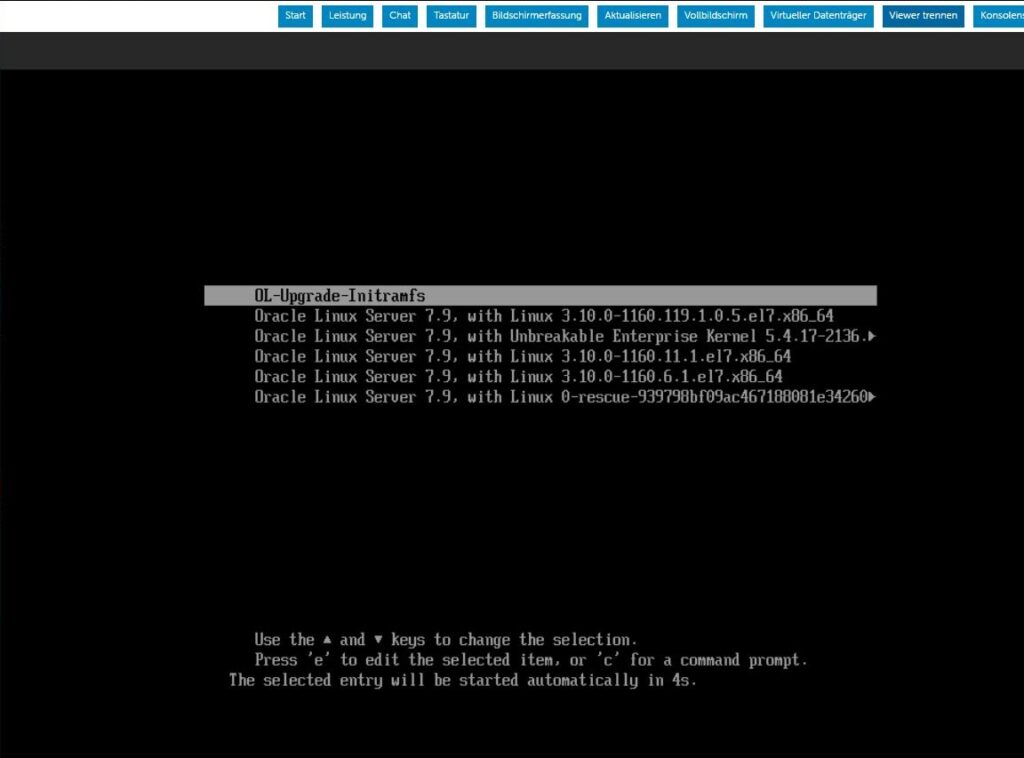
Reboot on the Upgrade initramfs.
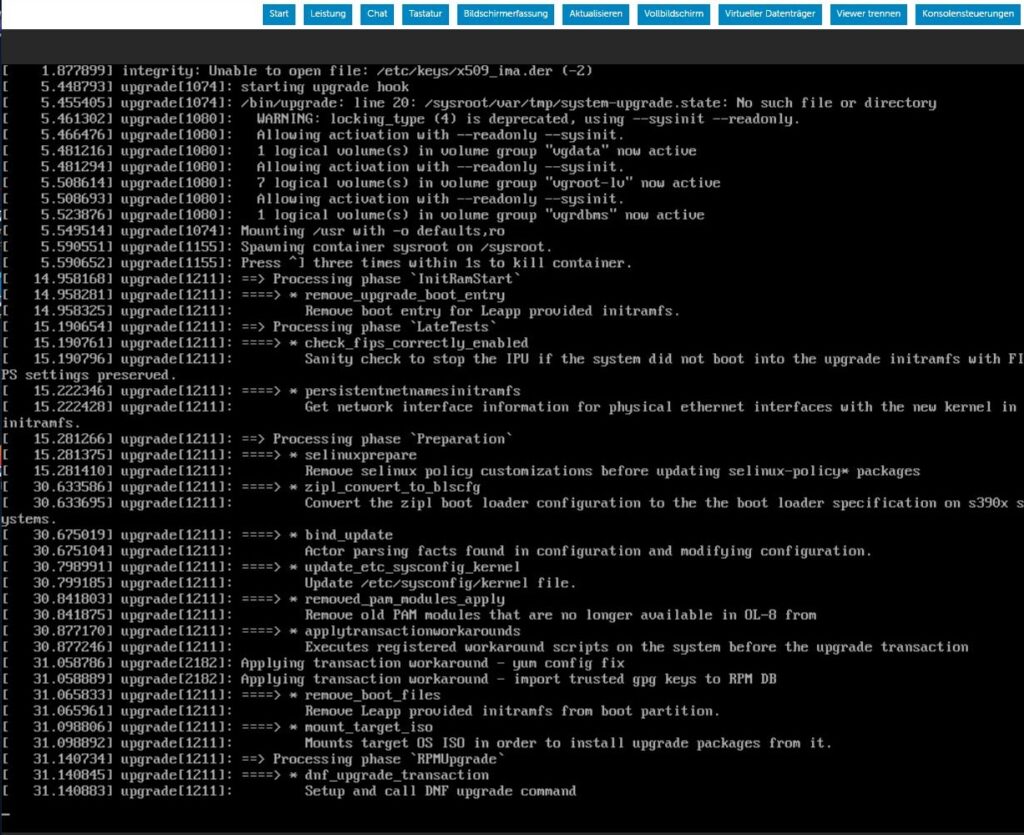
rpm package are upgraded from ol7 to ol8.
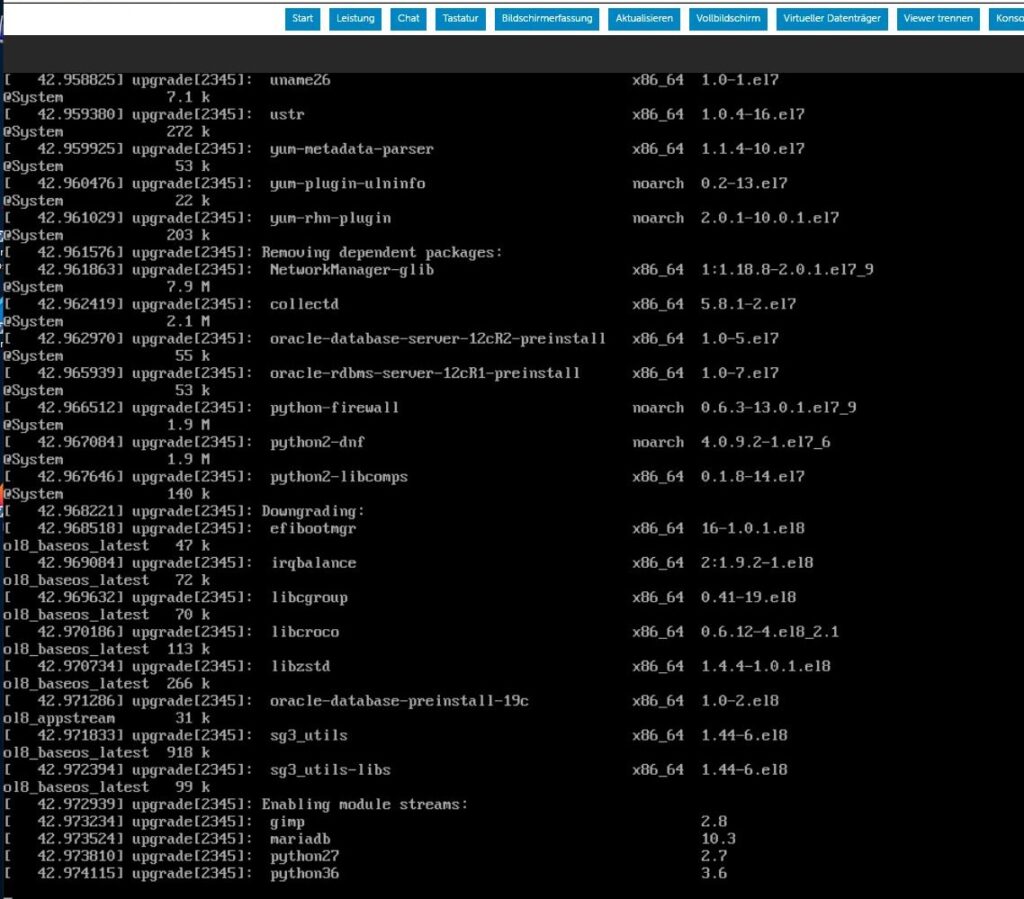
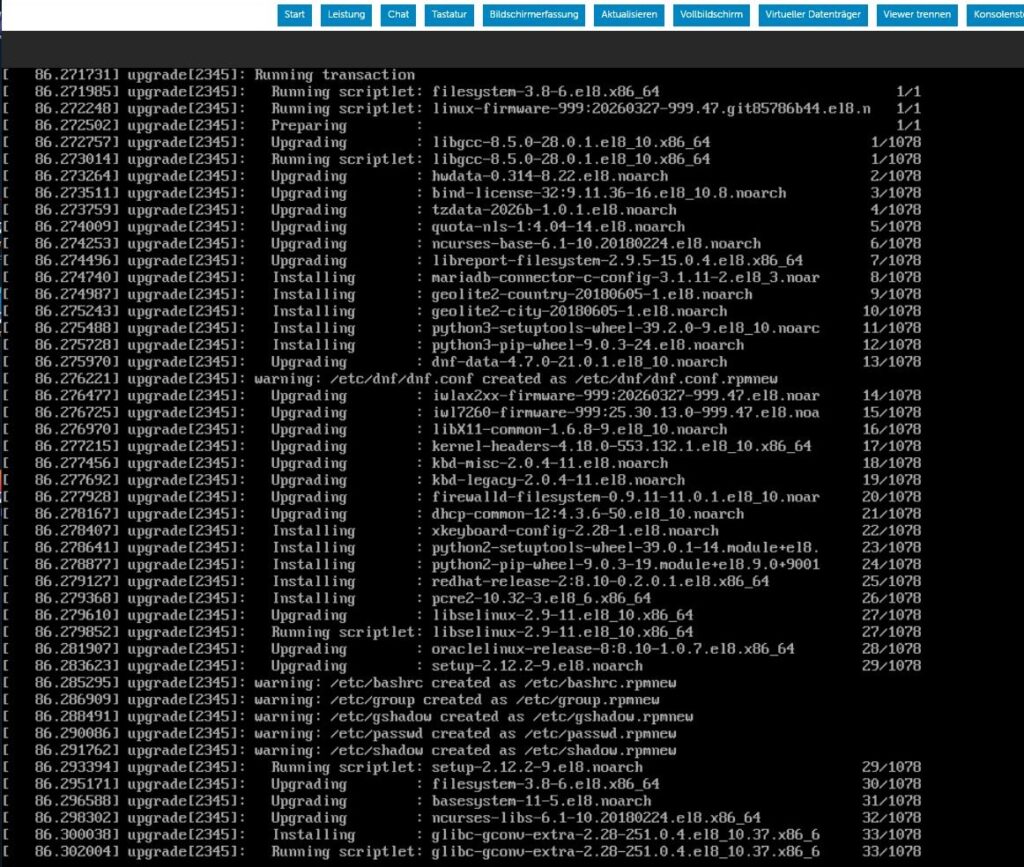
We have one more high severity issue to check and resolve once the upgrade is done.
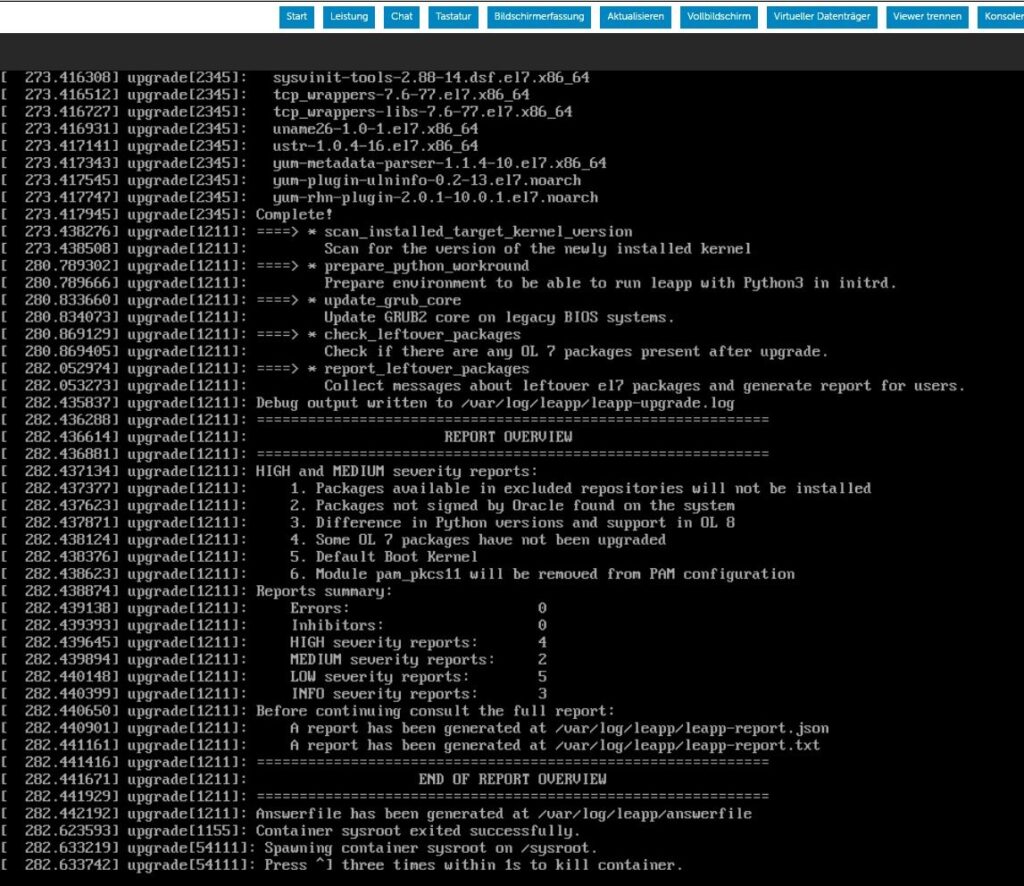
The server is automatically rebooted several times.
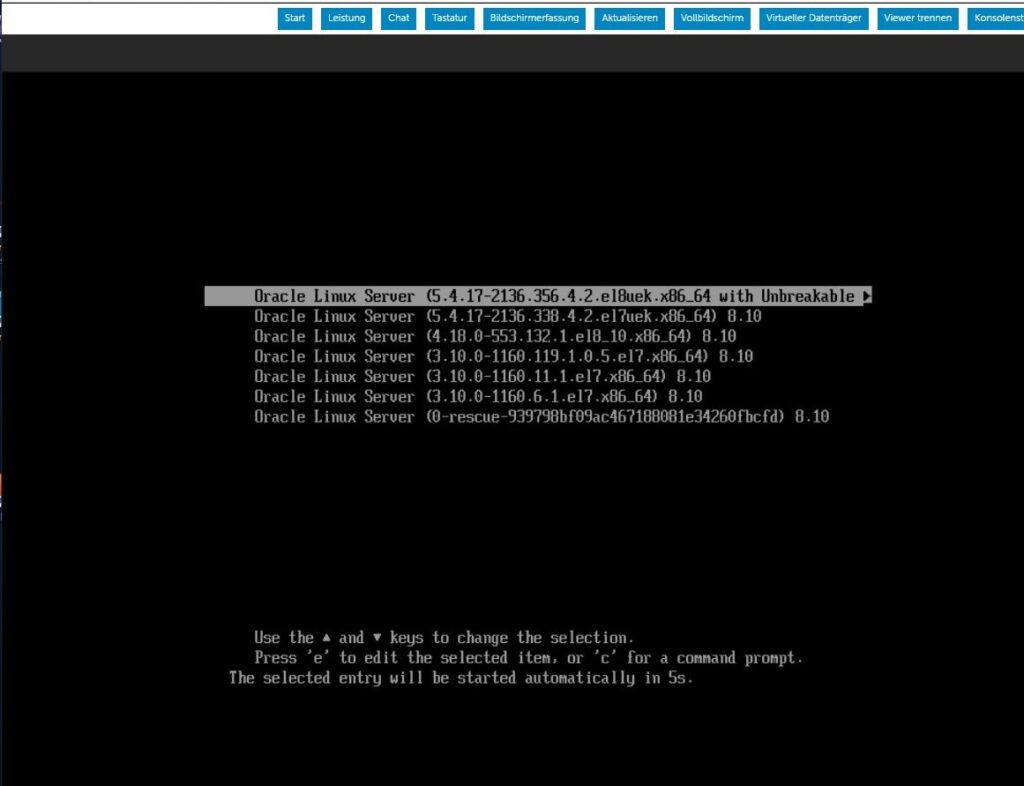
And we are done.
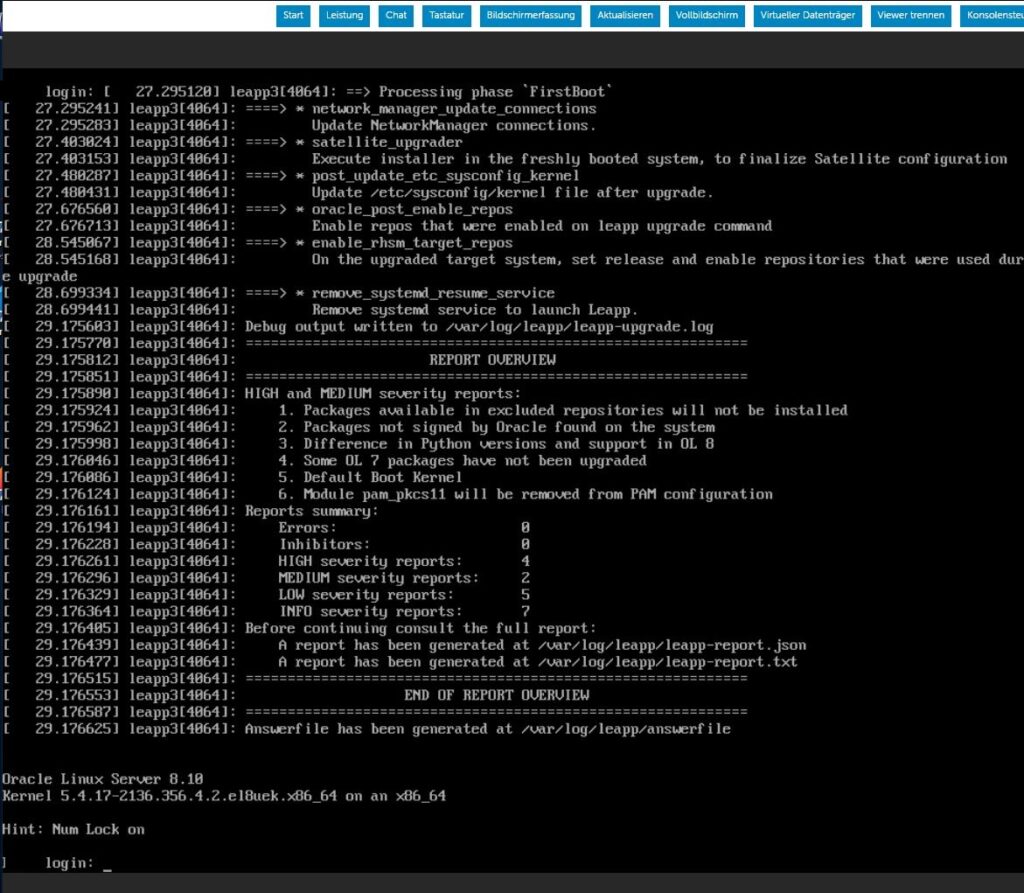
Check leapp report files
Now we have a new leapp report file, and we will check it for issue to be resolved.
Check file date.
[root@SRV ~]# date
Thu Jun 18 09:46:13 CEST 2026

[root@SRV ~]# uptime
 09:46:14 up 3 min,  1 user,  load average: 0.27, 0.32, 0.14

[root@SRV ~]# ls -ltrh /var/log/leapp/leapp-report.txt
-rw-r--r--. 1 root root 11K Jun 18 09:43 /var/log/leapp/leapp-report.txt

[root@SRV ~]# ls -ltrh /var/log/leapp/answerfile
-rw-r--r--. 1 root root 0 Jun 18 09:43 /var/log/leapp/answerfile
Check answer file content, it should be empty.
[root@SRV ~]# cat /var/log/leapp/answerfile
[root@SRV ~]#
Check leapp report issue. We will resolve them later on.
[root@SRV ~]# cat /var/log/leapp/leapp-report.txt
Risk Factor: high
Title: Packages available in excluded repositories will not be installed
Summary: 4 packages will be skipped because they are available only in target system repositories that are intentionally excluded from the list of repositories used during the upgrade. See the report message titled "Excluded target system repositories" for details.
The list of these packages:
- libnsl2-devel (repoid: ol8_codeready_builder)
- python3-pyxattr (repoid: ol8_codeready_builder)
- rpcgen (repoid: ol8_codeready_builder)
- rpcsvc-proto-devel (repoid: ol8_codeready_builder)
Key: 2437e204808f987477c0e9be8e4c95b3a87a9f3e
----------------------------------------
Risk Factor: high
Title: Packages not signed by Oracle found on the system
Summary: The following packages have not been signed by Oracle and may be removed during the upgrade process in case Oracle-signed packages to be removed during the upgrade depend on them:
- collectd
- epel-release
- libzstd
Key: f5a5d58476a97bf0a8904d00df5d1321189849ad
----------------------------------------
Risk Factor: high
Title: Difference in Python versions and support in OL 8
Summary: In OL 8, there is no 'python' command. Python 3 (backward incompatible) is the primary Python version and Python 2 is available with limited support and limited set of packages. If you no longer require Python 2 packages following the upgrade, please remove them. Read more here: https://docs.oracle.com/en/operating-systems/oracle-linux/8/python/
Related links:
    - Difference in Python versions and support in OL 8: https://docs.oracle.com/en/operating-systems/oracle-linux/8/python/
Remediation: [hint] Please run "alternatives --set python /usr/bin/python3" after upgrade
Key: 2f3a43f4f448995eec953217d54f388ed94838b2
----------------------------------------
Risk Factor: high
Title: Some OL 7 packages have not been upgraded
Summary: Following OL 7 packages have not been upgraded:
kernel-3.10.0-1160.119.1.0.5.el7
kernel-uek-5.4.17-2136.338.4.2.el7uek
kernel-3.10.0-1160.11.1.el7
leapp-upgrade-el7toel8-0.20.0-2.0.11.el7_9
Please remove these packages to keep your system in supported state.

Key: 1e4e21ca7b2b7d9c59556f4b9813ef0d801af32c
...
...
...
Check new sysetm release and kernel
I checked release and kernel.
[root@SRV ~]# cat /etc/oracle-release
Oracle Linux Server release 8.10

[root@SRV ~]# uname -r
5.4.17-2136.356.4.2.el8uek.x86_64

[root@SRV ~]# grubby --default-kernel
/boot/vmlinuz-5.4.17-2136.356.4.2.el8uek.x86_64
[root@SRV ~]#
Which is correct, as I can see from following link that the last el8 release is 8.10:
https://yum.oracle.com/repo/OracleLinux/OL8/baseos/latest/x86_64/index.html
Check file system occupancy
I checked the file system occupancy and could confirm all is ok.
[root@SRV ~]# df -h
Filesystem                     Size  Used Avail Use% Mounted on
devtmpfs                       252G     0  252G   0% /dev
tmpfs                          252G     0  252G   0% /dev/shm
tmpfs                          252G   11M  252G   1% /run
tmpfs                          252G     0  252G   0% /sys/fs/cgroup
/dev/mapper/vgroot--lv-root    7.5G  3.2G  4.3G  43% /
/dev/mapper/vgroot--lv-usr      12G  3.6G  7.7G  32% /usr
/dev/mapper/vgdata-lv--data    8.8T  5.0T  3.8T  57% /data
/dev/mapper/vgroot--lv-home    7.5G  3.9G  3.6G  53% /home
/dev/mapper/vgrdbms-lv--rdbms   11T  1.9T  8.7T  18% /rdbms
/dev/mapper/vgroot--lv-tmp     4.7G   33M  4.7G   1% /tmp
/dev/sdb2                      482M  330M  153M  69% /boot
/dev/sdb1                      952M  6.1M  946M   1% /boot/efi
/dev/mapper/vgroot--lv-opt      15G  627M   15G   5% /opt
/dev/mapper/vgroot--lv-var     9.4G  2.2G  7.2G  23% /var
tmpfs                           51G     0   51G   0% /run/user/0
[root@SRV ~]#
Postupgrade tasks
Now I will perform the standard and known postupgrade tasks to be run after an Oracle linux upgrade.
Doing this will also resolve all my high severity issue from the leapp report.
alternative for python
The command provided by the process did not work:
[root@SRV ~]# alternatives --set python /usr/bin/python3
failed to rename link /etc/alternatives/tmpdir.X8lXqU/tmp_sl -> /usr/share/man/man1/python.1.gz: Invalid cross-device link
If I check, I think I’m good as it is:
[root@SRV ~]# alternatives --display python
python - status is manual.
 link currently points to /usr/bin/python3
/usr/libexec/no-python - priority 404
 slave unversioned-python: (null)
 slave unversioned-python-man: /usr/share/man/man1/unversioned-python.1.gz
/usr/bin/python3 - priority 300
 slave unversioned-python: /usr/bin/python3
 slave unversioned-python-man: /usr/share/man/man1/python3.1.gz
/usr/bin/python2 - priority 200
 slave unversioned-python: /usr/bin/python2
 slave unversioned-python-man: /usr/share/man/man1/python2.1.gz
Current `best' version is /usr/libexec/no-python.

[root@SRV ~]# alternatives --display unversioned-python
[root@SRV ~]# readlink -f /usr/bin/python
/usr/libexec/platform-python3.6
[root@SRV ~]#
Moreover python is working:
[root@SRV ~]# which python
/usr/bin/python

[root@SRV ~]# ls -ltrh /usr/bin/python
lrwxrwxrwx. 1 root root 36 Jun 18 09:53 /usr/bin/python -> /etc/alternatives/unversioned-python

[root@SRV ~]# python --version
Python 3.6.8
[root@SRV ~]#
firewalld daemon
firewalld daemon was inactive before the upgrade, so I kept it as inactive.
[root@SRV ~]# systemctl status firewalld
● firewalld.service - firewalld - dynamic firewall daemon
   Loaded: loaded (/usr/lib/systemd/system/firewalld.service; disabled; vendor preset: enabled)
   Active: inactive (dead)
     Docs: man:firewalld(1)
[root@SRV ~]#
SELinux
I changed SE Linux from permissive to enforcing.
[root@SRV ~]# getenforce
Permissive

[root@SRV ~]# setenforce enforcing

[root@SRV ~]# getenforce
Enforcing
Permissive mode: SELinux logs policy violations but does not block them.
Enforcing mode: SELinux logs and blocks actions that violate the active policy.
I made the changes permanent:
[root@SRV ~]# grep -i ^SELINUX /etc/selinux/config
SELINUX=permissive
SELINUXTYPE=targeted

[root@SRV ~]# vi /etc/selinux/config

[root@SRV ~]# grep -i ^SELINUX /etc/selinux/config
SELINUX=Enforcing
SELINUXTYPE=targeted

[root@SRV ~]# cat /etc/selinux/config

# This file controls the state of SELinux on the system.
# SELINUX= can take one of these three values:
#     enforcing - SELinux security policy is enforced.
#     permissive - SELinux prints warnings instead of enforcing.
#     disabled - No SELinux policy is loaded.
SELINUX=Enforcing
# SELINUXTYPE= can take one of three values:
#     targeted - Targeted processes are protected,
#     minimum - Modification of targeted policy. Only selected processes are protected.
#     mls - Multi Level Security protection.
SELINUXTYPE=targeted


[root@SRV ~]#
Update dnf.conf
Edit /etc/dnf/dnf.conf and comment out exclude= that refer to leapp packages
[root@SRV ~]# grep -i leapp /etc/dnf/dnf.conf
exclude=python2-leapp,snactor,leapp-upgrade-el7toel8,leapp

[root@SRV ~]# vi /etc/dnf/dnf.conf

[root@SRV ~]# grep -i leapp /etc/dnf/dnf.conf
#exclude=python2-leapp,snactor,leapp-upgrade-el7toel8,leapp
[root@SRV ~]#

[root@SRV ~]# cat /etc/dnf/dnf.conf
[main]
gpgcheck=1
installonly_limit=3
clean_requirements_on_remove=True
proxy=http://172.X.X.X:3128
#exclude=python2-leapp,snactor,leapp-upgrade-el7toel8,leapp
[root@SRV ~]#
set PermitRootLogin no and restart sshd service
We will add security here and not permitting to use root to login directly through ssh.
[root@SRV ~]# grep -i PermitRootLogin /etc/ssh/sshd_config
PermitRootLogin yes
# the setting of "PermitRootLogin without-password".

[root@SRV ~]# vi /etc/ssh/sshd_config

[root@SRV ~]# grep -i PermitRootLogin /etc/ssh/sshd_config
PermitRootLogin no
# the setting of "PermitRootLogin without-password".

[root@SRV ~]# systemctl restart sshd
[root@SRV ~]#
Remove old linux repo and package
We need to remove any el7 old package and repo that is still existing. We also need to remove leapp package.
I checked existing old ol7 one:
[root@SRV ~]# rpm -qa | grep el7
kernel-3.10.0-1160.119.1.0.5.el7.x86_64
leapp-0.17.0-1.0.2.el7_9.noarch
kernel-uek-5.4.17-2136.338.4.2.el7uek.x86_64
kernel-3.10.0-1160.11.1.el7.x86_64
python2-leapp-0.17.0-1.0.2.el7_9.noarch
leapp-upgrade-el7toel8-0.20.0-2.0.11.el7_9.noarch
I checked existing leapp package:
[root@SRV ~]# rpm -qa | grep leapp
leapp-0.17.0-1.0.2.el7_9.noarch
leapp-repository-deps-el8-5.0.8-100.202401121819Z.0e51aebb.master.el8.noarch
python2-leapp-0.17.0-1.0.2.el7_9.noarch
leapp-upgrade-el7toel8-0.20.0-2.0.11.el7_9.noarch
leapp-deps-el8-5.0.8-100.202401121819Z.0e51aebb.master.el8.noarch
[root@SRV ~]#
So I removed all those packages, as for example:
[root@SRV ~]# dnf remove kernel-3.10.0-1160.11.1.el7.x86_64
Dependencies resolved.
=============================================================================================================================================================================================
 Package                                  Architecture                             Version                                                   Repository                                 Size
=============================================================================================================================================================================================
Removing:
 kernel                                   x86_64                                   3.10.0-1160.11.1.el7                                      @System                                    64 M

DB8action Summary
=============================================================================================================================================================================================
Remove  1 Package

Freed space: 64 M
Is this ok [y/N]: y
Running DB8action check
DB8action check succeeded.
Running DB8action test
DB8action test succeeded.
Running DB8action
  Preparing        :                                                                                                                                                                     1/1
  Running scriptlet: kernel-3.10.0-1160.11.1.el7.x86_64                                                                                                                                  1/1
  Erasing          : kernel-3.10.0-1160.11.1.el7.x86_64                                                                                                                                  1/1
  Running scriptlet: kernel-3.10.0-1160.11.1.el7.x86_64                                                                                                                                  1/1
  Verifying        : kernel-3.10.0-1160.11.1.el7.x86_64                                                                                                                                  1/1

Removed:
  kernel-3.10.0-1160.11.1.el7.x86_64

Complete!
To finally have no more el7 and leapp package:
[root@SRV ~]# rpm -qa | grep el7
[root@SRV ~]# rpm -qa | grep leapp
[root@SRV ~]#
And of course I have got el8 package:
[root@SRV ~]# rpm -qa | grep el8 | wc -l
610
[root@SRV ~]#
Check kernel
I confirmed all is ok with the kernel and boot file system occupancy.
[root@SRV ~]# uname -r
5.4.17-2136.356.4.2.el8uek.x86_64

[root@SRV ~]# rpm -qa | grep -i kernel
kernel-modules-extra-4.18.0-553.132.1.el8_10.x86_64
kernel-core-4.18.0-553.132.1.el8_10.x86_64
kernel-tools-4.18.0-553.132.1.el8_10.x86_64
kernel-workaround-0.1-1.el8.noarch
kernel-4.18.0-553.132.1.el8_10.x86_64
kernel-headers-4.18.0-553.132.1.el8_10.x86_64
kernel-uek-5.4.17-2136.356.4.2.el8uek.x86_64
kernel-modules-4.18.0-553.132.1.el8_10.x86_64
kernel-tools-libs-4.18.0-553.132.1.el8_10.x86_64

[root@SRV ~]# df -h /boot
Filesystem      Size  Used Avail Use% Mounted on
/dev/sdb2       482M  213M  270M  45% /boot

[root@SRV ~]# ls -ltrh /boot
total 188M
drwx------. 3 root root 4.0K Jan  1  1970 efi
-rw-------. 1 root root  60M Oct 28  2020 initramfs-0-rescue-939798bf09ac467188081e34260fbcfd.img
-rwxr-xr-x. 1 root root 6.5M Oct 28  2020 vmlinuz-0-rescue-939798bf09ac467188081e34260fbcfd
-rw-------. 1 root root 4.3M Jun  5 05:34 System.map-5.4.17-2136.356.4.2.el8uek.x86_64
-rw-r--r--. 1 root root 215K Jun  5 05:34 config-5.4.17-2136.356.4.2.el8uek.x86_64
-rwxr-xr-x. 1 root root  11M Jun  5 05:35 vmlinuz-5.4.17-2136.356.4.2.el8uek.x86_64
-rw-------. 1 root root 4.4M Jun 11 11:40 System.map-4.18.0-553.132.1.el8_10.x86_64
-rw-r--r--. 1 root root 198K Jun 11 11:40 config-4.18.0-553.132.1.el8_10.x86_64
-rwxr-xr-x. 1 root root  11M Jun 11 11:40 vmlinuz-4.18.0-553.132.1.el8_10.x86_64
drwxr-xr-x. 3 root root   21 Jun 18 09:33 loader
lrwxrwxrwx. 1 root root   57 Jun 18 09:35 symvers-5.4.17-2136.356.4.2.el8uek.x86_64.gz -> /lib/modules/5.4.17-2136.356.4.2.el8uek.x86_64/symvers.gz
lrwxrwxrwx. 1 root root   54 Jun 18 09:35 symvers-4.18.0-553.132.1.el8_10.x86_64.gz -> /lib/modules/4.18.0-553.132.1.el8_10.x86_64/symvers.gz
-rw-------. 1 root root  29M Jun 18 09:35 initramfs-4.18.0-553.132.1.el8_10.x86_64.img
drwx------. 2 root root   21 Jun 18 09:36 grub2
-rw-------. 1 root root  31M Jun 18 09:37 initramfs-5.4.17-2136.356.4.2.el8uek.x86_64.img
-rw-------. 1 root root  33M Jun 18 09:43 initramfs-5.4.17-2136.356.4.2.el8uek.x86_64kdump.img
[root@SRV ~]#
Relink oracle binaries
After a linux operating system, it is mandatory to relink all rdbms. This is mandatory to relink oracle executables to new operating system libraries.
I did following for all my dbhomes. As an example I will show you the process for rdbms193000.
First all oracle resources need to be stoppe. I stopped databases and listeners.
oracle@SRV:~/ [rdbms193000] ps -ef | grep -i [t]nslsn
oracle@SRV:~/ [rdbms193000] ps -ef | grep -i [p]mon
oracle@SRV:~/ [rdbms193000]
Relink oracle dbhome:
oracle@SRV:~/ [rdbms193000] echo $ORACLE_HOME
/rdbms/u01/app/oracle/product/19.30.260120

oracle@SRV:~/ [rdbms193000] cd $ORACLE_HOME/bin

oracle@SRV:/rdbms/u01/app/oracle/product/19.30.260120/bin/ [rdbms193000] relink all
writing relink log to: /rdbms/u01/app/oracle/product/19.30.260120/install/relinkActions2026-06-18_10-31-37AM.log
oracle@SRV:/rdbms/u01/app/oracle/product/19.30.260120/bin/ [rdbms193000] tail /rdbms/u01/app/oracle/product/19.30.260120/install/relinkActions2026-06-18_10-31-37AM.log
rm -f /rdbms/u01/app/oracle/product/19.30.260120/bin/drdaproc

INFO:
mv /rdbms/u01/app/oracle/product/19.30.260120/rdbms/lib/drdaproc /rdbms/u01/app/oracle/product/19.30.260120/bin/drdaproc

INFO:
chmod 751 /rdbms/u01/app/oracle/product/19.30.260120/bin/drdaproc

INFO: End output from spawned process.
INFO: ----------------------------------
oracle@SRV:/rdbms/u01/app/oracle/product/19.30.260120/bin/ [rdbms193000]
But relink might change ownership and permissions on some oracle files:
oracle@SRV:~/ [rdbms193000] ls -ltrh  $ORACLE_HOME/bin/oracle
-rwsr-s--x. 1 oracle oinstall 448M Jun 18 10:32 /rdbms/u01/app/oracle/product/19.30.260120/bin/oracle

oracle@SRV:~/ [rdbms193000] ls -ltrh  $ORACLE_HOME/bin/extjob
-rwxr-xr-x. 1 oracle oinstall 3.0M Jun 18 10:31 /rdbms/u01/app/oracle/product/19.30.260120/bin/extjob

oracle@SRV:~/ [rdbms193000] ls -ltrh $ORACLE_HOME/rdbms/admin/externaljob.ora
-rw-r-----. 1 root oinstall 1.5K Dec 21  2005 /rdbms/u01/app/oracle/product/19.30.260120/rdbms/admin/externaljob.ora

oracle@SRV:~/ [rdbms193000] ls -ltrh $ORACLE_HOME/bin/jssu
-rwxr-xr-x. 1 oracle oinstall 2.3M Jun 18 10:31 /rdbms/u01/app/oracle/product/19.30.260120/bin/jssu
oracle@SRV:~/ [rdbms193000]
This is why it is mandatory, after relink, to run root.sh. See also Executing “relink all” resets permission of extjob, jssu, oradism, externaljob.ora – KB148555.
Running root.sh goes went in failure:
[root@SRV ~]# cd /rdbms/u01/app/oracle/product/19.30.260120

[root@SRV 19.30.260120]# ./root.sh
Check /rdbms/u01/app/oracle/product/19.30.260120/install/root_SRV.INT.custname.CH_2026-06-18_10-37-33-682660639.log for the output of root script
[root@SRV 19.30.260120]# cat /rdbms/u01/app/oracle/product/19.30.260120/install/root_SRV.INT.custname.CH_2026-06-18_10-37-33-682660639.log
Performing root user operation.

The following environment variables are set as:
    ORACLE_OWNER= oracle
    ORACLE_HOME=  /rdbms/u01/app/oracle/product/19.30.260120
   Copying dbhome to /usr/local/bin ...
   Copying oraenv to /usr/local/bin ...
   Copying coraenv to /usr/local/bin ...

Entries will be added to the /etc/oratab file as needed by
Database Configuration Assistant when a database is created
Finished running generic part of root script.
Now product-specific root actions will be performed.
./root.sh: line 5: /rdbms/u01/app/oracle/product/19.30.260120/suptools/tfa/release/tfa_home/install/roottfa.sh: No such file or directory
See known issue: “Roottfa.sh: Not Found” after executing root.sh script. – KB104521
You might want to know that if you run root.sh as part of an ansible playbook you would have the same error, but the script would return a return code of 0, and you might not see that in fact root.sh could not be executed.
Resolve the problem by commenting out the tfa line, as we do not have tfa installed on our server.
[root@SRV 19.30.260120]# cat ./root.sh
#!/bin/sh
unset WAS_ROOTMACRO_CALL_MADE
. /rdbms/u01/app/oracle/product/19.30.260120/install/utl/rootmacro.sh "$@"
. /rdbms/u01/app/oracle/product/19.30.260120/install/utl/rootinstall.sh
/rdbms/u01/app/oracle/product/19.30.260120/suptools/tfa/release/tfa_home/install/roottfa.sh
/rdbms/u01/app/oracle/product/19.30.260120/install/root_schagent.sh

#
# Root Actions related to network
#
/rdbms/u01/app/oracle/product/19.30.260120/network/install/sqlnet/setowner.sh

#
# Invoke standalone rootadd_rdbms.sh
#
/rdbms/u01/app/oracle/product/19.30.260120/rdbms/install/rootadd_rdbms.sh

/rdbms/u01/app/oracle/product/19.30.260120/rdbms/install/rootadd_filemap.sh

[root@SRV 19.30.260120]# vi ./root.sh

[root@SRV 19.30.260120]# cat ./root.sh
#!/bin/sh
unset WAS_ROOTMACRO_CALL_MADE
. /rdbms/u01/app/oracle/product/19.30.260120/install/utl/rootmacro.sh "$@"
. /rdbms/u01/app/oracle/product/19.30.260120/install/utl/rootinstall.sh
#/rdbms/u01/app/oracle/product/19.30.260120/suptools/tfa/release/tfa_home/install/roottfa.sh
/rdbms/u01/app/oracle/product/19.30.260120/install/root_schagent.sh

#
# Root Actions related to network
#
/rdbms/u01/app/oracle/product/19.30.260120/network/install/sqlnet/setowner.sh

#
# Invoke standalone rootadd_rdbms.sh
#
/rdbms/u01/app/oracle/product/19.30.260120/rdbms/install/rootadd_rdbms.sh

/rdbms/u01/app/oracle/product/19.30.260120/rdbms/install/rootadd_filemap.sh
And I could successfully run root.sh.
[root@SRV 19.30.260120]# ./root.sh
Check /rdbms/u01/app/oracle/product/19.30.260120/install/root_SRV.INT.custname.CH_2026-06-18_10-39-42-830060996.log for the output of root script
[root@SRV 19.30.260120]# cat /rdbms/u01/app/oracle/product/19.30.260120/install/root_SRV.INT.custname.CH_2026-06-18_10-39-42-830060996.log
Performing root user operation.

The following environment variables are set as:
    ORACLE_OWNER= oracle
    ORACLE_HOME=  /rdbms/u01/app/oracle/product/19.30.260120
   Copying dbhome to /usr/local/bin ...
   Copying oraenv to /usr/local/bin ...
   Copying coraenv to /usr/local/bin ...

Entries will be added to the /etc/oratab file as needed by
Database Configuration Assistant when a database is created
Finished running generic part of root script.
Now product-specific root actions will be performed.
[root@SRV 19.30.260120]#
And if I check, my files permissions are now all good:
oracle@SRV:~/ [rdbms193000] ls -ltrh  $ORACLE_HOME/bin/oracle
-rwsr-s--x. 1 oracle oinstall 448M Jun 18 10:32 /rdbms/u01/app/oracle/product/19.30.260120/bin/oracle

oracle@SRV:~/ [rdbms193000] ls -ltrh  $ORACLE_HOME/bin/extjob
-rwsr-x---. 1 root oinstall 3.0M Jun 18 10:31 /rdbms/u01/app/oracle/product/19.30.260120/bin/extjob

oracle@SRV:~/ [rdbms193000] ls -ltrh $ORACLE_HOME/rdbms/admin/externaljob.ora
-rw-r-----. 1 root oinstall 1.5K Dec 21  2005 /rdbms/u01/app/oracle/product/19.30.260120/rdbms/admin/externaljob.ora

oracle@SRV:~/ [rdbms193000] ls -ltrh $ORACLE_HOME/bin/jssu
-rwsr-x---. 1 root oinstall 2.3M Jun 18 10:31 /rdbms/u01/app/oracle/product/19.30.260120/bin/jssu
oracle@SRV:~/ [rdbms193000]
Activate CIFS again
Now I can update the fstab if I deactivated at the beginning the CIFS mount point, and I can mount all of them.
oratab file
I will also update my oratab so the needed database will be restarted automatically at next reboot.
oracle@SRV:~/ [rdbms193000] vi /etc/oratab

oracle@SRV:~/ [rdbms193000] cat /etc/oratab
#


# This file is used by ORACLE utilities.  It is created by root.sh
# and updated by either Database Configuration Assistant while creating
# a database or ASM Configuration Assistant while creating ASM instance.

# A colon, ':', is used as the field terminator.  A new line terminates
# the entry.  Lines beginning with a pound sign, '#', are comments.
#
# Entries are of the form:
#   $ORACLE_SID:$ORACLE_HOME::
#
# The first and second fields are the system identifier and home
# directory of the database respectively.  The third field indicates
# to the dbstart utility that the database should , "Y", or should not,
# "N", be brought up at system boot time.
#
# Multiple entries with the same $ORACLE_SID are not allowed.
#
#
DB10:/rdbms/u01/app/oracle/product/19.30.260120:N
DB3:/rdbms/u01/app/oracle/product/19.30.260120:Y
DB9:/rdbms/u01/app/oracle/product/19.30.260120:Y
DB4:/rdbms/u01/app/oracle/product/19.30.260120:Y
DB1:/rdbms/u01/app/oracle/product/19.30.260120:Y
DB8:/rdbms/u01/app/oracle/product/19.30.260120:Y
DB7:/rdbms/u01/app/oracle/product/19.30.260120:Y
DB2:/rdbms/u01/app/oracle/product/19.30.260120:Y
DB5:/rdbms/u01/app/oracle/product/19.30.260120_MX:Y
DB6:/rdbms/u01/app/oracle/product/19.30.260120_MX:Y
Cleanup
I will remove leapp directory.
[root@SRV ~]# ls -ltrh /root/tmp_leapp_py3
total 4.0K
-rwxrwx---. 1 root root 118 Jun 18 09:36 leapp3
lrwxrwxrwx. 1 root root  38 Jun 18 09:36 leapp -> /usr/lib/python2.7/site-packages/leapp

[root@SRV ~]# rm -rf /root/tmp_leapp_py3

[root@SRV ~]# ls -ltrh /root/tmp_leapp_py3
ls: cannot access '/root/tmp_leapp_py3': No such file or directory
[root@SRV ~]#
Check rpm release
I ensured that I only have el8 package and no more el7 package.
[root@SRV ~]# rpm -qa | grep -i el7
[root@SRV ~]# rpm -qa | grep -i ol7
[root@SRV ~]# rpm -qa | grep -i el8 | wc -l
610
[root@SRV ~]# rpm -qa | grep -i el8 | tail -n3
libxmlb-0.1.15-1.el8.x86_64
libnetfilter_conntrack-1.0.6-5.el8.x86_64
librepo-1.14.2-5.el8.x86_64
[root@SRV ~]#
Remove el7 repo
It is also important to check the repo, because leapp upgrade will not remove customized repo running on el7.
As I can see here, I still have epel el7 repo.
[root@SRV ~]# dnf repolist all
repo id                                                           repo name                                                                                                          status
epel                                                              Extra Packages for Enterprise Linux 7 - x86_64                                                                     enabled
epel-debuginfo                                                    Extra Packages for Enterprise Linux 7 - x86_64 - Debug                                                             disabled
epel-source                                                       Extra Packages for Enterprise Linux 7 - x86_64 - Source                                                            disabled
epel-testing                                                      Extra Packages for Enterprise Linux 7 - Testing - x86_64                                                           disabled
epel-testing-debuginfo                                            Extra Packages for Enterprise Linux 7 - Testing - x86_64 - Debug                                                   disabled
epel-testing-source                                               Extra Packages for Enterprise Linux 7 - Testing - x86_64 - Source                                                  disabled
ol8_MODRHCK                                                       Latest RHCK with fixes from Oracle for Oracle Linux 8 (x86_64)                                                     disabled
ol8_UEKR6                                                         Latest Unbreakable Enterprise Kernel Release 6 for Oracle Linux 8 (x86_64)                                         enabled
ol8_UEKR6_RDMA                                                    Oracle Linux 8 UEK6 RDMA (x86_64)                                                                                  disabled
ol8_UEKR7                                                         Latest Unbreakable Enterprise Kernel Release 7 for Oracle Linux 8 (x86_64)                                         disabled
ol8_UEKR7_RDMA                                                    Oracle Linux 8 UEK7 RDMA (x86_64)                                                                                  disabled
...
...
...
Moreover those el7 repo are enabled.
I removed it.
[root@SRV ~]# rpm -qa | grep -i epel
epel-release-7-14.noarch

[root@SRV ~]# ls -ltrh /etc/yum.repos.d/*epel*
-rw-r--r--. 1 root root 1.5K Sep  4  2021 /etc/yum.repos.d/epel-testing.repo
-rw-r--r--. 1 root root 1.4K Sep  4  2021 /etc/yum.repos.d/epel.repo

[root@SRV ~]# dnf remove epel-release-7-14.noarch
Dependencies resolved.
=============================================================================================================================================================================================
 Package                                           Architecture                                Version                                    Repository                                    Size
=============================================================================================================================================================================================
Removing:
 epel-release                                      noarch                                      7-14                                       @System                                       25 k

DB8action Summary
=============================================================================================================================================================================================
Remove  1 Package

Freed space: 25 k
Is this ok [y/N]: y
Running DB8action check
DB8action check succeeded.
Running DB8action test
DB8action test succeeded.
Running DB8action
  Preparing        :                                                                                                                                                                     1/1
  Running scriptlet: epel-release-7-14.noarch                                                                                                                                            1/1
  Erasing          : epel-release-7-14.noarch                                                                                                                                            1/1
  Running scriptlet: epel-release-7-14.noarch                                                                                                                                            1/1
  Verifying        : epel-release-7-14.noarch                                                                                                                                            1/1

Removed:
  epel-release-7-14.noarch

Complete!
And I’m good.
[root@SRV ~]# rpm -qa | grep -i epel
[root@SRV ~]# ls -ltrh /etc/yum.repos.d/*epel*
ls: cannot access '/etc/yum.repos.d/*epel*': No such file or directory
[root@SRV ~]#
And I can ensure that only el8 repo are enabled.
[root@SRV ~]# dnf repolist all --enabled
repo id                                                           repo name
ol8_UEKR6                                                         Latest Unbreakable Enterprise Kernel Release 6 for Oracle Linux 8 (x86_64)
ol8_appstream                                                     Oracle Linux 8 Application Stream (x86_64)
ol8_baseos_latest                                                 Oracle Linux 8 BaseOS Latest (x86_64)
[root@SRV ~]#
If needed I can install epel for el8.
[root@SRV ~]# dnf install oracle-epel-release-el8
Oracle Linux 8 BaseOS Latest (x86_64)                                                                                                                        3.6 MB/s | 145 MB     00:40
Oracle Linux 8 Application Stream (x86_64)                                                                                                                   2.9 MB/s |  82 MB     00:28
Latest Unbreakable Enterprise Kernel Release 6 for Oracle Linux 8 (x86_64)                                                                                   4.4 MB/s | 148 MB     00:33
Last metadata expiration check: 0:00:23 ago on Thu 18 Jun 2026 11:04:31 AM CEST.
Dependencies resolved.
=============================================================================================================================================================================================
 Package                                               Architecture                         Version                                    Repository                                       Size
=============================================================================================================================================================================================
Installing:
 oracle-epel-release-el8                               x86_64                               1.0-5.el8                                  ol8_baseos_latest                                15 k

DB8action Summary
=============================================================================================================================================================================================
Install  1 Package

Total download size: 15 k
Installed size: 18 k
Is this ok [y/N]: y
Downloading Packages:
oracle-epel-release-el8-1.0-5.el8.x86_64.rpm                                                                                                                 133 kB/s |  15 kB     00:00
---------------------------------------------------------------------------------------------------------------------------------------------------------------------------------------------
Total                                                                                                                                                        131 kB/s |  15 kB     00:00
Running DB8action check
DB8action check succeeded.
Running DB8action test
DB8action test succeeded.
Running DB8action
  Preparing        :                                                                                                                                                                     1/1
  Installing       : oracle-epel-release-el8-1.0-5.el8.x86_64                                                                                                                            1/1
  Verifying        : oracle-epel-release-el8-1.0-5.el8.x86_64                                                                                                                            1/1

Installed:
  oracle-epel-release-el8-1.0-5.el8.x86_64

Complete!
I can check again my list of activated repo and I will find the new one in.
[root@SRV ~]# dnf repolist all --enabled
repo id                                                                repo name
ol8_UEKR6                                                              Latest Unbreakable Enterprise Kernel Release 6 for Oracle Linux 8 (x86_64)
ol8_appstream                                                          Oracle Linux 8 Application Stream (x86_64)
ol8_baseos_latest                                                      Oracle Linux 8 BaseOS Latest (x86_64)
ol8_developer_EPEL                                                     Oracle Linux 8 EPEL Packages for Development (x86_64)
ol8_developer_EPEL_modular                                             Oracle Linux 8 EPEL Modular Packages for Development (x86_64)
[root@SRV ~]#
I also remove leapp repository, as I do not need it any more.
[root@SRV ~]# ls -ltrh /etc/yum.repos.d/
total 28K
-rw-r--r--. 1 root root  530 Mar 28  2022 oracle-epel-ol8.repo
-rw-r--r--. 1 root root  243 May 23  2024 virt-ol8.repo
-rw-r--r--. 1 root root 4.5K Sep 19  2025 leapp-upgrade-repos-ol8.repo.save
-rw-r--r--. 1 root root 4.1K Jun 18 09:43 oracle-linux-ol8.repo
-rw-r--r--. 1 root root  941 Jun 18 09:43 uek-ol8.repo

[root@SRV ~]# rm -f /etc/yum.repos.d/leapp-upgrade-repos-ol8.repo.save

[root@SRV ~]# ls -ltrh /etc/yum.repos.d/
total 20K
-rw-r--r--. 1 root root  530 Mar 28  2022 oracle-epel-ol8.repo
-rw-r--r--. 1 root root  243 May 23  2024 virt-ol8.repo
-rw-r--r--. 1 root root 4.1K Jun 18 09:43 oracle-linux-ol8.repo
-rw-r--r--. 1 root root  941 Jun 18 09:43 uek-ol8.repo
I also could verify that I do not have any el7 old repo any more.
[root@SRV ~]# grep -i el7 /etc/yum.repos.d/*
[root@SRV ~]# grep -i el8 /etc/yum.repos.d/* | wc -l
0
[root@SRV ~]# grep -i ol8 /etc/yum.repos.d/* | wc -l
50
[root@SRV ~]# grep -i ol7 /etc/yum.repos.d/* | wc -l
0
[root@SRV ~]#
Reboot
I finally rebooted the server one last time before giving it back to the application team, to ensure all is ok.
To wrap up…
I showed how to upgrade an Oracle Linux from version el7 to el8. The process would exactly be the same for higher. I could not upgrade to el9 because the server was not supporting it. It is a production server that will still be replaced by customer, in one or two years, and it was important to upgrade Oracle Linux for security audit.
Also I could confirm that the last critical CVE as Dirty Frag (Copy Fail 2) are covered and that the last el8 version has the correction:
[root@SRV ~]# uname -r
5.4.17-2136.356.4.2.el8uek.x86_64

[root@SRV ~]# rpm -q --changelog kernel-uek-5.4.17-2136.356.4.2.el8uek | grep -iE 'CVE-2026-31431|CVE-2026-43284|CVE-2026-46300'
- net: skbuff: propagate shared-frag marker through frag-DB8fer helpers (Hyunwoo Kim) [Orabug: 39368828,39441326] {CVE-2026-43503,CVE-2026-46300}
- net: skbuff: preserve shared-frag marker during coalescing (William Bowling) [Orabug: 39368828] {CVE-2026-46300}
- xfrm: esp: avoid in-place decrypt on shared skb frags (Kuan-Ting Chen) [Orabug: 39334580,39367147] {CVE-2026-43284}
- crypto: algif_aead - Revert to operating out-of-place (Herbert Xu) [Orabug: 39250687,39283868,39292250] {CVE-2026-31431}
- crypto: algif_aead - use memcpy_sglist() instead of null skcipher (Eric Biggers) [Orabug: 39250687] {CVE-2026-31431}
[root@SRV ~]#
![Thumbnail [60x60]](https://www.dbi-services.com/blog/wp-content/uploads/2022/08/MAW_web-min-scaled.jpg)
![Thumbnail [90x90]](https://www.dbi-services.com/blog/wp-content/uploads/2025/05/JDE_Web-1-scaled.jpg)
![Thumbnail [90x90]](https://www.dbi-services.com/blog/wp-content/uploads/2025/11/LTO_WEB.jpg)