Context
A production instance, mid-afternoon, nothing unusual on any dashboard. An engineer opens a transaction to patch a single row while investigating a data issue:
BEGIN TRANSACTION;
UPDATE dbo.Orders SET Status = 'Reviewed' WHERE OrderId = 482193;
No COMMIT. No ROLLBACK. The tab gets buried under three others, the investigation moves on, and the lock is still held an hour later.
Every query, every batch, every login needs a worker thread to execute on. That pool is not infinite, it is sized by max worker threads, either left on its computed default or pinned to a fixed number.
SELECT name, value_in_use FROM sys.configurations WHERE name = 'max worker threads';

name                                value_in_use
----------------------------------- -------------------------------------------------------------------------------------------------------------------------
max worker threads                  128
What does “Sleeping” really mean?
SQL Server schedules work cooperatively, not preemptively. Each worker is handed a quantum (4 milliseconds) to run before it is expected to voluntarily yield the scheduler to the next runnable task. This is the mechanism behind SOS_SCHEDULER_YIELD: a worker that still has work to do, but whose quantum has expired, stepping aside so someone else gets a turn.
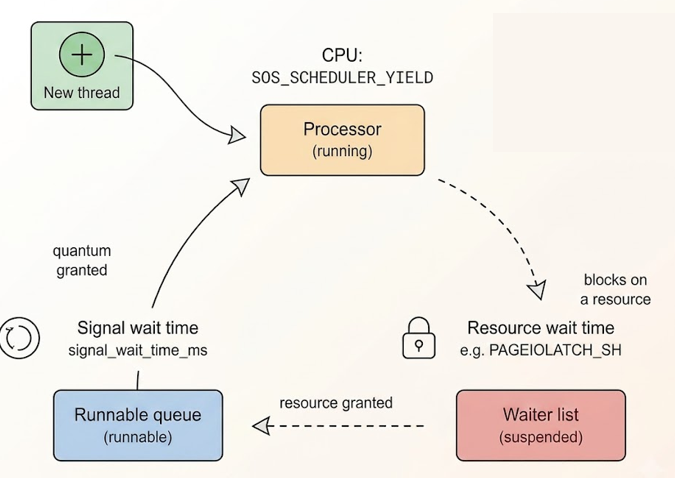
None of this applies to the open transaction from earlier. A session that has issued no command has no task and holds no worker. Its status in sys.dm_exec_sessions is sleeping, not running, not suspended.
SELECT
    s.session_id,
    s.status AS session_status,
    ct.text
FROM sys.dm_exec_sessions s
LEFT JOIN sys.dm_exec_requests r ON s.session_id = r.session_id
LEFT JOIN sys.dm_exec_connections c ON s.session_id = c.session_id
OUTER APPLY sys.dm_exec_sql_text(c.most_recent_sql_handle) ct
WHERE s.session_id = 54;

session_id session_status                 text
---------- ------------------------------ --------------------------------------------------------------------------------------------------------------------
54         sleeping                       UPDATE dbo.Orders SET Status = 'Reviewed' WHERE OrderId = 482193;
It is not waiting for a quantum, because it is not competing for one. The lock it holds costs the engine nothing in scheduling terms; it is bookkeeping in the lock manager, entirely separate from the worker pool.
Two hundred sessions walk into a lock
Let’s say that the application wants to confirm that the orders has been reviewed now it’s in the processed state.
BEGIN TRANSACTION;
UPDATE dbo.Orders SET Status = 'Processed' WHERE OrderId = 482193;
Seeing that the query didn’t complete to update the item, it will keep sending this transaction again and again, sending it 200 times let’s say.
Unlike the sleeping session above, each of these has issued a command. Each one is granted a worker to execute it, immediately hits the lock, and transitions to suspended, waiting on LCK_M_X.
wait_type                   waiting_tasks_count       wait_time_ms
THREADPOOL                      521                      2881770
SOS_SCHEDULER_YIELD             710                      41
 session_id     status        wait_type        wait_time   blocking_session_id
    68         suspended       LCK_M_X          29873             54
   ...
   206         suspended       LCK_M_X          29478             68
   207         suspended       LCK_M_X          29478             68
scheduler_id runnable_tasks_count work_queue_count active_workers_count
       0              0               19                 43
       1              0               5                  45
       2              0               10                 45
       3              0               2                  44
active_workers    max_workers_count
         205                    128
Note: max_workers_count only counts the user-facing pool; internal system threads, including the DAC’s own reserved worker used to capture this very output, sit outside that ceiling.
The worker is not released while the task waits. It stays attached to the suspended task for the entire duration of the block, doing nothing, simply reserved, waiting for the resource (the order line to update) to be available for updates.
The remainder cannot even be granted a worker to start waiting. They queue behind everyone else, and eventually give up entirely:
Login timeout expired
Login/Query timeout: 15/0 seconds
By this point the server has simply stopped accepting new connections.
When the fire exit is also on fire
Releasing the original lock should be the easy part: switch back to the session from the very first transaction, issue a ROLLBACK, and watch everything clear. Except that session, which has been sitting sleeping and worker-free this whole time, now has to issue a command of its own. And issuing a command means asking the pool for a worker (the same exhausted pool every other session is already queued for). The session responsible for the deadlock has no priority for fixing it. It gets in line like everyone else, behind two hundred sessions it created the conditions for.
When DAC is the last resort
This is where the Dedicated Admin Connection comes in the game. It runs on its own scheduler, with a worker reserved outside the regular pool, built specifically for an instance too exhausted to serve itself.
sqlcmd -A -S"." -E
SELECT blocking_session_id
FROM sys.dm_exec_requests
WHERE blocking_session_id <> 0;

KILL 54;
Note: the “.” here resolves to the local default instance but unlike an ordinary local connection (which typically uses Shared Memory), the DAC always connects over its own dedicated TCP listener on the loopback adapter, regardless of protocol settings on the port 1434 or a dynamic one (full documentation here).
The KILL forces the rollback from outside the exhausted pool entirely. Workers free up in cascade, and the two hundred suspended sessions complete their updates and release their own.
Final thoughts
In this example, we set the parameter max worker threads to 128 to easily saturate the worker threads. However, the default value for max worker threads is 0, which lets SQL Server compute the number of worker threads automatically at startup based on the number of logical CPUs and the platform architecture. Microsoft best practice can be found here and shows the following table:
| Number of logical CPUs | 64-bit computer |
|---|---|
| <= 4 | 512 |
| > 4 and <= 64 | 512 + ((logical CPUs – 4) * 16) |
| > 64 | 512 + ((logical CPUs – 4) * 32) |
And the key take-away from this experiment:
- Sleeping costs nothing, suspended costs a worker. The distinction between an idle transaction and a blocked one is the entire mechanism behind this incident: both hold a lock, only one of them holds a thread.
- The scheduler’s quantum explains CPU pressure, not threadpool exhaustion. Yielding after 4ms is about sharing a CPU among runnable workers; it has nothing to do with how many workers exist in the first place.
- The session that caused the block is not exempt from the consequences of the block. It has to compete for a worker like anything else, the moment it tries to clean up after itself.
- Never let a statement end without a
COMMITor aROLLBACK.
![Thumbnail [60x60]](https://www.dbi-services.com/blog/wp-content/uploads/2025/11/LTO_WEB.jpg)
![Thumbnail [90x90]](https://www.dbi-services.com/blog/wp-content/uploads/2025/05/martin_bracher_2048x1536.jpg)