

Following on from my previous articles: Create REST API from your database in minute with Feathers.js, and Add a UI to explore the Feathers.js API, today I want to add authentication in my Feathers.js REST API. Creation, update and delete operations will be authenticated, while read will remain public.
First step: add authentication to my application
I’m using the code from my previous articles, and I add the authentication to my Feathers.js API. I use the CLI, it’s quick and easy:
npx feathers generate authenticationI want a simple user + password authentication. To achieve this, I’ve configured my authentication service as follows:
? Which authentication methods do you want to use? Email + Password
? What is your authentication service name? user
? What path should the service be registered on? users
? What database is the service using? SQL
? Which schema definition format do you want to use? TypeBox
Now I have an authentication method available in my application. If you look at the code, a new service users has been generated. It’s used to be retrieved users from the database. I won’t explain here how to create a user, but you can refer to the documentation.
Second step: authenticate the service
Additionally, I’m now going to define which method is authenticated in my service. To do this, I open the workshop.ts file. The important part of the code for this configuration is this:
Questions about your own setup? A dbi services consultant can look at your case.
Talk to an expert (opens in a new tab) // Initialize hooks
app.service(workshopPath).hooks({
around: {
all: [
schemaHooks.resolveExternal(workshopExternalResolver),
schemaHooks.resolveResult(workshopResolver)
]
},
before: {
all: [
schemaHooks.validateQuery(workshopQueryValidator),
schemaHooks.resolveQuery(workshopQueryResolver)
],
find: [],
get: [],
create: [
schemaHooks.validateData(workshopDataValidator),
schemaHooks.resolveData(workshopDataResolver)
],
patch: [
schemaHooks.validateData(workshopPatchValidator),
schemaHooks.resolveData(workshopPatchResolver)
],
remove: []
},
after: {
all: []
},
error: {
all: []
}
})I add the “authenticate(‘jwt’)” function in create, patch and remove into the before block. This function check the credentials before the call of the main function.
  before: {
    ...
    create: [
      schemaHooks.validateData(workshopDataValidator),
      schemaHooks.resolveData(workshopDataResolver),
      authenticate('jwt')
    ],
    patch: [
      schemaHooks.validateData(workshopPatchValidator),
      schemaHooks.resolveData(workshopPatchResolver),
      authenticate('jwt')
    ],
    remove: [authenticate('jwt')]
  },
The basic authentication (user + password from the db) is managed by Feathers.js, which generates a JWT token on login.
Verify service authentication
Finally, I test the authentication of my service. To do this, I use the Swagger interface configured earlier. The POST method for creating a new record is now authenticated:
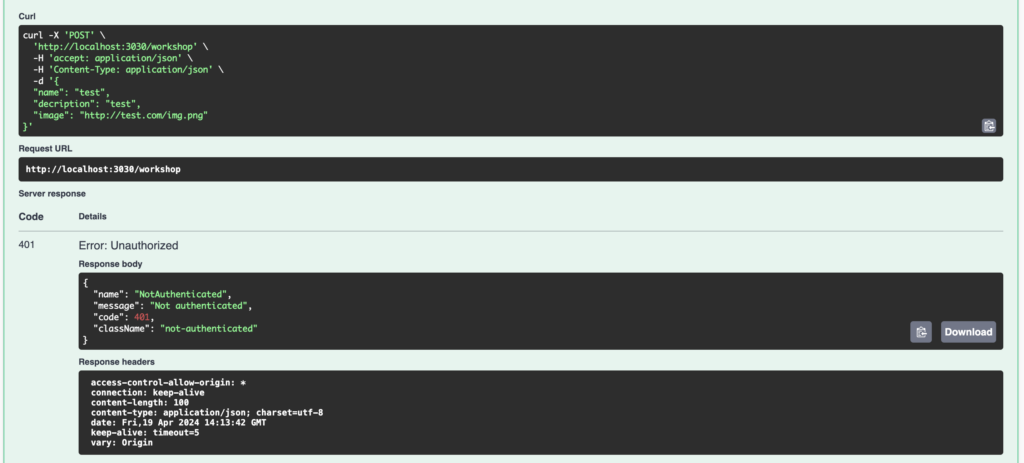
Authentication works correctly, but as I don’t pass a JWT token, I get the error 401 Unauthorized.
Conclusion
Adding authentication to a Feathers.js REST API is as easy as generating the service itself.
Feathers.js offers different authentication strategies, such as Local (user + password), JWT or oAuth. But if that’s not enough, you can also create a custom strategy.
In a future article, I’ll explain how to adapt the Swagger interface to manage authentication.
To continue with Feathers.js
See related articles: