

In our blogs we already talked about Migrating a CentOS 7 EC2 instance to Rocky Linux 8 and CentOS 8 machine to Red Hat 8 , but how does it look like if you want to migrate your CentOS8 machine to AlmaLinux 8?
Indeed it is as simple as migrating from CentOS7 to Rocky Linux or to Red Hat 8, if not easier, because there is a great script in the Alma Linux GitHub repository. If you have a deeper look at the script, you will recognize it checks a lot before starting to migrate and there are also some things that will terminate the migration e.g. if UEFI Secure Boot is enabled.
First of all make sure you have a backup or snapshot of the machine you want to migrate. There is never a guarantee that everything runs smoothly. The migration itself is straight forward.
1. Update your OS
Let’s start with checking the OS Version currently running on the machine.
[root@linux1 ~]# cat /etc/os-release
NAME="CentOS Linux"
VERSION="8"
ID="centos"
ID_LIKE="rhel fedora"
VERSION_ID="8"
PLATFORM_ID="platform:el8"
PRETTY_NAME="CentOS Linux 8"
ANSI_COLOR="0;31"
CPE_NAME="cpe:/o:centos:centos:8"
HOME_URL="https://centos.org/"
BUG_REPORT_URL="https://bugs.centos.org/"
CENTOS_MANTISBT_PROJECT="CentOS-8"
CENTOS_MANTISBT_PROJECT_VERSION="8"
[root@linux1 ~]# uname -a
Linux linux1 4.18.0-305.12.1.el8_4.x86_64 #1 SMP Wed Aug 11 01:59:55 UTC 2021 x86_64 x86_64 x86_64 GNU/Linux
[root@linx1~]#
I am running Version 8.4, so necessarily I don’t need to update my system prior the migration. If you’re running a version older than CentOS 8.4 you need to update your OS before moving to AlmaLinux. Make sure you correct your dnf config files to a valid mirror because as of January 31, 2022 the CentOS mirrorlists are offline. Your dnf update will fail.
[root@linux1 ~]# dnf update
CentOS Linux 8 - AppStream                                                                                                                                                                                                                                                     3.6  B/s |  38  B     00:10
Error: Failed to download metadata for repo 'appstream': Cannot prepare internal mirrorlist: No URLs in mirrorlist
[root@linux1 ~]#
To fix your dnf config files run the following sed commands and restart your dnf update. Once done reboot your system.
sed -i -e '/mirrorlist=http://mirrorlist.centos.org/?release=$releasever&arch=$basearch&repo=/ s/^#*/#/' -e '/baseurl=http://mirror.centos.org/$contentdir/$releasever// s/^#*/#/' -e '/^[baseos]/a baseurl=https://mirror.rackspace.com/centos-vault/8.5.2111/BaseOS/$basearch/os' /etc/yum.repos.d/CentOS-Linux-BaseOS.repo
sed -i -e '/mirrorlist=http://mirrorlist.centos.org/?release=$releasever&arch=$basearch&repo=/ s/^#*/#/' -e '/baseurl=http://mirror.centos.org/$contentdir/$releasever// s/^#*/#/' -e '/^[appstream]/a baseurl=https://mirror.rackspace.com/centos-vault/8.5.2111/AppStream/$basearch/os' /etc/yum.repos.d/CentOS-Linux-AppStream.repo
sed -i -e '/mirrorlist=http://mirrorlist.centos.org/?release=$releasever&arch=$basearch&repo=/ s/^#*/#/' -e '/baseurl=http://mirror.centos.org/$contentdir/$releasever// s/^#*/#/' -e '/^[cr]/a baseurl=https://mirror.rackspace.com/centos-vault/8.5.2111/ContinuousRelease/$basearch/os' /etc/yum.repos.d/CentOS-Linux-ContinuousRelease.repo
sed -i -e '/mirrorlist=http://mirrorlist.centos.org/?release=$releasever&arch=$basearch&repo=/ s/^#*/#/' -e '/baseurl=http://mirror.centos.org/$contentdir/$releasever// s/^#*/#/' -e '/^[devel]/a baseurl=https://mirror.rackspace.com/centos-vault/8.5.2111/Devel/$basearch/os' /etc/yum.repos.d/CentOS-Linux-Devel.repo
sed -i -e '/mirrorlist=http://mirrorlist.centos.org/?release=$releasever&arch=$basearch&repo=/ s/^#*/#/' -e '/baseurl=http://mirror.centos.org/$contentdir/$releasever// s/^#*/#/' -e '/^[extras]/a baseurl=https://mirror.rackspace.com/centos-vault/8.5.2111/extras/$basearch/os' /etc/yum.repos.d/CentOS-Linux-Extras.repo
sed -i -e '/mirrorlist=http://mirrorlist.centos.org/?release=$releasever&arch=$basearch&repo=/ s/^#*/#/' -e '/baseurl=http://mirror.centos.org/$contentdir/$releasever// s/^#*/#/' -e '/^[fasttrack]/a baseurl=https://mirror.rackspace.com/centos-vault/8.5.2111/fasttrack/$basearch/os' /etc/yum.repos.d/CentOS-Linux-FastTrack.repo
sed -i -e '/mirrorlist=http://mirrorlist.centos.org/?release=$releasever&arch=$basearch&repo=/ s/^#*/#/' -e '/baseurl=http://mirror.centos.org/$contentdir/$releasever// s/^#*/#/' -e '/^[ha]/a baseurl=https://mirror.rackspace.com/centos-vault/8.5.2111/HighAvailability/$basearch/os' /etc/yum.repos.d/CentOS-Linux-HighAvailability.repo
sed -i -e '/mirrorlist=http://mirrorlist.centos.org/?release=$releasever&arch=$basearch&repo=/ s/^#*/#/' -e '/baseurl=http://mirror.centos.org/$contentdir/$releasever// s/^#*/#/' -e '/^[plus]/a baseurl=https://mirror.rackspace.com/centos-vault/8.5.2111/centosplus/$basearch/os' /etc/yum.repos.d/CentOS-Linux-Plus.repo
sed -i -e '/mirrorlist=http://mirrorlist.centos.org/?release=$releasever&arch=$basearch&repo=/ s/^#*/#/' -e '/baseurl=http://mirror.centos.org/$contentdir/$releasever// s/^#*/#/' -e '/^[powertools]/a baseurl=https://mirror.rackspace.com/centos-vault/8.5.2111/PowerTools/$basearch/os' /etc/yum.repos.d/CentOS-Linux-PowerTools.repo

dnf update -y

systemctl reboot
2. Migrate to AlmaLinux
As soon as the machine is up to date you can download the almalinux-deploy.sh script from GitHub.
curl -O https://raw.githubusercontent.com/AlmaLinux/almalinux-deploy/master/almalinux-deploy.sh
Check if the script is executable, if not adjust it accordingly and start the migration.
[root@linux1 ~]# ls -al almalinux-deploy.sh
-rw-r--r-- 1 root root 34993 Feb  8 18:35 almalinux-deploy.sh
[root@linux1 ~]# chmod 744 almalinux-deploy.sh
[root@linux1 ~]# ls -al almalinux-deploy.sh
-rwxr--r--  1 root root 34993 Feb  8 18:35 almalinux-deploy.sh
[root@linux1 ~]#bash almalinux-deploy.sh
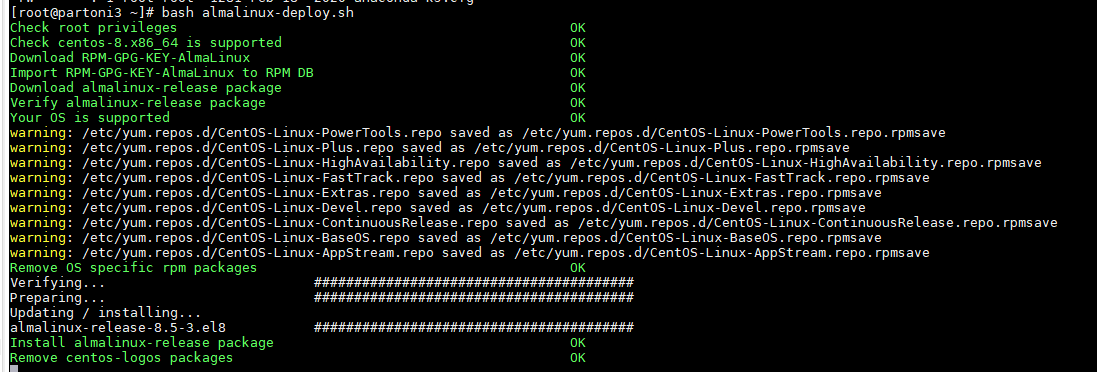
The duration of the migration depends of course on the number of installed packages.
3. Finalize the migration
After the migration completed successfully, the machine should be rebooted to run with the new AlmaLinux Kernel.
And as a last final check, ensure that the system convertion was successfully.
[root@linux1 ~]# cat /etc/redhat-release
AlmaLinux release 8.5 (Arctic Sphynx)
 [root@linux1 ~]# grubby --info DEFAULT | grep AlmaLinux
title="AlmaLinux (4.18.0-348.12.2.el8_5.x86_64) 8.5 (Arctic Sphynx)"
Don’t forget to test all your applications carefully after you switched to AlmaLinux.