I have decided to take some time in this cold month of February to continue this small series. This time, I’m going to speak about Reporting Services (SSRS) and some new features. Like my other article “SQL Server 2012: New features on Integration Services (SSIS)“, this article presents a summary of new features and enhancements for SQL 2012 Reporting Services.
The most important new feature is Power View (codename Crescent).
Power View
With his new file format RDLX, Power view is a new interactive BI feature.
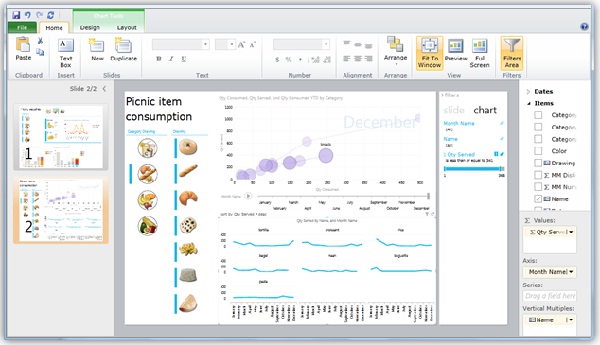
Based on Silverlight, end-users can visualize and interact directly with an SQL Server 2012 Analysis Services (SSAS) tabular model.
I will explain what news on SSAS is in the next article 😀
Power view is a good additional tool to display reports and to give to the end-user a solution to create self-report.
For more information, click here.
To have a set of sample to test it, click here.
SharePoint Mode
This new feature is based on a complete new architecture similar to SharePoint 2010 shared service. With this shared service, Reporting services can use a good range of SharePoint functionalities.
You have a lot of benefits like SharePoint cross-farm support for viewing reports or the SharePoint Central Administration which supports the Reporting Services SharePoint mode Configuration.
Data Alerts
A new feature for SQL Server 2012 Reporting Services called Data Alerts notifies a list of recipients about data’s report changes.
Data alerts runs in the background and polls the reports for some changes.
To create and manage these new alerts, you have 3 tools:
- Data Alert Designer
For users to create and edit data alert definitions.
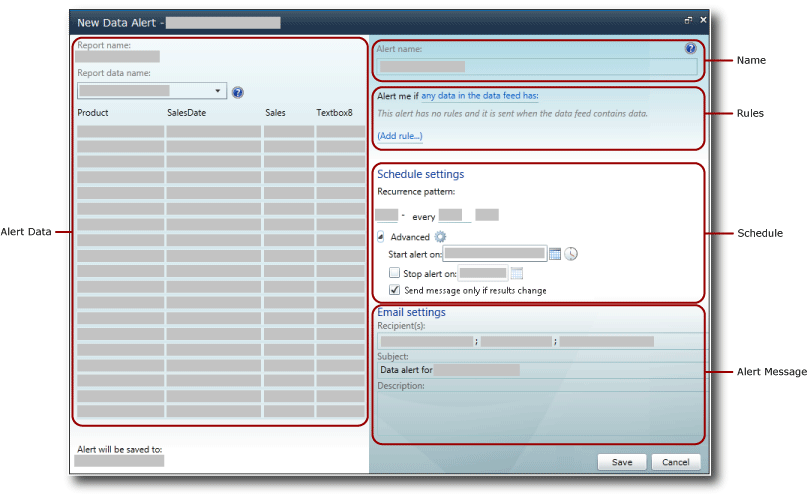
For more information, click here.
- Data Alert Manager for users
Users can view information, delete or change their data alerts.
- Data Alert Manager for alerting administrators
Administrators can view information, delete or change all data alerts created by all users.
For more information, click here.
Report Server Projects in SQL Server Data Tools for Visual Studio 2010
Add-in to Visual Studio 2010, SQL Server Data Tools (SSDT) is a development environment to modify BI Solutions.
With this tool, you can create, open and modify Report (rdl file) from version 2005, 2008 and 2008 R2.
Excel Renderer for Microsoft Excel 2003, 2007 & 2010
To enable this feature, Microsoft Office Compatibility Pack for Word, Excel, and PowerPoint must be installed.
This extension renders a report as an Excel document compatible with Excel version 2003, 2007 and 2010
You have some limits like maximum rows/worksheet with 1048576 or Maximum columns/worksheet with 16384 but normally you have a good marge 🙄
For more information, click here.
Word Renderer for Microsoft Word 2003, 2007 & 2010
Like Excel Renderer, to enable this feature, Microsoft Office Compatibility Pack for Word, Excel, and PowerPoint must be installed.
This extension renders a report as a Word document compatible with Word version 2003, 2007 and 2010
For more information, click here.
Conclusion
I hope this article gives you a good vision of all new features in SSRS and all new possibilities for your business and users.
You can find all information about the new Reporting Services here on the Microsoft TechNet.
My SQL Server 2012 series will be continued soon with SSAS…
![Thumbnail [60x60]](https://www.dbi-services.com/blog/wp-content/uploads/2022/08/STH_web-min-scaled.jpg)
![Thumbnail [90x90]](https://www.dbi-services.com/blog/wp-content/uploads/2022/09/CHC_web-min-min-scaled.jpg)
![Thumbnail [90x90]](https://www.dbi-services.com/blog/wp-content/uploads/2022/10/STS_web-min-scaled.jpg)
![Thumbnail [90x90]](https://www.dbi-services.com/blog/wp-content/uploads/2024/03/AHI_web.jpg)