Skip to content

Data Pump

Import order matters for GoldenGate instantiation filtering

When migrating a large database with GoldenGate, most of the volume is sometimes in old partitions which no longer change. A common shortcut is to move them first with expdp/impdp, even before GoldenGate is set up. Everything else, the active partitions and the non-partitioned tables, is exported once the extract is running, with PREPARECSN set. Instantiation filtering then makes the… 

Removing instantiation filtering from a GoldenGate replicat

In a recent blog, I explained how instantiation filtering works. DBOPTIONS ENABLE_INSTANTIATION_FILTERING makes a replicat discard any record whose commit CSN is at or below a table’s instantiation CSN. It applies everything above it. This replicat parameter should be kept during the whole initial load process. At some point the replicat has processed past the instantiation boundary for every table,… 

GoldenGate instantiation CSN explained

For more than ten years (GoldenGate 12.2, released in 2015), GoldenGate has provided a way of performing initial load of tables with a per-table instantiation CSN. But when migrating a database or just performing the initial load of a single table to prepare a GoldenGate replication, the known procedure is very often still the old one: start an extract, note… 

Migrate your database to 26ai on ODA

Introduction Oracle 26ai is not yet available on Bare Metal ODA, but it will probably be in a few weeks. For now, 26ai is available as a DB System on Oracle Database Appliance, meaning that it’s already possible to test this new version. Let’s try to migrate a 19c Bare Metal PDB to a 26ai DB System using 3 different… 

Why Data Pump Fails to Import Scheduler-Programs

Here is the How To of scripting them instead Oracle Data Pump can import simple programs without arguments, but it fails when handling Scheduler-Programs that contain arguments. This has been a persistent issue with no official resolution. Since this was a critical challenge in a recent project of mine, I’d like to share my solution. In rare cases, the scripts… 

impdp logtime=all metrics=y and 12cR2 parallel metadata

By Franck Pachot . A quick post to show why you should always use LOGTIME=ALL METRICS=Y when using Data Pump. Just look at an example showing the timestamp in front of each line and a message about each task completed by the worker: 15-NOV-17 11:48:32.305: W-5 Processing object type DATABASE_EXPORT/SCHEMA/PROCACT_SCHEMA 15-NOV-17 11:48:34.439: W-13 Completed 28 PROCACT_SCHEMA objects in 1 seconds… 

impdp content=metadata_only locks the stats

By Franck Pachot . With Oracle you can learn something every day. Today, preparing a migration to 12.2, I found all tables had locked statistics. I learned that it is the expected behavior since 10.2 when importing metadata_only including statistics, to avoid that the automatic job gathering comes and replaces the stats by ‘0 rows’. It is documented in DataPump… 

Data Pump LOGTIME, DUMPFILE, PARFILE, DATA_PUMP_DIR in 12c

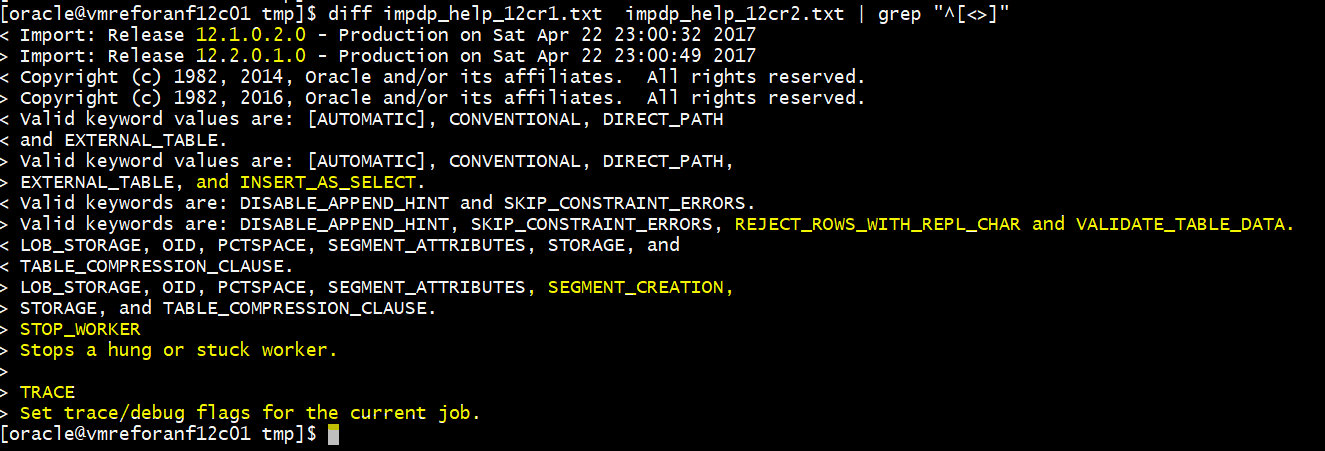
By Franck Pachot . Data Pump is a powerful way to save data or metadata, move it, migrate, etc. Here is an example showing few new features in 12cR1 and 12cR2. New parameters Here is the result of a diff between 12.1 and 12.2 ‘imp help=y’ But for this post, I’ll show the parameters that existed in 12.1 but have… 

DataPump ‘Processing object type’ misleading messages

By Franck Pachot . You’ve started a long DataPump and see it stuck on TABLE/STATISTICS/TABLE_STATISTICS, but you don’t expect that step to take a long time. Let’s see if we can rely on that message. I’ve a 500MB table and export it. I’ll use the 12c LOGTIME option to print a timestamp in front of each output line: 18-JAN-16 21:35:44.038:… 

does impdb into a compressed table really compress data?

Today at a customer we discussed the following scenario: To refresh a test database a datapump export and import was implemented. To save space on the test system the idea came up to compress the data on the test system. When we checked the documentation we came across the following statement: “When you use basic table compression, warehouse compression, or… 

How to remap tablespaces using Oracle Import/Export Tool

Since Oracle 10g, Oracle provides a great tool to import and export data from databases: Data Pump. This tool offers several helpful options, particularly one that allows to import data in a different tablespace than the source database. This parameter is REMAP_TABLESPACE. However, how can you do the same when you cannot use Data Pump to perform Oracle import and…