For years, we have all scheduled the same thing on our SQL Server environments: a nightly or weekly index maintenance job. We check the fragmentation level, we run a REORGANIZE between 5% and 30%, a REBUILD above 30% and we hope the job finishes before the business day starts.
Microsoft recently released a new feature in public preview: automatic index compaction. The database engine takes care of compacting the indexes itself, in the background, while the data changes. No job, no maintenance window, no script to maintain.
Here is what we will cover in this blog post
- Which problems this feature addresses
- The requirements
- The difference between page density and index fragmentation (and why it matters)
- What the feature does not do
This is the first part of a series of two blog posts.
Which problems does it address?
Automatic index compaction is Microsoft’s answer to a routine operational task: index maintenance jobs.
Here are the problems with these jobs
- They are expensive in CPU and I/O. A rebuild reads and rewrites the entire index
- They take time to run, and maintenance windows keep shrinking
- They generate a lot of transaction log, which impacts log backups and Always On replication
- They can block applications. An offline rebuild locks the table and even an online rebuild needs a short exclusive lock at the beginning and at the end
- Someone has to set them up, monitor them and fix them when they fail
There is also a less obvious problem: for years, these jobs have been optimizing the wrong metric. We will come back to this point in a moment.
Requirements
The feature is currently in public preview and available on
- Azure SQL Database
- Azure SQL Managed Instance, with the Always-up-to-date update policy
- SQL database in Microsoft Fabric
It is not available on SQL Server on-premises, including SQL Server 2025.
There is nothing to install. The feature relies on a background process that already runs on these platforms (the ADR cleaner, more on this below), and Accelerated Database Recovery is always enabled on Azure SQL Database, Azure SQL Managed Instance and SQL database in Fabric.
Internal and external fragmentation
When we talk about index fragmentation, we are actually talking about two different phenomena. They are measured by two different columns of sys.dm_db_index_physical_stats, they have different causes, and above all they have very different costs.
Before we start: how is a data file organized ?
To understand fragmentation, we need one prerequisite: how SQL Server sees its data files.
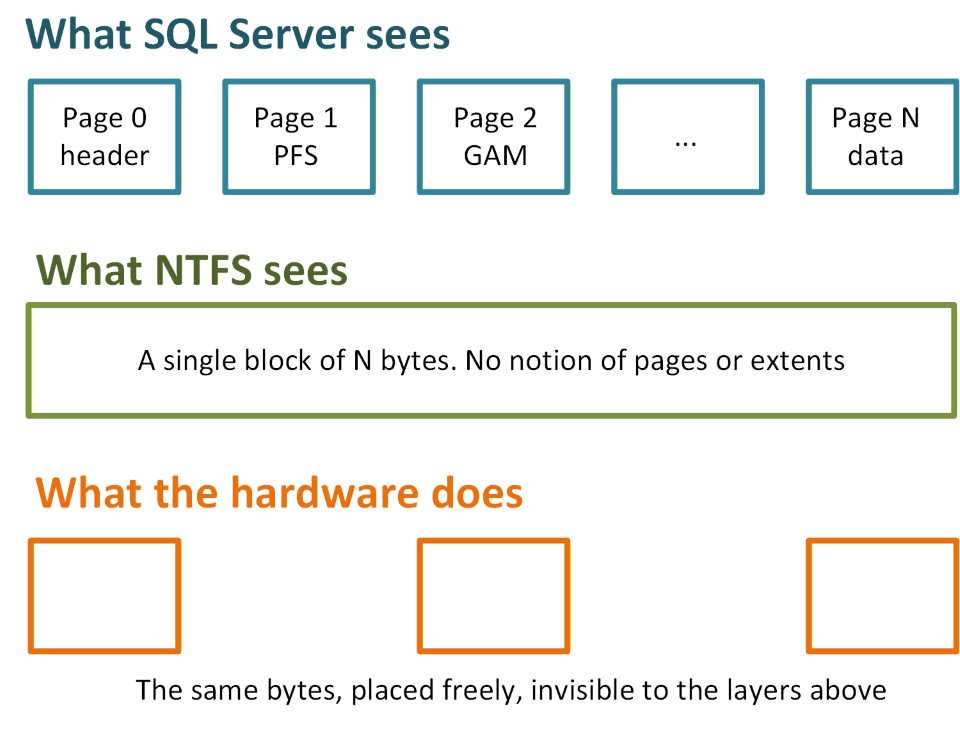
- For any program, a file is an array of bytes provided by the operating system. Byte 0, byte 1, byte 2, and so on. Reading means asking for a range: an offset and a length
- SQL Server slices this array into pages of 8 KB. The page N is, by definition, the bytes N × 8192 to (N+1) × 8192 − 1. The page ID is not a label, it is an address in the file
- Everything below the file (NTFS clusters, SSD, SAN volumes) is translated and hidden by the storage stack.
Every time we say “physical order” in the rest of this post, we mean the order of the pages inside the data file not their placement on the hardware.
What does it look like?
Internal fragmentation: the pages are not full
Internal fragmentation means that the pages of an index contain free space. It is measured by avg_page_space_used_in_percent, also called page density.
Where does it come from?
- Deletes, especially scattered deletes: the rows disappear, the pages stay
- Page splits: when a page is full, an insert in the middle of the key range or an update that makes a row grow moves half of the rows to a newly allocated page. Both pages end up around 50% full
- Updates that shrink variable length columns
- Large rows that do not pack well: a 5000 bytes row means one row per page, and around 38% of every page is lost mechanically
Note that some free space is normal, and even intentional: the space reserved by the fill factor is internal fragmentation on purpose to absorb future inserts without page splits.
What does it look like?
CREATE DATABASE DemoFrag
GO

ALTER DATABASE DemoFrag SET RECOVERY SIMPLE
GO

USE DemoFrag
GO

CREATE TABLE dbo.SplitDemo (
    Id      int NOT NULL CONSTRAINT PK_SplitDemo PRIMARY KEY CLUSTERED,
    Payload varchar(8000) NOT NULL
);

-- 2 lines about 4000 bytes per page
INSERT INTO dbo.SplitDemo VALUES
(1, REPLICATE('A', 4000)), (2, REPLICATE('B', 4000));
My page is almost full:

Why does it cost ?
Because the same rows are spread over more pages than necessary and everything in SQL Server is done at the page level:
- The buffer pool caches pages, not rows. A page at 40% density wastes 60% of the memory it occupies
- Every read, logical or physical, handles more pages for the same data
- Backups are bigger, integrity checks are longer
This is the key point: internal fragmentation follows the data everywhere, including in RAM. It is a permanent tax on memory, I/O and CPU. However it’s not the case with external fragmentation.
External fragmentation: the offsets do not follow the logical order
At the leaf level of a B-tree, the pages are chained together in the order of the index keys with two pointers stored in every page header (m_nextPage, m_prevPage). This chain is the logical order and it cannot be wrong: it is the order of the keys by definition.
External fragmentation (also called logical fragmentation) means that following this chain no longer corresponds to reading the file sequentially. The pages are logically ordered, but their offsets in the file are not. It takes two forms:
- Holes: the pages of the index are not at consecutive offsets. Pages of other objects, or free pages, sit in between
- Disorder: the pages are at consecutive offsets, but chained in a different order
avg_fragmentation_in_percent counts both forms without distinction. The columns fragment_count and avg_fragment_size_in_pages are closer to the real cost: they measure the length of the contiguous runs.
Where does it come from?
- Several objects growing at the same time: the engine allocates the extents in the order the requests arrive, so the objects interleave in the file. This is the normal life of a database
- Page splits: the new page is allocated where free space is found, rarely next to the original page
- Page deallocations: massive deletes, and the automatic index compaction itself
What does it look like?
USE DemoFrag
GO

CREATE TABLE dbo.SplitDemo (
    Id      int NOT NULL CONSTRAINT PK_SplitDemo PRIMARY KEY CLUSTERED,
    Payload varchar(8000) NOT NULL
);

-- 2 lines about 4000 bytes per page : lines 1 and 2 on 1 page, 3-4 on next page

INSERT INTO dbo.SplitDemo VALUES
(1, REPLICATE('A', 4000)), (2, REPLICATE('B', 4000)),
(3, REPLICATE('C', 4000)), (4, REPLICATE('D', 4000))

-- Lines location (file:page:slot)?
SELECT Id, sys.fn_PhysLocFormatter(%%physloc%%) AS physical_location
FROM dbo.SplitDemo;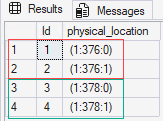
My first 2 rows are located on page 376 and the last 2 rows on page 378.
What does page 377 contain? I thought the pages were contiguous?
Since my table has a clustered index on Id it is stored as a B-tree. Can we see it?
SELECT allocated_page_page_id, page_type_desc, page_level, previous_page_page_id, next_page_page_id
FROM sys.dm_db_database_page_allocations(DB_ID(), OBJECT_ID('dbo.SplitDemo'),1, NULL, 'DETAILED');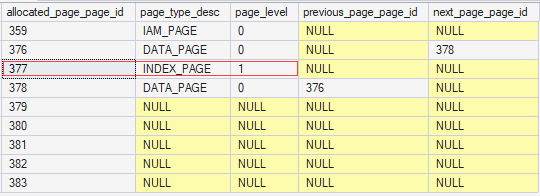
What does it look like internally?
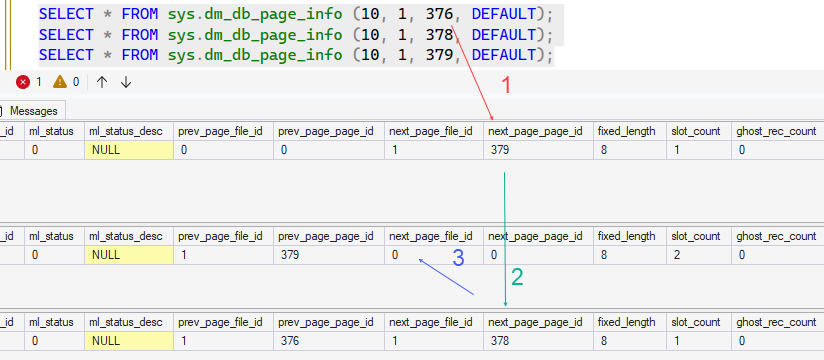
SELECT * FROM sys.dm_db_page_info (10, 1, 376, DEFAULT);
SELECT * FROM sys.dm_db_page_info (10, 1, 378, DEFAULT);
Page split to generate external fragmentation:
-- Split happens
UPDATE dbo.SplitDemo SET Payload = REPLICATE('B', 4100) WHERE Id = 2;

-- Check page density
SELECT index_level, page_count, avg_page_space_used_in_percent,
avg_fragmentation_in_percent, record_count,
ghost_record_count, version_ghost_record_count
FROM sys.dm_db_index_physical_stats(DB_ID(), OBJECT_ID('dbo.SplitDemo'),1, NULL, 'SAMPLED')
WHERE alloc_unit_type_desc = 'IN_ROW_DATA';
After the page split:
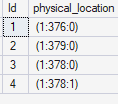
Line 1 is located at page 376
Line 2 is located at page 379
Line 3 is located at page 378
Line 4 is located at page 378
Why does it cost so little today?
There is exactly one mechanism through which external fragmentation ever costed something: the read-ahead. During a scan, the engine prefetches pages with large I/Os and an I/O is a contiguous range of the file: one offset, one length, up to 512 KB. When the index is contiguous one I/O brings back 64 pages. When it is not the same pages arrive in several smaller I/Os.
When do these smaller I/Os hurt ? Three conditions must be met at the same time:
- The data is cold: a page already in the buffer pool generates no physical I/O at all
- The operation is a large scan: a seek navigates the B-tree by page ID and does not care about the order
- Each additional I/O has a price
On SSD, NVMe and cloud storage, an additional I/O costs a few dozen microseconds and the physical placement below the file is arbitrary anyway (SSD controllers and SANs put the blocks wherever they want).
External fragmentation survived its own usefulness for another reason: it was a good symptom. It increases because of page splits, and page splits destroy the page density and inflate the transaction log. For twenty years, we treated the thermometer because it was correlated with the disease. The disease was the density.
Reference
Automatic Index Compaction – SQL Server | Microsoft Learn
Thank you. Amine Haloui
![Thumbnail [60x60]](https://www.dbi-services.com/blog/wp-content/uploads/2024/03/AHI_web.jpg)
![Thumbnail [90x90]](https://www.dbi-services.com/blog/wp-content/uploads/2025/11/LTO_WEB.jpg)
![Thumbnail [90x90]](https://www.dbi-services.com/blog/wp-content/uploads/2022/08/STH_web-min-scaled.jpg)
![Thumbnail [90x90]](https://www.dbi-services.com/blog/wp-content/uploads/2022/11/TBR-web-min-scaled.jpg)