Optimized locking is probably the SQL Server 2025 feature I was the most curious about as a DBA. On paper, lock escalation should almost disappear. Let’s check it with a simple test: 200,000 rows, an update on the first 10,000, and a transaction we leave open.
BEGIN TRANSACTION;
UPDATE dbo.orders SET status = 1 WHERE id <= 10000;

SELECT resource_type, request_mode, COUNT(*) AS locks
FROM sys.dm_tran_locks
WHERE request_session_id = @@SPID
GROUP BY resource_type, request_mode;
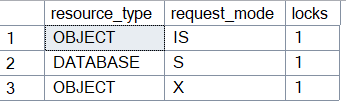
Without optimized locking:
With optimized locking:
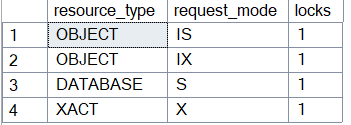
In the first case, SQL Server escalated the row locks to an X lock on the whole table. In the second, there is no escalation anymore, only one X lock on the transaction ID (XACT), next to the intent lock (IX) on the table (the IS lock in both results is on the small function I used to run this query).
That is nice in a demo, but on a real server nobody is looking at sys.dm_tran_locks at the right moment. I wanted to know how a DBA can check what optimized locking does once it is enabled. SQL Server 2025 has a few Extended Events for that, and I found some of their fields easy to misread and one of them reports LAQ as enabled on a database where it never ran once.
A quick reminder
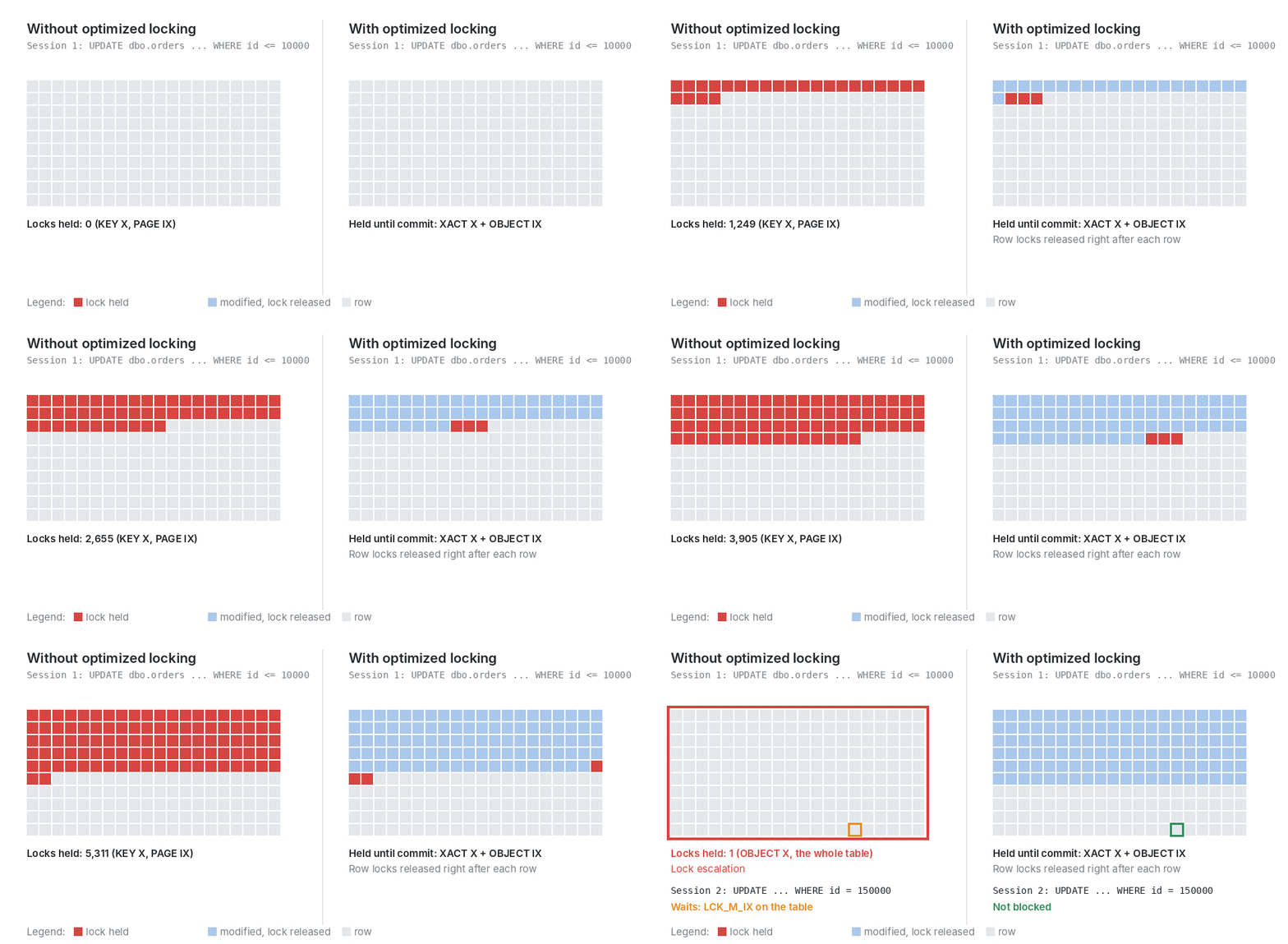
Optimized locking is made of two parts.
With TID locking, SQL Server still takes row and page locks when it modifies data, but it releases each of them as soon as the row is modified. Until the commit, instead of thousands of row and page locks, the transaction keeps one X lock on its transaction ID, plus the intent lock (IX) on the table.
Lock after qualification (LAQ) evaluates the WHERE clause on the last committed version of each row, without locking it, and only locks the rows that qualify. LAQ needs read committed snapshot isolation (RCSI). Optimized locking itself only needs accelerated database recovery (ADR).
My colleague Roger Schönmann already showed both parts with demos on this blog, so I will stay on the monitoring side here.
The events
Here are the events to know:
| Event | When it fires | What it gives |
|---|---|---|
lock_escalation | at each escalation | the table, the cause, the number of locks converted |
locking_stats | every few minutes for each database, even if optimized locking is disabled | counters for the interval: escalations, LAQ attempts, reasons why LAQ was skipped, and whether TID locking and LAQ are enabled |
locking_stats2 | at the same time as locking_stats (observed) | skip index locks and LAQ heuristics counters (SQL Server and Azure SQL Managed Instance only) |
lock_after_qual_stmt_abort | at each restart | a statement that LAQ had to restart, with its plan hash |
Microsoft Learn presents these events, but the 70 or so fields of locking_stats and locking_stats2 are not listed there. You can still get a short description of each one from the engine:
SELECT object_name AS event_name, name AS field, description
FROM sys.dm_xe_object_columns
WHERE object_name IN (N'locking_stats', N'locking_stats2', N'lock_after_qual_stmt_abort')
  AND column_type = N'data'
ORDER BY event_name, field;
Here is the session I used:
CREATE EVENT SESSION optimized_locking ON SERVER
ADD EVENT sqlserver.lock_escalation
    (ACTION (sqlserver.sql_text) WHERE (sqlserver.database_name = N'<DB_NAME>')),
ADD EVENT sqlserver.lock_after_qual_stmt_abort
    (ACTION (sqlserver.sql_text) WHERE (sqlserver.database_name = N'<DB_NAME>')),
ADD EVENT sqlserver.locking_stats,
ADD EVENT sqlserver.locking_stats2
ADD TARGET package0.event_file (SET filename = N'optimized_locking.xel', max_file_size = 50)
WITH (MAX_DISPATCH_LATENCY = 5 SECONDS);

ALTER EVENT SESSION optimized_locking ON SERVER STATE = START;
Most counters of locking_stats are at zero, so reading the raw XML gets tiring quickly. I used this query, which returns one row per non-zero field for one database:
DECLARE @log nvarchar(260) = CAST(SERVERPROPERTY('ErrorLogFileName') AS nvarchar(260));
DECLARE @xel nvarchar(260) = LEFT(@log, LEN(@log) - CHARINDEX(N'\', REVERSE(@log)) + 1) + N'optimized_locking*.xel';

SELECT CAST(x.timestamp_utc AS datetime2(0))       AS ts_utc,
       x.object_name,
       d.n.value('@name', 'sysname')                AS field,
       d.n.value('(value)[1]', 'nvarchar(400)')     AS value
FROM sys.fn_xe_file_target_read_file(@xel, NULL, NULL, NULL) AS x
CROSS APPLY (SELECT CAST(x.event_data AS xml)) AS t(e)
CROSS APPLY t.e.nodes('/event/data') AS d(n)
WHERE x.object_name IN (N'locking_stats', N'locking_stats2')
  AND t.e.value('(/event/data[@name="database_id"]/value)[1]', 'int') = DB_ID(N'<DB_NAME>')
  AND d.n.value('@name', 'sysname') <> N'database_id'
  AND d.n.value('(value)[1]', 'nvarchar(400)') NOT IN (N'0', N'false')
ORDER BY ts_utc, x.object_name, field;
You cannot force locking_stats to fire, you have to wait. In my lab it came every 5 minutes for an active database.
Without optimized locking: the escalation
Back to the 10,000-row update, on a database without optimized locking. The lock_escalation event arrives right away, and the next locking_stats counts it:
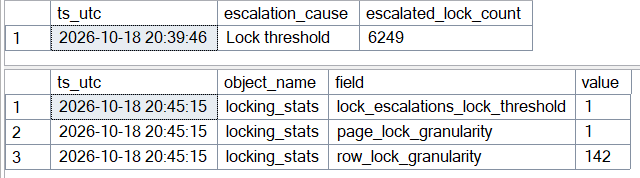
The escalation was caused by the lock count (Lock threshold), and 6,249 locks were converted into the table lock. I got exactly 6,249 every time I ran this test. About five minutes later, locking_stats showed lock_escalations_lock_threshold = 1.
lock_escalation is the one to use when you look for the statement that escalated. The counter in locking_stats is cheaper to collect, for all databases, and it is a good way to compare the number of escalations before and after enabling optimized locking.
With optimized locking: reading the waits
After enabling ADR and optimized locking, the same update didn’t produce any lock_escalation event. A second session updating id = 150000, a row far from the first 10,000, was not blocked anymore.
If the second session updates a row that the first one modified, it still has to wait, but now it waits on the transaction. The wait type is LCK_M_S_XACT_MODIFY, and wait_resource shows the transaction and the row together:
XACT: 30:4417:0 KEY: 30:72057594047234048 (c1ceb6ec8491)
With a parallel plan, I was surprised at first: sys.dm_exec_requests showed only CXCONSUMER for the blocked statement. The lock waits (LCK_M_S_XACT) were visible on the parallel tasks, in sys.dm_os_waiting_tasks.
LAQ shows as enabled, but it never ran
At this stage, the database had ADR and optimized locking, but RCSI was still off. I ran two updates on two different customers. The second one stayed blocked until the first one rolled back. Then I read the next locking_stats:
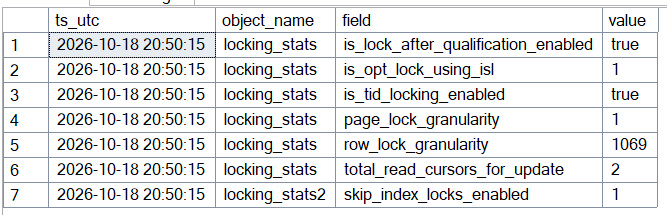
is_tid_locking_enabled is true, as expected. is_lock_after_qualification_enabled is true as well, even though LAQ cannot work without RCSI. Both flags simply follow the OPTIMIZED_LOCKING setting of the database.
The information is in what the grid doesn’t show. There is no num_lock_after_qualification_attempts row, so LAQ was not used a single time.
On a fresh database with ADR, optimized locking and RCSI enabled, I ran the same test. This time the second update went through immediately, and the next locking_stats looked like this:
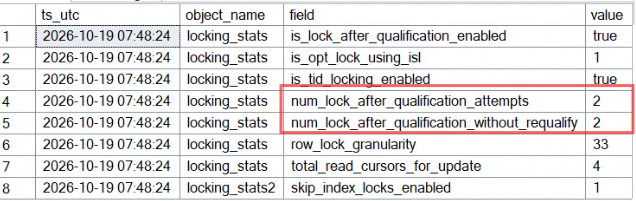
The flags are the same as before, but now num_lock_after_qualification_attempts = 2: both updates used LAQ. num_lock_after_qualification_without_requalify = 2 says that neither of them had to evaluate a row again, which makes sense since they never touched the same customer.
So if you want to know whether LAQ is really working on a database, num_lock_after_qualification_attempts is the field to check. If it never appears while updates are running, LAQ is not being used.
When LAQ restarts a statement
With RCSI enabled, LAQ has to deal with rows modified by another transaction. The statement waits for that transaction, then evaluates the row again (a requalification, counted in num_lock_after_qualification_requalifies). When the plan doesn’t allow it, SQL Server restarts the statement without LAQ, and the work done before the restart is wasted.
To get this case, session 1 updates customer 1 and keeps its transaction open. Session 2 runs UPDATE dbo.orders SET amount = amount + 10 WHERE customer_id IN (1, 2) and waits. Then session 1 commits:

logical_reads_before_retry gives the work lost before the restart, 3 reads here. In two earlier runs of the same test, the next locking_stats showed num_lock_after_qualification_requalifies_not_supported = 1 and num_lock_after_qualification_unsupported_op = 2.
In my tests, the plan made the difference. With OPTION (MAXDOP 1), the same scenario ended with one requalified row and no restart. With a parallel plan (Gather Streams before the Clustered Index Update), the statement was restarted each time.
An occasional restart is not a problem. If the same plan hash comes back again and again, that is wasted work. In the optimized locking v2 post, Dimitri Furman explains what SQL Server does about it:
With the new improvement, in addition to tracking at the database level, the engine also tracks LAQ feedback at the query plan level and persists it in Query Store. If thresholds are exceeded for a particular query plan, LAQ is disabled only for that plan rather than for the entire database. The rest of the workload still benefits from LAQ.
Conclusion
Optimized locking doesn’t require rewriting queries, but lock hints, OUTPUT or MERGE keep LAQ out, as the skip reasons show. To check what it actually does, you have to read the right fields, because the enabled flags only reflect the database setting.
Here is what I would look at on a SQL Server 2025 instance:
| Question | Where to look |
|---|---|
| Do escalations still happen? | lock_escalation, and lock_escalations_lock_threshold / lock_escalations_memory_pressure in locking_stats |
| Is LAQ really used? | num_lock_after_qualification_attempts (the is_lock_after_qualification_enabled flag is not enough) |
| Why is LAQ skipped? | the laq_skip_reason_* counters (lock hints, OUTPUT, MERGE, columnstore, wasted work…) |
| Are statements restarted? | lock_after_qual_stmt_abort, then the plan hash in Query Store |
| Who is blocking whom? | the XACT part of wait_resource, and sys.dm_os_waiting_tasks for parallel plans |
To go further, Microsoft’s support team followed the locks one by one with Extended Events, and the optimized locking v2 post measures skipped index locks with lock_acquired and a histogram target.
![Thumbnail [60x60]](https://www.dbi-services.com/blog/wp-content/uploads/2025/11/LTO_WEB.jpg)
![Thumbnail [90x90]](https://www.dbi-services.com/blog/wp-content/uploads/2022/08/STH_web-min-scaled.jpg)
![Thumbnail [90x90]](https://www.dbi-services.com/blog/wp-content/uploads/2024/03/AHI_web.jpg)