In order to be able to test the GenAI Ask EM functionality of OEM 24ai, and after I have first installed an OEM platform from OCI MarketPlace, I have been installing and configuring an Oracle Management agent on one of my DB System that I have in my lab. When the process is still quite the same I still found interesting to share it here in a blog, moreover I faced some issue that I could resolve.
Prepare OMS connection to host target
I need to have a ssh key pair to be able to connect from my OEM to the target DB System when adding the agent.
Create ssh key pair
I first need to create a ssh key pair. I created the ssh key with ops user from the OMS server.
[opc@oms1 ~]$ cd .ssh

[opc@oms1 .ssh]$ pwd
/home/opc/.ssh

[opc@oms1 .ssh]$ ls -al
total 8
drwx------. 2 opc opc   48 Jul 21 11:50 .
drwx------. 3 opc opc  115 Jul 13 09:13 ..
-rw-------. 1 opc opc 1467 Jul 13 08:02 authorized_keys
-rw-r--r--. 1 opc opc   95 Jul 21 11:50 known_hosts

[opc@oms1 .ssh]$ ssh-keygen -t rsa -b 4096 -f ~/.ssh/oem_agent_key
Generating public/private rsa key pair.
Enter passphrase for "/home/opc/.ssh/oem_agent_key" (empty for no passphrase):
Enter same passphrase again:
Your identification has been saved in /home/opc/.ssh/oem_agent_key
Your public key has been saved in /home/opc/.ssh/oem_agent_key.pub
The key fingerprint is:
SHA256:K5xoWmpI6WCEmKlPVUthV9Ckwg6ehjkbPHWYc7D6RL4 opc@oms1
The key's randomart image is:
+---[RSA 4096]----+
|    . o.o=o      |
|     Bo. ..      |
|oo  Oo=..        |
|=o O.B..         |
|o X.* . S        |
|o+.O + . .       |
|=+. E + .        |
|..o=   .         |
| .o              |
+----[SHA256]-----+

[opc@oms1 .ssh]$ ls -al
total 16
drwx------. 2 opc opc   94 Jul 21 14:26 .
drwx------. 3 opc opc  115 Jul 13 09:13 ..
-rw-------. 1 opc opc 1467 Jul 13 08:02 authorized_keys
-rw-r--r--. 1 opc opc   95 Jul 21 11:50 known_hosts
-rw-------. 1 opc opc 3369 Jul 21 14:26 oem_agent_key
-rw-r--r--. 1 opc opc  734 Jul 21 14:26 oem_agent_key.pub
[opc@oms1 .ssh]$
I have now both private and public keys, named respectively, oem_agent_key and oem_agent_key.pub.
Add the key on the target DB-System
I will get the content of my public key:
[opc@oms1 .ssh]$ cat oem_agent_key.pub
ssh-rsa AAAAB3NzaC1yc2EAAAADAQABAA...D8XdH9w7OCaTl9STwQhml1llLmznDdJu2QmfcWT/Wj1u+JM/zpYyA2EhMY6lsQ== opc@oms1
[opc@oms1 .ssh]$
And add the content of the public key to my DB System authorized_keys file.
[opc@svl-orap-chz0-cl1n1 ~]$ cd .ssh

[opc@svl-orap-chz0-cl1n1 .ssh]$ pwd
/home/opc/.ssh

[opc@svl-orap-chz0-cl1n1 .ssh]$ ls -ltrh
total 8.0K
-rw------- 1 root root 102 Jul 22 06:35 authorized_keys.bkp
-rw------- 1 opc  opc  503 Jul 22 06:58 authorized_keys

[opc@svl-orap-chz0-cl1n1 .ssh]$ cp -p authorized_keys authorized_keys.bkp.20260722

[opc@svl-orap-chz0-cl1n1 .ssh]$ vi authorized_keys

[opc@svl-orap-chz0-cl1n1 .ssh]$ tail -n1 authorized_keys
ssh-rsa AAAAB3NzaC1yc2EAAAADAQAB...1ID8XdH9w7OCaTl9STwQhml1llLmznDdJu2QmfcWT/Wj1u+JM/zpYyA2EhMY6lsQ== opc@oms1
[opc@svl-orap-chz0-cl1n1 .ssh]$
Test connection from opc oms
I will test the connection and see if I can connect from my OMS server to the DB System.
[opc@oms1 .ssh]$ pwd
/home/opc/.ssh

[opc@oms1 .ssh]$ ls -ltrh
total 16K
-rw-------. 1 opc opc 1.5K Jul 13 08:02 authorized_keys
-rw-r--r--. 1 opc opc   95 Jul 21 11:50 known_hosts
-rw-r--r--. 1 opc opc  734 Jul 21 14:26 oem_agent_key.pub
-rw-------. 1 opc opc 3.3K Jul 21 14:26 oem_agent_key

[opc@oms1 .ssh]$ ssh -i oem_agent_key [email protected]
Last login: Wed Jul 22 07:27:49 2026 from 192.168.0.89
[opc@svl-orap-chz0-cl1n1 ~]$
Which is successful.
Installing a Standalone Oracle Management Agent Using Add Host Targets Wizard or EM CLI
Deployment of the agent through the console
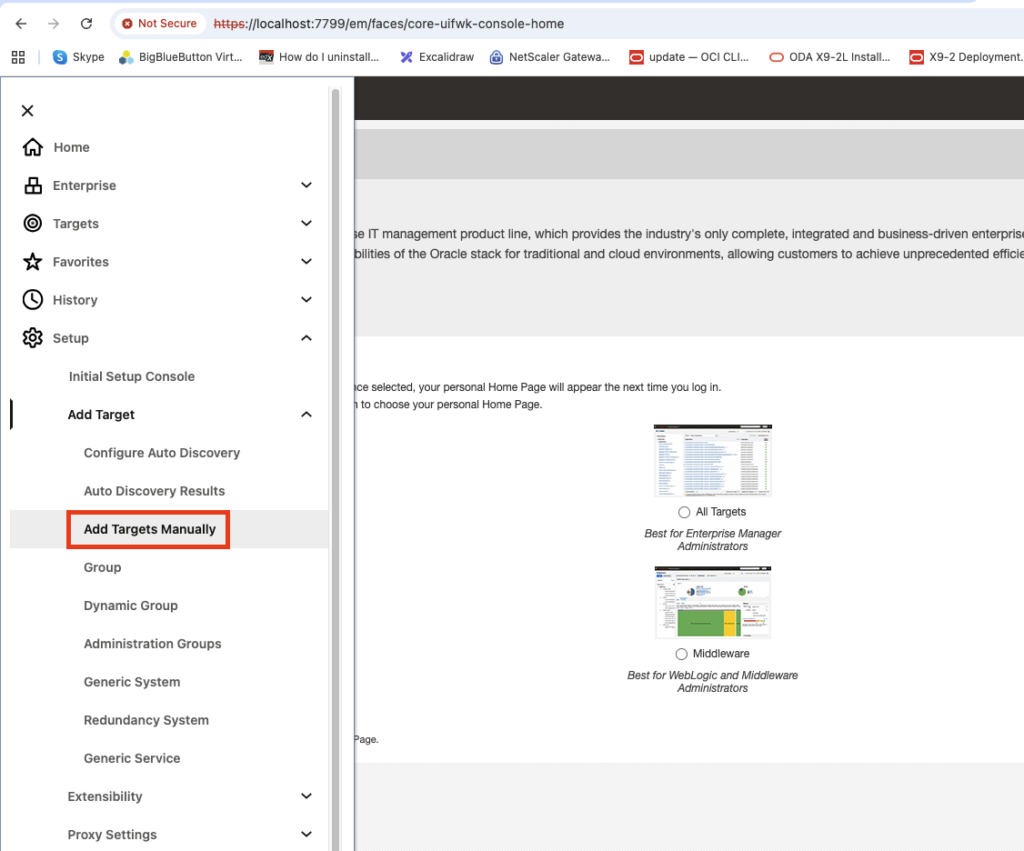
Now I can deploy my agent on the DB Systems through EOM console. For this I will use, the “Add Targets Manually” option from the “Setup” menu.
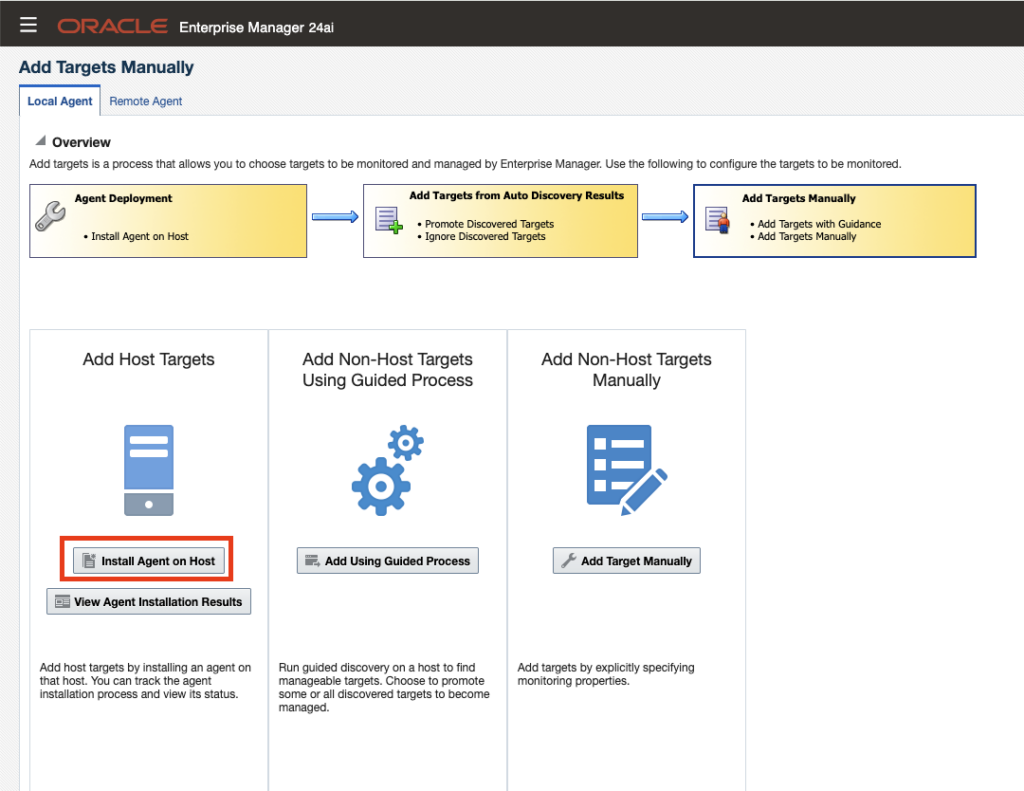
I will use “Add Host Targets” and “Install Agent on Host”.
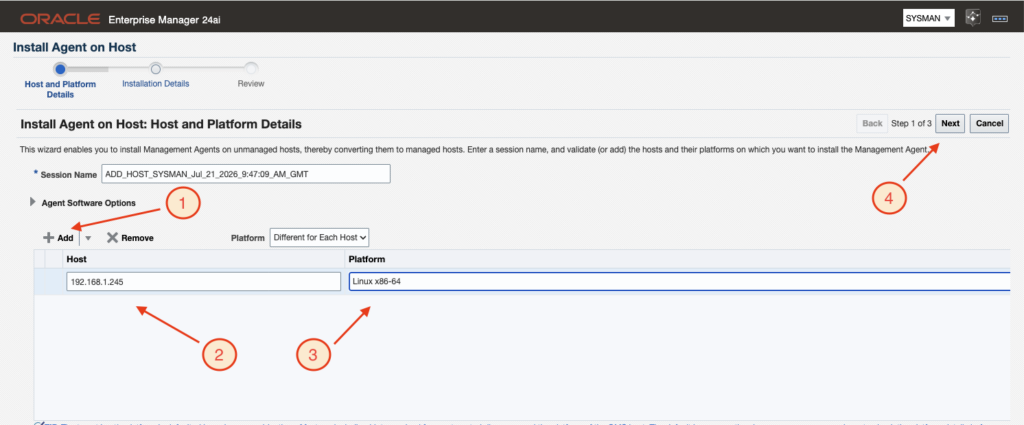
I will provide all needed information as hostname, platform. As it is a lab and I do not have any DNS I have used the IP address. This is perfectly working, but of course for a production system you will be using the hostname and rarely IP addresses.
I will therefore get the warning message which I will accept.

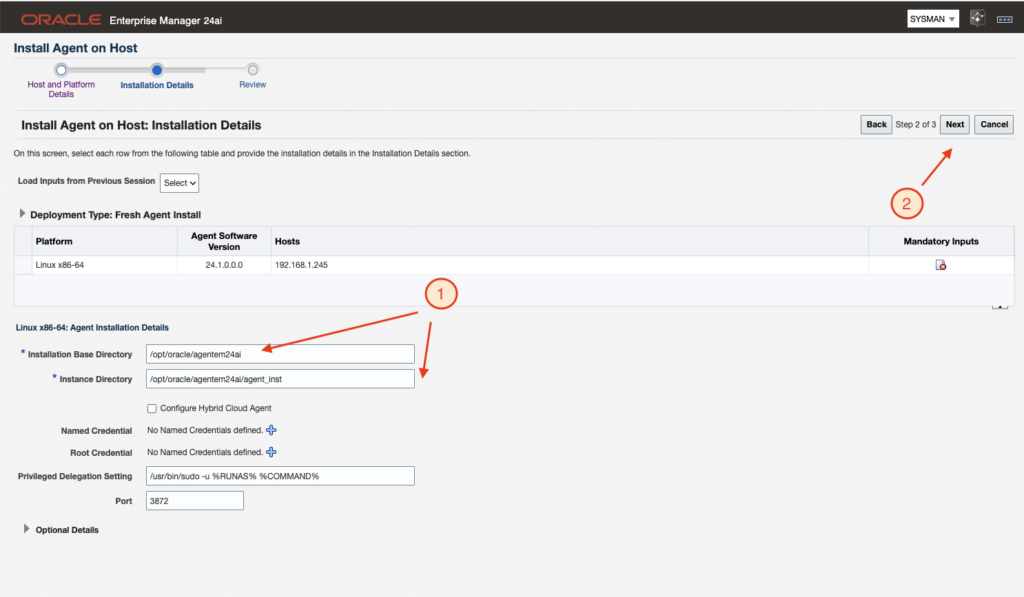
I will need to provide agent installation directories before clicking the “next” button.
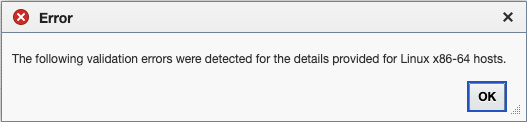
I will get following error because the credentials are missing.
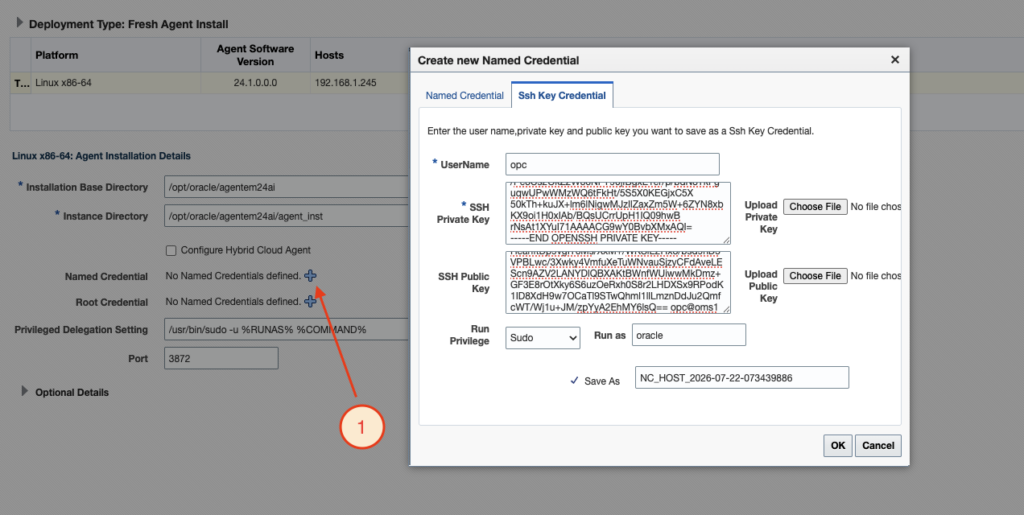
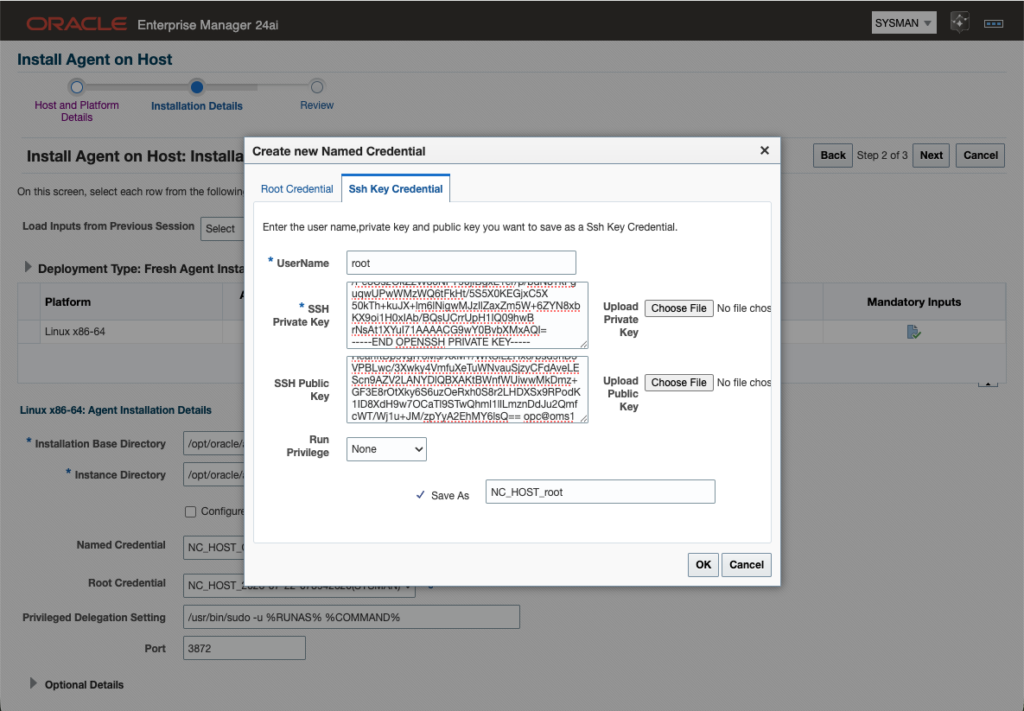
I will provide the credential to OMS to connect to the DB System through the OPC user with sudo privilege, using the key pair I had initially created.
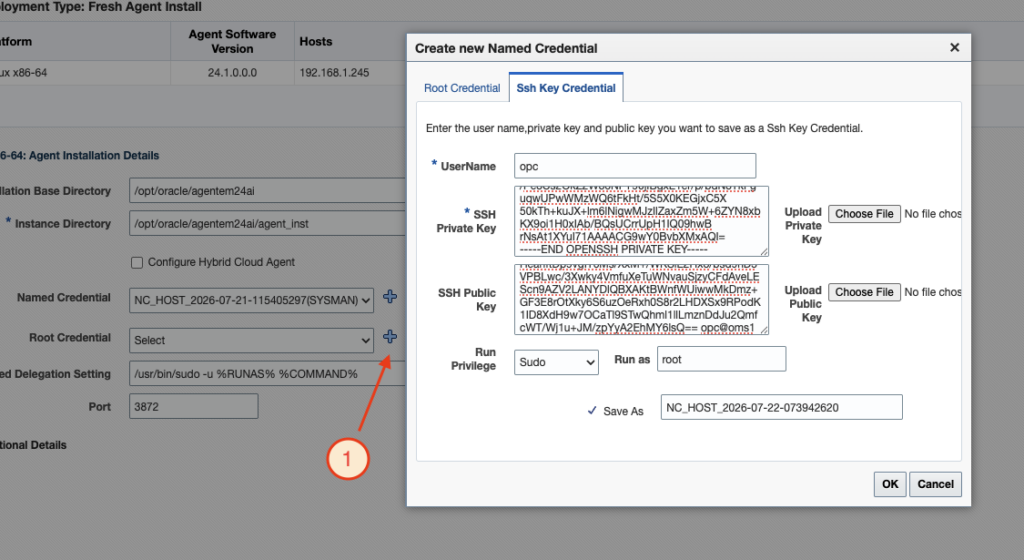
I will do the same for the root credential.
And finally click the “Next” button again.
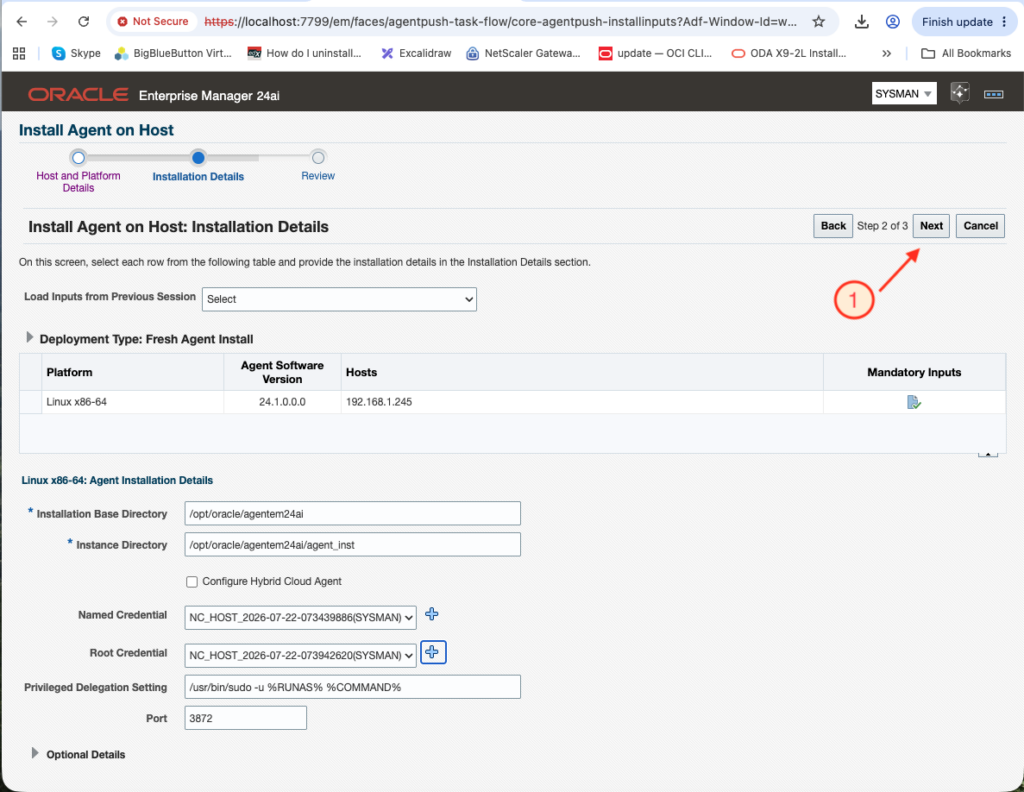
Now I can deploy the agent on the DB System.
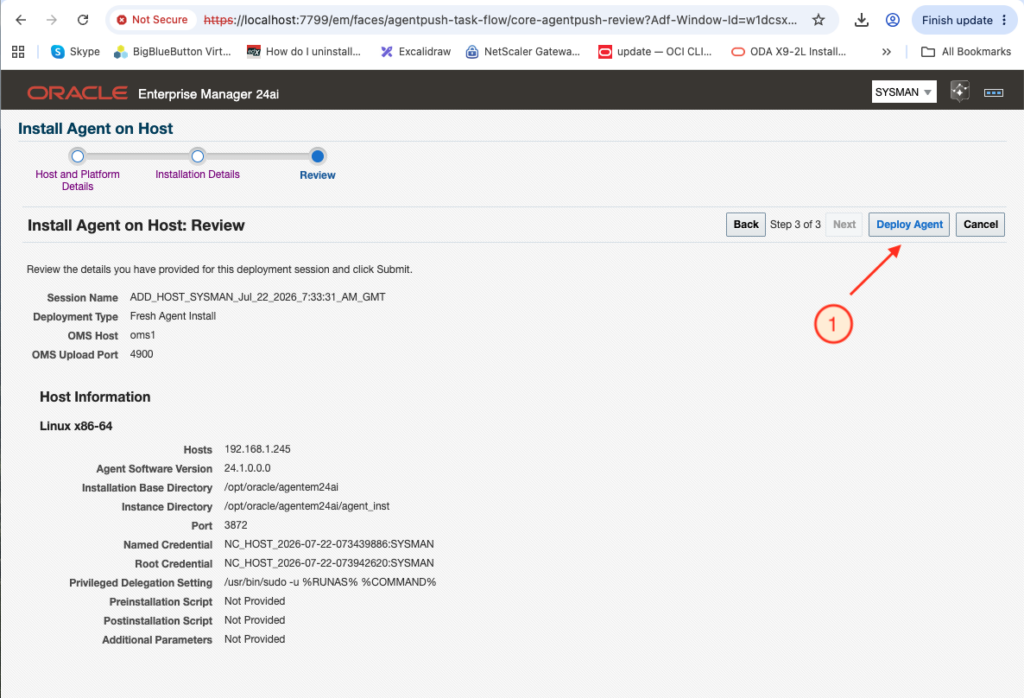
The installation is starting.
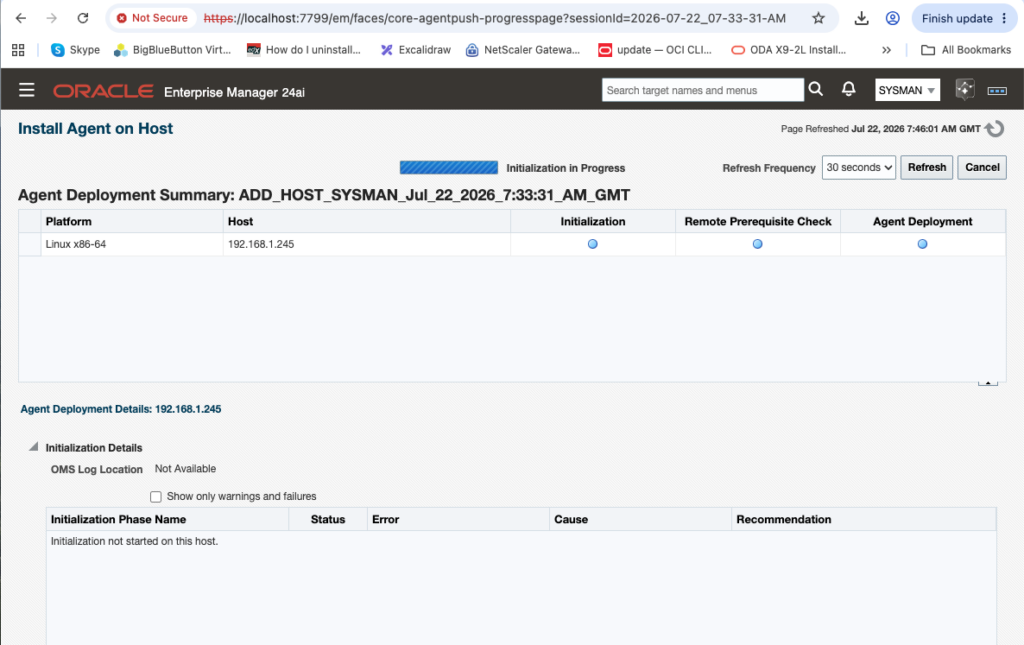
Issue #1: Agent deployed as OPC user
I could first see that the agent would be deployed with OPC user. Which make sense, I have given opc as username.
Let’s change the user and provide oracle and root as username in the configuration of the GUI to deploy the agent.
I will first add the key for the oracle user.
[oracle@svl-orap-chz0-cl1n1 .ssh]$ pwd
/home/oracle/.ssh

[oracle@svl-orap-chz0-cl1n1 .ssh]$ ls -ltrh
total 16K
-rw-r--r-- 1 oracle oinstall  580 Jun 18 05:59 id_rsa.pub
-rw------- 1 oracle oinstall 2.6K Jun 18 05:59 id_rsa
-rw-r--r-- 1 oracle oinstall  580 Jun 18 05:59 authorized_keys
-rw-r--r-- 1 oracle oinstall  573 Jun 18 05:59 known_hosts

[oracle@svl-orap-chz0-cl1n1 .ssh]$ cp -p authorized_keys authorized_keys.bkp.20260722

[oracle@svl-orap-chz0-cl1n1 .ssh]$ echo 'ssh-rsa AAAAB3NzaC1yc2EAAAADAQABAAACAQC0gtuJAJuw7eS/luTIo4Z0P7ixDEjVlv+q9rLcDgS3Jb8dy4kdAUjgnLjsRYKHZm+LD857hC/C69dT5Xc3TiZgTO/jvORnZRoIGmKFKc6g497AVkm0y...9RPodK1ID8XdH9w7OCaTl9STwQhml1llLmznDdJu2QmfcWT/Wj1u+JM/zpYyA2EhMY6lsQ== opc@oms1' > authorized_keys
[oracle@svl-orap-chz0-cl1n1 .ssh]$
Let’s test the connection.
[opc@oms1 .ssh]$ ssh -i oem_agent_key [email protected]
Last login: Wed Jul 22 08:07:00 2026
[oracle@svl-orap-chz0-cl1n1 ~]$
Successful.
Doing the same for user root will not be possible:
[opc@oms1 .ssh]$ ssh -i oem_agent_key [email protected]
[email protected]'s password:
Because of the sshd configuration:
[root@svl-orap-chz0-cl1n1 ~]# sudo grep -E '^(PermitRootLogin|PubkeyAuthentication|PasswordAuthentication)' /etc/ssh/sshd_config
PasswordAuthentication yes
PermitRootLogin no
PermitRootLogin no
[root@svl-orap-chz0-cl1n1 ~]#
root ssh login are disabled. So leave it as it is for root. Root access will be needed to run root.sh script which we can do manually.
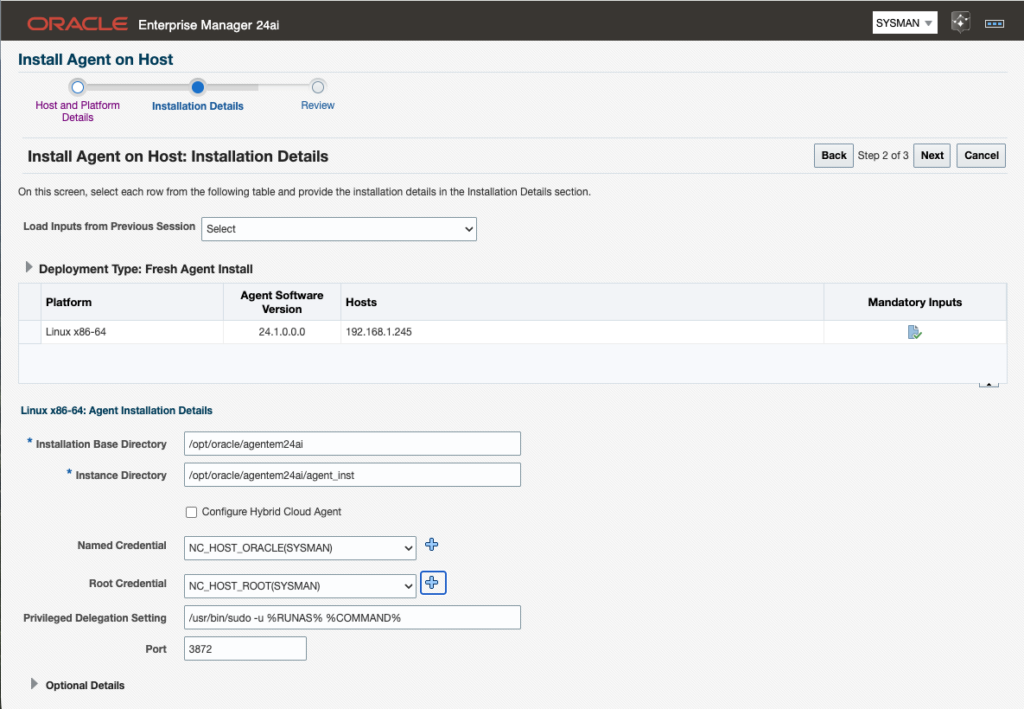
So now I will update the inputs and retry the installation.
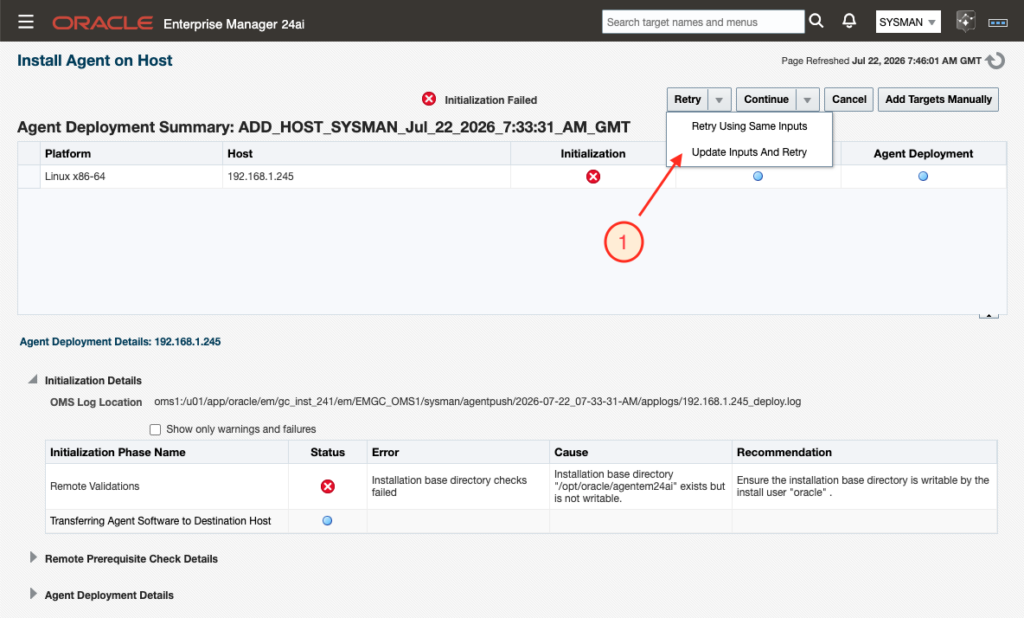
As previously told, I will change username opc with oracle for named credential.
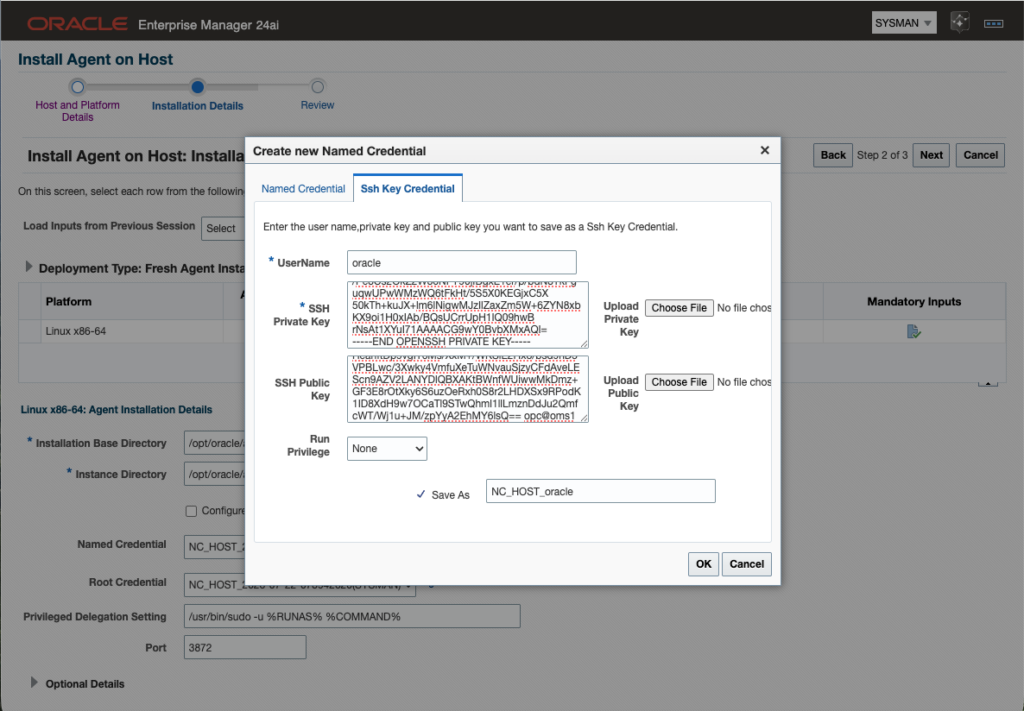
I changed the root credential with username root as well, which will not work, but it is not a problem, I will run the root.sh script manually. I later wondered if I would not better had to keep opc. I will be able to test this on a next agent installation.
Issue #2: Permissions for directory creation
Facing next issue:
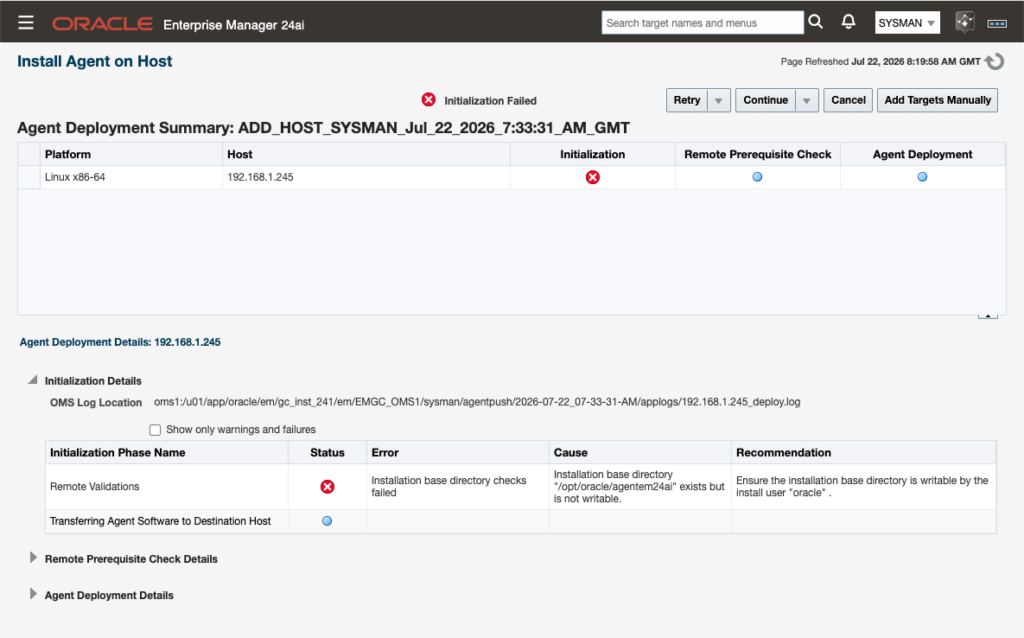
I could easily determine the problem. Oracle has no permission to write in the oracle directory.
Which is correct, as root is owner of the oracle directory and other group do not have access to it.
[oracle@svl-orap-chz0-cl1n1 opt]$ pwd
/opt

[oracle@svl-orap-chz0-cl1n1 opt]$ ls -ld oracle
drwxr-xr-x 13 root root 4096 Jul 22 07:55 oracle
[oracle@svl-orap-chz0-cl1n1 opt]$
Let’s create the directory manually.
[root@svl-orap-chz0-cl1n1 ~]# cd /opt/oracle

[root@svl-orap-chz0-cl1n1 oracle]# mkdir agentem24ai

[root@svl-orap-chz0-cl1n1 oracle]# chown oracle: agentem24ai

[root@svl-orap-chz0-cl1n1 oracle]# ls -ld agentem24ai
drwxr-xr-x 2 oracle oinstall 4096 Jul 22 08:22 agentem24ai
[root@svl-orap-chz0-cl1n1 oracle]#
And I retried using same inputs. This will use same installation configuration parameters, cleaning the existing agent installation and starting a new installation.
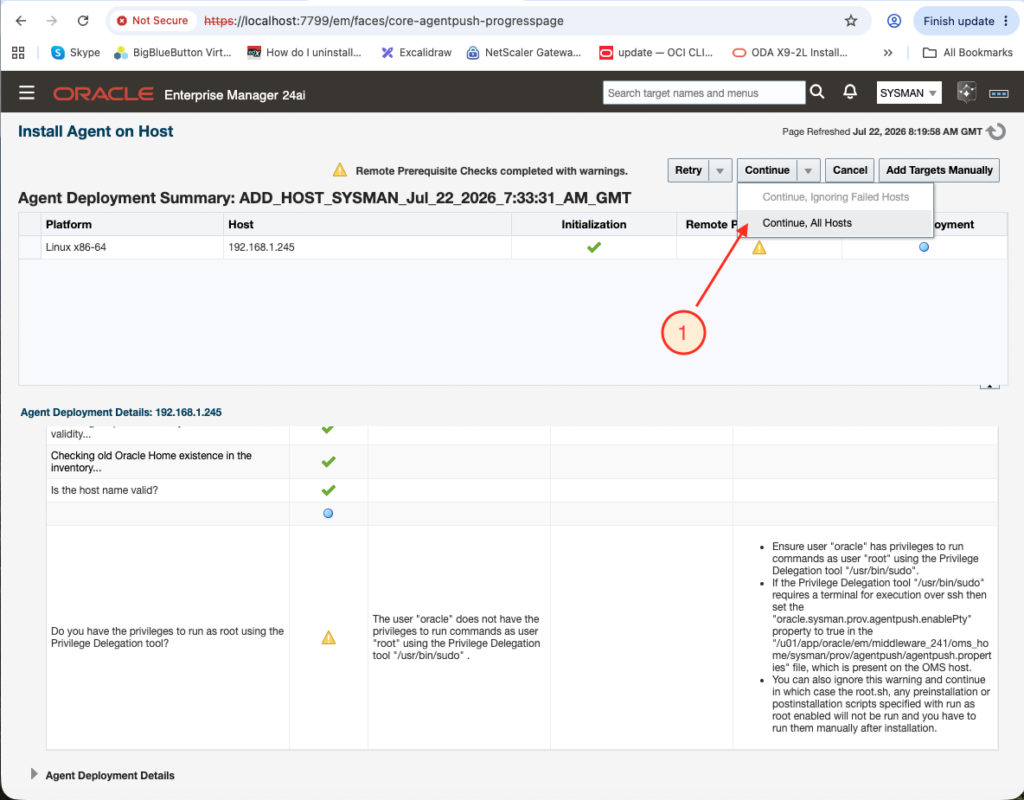
This step was then successful.
Next warning can be ignored as I will run root.sh manually.
Issue #3: Naming resolution issue
I then got next error:
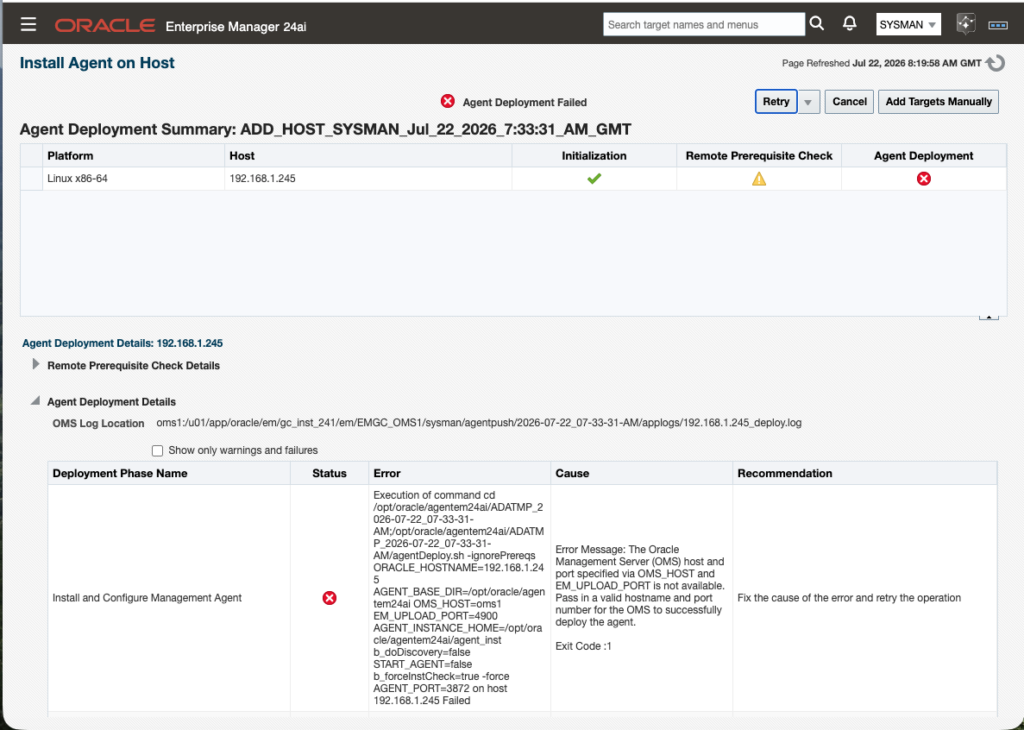
This is a naming resolution issue from target to OMS server.
[opc@svl-orap-chz0-cl1n1 ~]$ sudo ping oms1
ping: oms1: Name or service not known
As workaround, knowing I do not have any DNS server, I have just updated /etc/hosts file.
[opc@svl-orap-chz0-cl1n1 ~]$ sudo grep -i oms1 /etc/hosts
[opc@svl-orap-chz0-cl1n1 ~]$ sudo vi /etc/hosts
[opc@svl-orap-chz0-cl1n1 ~]$ sudo grep -i oms1 /etc/hosts
192.168.1.142  oms1
And could now successfully confirmed naming resolution is working.
[opc@svl-orap-chz0-cl1n1 ~]$ sudo ping oms1
PING oms1 (192.168.1.142) 56(84) bytes of data.
64 bytes from oms1 (192.168.1.142): icmp_seq=1 ttl=64 time=0.304 ms
64 bytes from oms1 (192.168.1.142): icmp_seq=2 ttl=64 time=0.315 ms
^C
--- oms1 ping statistics ---
2 packets transmitted, 2 received, 0% packet loss, time 1011ms
rtt min/avg/max/mdev = 0.304/0.309/0.315/0.018 ms
[opc@svl-orap-chz0-cl1n1 ~]$
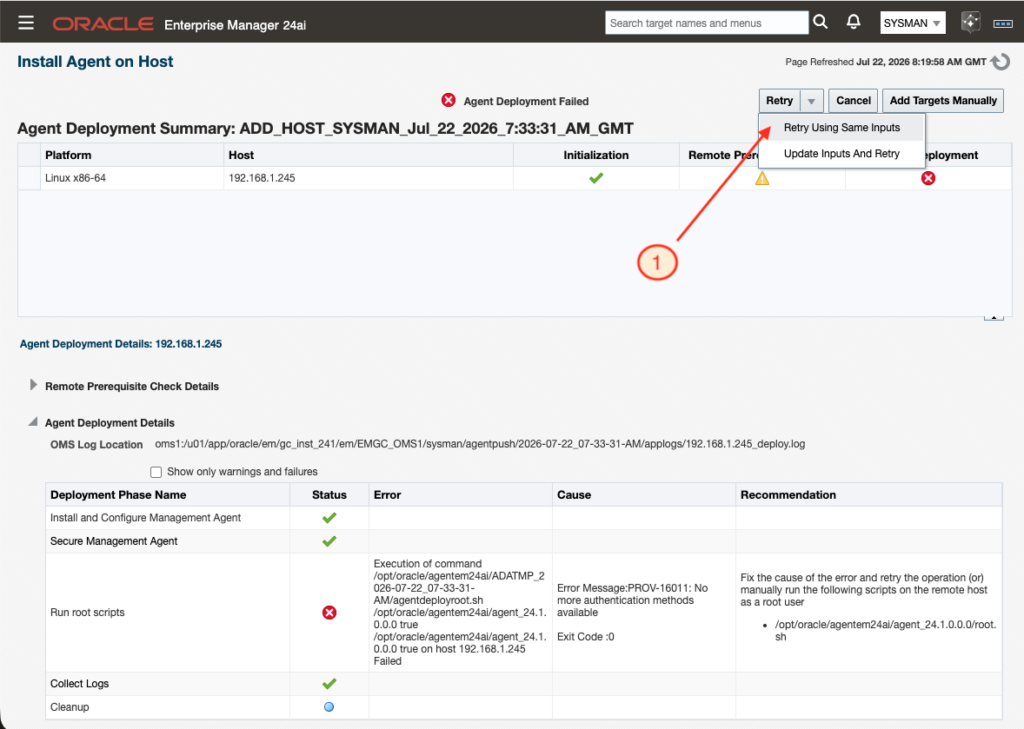
I have then retried a new installation with the menu “Retry Using Same Inputs”
Issue #4: Need to manually run root.sh
I then faced the expected error, where I will need to run root.sh manually.
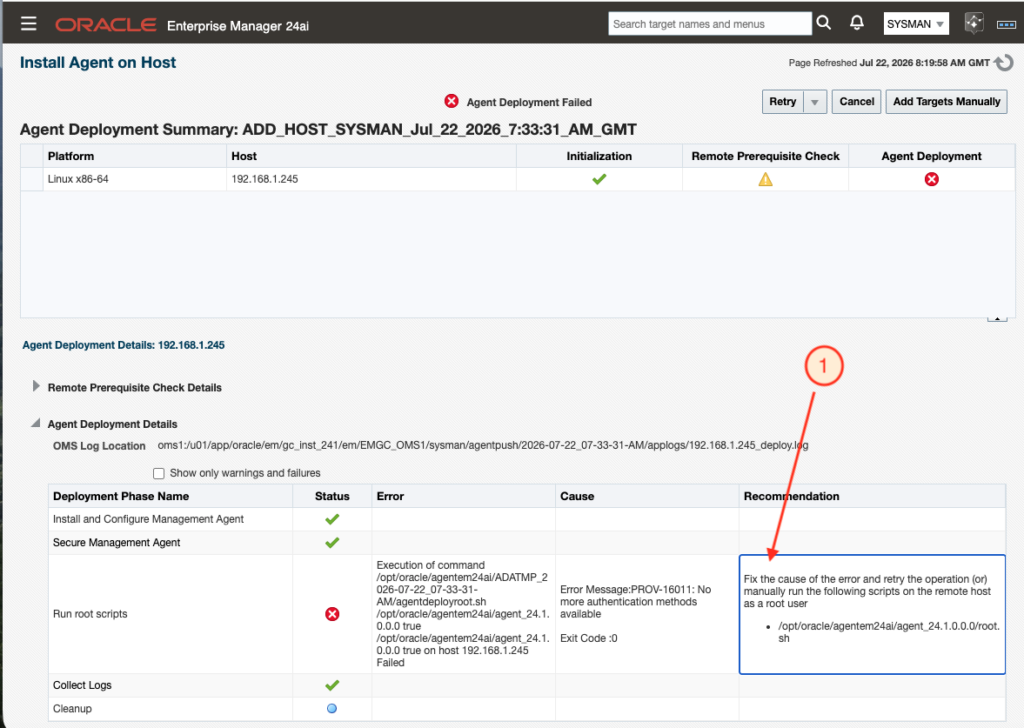
This is expected as oracle has no root sudo privilege. So let’s run root.sh manually.
[opc@svl-orap-chz0-cl1n1 ~]$ sudo su - root
Last login: Wed Jul 22 08:30:59 UTC 2026

[root@svl-orap-chz0-cl1n1 ~]# /opt/oracle/agentem24ai/agent_24.1.0.0.0/root.sh

Finished product-specific root actions.
/etc exist

Creating /etc/oragchomelist file...
[root@svl-orap-chz0-cl1n1 ~]#
And I retried a new installation with the menu “Retry Using Same Inputs”.
Issue #5: Agent service start issue
I then faced a new issue, see below:
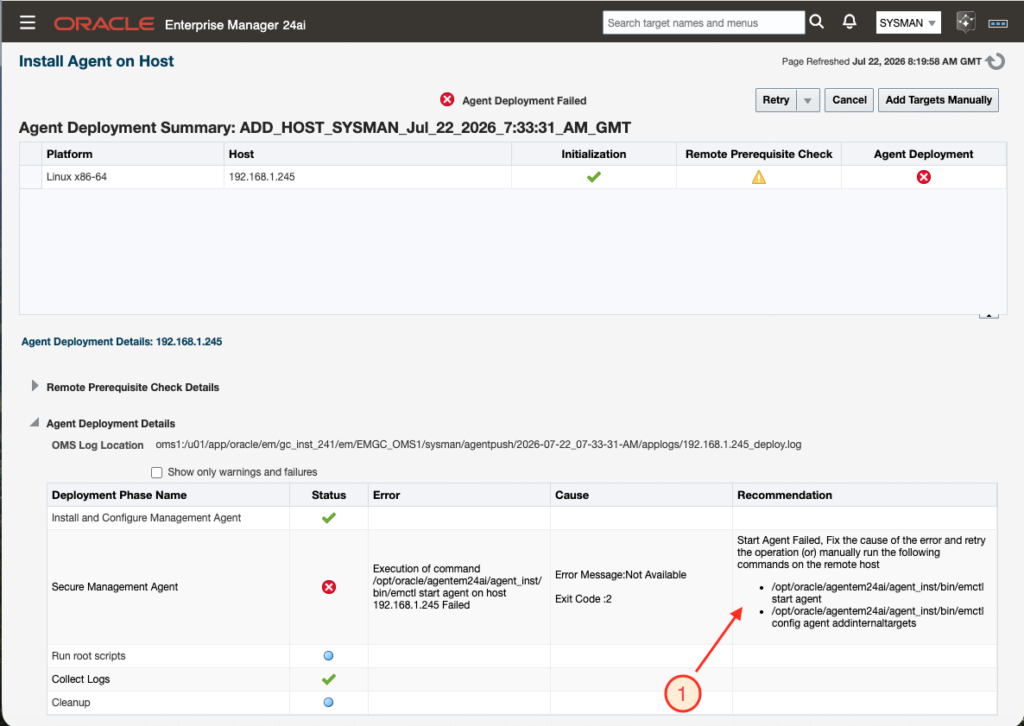
This seems correct, the agent is not started and starting it is failing.
[oracle@svl-orap-chz0-cl1n1 ~]$ /opt/oracle/agentem24ai/agent_inst/bin/emctl status agent
Oracle Enterprise Manager 24ai Release 1
Copyright (c) 1996, 2024 Oracle Corporation.  All rights reserved.
---------------------------------------------------------------
Agent is Not Running

[oracle@svl-orap-chz0-cl1n1 ~]$ /opt/oracle/agentem24ai/agent_inst/bin/emctl start agent
Oracle Enterprise Manager 24ai Release 1
Copyright (c) 1996, 2024 Oracle Corporation.  All rights reserved.
Starting agent ......... failed.
HTTP Listener failed at Startup
Possible port conflict on port(3872): Retrying the operation........
Failed to start the agent after 6 attempts.  Please check that the port(3872) is available.
Consult emctl.log and emagent.nohup in: /opt/oracle/agentem24ai/agent_inst/sysman/log
[oracle@svl-orap-chz0-cl1n1 ~]$
The log will show the same:
[oracle@svl-orap-chz0-cl1n1 log]$ pwd
/opt/oracle/agentem24ai/agent_inst/sysman/log

[oracle@svl-orap-chz0-cl1n1 log]$ view gcagent.log
...
Caused by: oracle.sysman.gcagent.comm.agent.FatalException: unable to start the HTTP server: Failed to bind to 0.0.0.0/0.0.0.0:3872
I could see that the agent can not start because the port 3872 on the server is already in used:
[oracle@svl-orap-chz0-cl1n1 ~]$ ss -ltnp | grep ':3872'
LISTEN 0      50           0.0.0.0:3872       0.0.0.0:*    users:(("java",pid=27399,fd=122))
[oracle@svl-orap-chz0-cl1n1 ~]$
Checking the PID process, I could see that it is the agent itself, so from a previous installation were the installer did not stop the agent correctly.
[oracle@svl-orap-chz0-cl1n1 ~]$ ps -ef | grep 27399
oracle   27399 27348  0 08:46 ?        00:00:11 /opt/oracle/agentem24ai/agent_24.1.0.0.0/oracle_common/jdk/bin/java -Xmx128M -XX:MaxMetaspaceSize=192M -server -Djava.security.egd=file:///dev/./urandom -Dsun.lang.ClassLoader.allowArraySyntax=true -XX:-UseLargePages -XX:+UseLinuxPosixThreadCPUClocks -XX:+UseConcMarkSweepGC...
I killed the process and ensure the port is free:
[oracle@svl-orap-chz0-cl1n1 ~]$ kill -9 27399
[oracle@svl-orap-chz0-cl1n1 ~]$ ss -ltnp | grep ':3872'
[oracle@svl-orap-chz0-cl1n1 ~]$
And could then run both commands (start agent and config agent):
[oracle@svl-orap-chz0-cl1n1 ~]$ /opt/oracle/agentem24ai/agent_inst/bin/emctl start agent
Oracle Enterprise Manager 24ai Release 1
Copyright (c) 1996, 2024 Oracle Corporation.  All rights reserved.
Starting agent ...... started.

[oracle@svl-orap-chz0-cl1n1 ~]$ /opt/oracle/agentem24ai/agent_inst/bin/emctl config agent addinternaltargets
Oracle Enterprise Manager 24ai Release 1
Copyright (c) 1996, 2024 Oracle Corporation.  All rights reserved.
[oracle@svl-orap-chz0-cl1n1 ~]$
Agent could now successfully start.
[oracle@svl-orap-chz0-cl1n1 ~]$ /opt/oracle/agentem24ai/agent_inst/bin/emctl status agent
Oracle Enterprise Manager 24ai Release 1
Copyright (c) 1996, 2024 Oracle Corporation.  All rights reserved.
---------------------------------------------------------------
Agent Version          : 24.1.0.0.0
OMS Version            : 24.1.0.0.0
Protocol Version       : 12.1.0.1.0
Agent Home             : /opt/oracle/agentem24ai/agent_inst
Agent Log Directory    : /opt/oracle/agentem24ai/agent_inst/sysman/log
Agent Binaries         : /opt/oracle/agentem24ai/agent_24.1.0.0.0
Core JAR Location      : /opt/oracle/agentem24ai/agent_24.1.0.0.0/jlib
Agent Process ID       : 81277
Parent Process ID      : 81227
Agent URL              : https://192.168.1.245:3872/emd/main/
Local Agent URL in NAT : https://192.168.1.245:3872/emd/main/
Repository URL         : https://oms1:4900/empbs/upload
Started at             : 2026-07-22 09:32:31
Started by user        : oracle
Operating System       : Linux version 5.15.0-319.201.4.6.el8uek.x86_64 (amd64)
Number of Targets      : (none)
Last Reload            : (none)
Last successful upload                       : 2026-07-22 09:32:44
Last attempted upload                        : 2026-07-22 09:32:44
Total Megabytes of XML files uploaded so far : 0
Number of XML files pending upload           : 0
Size of XML files pending upload(MB)         : 0
Available disk space on upload filesystem    : 79.83%
Collection Status                            : Collections enabled
Heartbeat Status                             : Ok
Last attempted heartbeat to OMS              : 2026-07-22 09:36:33
Last successful heartbeat to OMS             : 2026-07-22 09:36:33
Next scheduled heartbeat to OMS              : 2026-07-22 09:37:33

---------------------------------------------------------------
Agent is Running and Ready
[oracle@svl-orap-chz0-cl1n1 ~]$
I ensure that the port is free before doing a new last installation, by stopping the agent manually and checking the port is free.
I then retry a full installation again, and all went properly. I just had to run root.sh manually. This was expected. The only sad point is that the installer will stop here in failure, when it should just provide a warning.
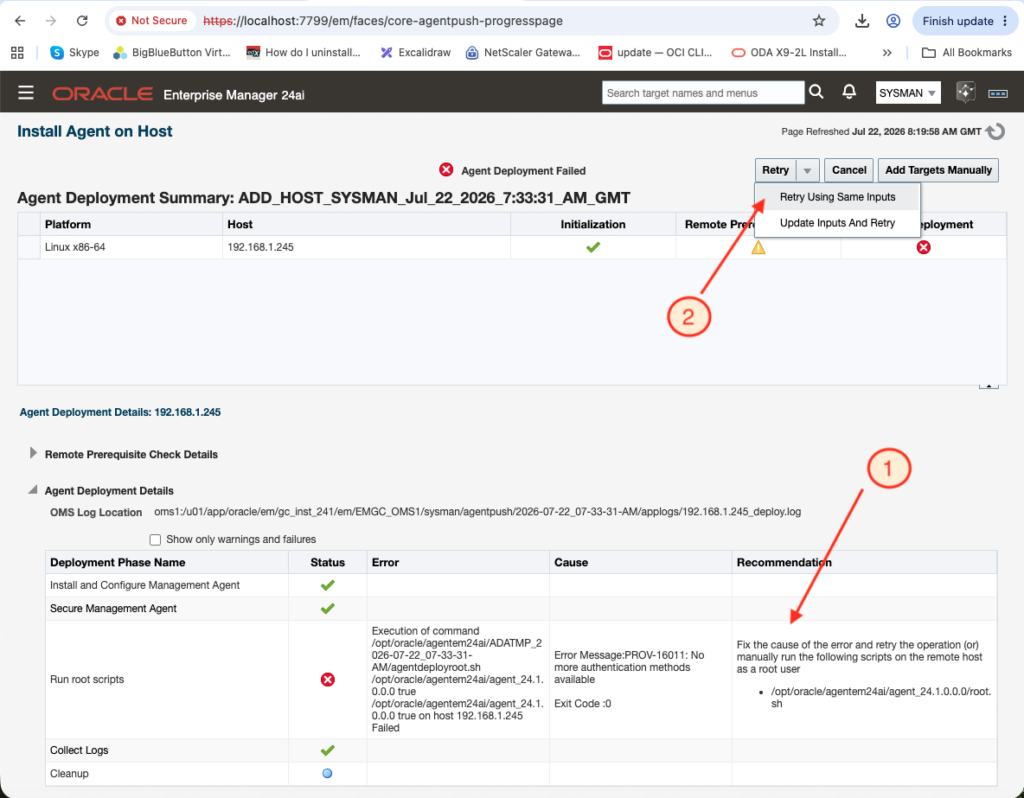
I run root.sh manually.
[root@svl-orap-chz0-cl1n1 ~]# /opt/oracle/agentem24ai/agent_24.1.0.0.0/root.sh

Finished product-specific root actions.
/etc exist
[root@svl-orap-chz0-cl1n1 ~]#
Check target host in the console
We can see our new target in OEM but having an issue connecting to the agent on the port 3872.
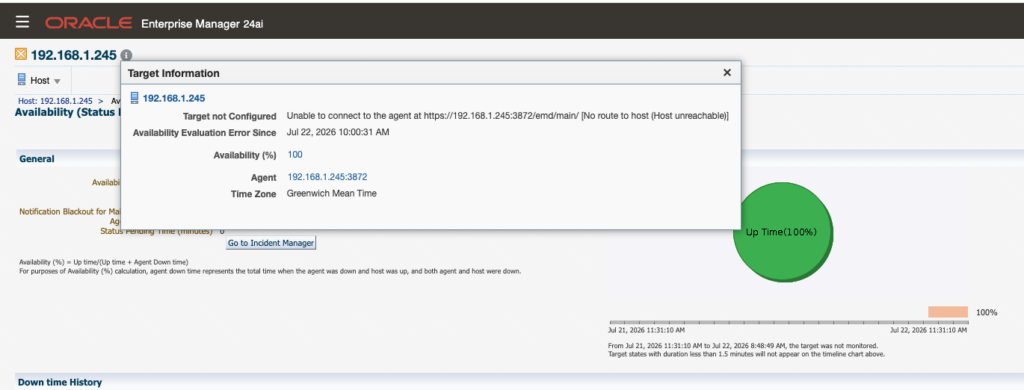
From the OMS server I can ping the DB System:
[oracle@oms1 ~]$ ping 192.168.1.245
PING 192.168.1.245 (192.168.1.245) 56(84) bytes of data.
64 bytes from 192.168.1.245: icmp_seq=1 ttl=64 time=0.356 ms
64 bytes from 192.168.1.245: icmp_seq=2 ttl=64 time=0.234 ms
64 bytes from 192.168.1.245: icmp_seq=3 ttl=64 time=0.239 ms
^C
--- 192.168.1.245 ping statistics ---
3 packets transmitted, 3 received, 0% packet loss, time 2040ms
rtt min/avg/max/mdev = 0.234/0.276/0.356/0.056 ms
[oracle@oms1 ~]$
But from the OMS server I can not reach the DB System on the 3872 port:
[oracle@oms1 ~]$ nc -zv 192.168.1.245 3872
Ncat: Version 7.92 ( https://nmap.org/ncat )
Ncat: No route to host.
I confirm that from the OMS server I can reach the DB System on the port 22:
[oracle@oms1 ~]$ nc -vz 192.168.1.245 22
Ncat: Version 7.92 ( https://nmap.org/ncat )
Ncat: Connected to 192.168.1.245:22.
Ncat: 0 bytes sent, 0 bytes received in 0.03 seconds.
[oracle@oms1 ~]$
To understand what is happening I ran a tcpdump.
[opc@svl-orap-chz0-cl1n1 ~]$ sudo tcpdump -nn -i any port 3872
dropped privs to tcpdump
tcpdump: verbose output suppressed, use -v or -vv for full protocol decode
listening on any, link-type LINUX_SLL (Linux cooked v1), capture size 262144 bytes
13:24:11.765793 IP 192.168.1.142.20016 > 192.168.1.245.3872: Flags [S], seq 3591942206, win 62720, options [mss 8960,sackOK,TS val 1202488162 ecr 0,nop,wscale 7], length 0
We can clearly see that the OMS server is sending a TCP SYN packet to the DB server but we do not see the SYN-ACK packet coming back. So clearly a firewall issue. I checked the OCI policies and all were ok. So let’s check if there is any local firewall configured on the DB System.
We can check nftables configuration using following command:
[opc@svl-orap-chz0-cl1n1 ~]$ sudo nft list ruleset
Doing so, I realized that port 3872 is not in the allowed rules:
chain INPUT {
    type filter hook input priority filter;
    policy accept;

    ...

    meta l4proto tcp ct state new tcp dport 2484 accept
    meta l4proto tcp ct state new tcp dport 22 accept
    meta l4proto tcp ct state new tcp dport 1521 accept
    meta l4proto tcp ct state new tcp dport 1522 accept
    meta l4proto tcp ct state new tcp dport 5000 accept
    meta l4proto tcp ct state new tcp dport 6200 accept

    ...

    counter packets 116 bytes 6604 reject with icmp type host-prohibited
}
I added the rule in iptables:
[opc@svl-orap-chz0-cl1n1 ~]$ sudo iptables -I INPUT 1 -p tcp -s 192.168.1.142 --dport 3872 -m conntrack --ctstate NEW -j ACCEPT
And I could then connect successfully from the OMS server to my DB System on port 3872:
[oracle@oms1 ~]$ nc -vz 192.168.1.245 3872
Ncat: Version 7.92 ( https://nmap.org/ncat )
Ncat: Connected to 192.168.1.245:3872.
Ncat: 0 bytes sent, 0 bytes received in 0.03 seconds.
[oracle@oms1 ~]$
I made the changes permanent:
[opc@svl-orap-chz0-cl1n1 ~]$ sudo systemctl status iptables
● iptables.service - IPv4 firewall with iptables
   Loaded: loaded (/usr/lib/systemd/system/iptables.service; enabled; vendor preset: disabled)
   Active: active (exited) since Wed 2026-07-22 06:35:33 UTC; 7h ago
 Main PID: 1550 (code=exited, status=0/SUCCESS)
    Tasks: 0 (limit: 79998)
   Memory: 0B
   CGroup: /system.slice/iptables.service

Jul 22 06:35:33 svl-orap-chz0-cl1n1 systemd[1]: Starting IPv4 firewall with iptables...
Jul 22 06:35:33 svl-orap-chz0-cl1n1 iptables.init[1550]: iptables: Applying firewall rules: [  OK  ]
Jul 22 06:35:33 svl-orap-chz0-cl1n1 systemd[1]: Started IPv4 firewall with iptables.

[opc@svl-orap-chz0-cl1n1 ~]$ sudo iptables-save | grep 3872
-A INPUT -s 192.168.1.142/32 -p tcp -m tcp --dport 3872 -m conntrack --ctstate NEW -j ACCEPT
[opc@svl-orap-chz0-cl1n1 ~]$

[opc@svl-orap-chz0-cl1n1 ~]$ sudo service iptables save
iptables: Saving firewall rules to /etc/sysconfig/iptables:[  OK  ]

[opc@svl-orap-chz0-cl1n1 ~]$ sudo grep 3872 /etc/sysconfig/iptables
-A INPUT -s 192.168.1.142/32 -p tcp -m tcp --dport 3872 -m conntrack --ctstate NEW -j ACCEPT
[opc@svl-orap-chz0-cl1n1 ~]$
Now if I checked the status of the agent with emctl status agent, I can see that the upload is now updated.
Before the port was added, the upload from the status was:
Last successful upload : (none)
Last attempted upload : (none)
Now it is:
Last successful upload : 2026-07-22 14:17:11
Last attempted upload : 2026-07-22 14:17:11
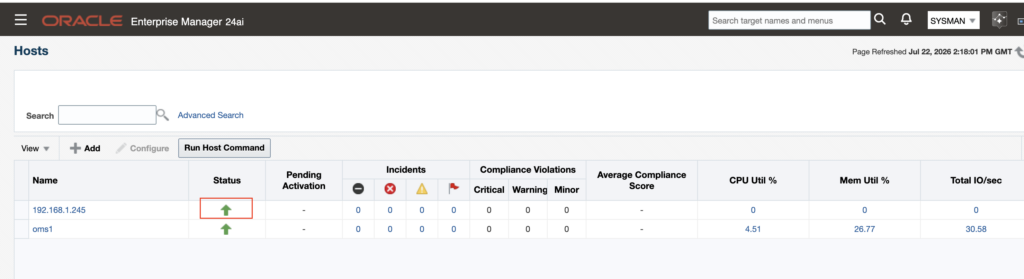
If I look into OEM, the agent is now fully green:
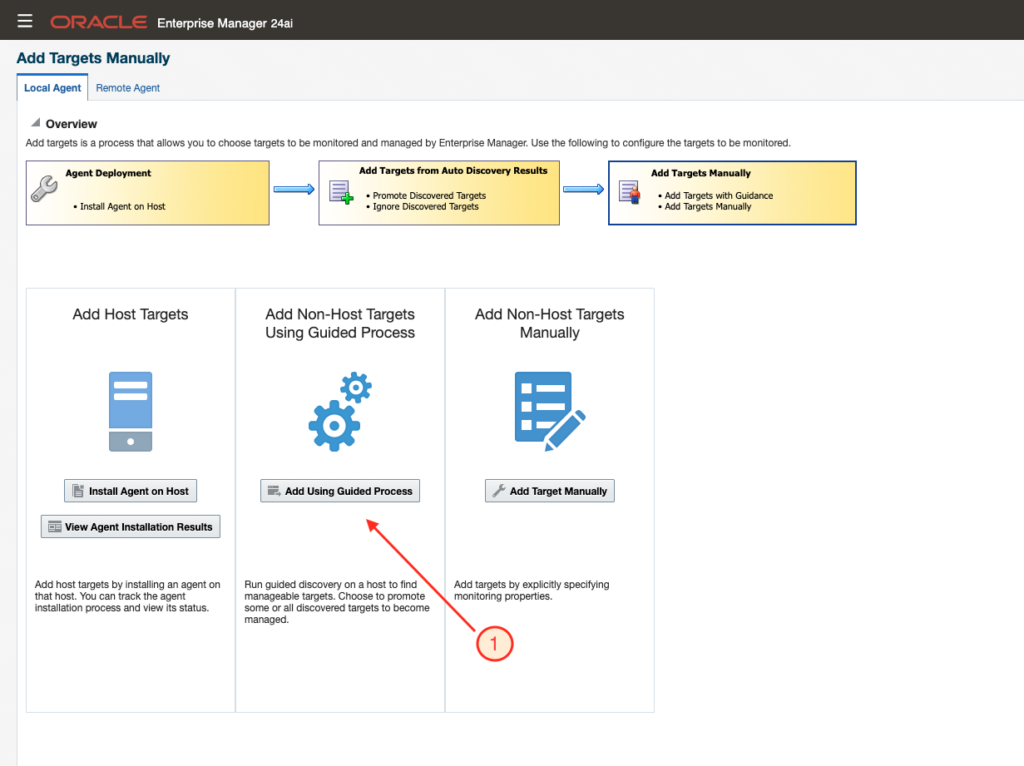
Add Non-Host Targets Using Guided Process
Now that the agent is installed and host has been added to OEM 24ai, I can add all components. Please see next pictures for the process and what I have been doing.
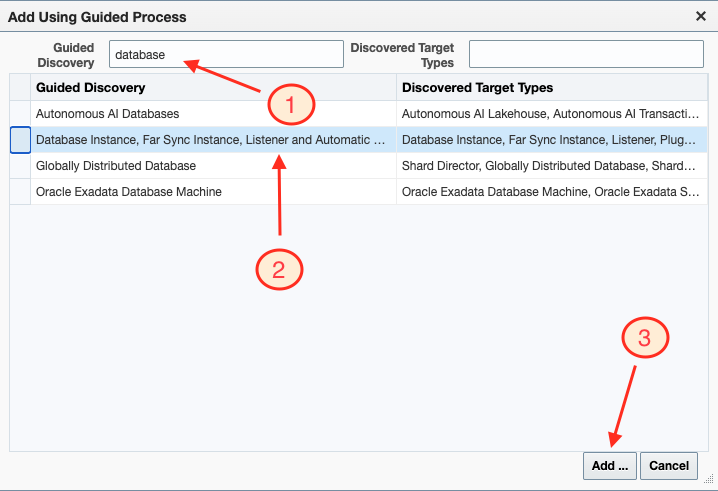
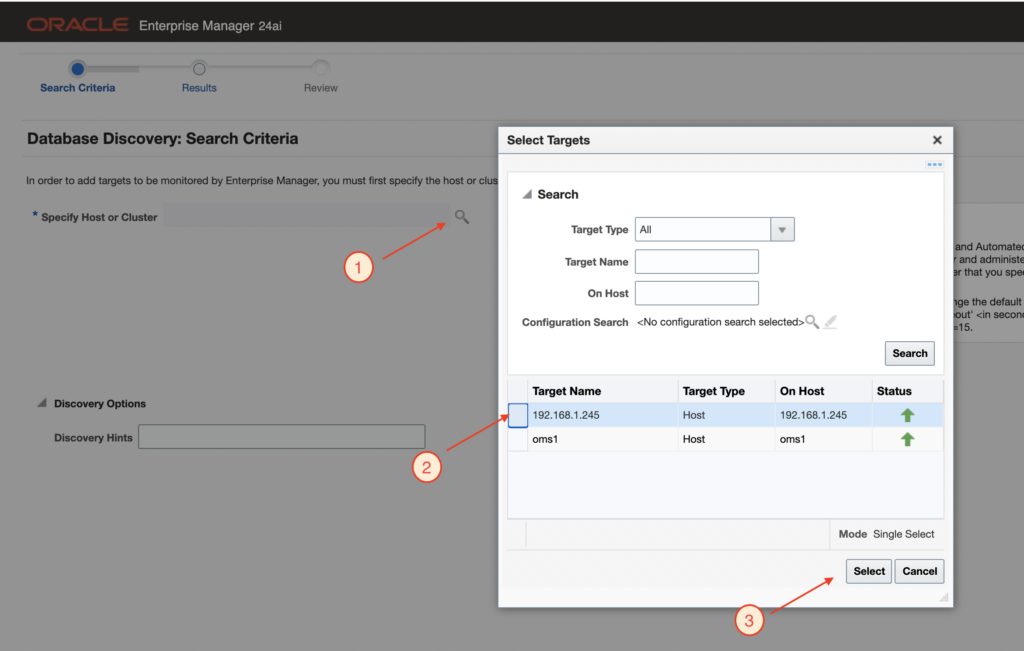
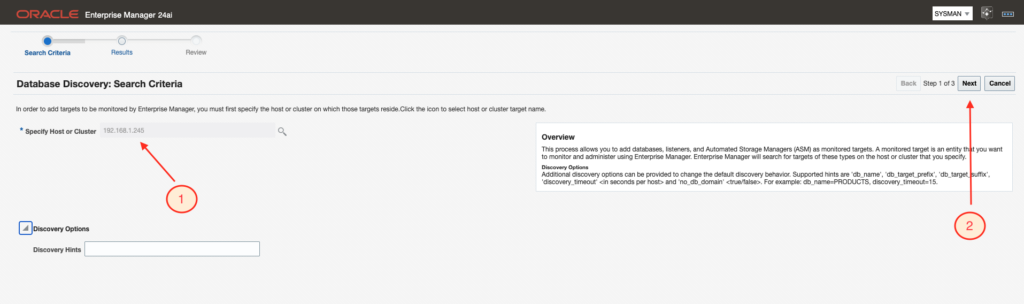
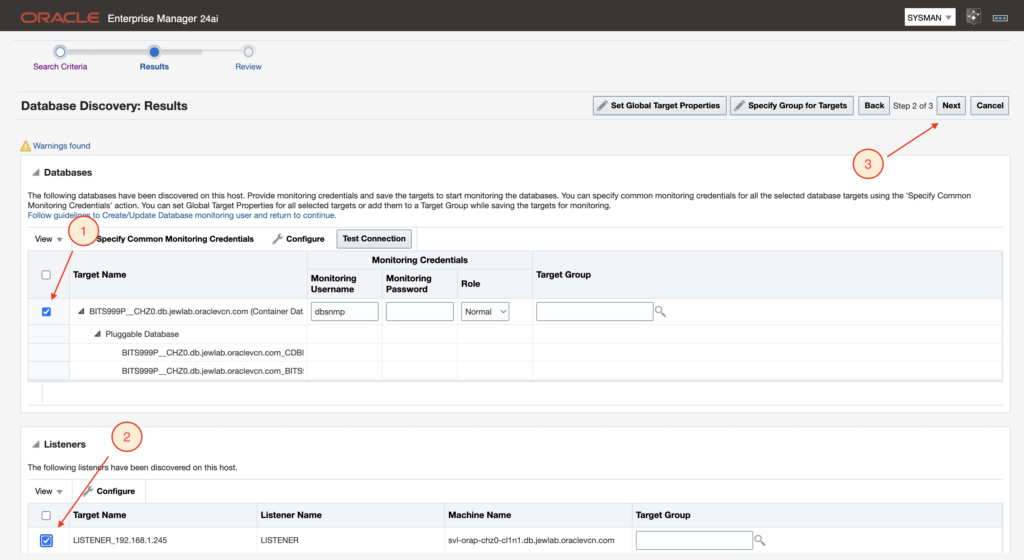
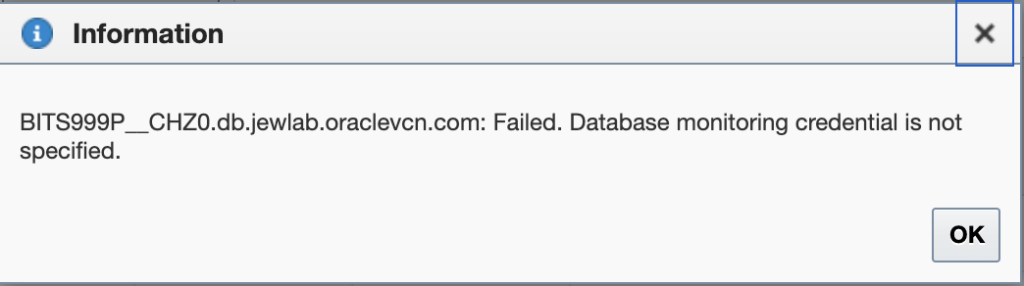
I then failed credential issue:
I changed DBSNMP user password:
[oracle@svl-orap-chz0-cl1n1 ~]$ sqlplus / as sysdba

SQL*Plus: Release 19.0.0.0.0 - Production on Wed Jul 22 14:31:22 2026
Version 19.31.0.0.0

Copyright (c) 1982, 2026, Oracle.  All rights reserved.


Connected to:
Oracle Database 19c EE Extreme Perf Release 19.0.0.0.0 - Production
Version 19.31.0.0.0

SQL> show con_name

CON_NAME
------------------------------
CDB$ROOT

SQL> select username from dba_users where username='DBSNMP';

USERNAME
--------------------------------------------------------------------------------
DBSNMP

SQL> alter user DBSNMP identified by "XXXXXXXXXXX";

User altered.

SQL>
I tested a connection with tnsping from the OMS server:
[oracle@oms1 ~]$ $ORACLE_HOME/bin/tnsping svl-orap-chz0-cl1n1.db.jewlab.oraclevcn.com:1521/BITS999P__CHZ0.db.jewlab.oraclevcn.com

TNS Ping Utility for Linux: Version 19.0.0.0.0 - Production on 22-JUL-2026 14:41:00

Copyright (c) 1997, 2026, Oracle.  All rights reserved.

Used parameter files:
/u01/app/oracle/database/product/network/admin/sqlnet.ora

Used EZCONNECT adapter to resolve the alias
Attempting to contact (DESCRIPTION=(CONNECT_DATA=(SERVICE_NAME=BITS999P__CHZ0.db.jewlab.oraclevcn.com))(ADDRESS=(PROTOCOL=tcp)(HOST=192.168.1.245)(PORT=1521)))
OK (0 msec)
[oracle@oms1 ~]$
And a sqlplus connection as well:
[oracle@oms1 ~]$ $ORACLE_HOME/bin/sqlplus [email protected]:1521/BITS999P__CHZ0.db.jewlab.oraclevcn.com

SQL*Plus: Release 19.0.0.0.0 - Production on Wed Jul 22 14:42:00 2026
Version 19.31.0.0.0

Copyright (c) 1982, 2026, Oracle.  All rights reserved.

Enter password:
ERROR:
ORA-28000: The account is locked.


Enter user-name:
Connection is working, account is locked, I then unlocked it.
[oracle@svl-orap-chz0-cl1n1 ~]$ sqlplus / as sysdba

SQL*Plus: Release 19.0.0.0.0 - Production on Wed Jul 22 14:42:42 2026
Version 19.31.0.0.0

Copyright (c) 1982, 2026, Oracle.  All rights reserved.


Connected to:
Oracle Database 19c EE Extreme Perf Release 19.0.0.0.0 - Production
Version 19.31.0.0.0

SQL> show con_name

CON_NAME
------------------------------
CDB$ROOT

SQL> alter user dbsnmp account unlock;

User altered.

SQL>
And could successfully connect with DBSNMP user from the OMS server to my DB System.
[oracle@oms1 ~]$ $ORACLE_HOME/bin/sqlplus [email protected]:1521/BITS999P__CHZ0.db.jewlab.oraclevcn.com

SQL*Plus: Release 19.0.0.0.0 - Production on Wed Jul 22 14:43:23 2026
Version 19.31.0.0.0

Copyright (c) 1982, 2026, Oracle.  All rights reserved.

Enter password:

Connected to:
Oracle Database 19c EE Extreme Perf Release 19.0.0.0.0 - Production
Version 19.31.0.0.0

SQL>
I then went forward with adding the components by first testing the connection through the OEM console:
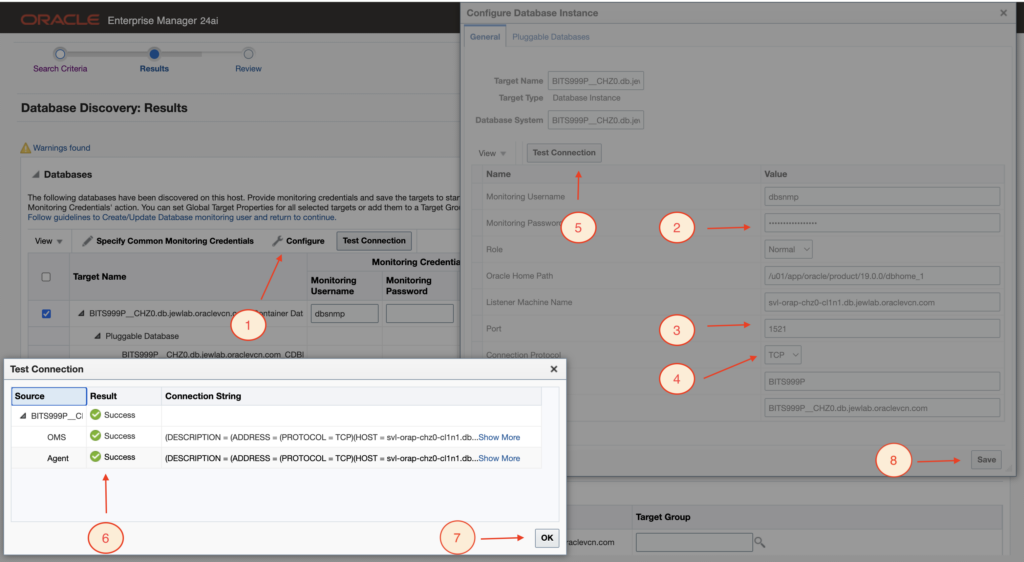
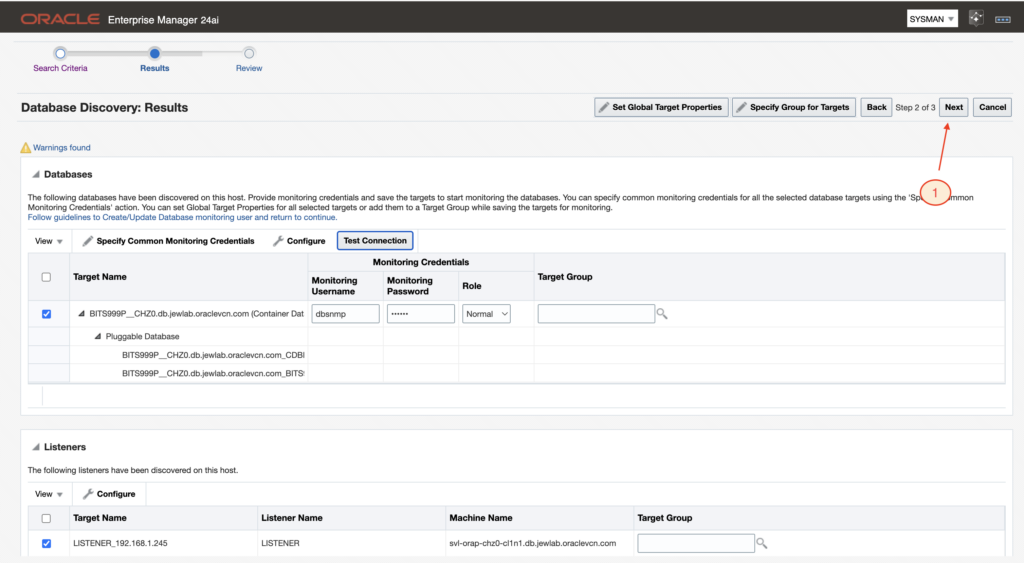
And I went forward with adding non-host targets, clicking the “Next” button.
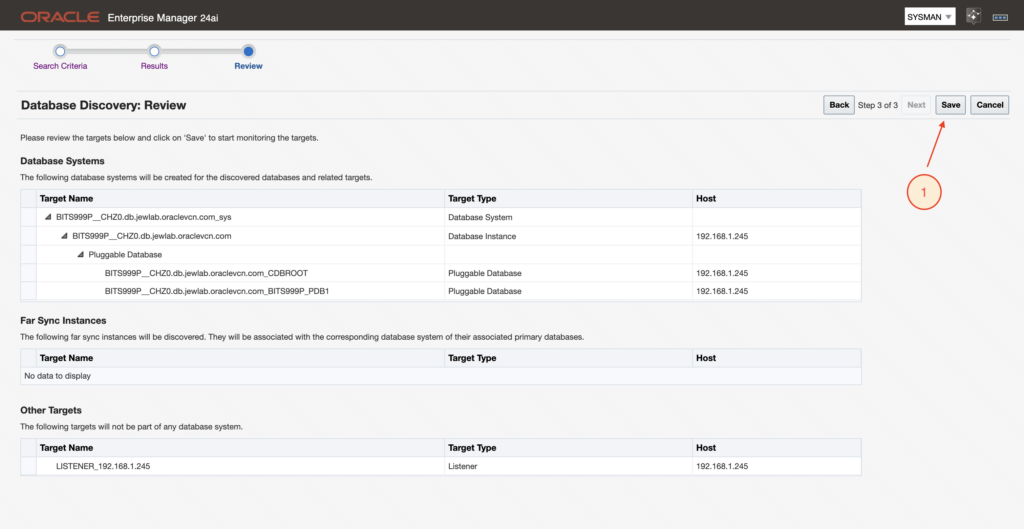
And clicking the “Save” button.
I faced a next Plug-in validation issue:
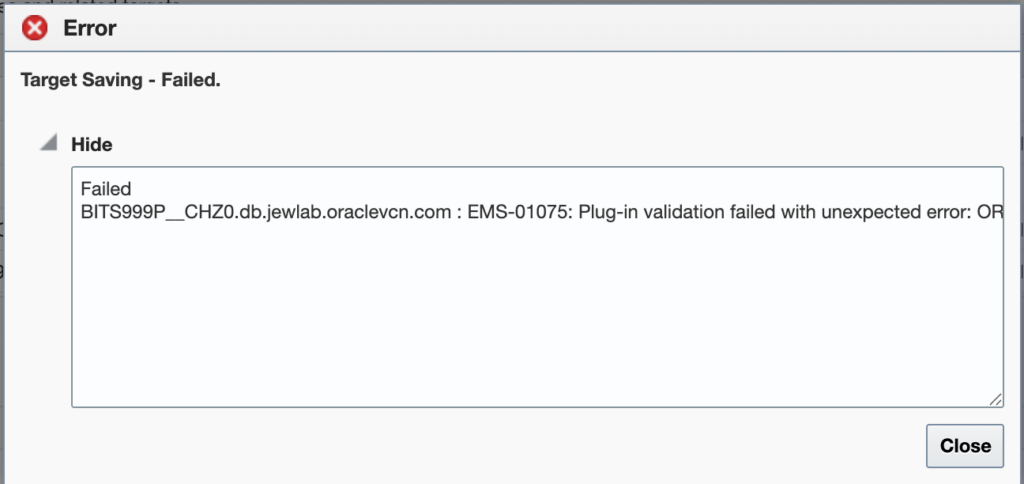
I troubleshooted the error message:
Failed
BITS999P__CHZ0.db.jewlab.oraclevcn.com : EMS-01075: Plug-in validation failed with unexpected error: ORA-20989: Property does not existOracleHome for Agent https://192.168.1.245:3872/emd/main/
Both pingOMS and upload agent was working from the DB System.
[oracle@svl-orap-chz0-cl1n1 ~]$ /opt/oracle/agentem24ai/agent_inst/bin/emctl pingOMS agent
Oracle Enterprise Manager 24ai Release 1
Copyright (c) 1996, 2024 Oracle Corporation.  All rights reserved.
---------------------------------------------------------------
EMD pingOMS completed successfully

[oracle@svl-orap-chz0-cl1n1 ~]$ /opt/oracle/agentem24ai/agent_inst/bin/emctl upload agent
Oracle Enterprise Manager 24ai Release 1
Copyright (c) 1996, 2024 Oracle Corporation.  All rights reserved.
---------------------------------------------------------------
EMD upload completed successfully
But checking the listplugins agent we can see that only the Oracle Home plugin is deployed. And no database plugin…
[oracle@svl-orap-chz0-cl1n1 ~]$ /opt/oracle/agentem24ai/agent_inst/bin/emctl listplugins agent
Oracle Enterprise Manager 24ai Release 1
Copyright (c) 1996, 2024 Oracle Corporation.  All rights reserved.
---------------------------------------------------------------
oracle.sysman.oh    24.1.0.0.0           /opt/oracle/agentem24ai/agent_24.1.0.0.0/plugins/oracle.sysman.oh.agent.plugin_24.1.0.0.0

[oracle@svl-orap-chz0-cl1n1 ~]$
When for the OMS agent we are having much more:
[oracle@oms1 ~]$ /u01/emagent/agent_24.1.0.0.0/bin/emctl listplugins agent
Oracle Enterprise Manager 24ai Release 1
Copyright (c) 1996, 2024 Oracle Corporation.  All rights reserved.
---------------------------------------------------------------
oracle.sysman.emas  24.1.1.0.0           /u01/emagent/agent_24.1.0.0.0/plugins/oracle.sysman.emas.agent.plugin_24.1.1.0.0
oracle.sysman.emrep 24.1.0.0.0           /u01/emagent/agent_24.1.0.0.0/plugins/oracle.sysman.emrep.agent.plugin_24.1.0.0.0
oracle.sysman.beacon 24.1.0.0.0           /u01/emagent/agent_24.1.0.0.0/plugins/oracle.sysman.beacon.agent.plugin_24.1.0.0.0
oracle.sysman.oh    24.1.0.0.0           /u01/emagent/agent_24.1.0.0.0/plugins/oracle.sysman.oh.agent.plugin_24.1.0.0.0
oracle.sysman.si    24.1.1.0.0           /u01/emagent/agent_24.1.0.0.0/plugins/oracle.sysman.si.agent.plugin_24.1.1.0.0
oracle.sysman.db    24.1.1.0.0           /u01/emagent/agent_24.1.0.0.0/plugins/oracle.sysman.db.agent.plugin_24.1.1.0.0
oracle.sysman.xa    24.1.1.0.0           /u01/emagent/agent_24.1.0.0.0/plugins/oracle.sysman.xa.agent.plugin_24.1.1.0.0
oracle.apps.ebs     13.5.1.0.0           /u01/emagent/agent_24.1.0.0.0/plugins/oracle.apps.ebs.agent.plugin_13.5.1.0.0
oracle.fmw.gg       13.5.2.0.0           /u01/emagent/agent_24.1.0.0.0/plugins/oracle.fmw.gg.agent.plugin_13.5.2.0.0
oracle.apps.psft    13.5.1.1.0           /u01/emagent/agent_24.1.0.0.0/plugins/oracle.apps.psft.agent.plugin_13.5.1.1.0

[oracle@oms1 ~]$
From the OMS Server, I can see that all is ok with the OMS Agent target itself but not the DB System agent:
[oracle@oms1 ~]$ /u01/app/oracle/em/middleware_241/oms_home/bin/emcli get_targets \
  -targets="oracle_emd"
Status  Status           Target Type           Target Name
 ID
1       Up               oracle_emd            oms1:3872
2       Metric Collecti  oracle_emd            192.168.1.245:3872
        on Error
[oracle@oms1 ~]$
Even after restarting the OMS server I could still see in the log following error related to port 3872:
[oracle@svl-orap-chz0-cl1n1 ~]$ grep -iE "error|exception|fail|metric|collection|192.168.1.245" /opt/oracle/agentem24ai/agent_inst/sysman/log/gcagent.log | tail -10
2026-07-22 18:36:00,248 [38:74B31929] INFO - >>> Reporting exception: oracle.sysman.emSDK.agent.client.exception.NoSuchTargetException: the oracle_emd target "192.168.1.245:3872" does not exist (request id 1) <<[178474536010002])] INFO - >>> Dispatching request: GetConfigPropertyRequest (properties:[_enableMetricBrowser, UploadInterval, REPOSITORY_URL]) <<[178474570230001])] INFO - >>> Dispatching request: PerformOperationRequest (VERIFY_NMO (targetId=oracle_emd.192.168.1.245:3872) -verify authscheme=AGENT_USER jobId=OMS.console@11737@oms1=>[178474570230001]) <<<
2026-07-22 18:41:42,576 [96:92AD4E27] WARN - target oracle_emd.192.168.1.245:3872 does not exist
 error:) (request id 1) <<<
) error() exitCode(0) statusCode(OK)]
[oracle@svl-orap-chz0-cl1n1 ~]$
See the error:
target oracle_emd.192.168.1.245:3872 does not exist
Checking the targets on the DB System agent and port 3872, I could definitively confirm that oracle_emd target 192.168.1.245:3872 is not existing in OMS repository:
[oracle@oms1 ~]$ /u01/app/oracle/em/middleware_241/oms_home/bin/emcli get_targets \
  -targets="oracle_emd:192.168.1.245:3872"
Status  Status           Target Type           Target Name
 ID
[oracle@oms1 ~]$
Which can also be confirmed throught the OEM console:
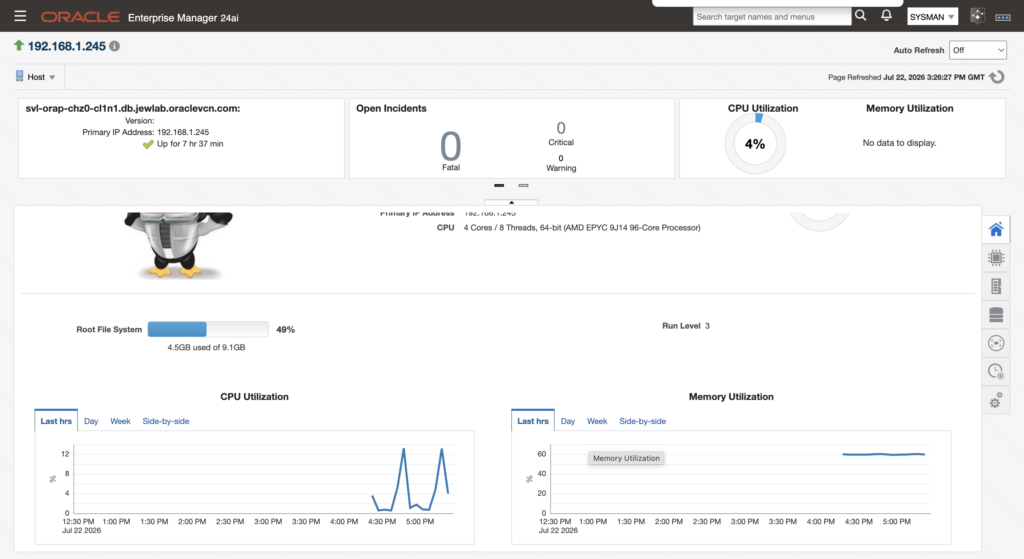
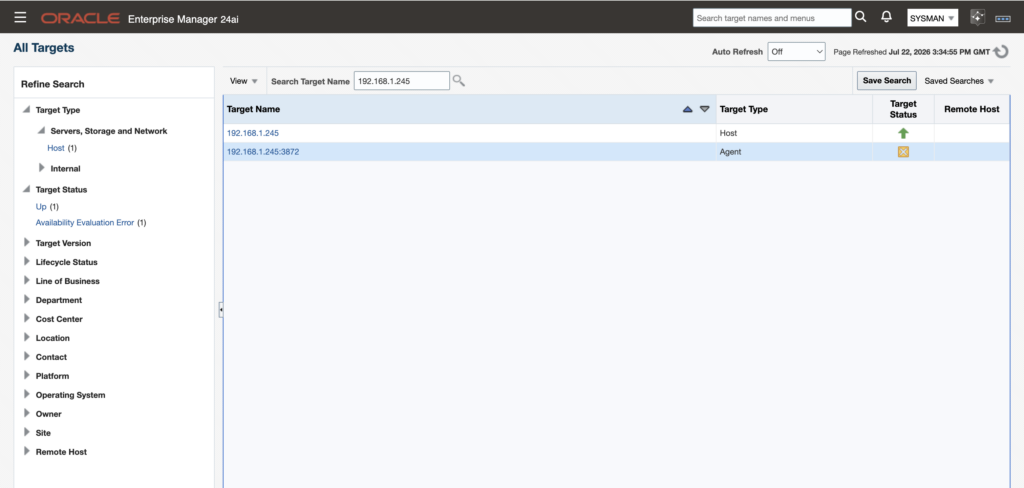
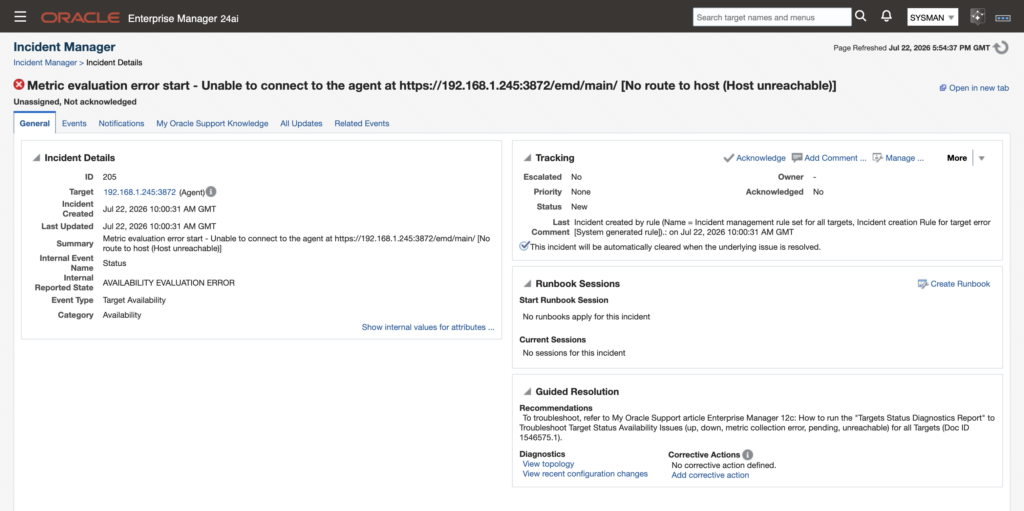
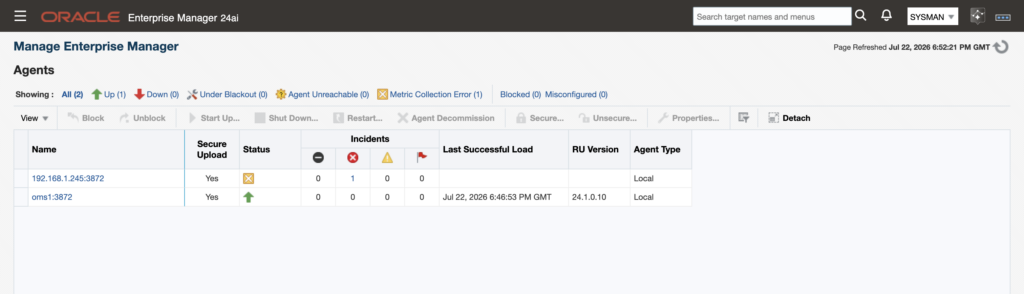
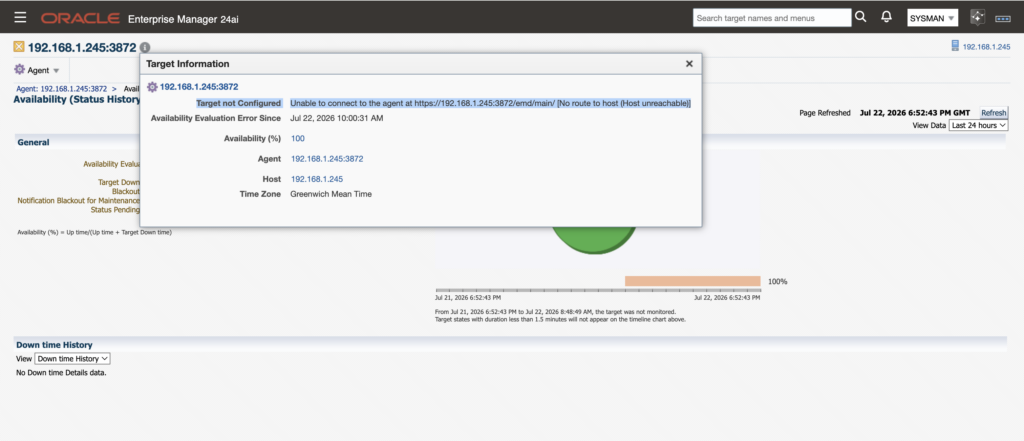
The agent on the DB System is healthy and communicating with OMS, but it seems that due to the previous 3872 port issue during the agent installation, OMS does not have a valid/configured Agent target that it can use for management operations.
Resynchronisation was also not working:
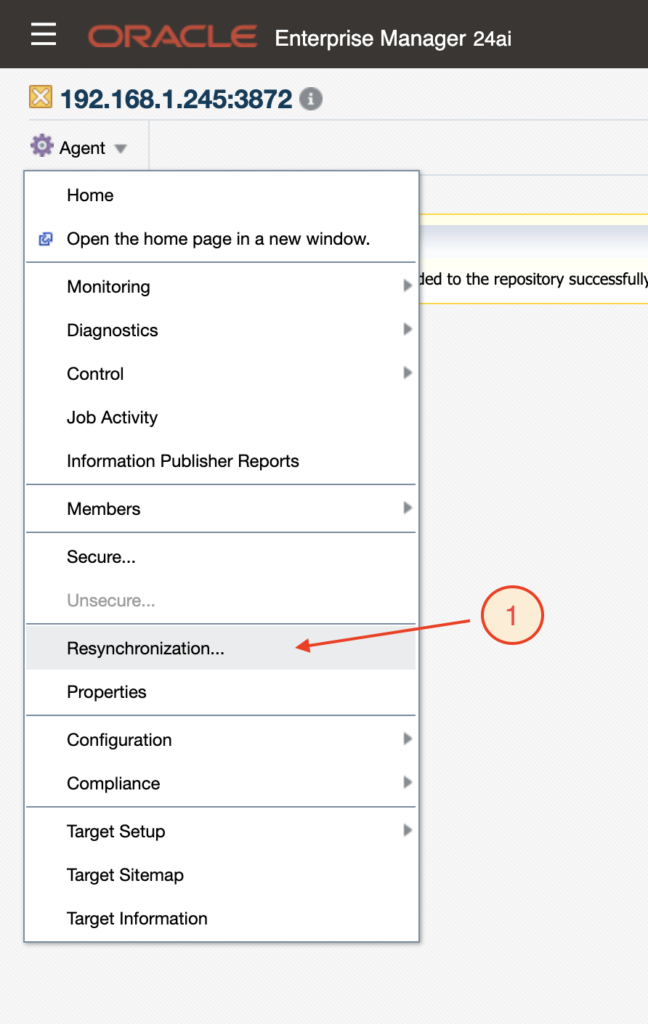
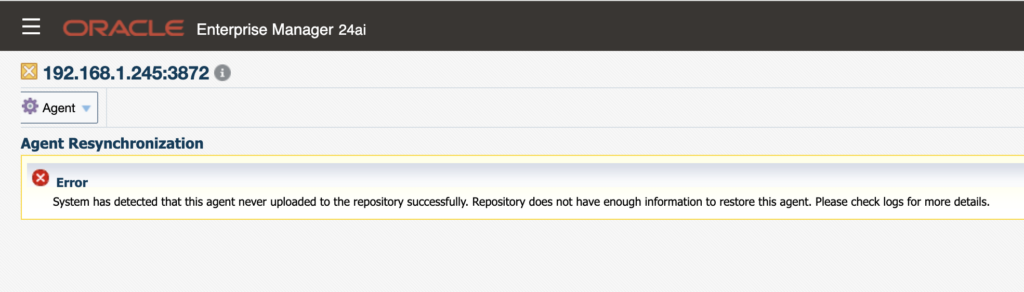
So I decided to remove the agent manually.
I stopped the agent on the DB System:
[oracle@svl-orap-chz0-cl1n1 ~]$ /opt/oracle/agentem24ai/agent_inst/bin/emctl stop agent
Oracle Enterprise Manager 24ai Release 1
Copyright (c) 1996, 2024 Oracle Corporation.  All rights reserved.
Stopping agent ... stopped.
I deleted the agent installation with following command:
[oracle@svl-orap-chz0-cl1n1 ~]$ /opt/oracle/agentem24ai/agent_24.1.0.0.0/perl/bin/perl \
> /opt/oracle/agentem24ai/agent_24.1.0.0.0/sysman/install/AgentDeinstall.pl \
> -agentHome /opt/oracle/agentem24ai/agent_24.1.0.0.0
I manually removed the DB System agent from the OMS repository:
[oracle@oms1 ~]$ /u01/app/oracle/em/middleware_241/oms_home/bin/emcli delete_target \
> -name="192.168.1.245:3872" -type="oracle_emd" -delete_monitored_targets
Target "192.168.1.245:3872:oracle_emd" deleted successfully
[oracle@oms1 ~]$
And I checked that the DB System agent directory is empty:
[oracle@svl-orap-chz0-cl1n1 agentem24ai]$ pwd
/opt/oracle/agentem24ai

[oracle@svl-orap-chz0-cl1n1 agentem24ai]$ ls -ltrh
total 0
[oracle@svl-orap-chz0-cl1n1 agentem24ai]$ cd ..

[oracle@svl-orap-chz0-cl1n1 oracle]$ ls -ld agentem24ai/
drwxr-xr-x 2 oracle oinstall 4096 Jul 22 19:33 agentem24ai/
[oracle@svl-orap-chz0-cl1n1 oracle]$
Deploying the agent again
And I reinstalled the agent as described at the beginning of the blog. The following pictures describe the process again.
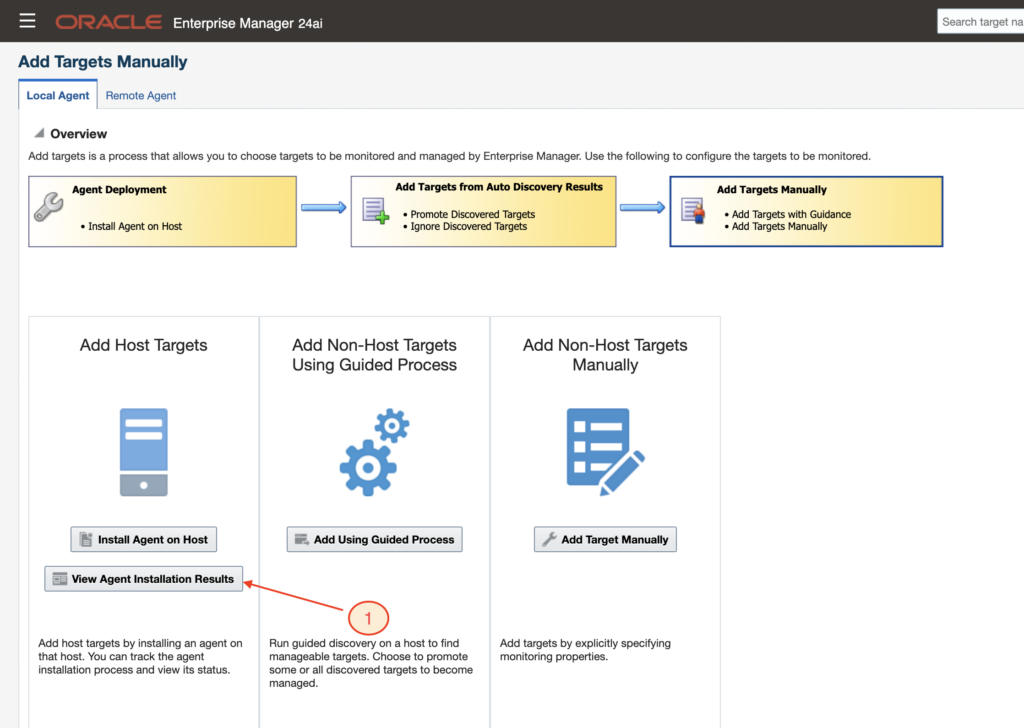
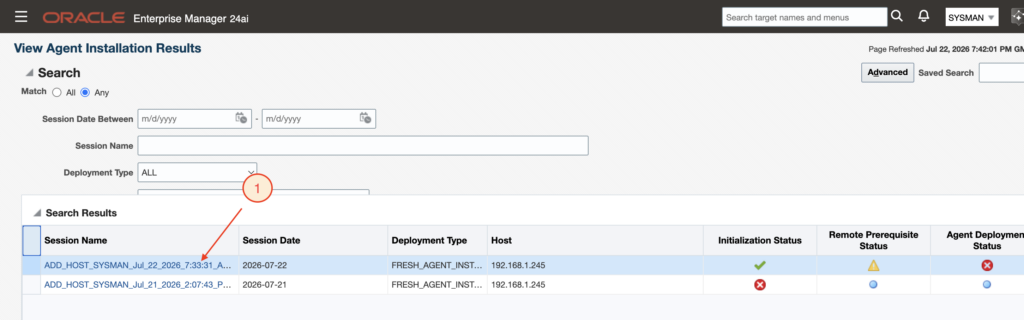
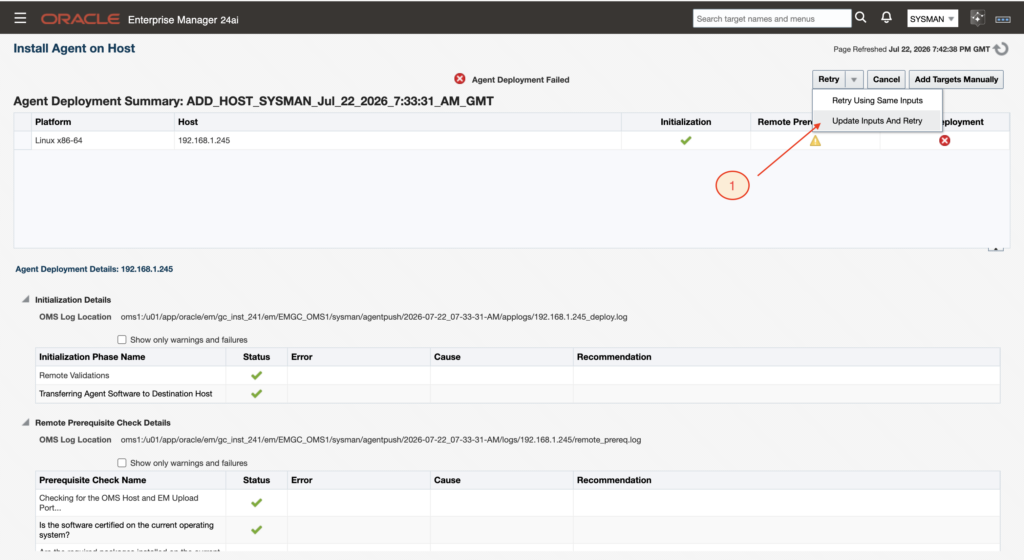
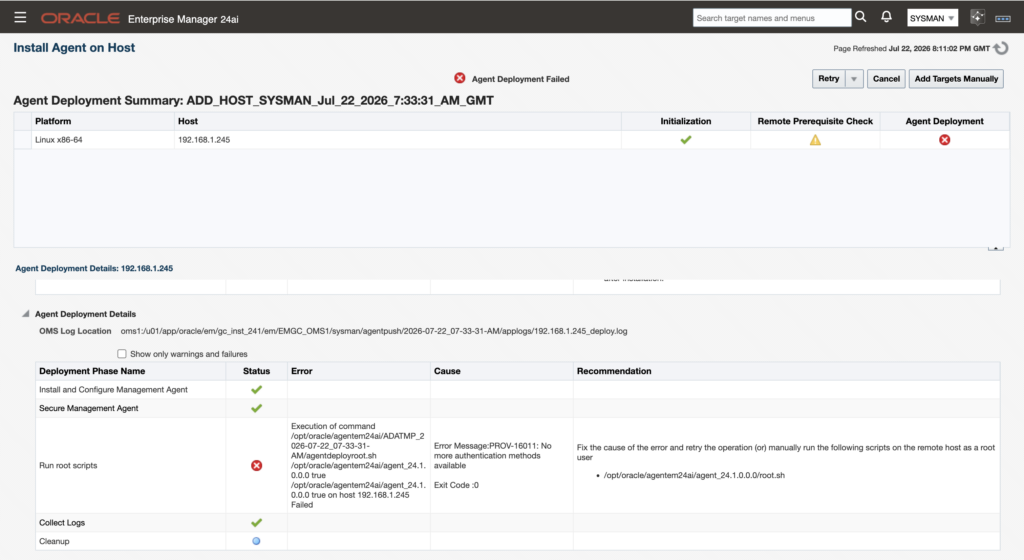
Running manually root.sh:
[root@svl-orap-chz0-cl1n1 ~]# /opt/oracle/agentem24ai/agent_24.1.0.0.0/root.sh

Finished product-specific root actions.
/etc exist
[root@svl-orap-chz0-cl1n1 ~]#
Check target DB System agent status
I confirmed that the agent status on the target DB System is up and running as expected, see below:
[oracle@svl-orap-chz0-cl1n1 ~]$ /opt/oracle/agentem24ai/agent_inst/bin/emctl status agent
Oracle Enterprise Manager 24ai Release 1
Copyright (c) 1996, 2024 Oracle Corporation.  All rights reserved.
---------------------------------------------------------------
Agent Version          : 24.1.0.0.0
OMS Version            : 24.1.0.0.0
Protocol Version       : 12.1.0.1.0
Agent Home             : /opt/oracle/agentem24ai/agent_inst
Agent Log Directory    : /opt/oracle/agentem24ai/agent_inst/sysman/log
Agent Binaries         : /opt/oracle/agentem24ai/agent_24.1.0.0.0
Core JAR Location      : /opt/oracle/agentem24ai/agent_24.1.0.0.0/jlib
Agent Process ID       : 5649
Parent Process ID      : 5551
Agent URL              : https://192.168.1.245:3872/emd/main/
Local Agent URL in NAT : https://192.168.1.245:3872/emd/main/
Repository URL         : https://oms1:4900/empbs/upload
Started at             : 2026-07-22 20:16:25
Started by user        : oracle
Operating System       : Linux version 5.15.0-319.201.4.6.el8uek.x86_64 (amd64)
Number of Targets      : 4
Last Reload            : (none)
Last successful upload                       : 2026-07-22 20:17:41
Last attempted upload                        : 2026-07-22 20:17:41
Total Megabytes of XML files uploaded so far : 0.33
Number of XML files pending upload           : 0
Size of XML files pending upload(MB)         : 0
Available disk space on upload filesystem    : 79.66%
Collection Status                            : Collections enabled
Heartbeat Status                             : Ok
Last attempted heartbeat to OMS              : 2026-07-22 20:18:28
Last successful heartbeat to OMS             : 2026-07-22 20:18:28
Next scheduled heartbeat to OMS              : 2026-07-22 20:19:28

---------------------------------------------------------------
Agent is Running and Ready
And agent is also all ok in OMS. See two next pictures.
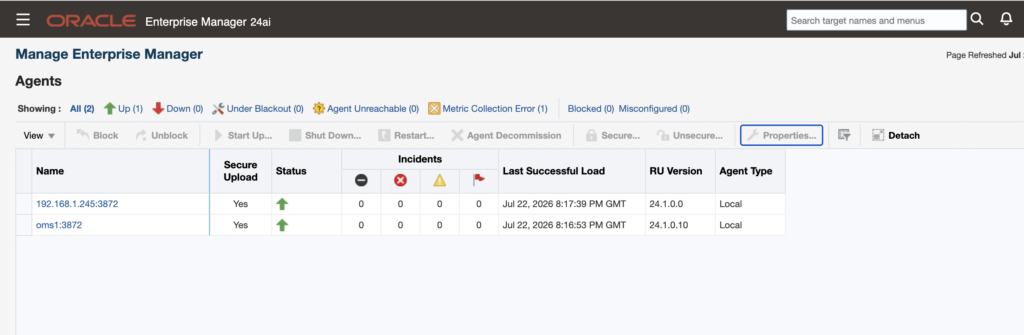
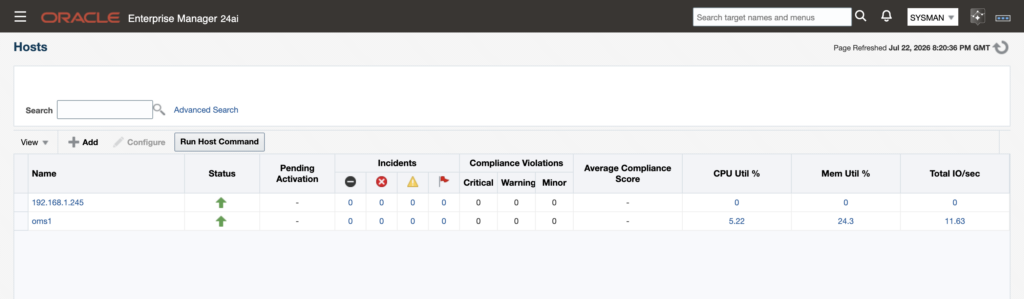
And now we have OMS repository all good for the target DB System host as well:
[oracle@oms1 ~]$ /u01/app/oracle/em/middleware_241/oms_home/bin/emcli get_targets | grep 192.168.1.245
1       Up               host                  192.168.1.245
1       Up               oracle_emd            192.168.1.245:3872
-9      N/A              oracle_home           agent24c1_2_192.168.1.245_8659
[oracle@oms1 ~]$
Also list target on the DB System agent is much better now:
[oracle@svl-orap-chz0-cl1n1 ~]$ /opt/oracle/agentem24ai/agent_inst/bin/emctl config agent listtargets
Oracle Enterprise Manager 24ai Release 1
Copyright (c) 1996, 2024 Oracle Corporation.  All rights reserved.
[192.168.1.245, host]
[192.168.1.245:3872, oracle_emd]
[agent24c1_2_192.168.1.245_8659, oracle_home]
[oms1:3872_proxy, oracle_emd_proxy]
[oracle@svl-orap-chz0-cl1n1 ~]$
Add Non-Host Targets Using Guided Process again as per previous guidance
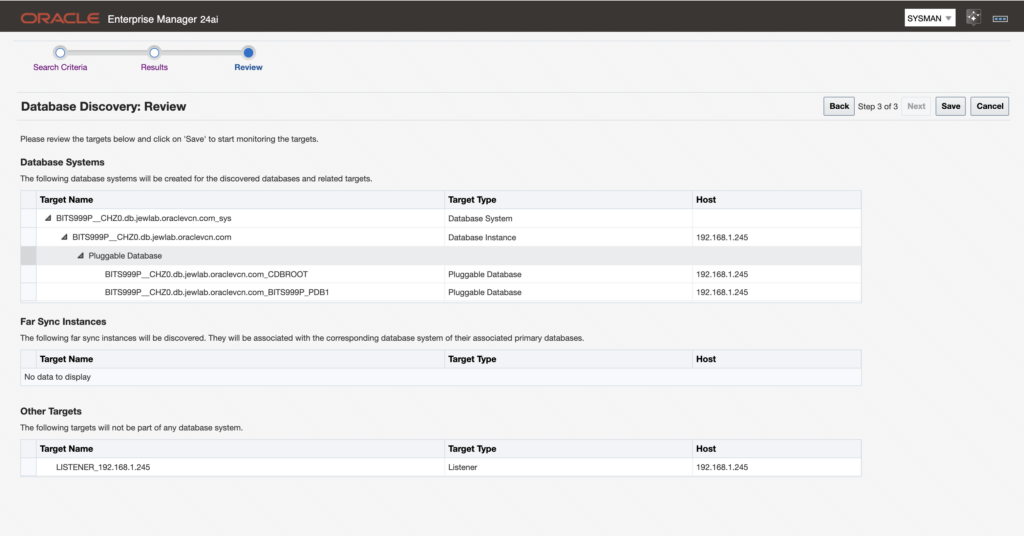
I then could successfully add all host components following previous guidance. Before saving database discovery review, all information could be displayed properly, see following pictures.
Check new database target
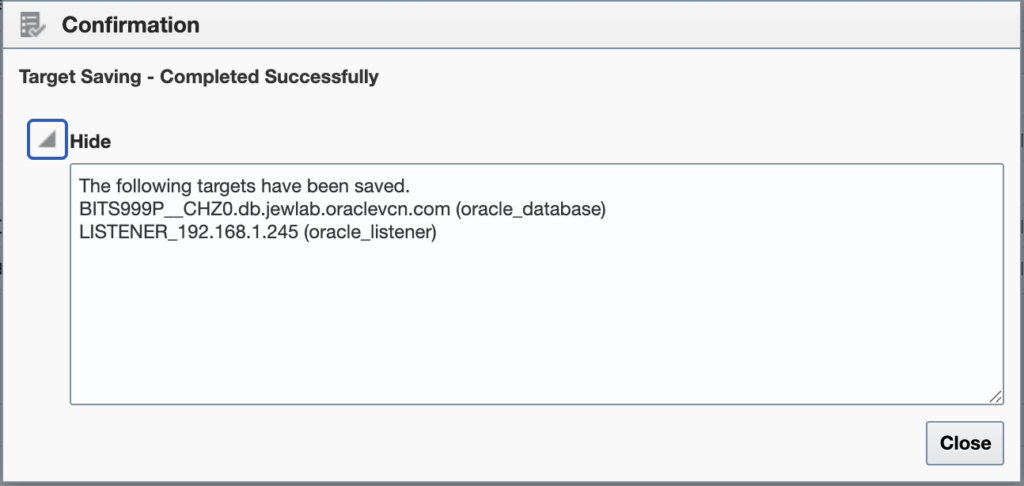
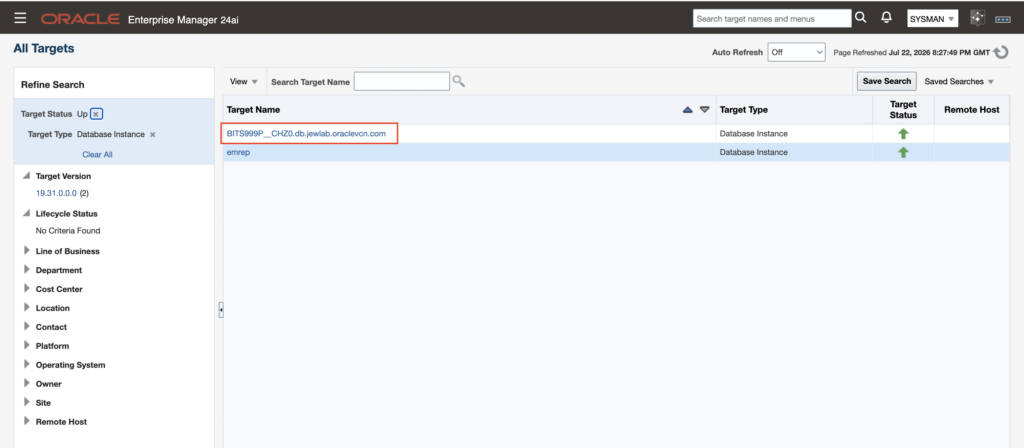
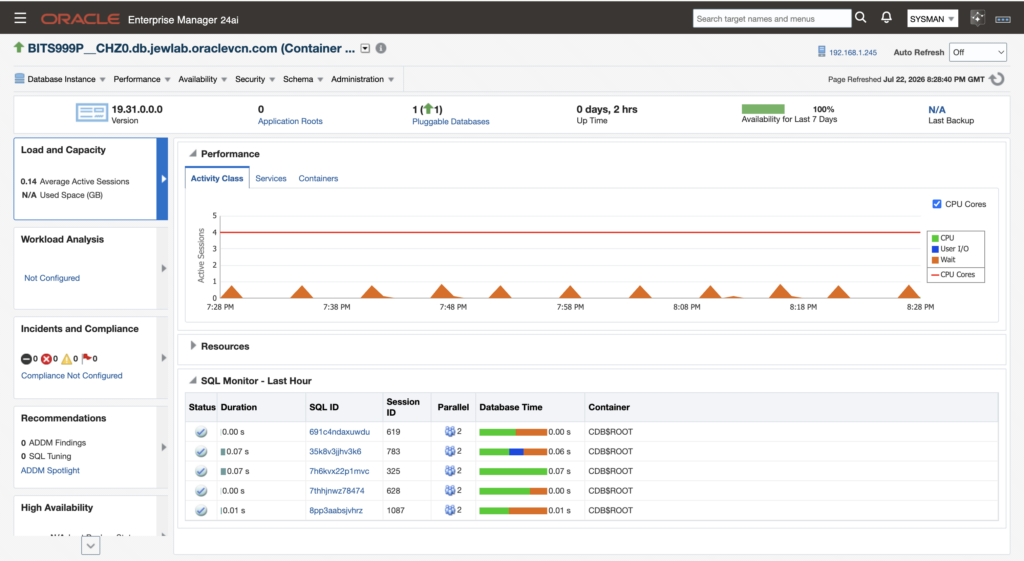
And I could finally check that new database target is well recorderd in OMS.
To wrap up…
I could successfully deployed an agent on one of my DB System lab. I’m now ready to activate Ask EM functionality in order to test it.
![Thumbnail [60x60]](https://www.dbi-services.com/blog/wp-content/uploads/2022/08/MAW_web-min-scaled.jpg)
![Thumbnail [90x90]](https://www.dbi-services.com/blog/wp-content/uploads/2025/05/JDE_Web-1-scaled.jpg)