

By Franck Pachot
.
Since Aug. 4, 2020 we have the possibility to rename an Autonomous Database (ATP, ADW or AJD – the latest JSON database) on shared Exadata infrastructure (what was called ‘serverless’ last year which is a PDB in a public CDB). As the PDB name is internal, we reference the ADB with its database name is actually a part of the service name.
I have an ATP database that I’ve created in the Oracle Cloud Free Tier a few months ago.
I have downloaded the region and instance wallet to be used by client connections:
SQL> host grep _high /var/tmp/Wallet_DB202005052234_instance/tnsnames.ora

db202005052234_high = (description= (retry_count=20)(retry_delay=3)(address=(protocol=tcps)(port=1522)(host=adb.eu-frankfurt-1.oraclecloud.com))(connect_data=(service_name=jgp1nyc204pdpjc_db202005052234_high.atp.oraclecloud.com))(security=(ssl_server_cert_dn="CN=adwc.eucom-central-1.oraclecloud.com,OU=Oracle BMCS FRANKFURT,O=Oracle Corporation,L=Redwood City,ST=California,C=US")))
This is the instance wallet which references only this database (db202005052234)
SQL> host grep _high /var/tmp/Wallet_DB202005052234_region/tnsnames.ora

db202005052234_high = (description= (retry_count=20)(retry_delay=3)(address=(protocol=tcps)(port=1522)(host=adb.eu-frankfurt-1.oraclecloud.com))(connect_data=(service_name=jgp1nyc204pdpjc_db202005052234_high.atp.oraclecloud.com))(security=(ssl_server_cert_dn="CN=adwc.eucom-central-1.oraclecloud.com,OU=Oracle BMCS FRANKFURT,O=Oracle Corporation,L=Redwood City,ST=California,C=US")))
db202003061855_high = (description= (retry_count=20)(retry_delay=3)(address=(protocol=tcps)(port=1522)(host=adb.eu-frankfurt-1.oraclecloud.com))(connect_data=(service_name=jgp1nyc204pdpjc_db202003061855_high.adwc.oraclecloud.com))(security=(ssl_server_cert_dn="CN=adwc.eucom-central-1.oraclecloud.com,OU=Oracle BMCS FRANKFURT,O=Oracle Corporation,L=Redwood City,ST=California,C=US")))
This contains also my other database service that I have in the same region.
I connect using this wallet:
SQL> connect admin/"TheAnswer:=42"@DB202005052234_tp?TNS_ADMIN=/var/tmp/Wallet_DB202005052234_instance
Connected.

SQL> select name,network_name,creation_date,pdb from v$services;

                                                          NAME                                                   NETWORK_NAME          CREATION_DATE                               PDB
______________________________________________________________ ______________________________________________________________ ______________________ _________________________________
JGP1NYC204PDPJC_DB202005052234_high.atp.oraclecloud.com        JGP1NYC204PDPJC_DB202005052234_high.atp.oraclecloud.com        2019-05-17 20:53:03    JGP1NYC204PDPJC_DB202005052234
JGP1NYC204PDPJC_DB202005052234_tpurgent.atp.oraclecloud.com    JGP1NYC204PDPJC_DB202005052234_tpurgent.atp.oraclecloud.com    2019-05-17 20:53:03    JGP1NYC204PDPJC_DB202005052234
JGP1NYC204PDPJC_DB202005052234_low.atp.oraclecloud.com         JGP1NYC204PDPJC_DB202005052234_low.atp.oraclecloud.com         2019-05-17 20:53:03    JGP1NYC204PDPJC_DB202005052234
JGP1NYC204PDPJC_DB202005052234_tp.atp.oraclecloud.com          JGP1NYC204PDPJC_DB202005052234_tp.atp.oraclecloud.com          2019-05-17 20:53:03    JGP1NYC204PDPJC_DB202005052234
jgp1nyc204pdpjc_db202005052234                                 jgp1nyc204pdpjc_db202005052234                                 2020-08-13 09:02:02    JGP1NYC204PDPJC_DB202005052234
JGP1NYC204PDPJC_DB202005052234_medium.atp.oraclecloud.com      JGP1NYC204PDPJC_DB202005052234_medium.atp.oraclecloud.com      2019-05-17 20:53:03    JGP1NYC204PDPJC_DB202005052234
Here are all the services registered: the LOW/MEDIUM/HIGH/TP/TP_URGENT for my connections and the PDB name one.
Now from the Cloud Console I rename the database:
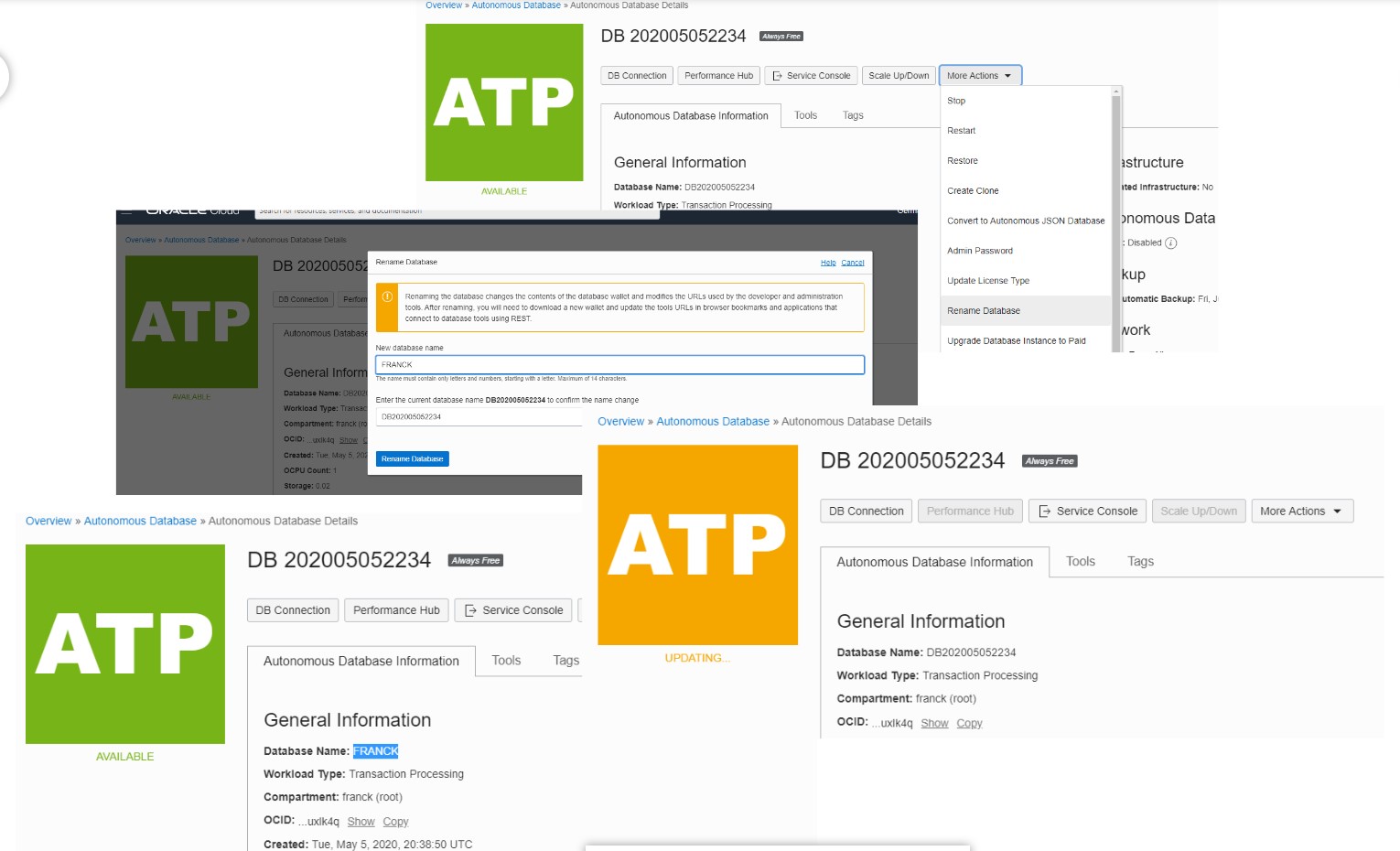
You can see that the “display name” (DB 202008131439) didn’t change but the “Database name” has been renamed (from “DB202008131439” to “FRANCK”).
SQL> select name,network_name,creation_date,pdb from v$services;

Error starting at line : 1 in command -
select name,network_name,creation_date,pdb from v$services
Error at Command Line : 1 Column : 1
Error report -
SQL Error: No more data to read from socket
SQL>
My connection has been canceled. I need to connect again.
SQL> connect admin/"TheAnswer:=42"@DB202005052234_tp?TNS_ADMIN=/var/tmp/Wallet_DB202005052234_instance
Aug 13, 2020 10:13:41 AM oracle.net.resolver.EZConnectResolver parseExtendedProperties
SEVERE: Extended settings parsing failed.
java.lang.RuntimeException: Unable to parse url "/var/tmp/Wallet_DB202005052234_instance:1521/DB202005052234_tp?TNS_ADMIN"
        at oracle.net.resolver.EZConnectResolver.parseExtendedProperties(EZConnectResolver.java:408)
        at oracle.net.resolver.EZConnectResolver.parseExtendedSettings(EZConnectResolver.java:366)
        at oracle.net.resolver.EZConnectResolver.parse(EZConnectResolver.java:171)
        at oracle.net.resolver.EZConnectResolver.(EZConnectResolver.java:130)
        at oracle.net.resolver.EZConnectResolver.newInstance(EZConnectResolver.java:139)
        at oracle.jdbc.driver.OracleDriver.connect(OracleDriver.java:669)
        at oracle.jdbc.driver.OracleDriver.connect(OracleDriver.java:562)
        at java.sql.DriverManager.getConnection(DriverManager.java:664)
        at java.sql.DriverManager.getConnection(DriverManager.java:208)
        at oracle.dbtools.raptor.newscriptrunner.SQLPLUS.connect(SQLPLUS.java:5324)
        at oracle.dbtools.raptor.newscriptrunner.SQLPLUS.logConnectionURL(SQLPLUS.java:5418)
        at oracle.dbtools.raptor.newscriptrunner.SQLPLUS.logConnectionURL(SQLPLUS.java:5342)
        at oracle.dbtools.raptor.newscriptrunner.SQLPLUS.getConnection(SQLPLUS.java:5154)
        at oracle.dbtools.raptor.newscriptrunner.SQLPLUS.runConnect(SQLPLUS.java:2414)
        at oracle.dbtools.raptor.newscriptrunner.SQLPLUS.run(SQLPLUS.java:220)
        at oracle.dbtools.raptor.newscriptrunner.ScriptRunner.runSQLPLUS(ScriptRunner.java:425)
        at oracle.dbtools.raptor.newscriptrunner.ScriptRunner.run(ScriptRunner.java:262)
        at oracle.dbtools.raptor.newscriptrunner.ScriptExecutor.run(ScriptExecutor.java:344)
        at oracle.dbtools.raptor.newscriptrunner.ScriptExecutor.run(ScriptExecutor.java:227)
        at oracle.dbtools.raptor.scriptrunner.cmdline.SqlCli.process(SqlCli.java:410)
        at oracle.dbtools.raptor.scriptrunner.cmdline.SqlCli.processLine(SqlCli.java:421)
        at oracle.dbtools.raptor.scriptrunner.cmdline.SqlCli.startSQLPlus(SqlCli.java:1179)
        at oracle.dbtools.raptor.scriptrunner.cmdline.SqlCli.main(SqlCli.java:502)

  USER          = admin
  URL           = jdbc:oracle:thin:@DB202005052234_tp?TNS_ADMIN=/var/tmp/Wallet_DB202005052234_instance
  Error Message = Listener refused the connection with the following error:
ORA-12514, TNS:listener does not currently know of service requested in connect descriptor
  USER          = admin
  URL           = jdbc:oracle:thin:@DB202005052234_tp?TNS_ADMIN=/var/tmp/Wallet_DB202005052234_instance:1521/DB202005052234_tp?TNS_ADMIN=/var/tmp/Wallet_DB202005052234_instance
  Error Message = IO Error: Invalid connection string format, a valid format is: "host:port:sid"

Warning: You are no longer connected to ORACLE.
SQL>
The service is not known, which makes sense because the rename of the database is actually a rename of the services.
Oracle documentation says that we have to download the wallet again after a rename of the database. But that’s not very agile. Let’s rename the service in the tnsnames.ora
SQL> host sed -ie s/_db202005052234/FRANCK/g /var/tmp/Wallet_DB202005052234_instance/tnsnames.ora
This changes only the SERVICE_NAME in CONNECT_DATA but not the tnsnames.ora entry, then I can use the same connection string.
SQL> connect admin/"TheAnswer:=42"@DB202005052234_tp?TNS_ADMIN=/var/tmp/Wallet_DB202005052234_instance

SQL> select name,network_name,creation_date,pdb from v$services;

                                                  NAME                                           NETWORK_NAME          CREATION_DATE                       PDB
______________________________________________________ ______________________________________________________ ______________________ _________________________
JGP1NYC204PDPJC_FRANCK_high.atp.oraclecloud.com        JGP1NYC204PDPJC_FRANCK_high.atp.oraclecloud.com        2019-05-17 20:53:03    JGP1NYC204PDPJC_FRANCK
JGP1NYC204PDPJC_FRANCK_tp.atp.oraclecloud.com          JGP1NYC204PDPJC_FRANCK_tp.atp.oraclecloud.com          2019-05-17 20:53:03    JGP1NYC204PDPJC_FRANCK
JGP1NYC204PDPJC_FRANCK_medium.atp.oraclecloud.com      JGP1NYC204PDPJC_FRANCK_medium.atp.oraclecloud.com      2019-05-17 20:53:03    JGP1NYC204PDPJC_FRANCK
jgp1nyc204pdpjc_franck                                 jgp1nyc204pdpjc_franck                                 2020-08-13 10:05:58    JGP1NYC204PDPJC_FRANCK
JGP1NYC204PDPJC_FRANCK_low.atp.oraclecloud.com         JGP1NYC204PDPJC_FRANCK_low.atp.oraclecloud.com         2019-05-17 20:53:03    JGP1NYC204PDPJC_FRANCK
JGP1NYC204PDPJC_FRANCK_tpurgent.atp.oraclecloud.com    JGP1NYC204PDPJC_FRANCK_tpurgent.atp.oraclecloud.com    2019-05-17 20:53:03    JGP1NYC204PDPJC_FRANCK
Using the new SERVICE_NAME is sufficient. As you can see above, some autonomous magic remains: the new services still have the old creation date.
Note that you should follow the documentation and download the wallet and change your connection string. There is probably a reason behind this. But autonomous or not, I like to understand what I do and I don’t see any reason for changing everything when renaming a service.