We recently worked on a customer proof of concept (PoC) involving Oracle databases hosted in Oracle Cloud Infrastructure (OCI) within private VCN subnets.
The goal was to evaluate OCI-managed MCP servers and determine whether extending their available toolsets with additional database operations could reduce reliance on agent skills. By exposing reusable operations as MCP tools, we aimed to reduce token consumption and associated costs while improving execution efficiency, without compromising the security of databases hosted in private VCN subnets.
Provision OCI-resources: When RTFM Isn’t Enough
Provisioning an MCP server requires an underlying database connection that combines database credentials with network connectivity to the target database, typically through a private endpoint. This connection allows the MCP server to access the database securely while keeping it within the private VCN.
The detailed setup procedure is beyond the scope of this article, as Oracle provides official documentation covering the prerequisites, configuration, and provisioning for Database Tools Private Endpoints
In short, the documentation mentions using Zero Trust Packet Routing (ZPR) alongside, or instead of, Network Security Groups (NSGs) to control network access.
So far, so good. We already use NSGs exclusively to manage network traffic.
However, the documentation does not clearly spell out which specific NSG rules are required or whether ingress rules alone are sufficient. After digging deeper into the documentation, we found the missing piece of the puzzle:
Creating a Database Management Private Endpoint
The key takeaway is that the Network Security Groups (NSGs) associated with the private endpoint must have appropriate ingress and egress rules to permit the required network traffic.
This is where things got more interesting. Our environment already hosted several databases interconnected through Oracle database links, with ingress and egress rules in place for the relevant subnets, including the newly provisioned private endpoint. Yet, despite these existing network configurations, the MCP server still could not connect to the target database.
ORA-12170: Cannot connect. TCP connect timeout

Clearly, something was missing. We therefore dug deeper into the private endpoint’s specific network security requirements to identify the root cause of the connectivity issue.
Still Getting ORA-12170, But Why?
Hold on a minute! We quickly went through the OCI Console to double-check our network configuration:
- ✅ Verified the private endpoint’s NSG ingress and egress rules.
- ✅ Confirmed that the databases and the private endpoint were deployed in the same subnet.
Everything looked correct at first glance, yet the dreaded ORA-12170: TNS:Connect timeout occurred error persisted.
What were we missing? Time to bring in Oracle Support!
While working with Oracle Support, we took a closer look at the NSG configuration and the private endpoint’s VNIC. Something caught our attention: an entry was missing from the list, but we hadn’t initially considered it relevant.
This prompted us to inspect the private endpoint configuration in greater detail using the OCI Command Line Interface (OCI CLI).
jerome_witt@cloudshell:~ (eu-zurich-1)$ oci dbtools private-endpoint get \
  --private-endpoint-id ${EDP_OCID}  \
  --query 'data.{"nsg-ids": "nsg-ids", "private-endpoint-vnic-id": "private-endpoint-vnic-id", "security-attributes": "security-attributes"}' \
  --output json
{
  "nsg-ids": null,
  "private-endpoint-vnic-id": "ocid1.vnic.oc1.eu-zurich-1.xxxxxxxxxxxxxxxxx",
  "security-attributes": {}
}
Oh! The nsg-ids field is null! That was the missing piece of the puzzle.
After updating the private endpoint with the appropriate NSG, we ran the following OCI CLI command:
oci dbtools private-endpoint update \
  --private-endpoint-id ${EDP_OCID} \
  --nsg-ids '["${NSG_ATTACHED_TO_DB_OCID}"]'
And then, the magic happened! The database connection succeeded, and the dreaded ORA-12170 error was gone.
After explicitly associating the appropriate NSG with the Database Tools private endpoint, connectivity was restored. The OCI CLI output had revealed that the nsg-ids field was null, a detail we had overlooked when initially checking the configuration through the OCI Console.
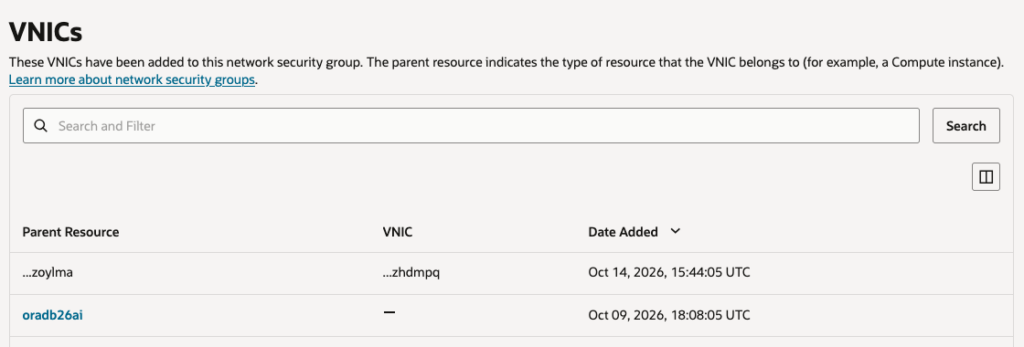
This behavior may be related to recent changes in OCI as Oracle continues to rapidly develop and roll out its core Deep Data Security capabilities.
What had initially looked like a correctly configured network turned out to be missing a crucial piece: the NSG association explicitly configured on the Database Tools private endpoint itself.
Lessons Learned
- Never blindly trust the console! Always verify the underlying configuration using the OCI CLI.
- Have fun troubleshooting! Sometimes, the smallest configuration detail makes all the difference.
By the way, it seems we’re not alone. Others have apparently encountered similar database connectivity issues when configuring OCI Database Tools but none were using NSGs exclusively.
For further reference, these Oracle Support knowledge base articles may be useful:
- KB64948 — How to Connect to the Autonomous Database (Private Endpoint Access)
- KB42277 — OCI — Enable Database Management Fails
![Thumbnail [60x60]](https://www.dbi-services.com/blog/wp-content/uploads/2022/08/JEW_web-min-scaled.jpg)
![Thumbnail [90x90]](https://www.dbi-services.com/blog/wp-content/uploads/2022/08/STH_web-min-scaled.jpg)
![Thumbnail [90x90]](https://www.dbi-services.com/blog/wp-content/uploads/2025/11/LTO_WEB.jpg)
![Thumbnail [90x90]](https://www.dbi-services.com/blog/wp-content/uploads/2022/09/DDI_web-min-scaled.jpg)